The current pre-release of the client ("pioneer" in the version) is only compatible to itself. So you can only play with other testers. Please be aware!
FAF's rules are set out on the main FAForever website - by accessing FAF services, you agree to the rules outlined there, which are supplemental to the FAF Terms of Service.
For details of how to report rule breaches and/or how the rules are enforced, please refer to the separate page on moderation
Separate contribution guidelines exist for those considering contributing to FAF, while there are also official tournament rules that apply to official FAF tournaments.
I'm not sure what you mean by super buggy audio, but it would be helpful if you could try these specific workarounds since I've developed fixes for them:
Change from 5.1 (side speakers) or 7.1 audio to stereo. Side speakers because FA supports the older 5.1 back speakers channel format. This is the bug fixed in the binary patch.
If your PC uptime is more than 24.86 days, sounds will play once per game session. Restarting your PC will fix this. This is a bug in XACT so it doesn't fit in a binary patch.
Thanks for your replies, I tested Eternal Strategic Icons, in combination with Penguin's Icon Mod and ACU Highlight (those three mods seem to be compatible), and it looks a lot nicer with the size increase of 150%
You can start watching them and then tab out and close the client. The client needs internet before starting them to download the correct game version, mods, etc.
Hello I_Darkstar_x,
welcome to FAForever.
Maps are normaly stored in the folder:
C:\Users\YOURNAME\Documents\My Games\Gas Powered Games\Supreme Commander Forged Alliance\Maps
Move to this folder, sort it by date and the last installed map should be your direct strike map.
Delete it.
@mastergoa Also consider using tracking (select a unit and press the tracking key, default keybind = t) with the different ways of changing the viewing angle.
You can go into a player's POV, select a unit, turn on tracking, then go back to "observer" POV to get rid of the fog of war, and the tracking will stay on.
Hello DSM,
i checked the log and i ends right before loading the move in the mainscreen.
There was also an error inside the ShowEscapeDialog (Did you press [ESC] while loading the game ?)
please make sure you played the game at least once over steam.
(Start the game over steam and play a single game for 1-2 minutes and end the game.)
delete everything inside this directoy:
C:\ProgramData\FAForever\gamedata\*.*
start a game with the FAF client and see if you can reach the ingame lobby.
make sue you don't use any cyrillic chars in username or filepath etc.
Supreme Commander can't handle non english charactes very well.
Then post a new game.log.
I viewed the game.log and there are no errors.
The log ended after destroying an ACU and before sending the score data.
Last line was info: send Ptr: 5BE30002
Looks like you lost the connection when the game tried to send a bunch of data.
If possible send us the a new log when you crash again.
Also post the reported crash adress like EXCEPTION_ACCESS_VIOLATION at address 0x0095854f
It works, thanks!
I thought I checked the file path of the .exe thats running via task manager, but it turns out I didn't look closely enough, ouch...
Topic can be closed
Just had the same issue in dual gap game (6v6, no AI).Very long game, much units, happened at the moment I unzoomed very quickly. Farthest regions on the map didn't load unit icons.
It is only useful for tourney prep, that’s about the only situation where bos get serious effort put into them.
Still is a nice thing to have for tournament players, though.
Also doesn’t really matter if it gets revealed the first time you play the map, people won’t have the time to incorporate the bo into their gameplay in the middle of a tourney. The main problem is that you could spend 8 hours working on a bo for a tourney map and then some dude logs on, sees your work, spends an hour copying it and maybe refines it even more himself. Just destroys the desire to do any bo work unless you know the mechanics on how to break your replays (which is another barrier to entry for new high tier players).
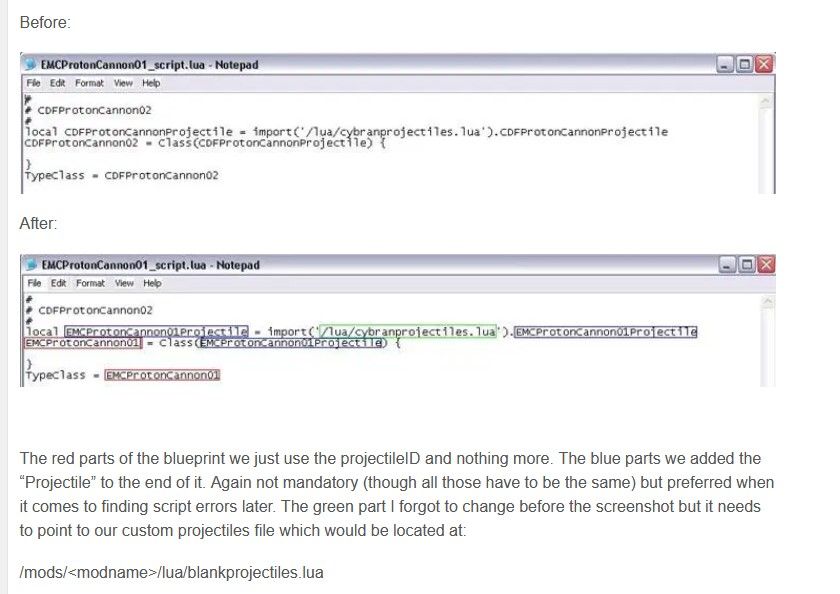
point to our custom projectiles file which would be located at:
/mods/<modname>/lua/blankprojectiles.lua
It would be located it there in case you create the file !
Crate a textfile inside your mod folder:
/mods/<modname>/lua/textfile.txt
then rename the textfile to blankprojectiles.lua
Now you have your empty projectile in
/mods/<modname>/lua/blankprojectiles.lua
Hey you both,
'
Thanks for your help...I copied the code out of the Tutorial and changed it in my way and that seems to work...absolutely no idea why it didnt work with my version at first...