The current pre-release of the client ("pioneer" in the version) is only compatible to itself. So you can only play with other testers. Please be aware!

Subcategories

  • 29 Topics
    260 Posts
    maudlin27M
    FAF's rules are set out on the main FAForever website - by accessing FAF services, you agree to the rules outlined there, which are supplemental to the FAF Terms of Service. For details of how to report rule breaches and/or how the rules are enforced, please refer to the separate page on moderation Separate contribution guidelines exist for those considering contributing to FAF, while there are also official tournament rules that apply to official FAF tournaments.
  • 948 Topics
    5k Posts
    wilson_W
    Hey @HerbertFreir, I've randomly come across this post. It's a common thing in pretty much every online game that people will flame each other. All it is is a coping mechanism so they must not admit they made a mistake themselves. It's really just the easy way out for being anonymous on the internet. There is no way of saying this is common or uncommon across a community as a whole as it's mostly invididual. Estimating how often it will happen to you is nearly impossible. Sometimes you will be flamed three times a day, sometimes it won't happen for two years straight. But there is a tendency: The bigger and the younger (on average) the community the more likely it is that people will flame, as they don't expect to bump into the other one ever again. FAF is a small, "well aged" community, and therefore less likely to be that way, as you for sure will bump into someone again. What usually helps is narrowing down the amount of anonymity to a minimum by playing with people you know through joining smaller clans / communities. I, for instance, happen to run a beginners group within the FAF Dojo. It's me and my co-trainer running training sessions with up to a dozen trainees (0-1300 rated) three times a week, in the EU evening hours. Our youngest trainee is ~20 years old, our oldest is ~60 years old. We have gay / trans people, furries... We welcome everyone and respect each other. It's about having fun and learning together. If the above is appealing to you and you could make (some of) the training hours, feel free to join our Discord server and reach out to me. If you can not make my specific training hours, please still feel free to join, meet people you could play with, and maybe find another trainer that matches your time zone.
  • Please provide detailled logs and/or error messages!

    1k Topics
    4k Posts
    maggeM
    Have you secured your Discord account since the incident? What steps have you taken to make sure it cannot be used for malicious activity again?
  • 40 Topics
    160 Posts
    D
    Thanks for your replies, I tested Eternal Strategic Icons, in combination with Penguin's Icon Mod and ACU Highlight (those three mods seem to be compatible), and it looks a lot nicer with the size increase of 150%
  • error

    2
    0 Votes
    2 Posts
    169 Views
    L
    You could try delete C:\ProgramData\FAForever folder
  • This topic is deleted!

    5
    0 Votes
    5 Posts
    55 Views
  • Game crash on rehost with same settings

    crash crash rehost rehost
    19
    0 Votes
    19 Posts
    1k Views
    UvesoU
    [image: 1622449252750-fafdev.png]
  • Cannot launch through FAF Client

    4
    0 Votes
    4 Posts
    320 Views
    X
    Thanks guys, that didn't actually work on first try but I went in to the details tab of Properties and hit remove properties and personal information, selected all and applied. Then the game launched in to Black day from the Co op tab I'll test properly with a game when I have the time but I think its fixed now. Thanks again guys a fresh day and some positive reinforcement I was on the right track helped allot, hope to see in game soon. Once I have a few practice games to learn the current BOs as I haven't played against people since the Sup com Beta (I know plz forgive me lol)
  • My game crashes 1 out of 6 games

    4
    0 Votes
    4 Posts
    310 Views
    T
    I had the same issue as you. It was a driver issue. Go to "windows updates", check for updates, then under "optional updates" install the newest drivers. For me it was a USB driver that was crashing it. It actually crashed my entire computer, not just the game.
  • FAF 1.4.4 won't start [solved]

    9
    0 Votes
    9 Posts
    494 Views
    T
    Yep, I just did it and it worked! There was a C:\Program Files\Downlord's FAF Client\lib\downlords-faf-client-1.4.3.jar remaining from the uninstall of the previous version, I think it might have been responsible from the problem (?). Thanks Sheikak, Rowey and Aska!
  • Custom Games Wont Load

    6
    0 Votes
    6 Posts
    386 Views
    D
    Will do. thx
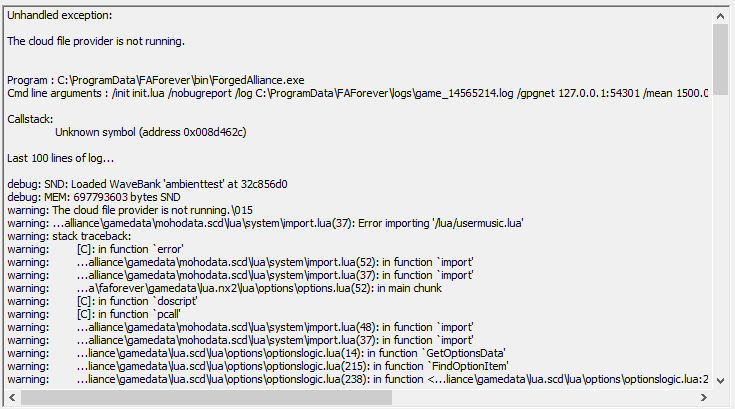
  • The cloud file provider is not running

    3
    1
    0 Votes
    3 Posts
    200 Views
    H
    i have onedrive uninstalled
  • Help

    2
    0 Votes
    2 Posts
    147 Views
    AlenochkaA
    Resolved! Requires installation of the old version DirectX.
  • Banned map vault

    3
    1
    0 Votes
    3 Posts
    297 Views
    DelmaffD
    @biass said in Banned map vault: Check your forum pms Thanks for unblocking, but I didn't even notice that I was banned. Make a notification or status in the launcher. xD
  • help

    1
    0 Votes
    1 Posts
    106 Views
    No one has replied
  • Brewlan crash

    2
    0 Votes
    2 Posts
    185 Views
    UvesoU
    Hello beeej, is it possible to post the full game.log ? (Upload it to https://pastebin.com/ and post only the link here)
  • FAF Error

    11
    0 Votes
    11 Posts
    102k Views
    R
    Xact errors in game log. Ffs can some moderator please make a sticky with xact error in the title and link to tatsus post about stereo sound issues
  • 4K and huge cursor

    5
    0 Votes
    5 Posts
    884 Views
    T
    A further update: I changed the compatibility settings and it works fine the first time but then goes back to its old way I have realised that Forged Alliance iteself changes the compatibility settings in the registry. I disabled the Program Compatibility Assistant but the settings still keep changing after each game. I wrote this registry change that will fix the huge cursor but it needs to be run each time, before the Supreme Commander.exe is loaded. Not sure if there's an easier way around this but at least its a quick fix. If anyone wants to recreate this, copy the text below and save it in Notepad. Call the file "FAF.reg" and save it. Opening it will change the DPI settings to stop the cursor being huge! Windows Registry Editor Version 5.00 [HKEY_CURRENT_USER\SOFTWARE\Microsoft\Windows NT\CurrentVersion\AppCompatFlags\Layers] "C:\ProgramData\FAForever\bin\ForgedAlliance.exe"="~ DPIUNAWARE" "C:\Program Files (x86)\Steam\steamapps\common\Supreme Commander Forged Alliance\bin\SupremeCommander.exe"="~ DPIUNAWARE"
  • Error

    4
    0 Votes
    4 Posts
    319 Views
    L
    I started the game with /nosound. Same error. But i deinstalled the realtek audio driver. It seems working now.
  • Factory repeat build hotkey won't work

    3
    0 Votes
    3 Posts
    380 Views
    E
    Try it without any mods enabled and see if that helps, then slowly add back in mods until it stops working again and let us know which mod breaks it. Also it can be a bit buggy where it takes half a second or so to show up especially if you have draggable build queues enabled which I'd highly recommend turning off. Make sure you're doing it either with only one factory selected or if you have multiple factories selected that they're all on the same repeat setting before using the hotkey as well.
  • This topic is deleted!

    2
    0 Votes
    2 Posts
    130 Views
  • Error

    1
    0 Votes
    1 Posts
    118 Views
    No one has replied
  • This topic is deleted!

    1
    0 Votes
    1 Posts
    7 Views
    No one has replied
  • wont start game

    3
    0 Votes
    3 Posts
    391 Views
    P
    Для тех хто едет на т34 :"надо запустить игру в стиме после установки , затем качайте клиент фаф!"