The current pre-release of the client ("pioneer" in the version) is only compatible to itself. So you can only play with other testers. Please be aware!

Subcategories

  • 29 Topics
    260 Posts
    maudlin27M
    FAF's rules are set out on the main FAForever website - by accessing FAF services, you agree to the rules outlined there, which are supplemental to the FAF Terms of Service. For details of how to report rule breaches and/or how the rules are enforced, please refer to the separate page on moderation Separate contribution guidelines exist for those considering contributing to FAF, while there are also official tournament rules that apply to official FAF tournaments.
  • 955 Topics
    5k Posts
    N
    I'm not sure what you mean by super buggy audio, but it would be helpful if you could try these specific workarounds since I've developed fixes for them: Change from 5.1 (side speakers) or 7.1 audio to stereo. Side speakers because FA supports the older 5.1 back speakers channel format. This is the bug fixed in the binary patch. If your PC uptime is more than 24.86 days, sounds will play once per game session. Restarting your PC will fix this. This is a bug in XACT so it doesn't fit in a binary patch.
  • Please provide detailled logs and/or error messages!

    1k Topics
    4k Posts
    S
    What version of the browser are you running?
  • 40 Topics
    160 Posts
    D
    Thanks for your replies, I tested Eternal Strategic Icons, in combination with Penguin's Icon Mod and ACU Highlight (those three mods seem to be compatible), and it looks a lot nicer with the size increase of 150%
  • weird sound troubles in FAF only

    2
    0 Votes
    2 Posts
    98 Views
    No one has replied
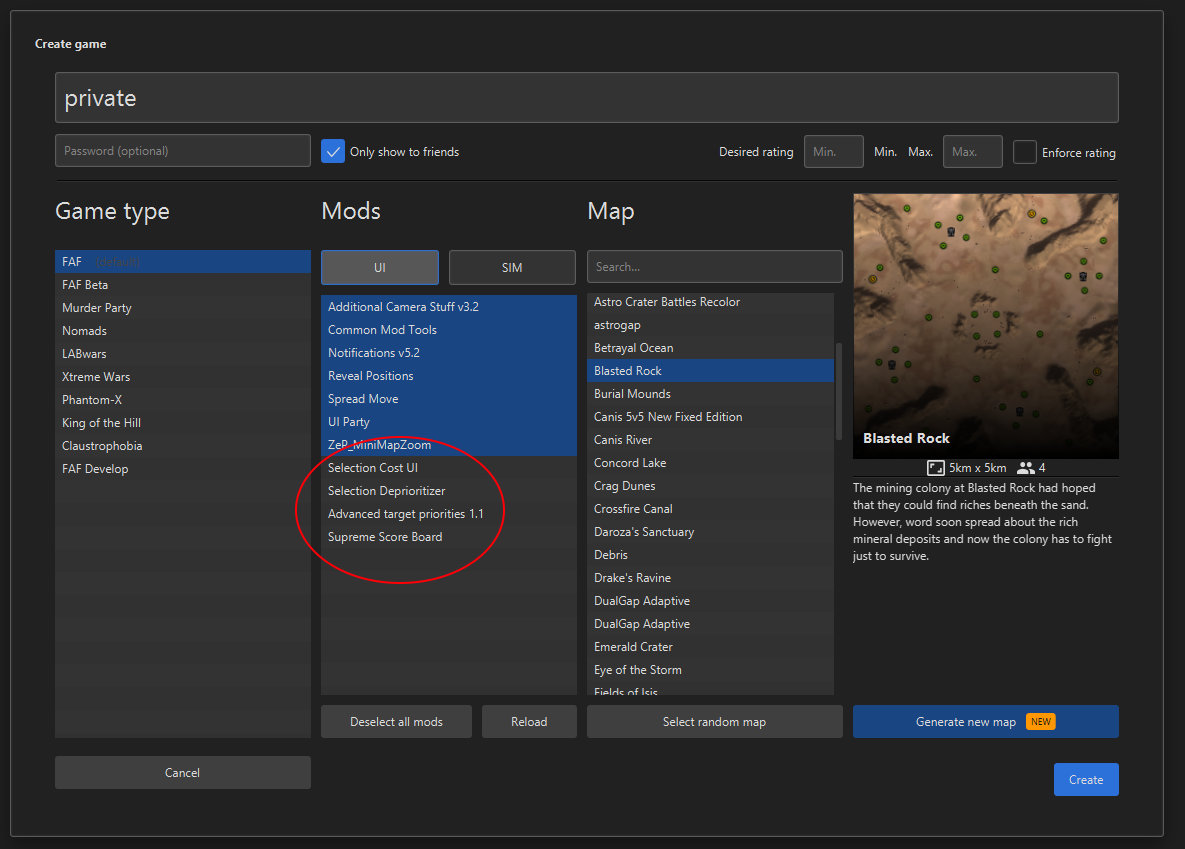
  • UI-Mod selection on game creation

    6
    1
    0 Votes
    6 Posts
    350 Views
    L
    To copy stuff over from my old PC was the way I broke it here. I now deinstalled downlords client and tried to clean all remainders of it. With a clean install and all mods installed again from the vault it now really works like a charm. Thx
  • This topic is deleted!

    1
    0 Votes
    1 Posts
    8 Views
    No one has replied
  • FA launches then immediately crashes with the following error:

    5
    0 Votes
    5 Posts
    249 Views
    A
    Absolutely none; the game is bone-stock. However, the replay I'm attempting to load is from an ancient version; over 7 years old. (I'm not sure if we had mods enabled then, though...)
  • 0 Votes
    3 Posts
    2k Views
    M
    Awesome! Thanks so much!
  • Can't download replay info from vault

    2
    0 Votes
    2 Posts
    263 Views
    S
    The parser for the replays was not updated to accept the new compresed replay format so the download info button is currently broken
  • game crashed mid game

    10
    0 Votes
    10 Posts
    480 Views
    K
    I'm running NVDIA 466.11 . release day 4/14/2021
  • Sound issue

    3
    0 Votes
    3 Posts
    253 Views
    R
    Could be the infamous sound bug. Try disabling and reenabling audio in bios settings or reinstall drivers: https://forums.faforever.com/viewtopic.php?f=3&t=13623
  • Plz help! Game crashed

    3
    0 Votes
    3 Posts
    376 Views
    I
    Thanks! Yes, it really helped by deleting all files.
  • Can't open the Launcher at all

    4
    0 Votes
    4 Posts
    242 Views
    L
    Restart PC then Uninstall(like executing the uninstaller not just install the new, also make sure the folder of the program is gone after that, tick the checkbox to install all) and install whatever version you like.
  • Game Desyncs when playing with Friends + mods

    6
    0 Votes
    6 Posts
    306 Views
    UvesoU
    Please post a full Game.log next time, so we don't need to guess so much.
  • Error message when starting up the client.

    4
    0 Votes
    4 Posts
    253 Views
    F
    @Amygdala All resolved. As per our conversation Amygdala, it wasn't the Steam linking it was the FAF Client not pointing to the correct location on my PC.
  • UI Party Mod Clipping Off Screen

    4
    0 Votes
    4 Posts
    418 Views
    K
    I am having the same issue for UI Party and not able to solve: is there any way to reduce the window to apply changes i make? I play on Laptop.
  • Personal mod creating desyncs in multiplayer

    12
    0 Votes
    12 Posts
    991 Views
    UvesoU
    @NuclearAfikomen: Thanks for reporting this back! There are no stupid questions, only stupid answers!
  • wrong linked account

    3
    0 Votes
    3 Posts
    219 Views
    DeribusD
    Handled in chat
  • Game crash: platoon.lua(1444): method `GetLocationCoords' (a nil value)

    5
    0 Votes
    5 Posts
    418 Views
    UvesoU
    @warstar441 , Thanks for reporting this back !
  • Game is crashing with this error:

    5
    0 Votes
    5 Posts
    540 Views
    T
    Might be a permissions thing. By moving it, it would get new NTFS permissions, inherited from the parent folder.
  • AnnounceDeath AIx: Uveso Overwhelm crash

    3
    0 Votes
    3 Posts
    141 Views
    UvesoU
    Hello BilgeRatPDX , The crash EXCEPTION_ACCESS_VIOLATION (0xc0000005) at address 0x0067aa5f is known since 5 Jan 2015: from 2015 https://github.com/FAForever/fa/issues/318 from 2020 https://github.com/FAForever/fa/issues/3235 My AI does not exist in 2015, so this error is surly not from my AI. Maybe you are using Full share option ? In case you use full share, read here: https://forum.faforever.com/topic/1310/humans-vs-sorian-uveso-aix-game-crashes-on-ai-acu-kill-since-faf-client-1-4-2 (game patch for this issue is included to my AI version 92 for testing; it will be patched to the game after testing) And please, could you always post your full game log, that would be nice!
  • plz help me, game not start

    4
    0 Votes
    4 Posts
    222 Views
    P
    Вот что еще помогло, снять галочку "только для четения" с папок и файлов внутри папки ФаФ (с самой папки, почему-то не снимается) + запуск клиента фаф от имени администратора! Вышло сообщение (на инглише) жмешь окей и все работает!
  • Can't play since update. If i try to launch a game it just crashes.

    2
    0 Votes
    2 Posts
    392 Views
    P
    Didn't anyone help you with this? I don't really know how to interpret your logfile. Try launching the game directly, instead of through the FAF client. Does that work? If so, create a new profile and make that active. Sometimes, there can be things written in the profile in the game.prefs file that can prevent the program from starting.