The current pre-release of the client ("pioneer" in the version) is only compatible to itself. So you can only play with other testers. Please be aware!
  • Помощь

    2
    0 Votes
    2 Posts
    112 Views
    MostLostNoobM
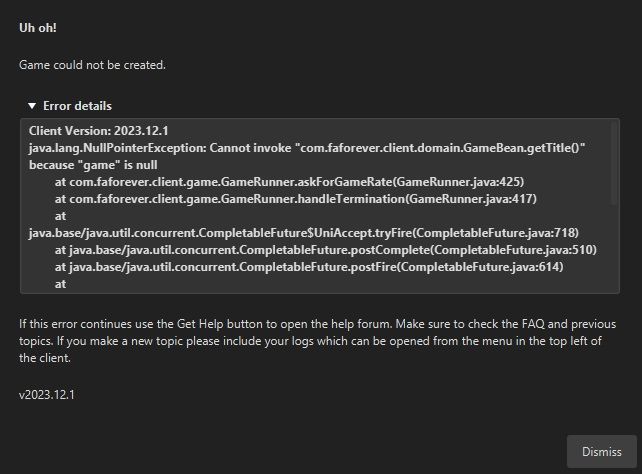
    @skvrus Go to top left menu > Settings > Notifications > After Game Review > Uncheck. Some users have reported issues creating games & it seems that's the cause, which is under investigation.
  • Рассинхронизация во время игры н

    1
    0 Votes
    1 Posts
    91 Views
    No one has replied
  • Large custom maps flagged as zip bombs

    3
    0 Votes
    3 Posts
    408 Views
    S
    It seemed more prevalent the other day but now I can only find a few that trigger it. Basebuilder v1.0, Barren Biggy, 1v1 BIGFMAP, custom000, mnt dew baja blast. I'm not actually interested in playing all of these, they're just the ones that gave the error. The FAF client gives me the warning when I try to download them. Swear to god it was happening on more maps the other day, but that could be my failing memory or different search conditions.
  • UEF engi stations "repairing" mobile factories

    3
    0 Votes
    3 Posts
    248 Views
    ?
    https://replay.faforever.com/21548340. It's the Holly Raid mission. 00:59:30 - top fatty's mobile factory is damaged by mercies 01:15:00 - falling czar damages bottom's fatty's factory 01:29:00 - drones start getting stuck trying to repair bottom fatty's factory Strange. Tried replicating in a custom game with cheats, didn't work.
  • Some chat messages not shown while playing

    1
    1 Votes
    1 Posts
    180 Views
    No one has replied
  • Game could not be created

    7
    1
    0 Votes
    7 Posts
    577 Views
    L
    That seemed to do it. Thank you!
  • trying to run fa forever on ubuntu

    9
    0 Votes
    9 Posts
    601 Views
    P
    ok, after some poking around, i have found someone else with the same exit code, with them the run file is messed up, they had incorrect caps and 2 slashes where only 1 should be. Now i am not certain what the run file is or how it should look, where can i see what this is so i can see if one i have it and two if it is done correctly?
  • Degrading game responsiveness over time (factory queue in particular)

    23
    4 Votes
    23 Posts
    2k Views
    JipJ
    The fix of the problem described by silentNoob is now live
  • Large maps crash on spawn or during loading.

    crash freeze
    6
    0 Votes
    6 Posts
    660 Views
    S
    @jip It seems on further testing I was able to load into that map just fine with Ai Uveso and experienced no crashes, but that was when playing alone. Playing with my friend had issues, so it could be something on his end or something about connecting online to another person specifically.
  • Player noted pressing ^ causes crash

    9
    -1 Votes
    9 Posts
    490 Views
    JipJ
    No, thank you for sharing it. Always better to check and be certain
  • Pathfinding Issue? Time Stamps and Images to Show

    11
    0 Votes
    11 Posts
    1k Views
    MoraxM
    Well whatever is going on, it is far more noticeable with this one command.
  • Game wont start

    38
    0 Votes
    38 Posts
    2k Views
    J
    @Nex, I've managed to sort it, thank you for your help. I think it was the forged alliance exe file within the "C:\ProgramData\FAForever\bin" location, I went into properties there and allowed all permissions for all users (I think it was the user with my email as opposed to my laptop login user). I tried allowing all permissions for all users on the FAForever folder before this but it didn't seem to work. I had to clear the gamedata folder again too.
  • Unhandled Exception during co-op missions

    exception unhandled game crash
    5
    0 Votes
    5 Posts
    482 Views
    MostLostNoobM
    @masterofthardus Simple sound issue fix steps are: Windows key > type: Control Panel > Open > Sound > Playback > select the Device you use: Configure > Stereo > finish configuration, Properties: Enhancements > Disable all enhancements, Advanced > no higher than 24 bit, 48000 Hz, Spatial Sound > Off, Restart or Shift+Shutdown (not just Shutdown) of PC If your headphones come with any applet/program, then you may want to disable that & try using the headphones without it. Similarly, if they use a USB or Bluetooth dongle to connect to the PC, see if you can connect directly without the dongle. If none of that helps nor the troubleshooting help on the page arma linked, then you may want to think about installing a 3rd party device/driver like VoiceMeeter or VAC.
  • Three bugs, thats I have.

    13
    3
    0 Votes
    13 Posts
    840 Views
    JipJ
    Fixes for (1) and (3) are live, thank you for reporting them
  • T1 transport carrying 3 T1 engies refused to pick up 1 more T1 engi

    2
    0 Votes
    2 Posts
    164 Views
    ZLOZ
    https://forums.faforever.com/viewtopic.php?f=2&t=17511 just gonna post this link cause it is a good read. Tho even considering transport weirdness described there it still does not explain what is described in the post.
  • Red lines on map

    19
    2
    0 Votes
    19 Posts
    2k Views
    N
    @linikratyo yeah if you don't want to play the coop campaign all the stuff about the shortcut doesn't matter to you. Normal AI should also be fine, if you want more of a challenge you can try out the different AIs from the Vault.
  • GC blinks out of existence, enemy changes target

    3
    0 Votes
    3 Posts
    208 Views
    LLIALLIJIbIKL
    Had something like that with GC too
  • Lobby Crashing Bot Back?

    11
    0 Votes
    11 Posts
    882 Views
    maggeM
    The chance of a crash with Fullscreen when ALT+TAB is common to others as well. The game engine just hates it. Currently it looks like the crash can be more related to Fullscreen ALT+TAB or/and XACT3DApply. If a bot would go around hard freeze people's PC by crashing the entire game, there would be many more bells and whistle. Windows Event Log: Using the Start Menu: Click on the "Start" button or press the Windows key on your keyboard. Type "Event Viewer" and press Enter. Check Application and System events if any Supreme Commander related crashes are available. Alternate: Using the Run dialog: Press Win + R on your keyboard to open the Run dialog. Type "eventvwr.msc" and press Enter. Example for visualizing: [image: 1701092744373-a7092cc4-9c24-45fc-ac8e-add7eb33c3ad-image.png]
  • Destro tp randomly

    4
    0 Votes
    4 Posts
    347 Views
    IndexLibrorumI
    That's quite cool, as long as it's clearly communicated to players. I'll have to keep this in mind for a future map.
  • 0 Votes
    6 Posts
    662 Views
    MostLostNoobM
    @endranii GG WP