If I recall correct, you can do CTRL + ALT + Right Click to permanently mute a player for that session.
The current pre-release of the client ("pioneer" in the version) is only compatible to itself. So you can only play with other testers. Please be aware!
 J
Offline
J
Offline
Posts
-
RE: Can you turn off being able to see the drawings other people on your team scribble on the map?
-
RE: Is this a cheat or not?
it isn’t very difficult to give navy units collision like land units
okay, enlighten us
 .
.There's a few myths here that do not align with my own understanding of the engine, let me add some info:
Submarines behave like underwater air units. This is because of their motion type as far as I am aware, maybe Balthazar knows better. That is why they can stack, because technically you can do the same with air units. @maudlin27 already mentioned this, especially gunships. Nobody does that though, because the average anti air gun of any significance has splash damage. In Steam FA, some tech 3 AA guns do not have splash damage. In FAForever, all tech 3 AA guns have splash damage. This is why.
The easiest solution to make stacking submarines less attractive is to give torpedo's splash damage too. Problem immediately solved, the micro would no longer be about stacking (which is hardly micro - it's just one hotkey) and more about keeping the submarines separated so that the splash damage (of torpedo's) doesn't hit multiple submarines. Keeping submarines separated feels like more interesting gameplay to me, both in terms of watching and in terms of playing. But who am I
 .
.Normal move command obeys the collision box, subs aren’t any different
No move command obeys any collision box. Yes, while moving units can bump into each other for some motion types/layers. But that has to do with moving in general, not with the (type of) move command.
Regular move commands expect the selection to end up in some form of formation. The formation itself has the collision box of a unit as one of its parameters, in a loosely manner. The distribute order feature just sends all units to the same location, it does not attempt to make a formation. If you give a single unit a move command, it is equivalent to move command of the distribute orders feature. When there's just 1 unit, no formation logic is run and therefore no formation is made.
Do not confuse this with formation move. Formation move means the units also move in formation. There is, without using distribute orders, always a formation in play even with regular move commands: the formation where they end up at!
The only thing the distribute orders feature does is automate the task of assigning a move command to all the units in your selection as if you separately selected each unit and gave it a move command with just that unit in your selection.
Source: https://github.com/FAForever/fa/pull/5908, hours and hours of investigating how move commands and formations work and behave.
Not mentioned in this topic, but a similar myth: a large selection of naval units taking forever to respond to a (new) move command. This is intentional, as the formation logic has a 'delay' parameter where each row is delayed longer than the row before it. I think this is there to not deplete the pathfinding budget when you quickly issue many (move) orders, but I'm not sure. This is especially painful for naval units, since there's usually more rows since naval units are, uuhh - preeeeetty wide in the formation. Therefore there are more rows. And the more rows, the longer it takes for all units to start moving.
-
RE: FAF replay command format question and parser question
I think you're right, this is what my parser in C# does:
-
RE: Faster Way to Check Terrain Pathability
Yes, a leaf is one of the squares. The colors of a connected area are the labels. A tree is the equivalent of a cell in the imap grid. The imap grid is often a coarse 16x16 grid across the entire map, used by AIs for threat analysis. Each tree can have one or more sections, one for each label (color) in the area. In practice, the air grid is equivalent to the imap grid.
You can loop over all labels, filter on layer, then compute the area to find all water regions and then filter on the Area field to remove small ponds that you can't use for your purpose.
-
RE: Is there a way to copy text from the lobby?
Soon maybe you can do this in-game: https://github.com/FAForever/fa/pull/7098#issuecomment-4322141766
-
RE: Faster Way to Check Terrain Pathability
I'm trying to generate a list of pathable spawn points for the mod AI Wave Survival.
Sometimes, players use a map that has impassable terrain or water near where they set the HQ Spawn points. Currently, spawn points are chosen at random around the HQ to spawn in units, meaning units can get stuck or immediately die if they are a land unit that spawns on water. So, I am adding tables of approved spawn points that will alleviate the issue.
Like I mentioned, the scripts run at the start of the game, so don't really affect performance much. Just seeing if I can optimize them a bit.
Thanks!
The navigational mesh only checks for pathability, not buildability. But it's often quite close. What may work is this: loop over all the compressed trees of the land layer, then loop over all the sections of a compressed tree. A section has an
Areafield, which helps you differentiate between small and large area's. The leaves of an area are sorted from large to small. If an area matches your requirements, pick the largest leaf and compute its center. Use that as a possible candidate for a spawn point.You could then further refine it by checking the size of the leaf itself. If it's really large, then you may want to pick a random point in the leaf to make sure two games never look identical and to break the feeling of the 'grid'.
Relevant references:
- Class of
NavGrids: https://github.com/FAForever/fa/blob/develop/lua/sim/NavGenerator.lua#L62-L68 - Class of
NavGrid: https://github.com/FAForever/fa/blob/develop/lua/sim/NavGenerator.lua#L185-L189 - Class of
NavTree: https://github.com/FAForever/fa/blob/develop/lua/sim/NavGenerator.lua#L413-L420 - Class of
NavSection: https://github.com/FAForever/fa/blob/develop/lua/sim/NavGenerator.lua#L404-L411
You can then further refine the set of leaves by checking whether they can (not) path to where the players spawn, or use that as input to determine what the spawn point should initially spawn (amphibious + air vs land, etc). Some utilities for this are in
NavUtils.lua. Or use the area as input, for 'small' and 'large' spawn points.All of this can run in less than 2-5ms, meaning you could technically even do it dynamically. But I do not think that would be necessary for your case.
There's also some debug utilites to make drawing out the leaves you picked easier. See also the following for inspiration:
- Class of
-
RE: The ReUI Slop department - minigames and other fun stuff
Maybe I am missing the point, but why would you want to add (types of) gambling into this game?
-
RE: Faster Way to Check Terrain Pathability
@rama can you tell us what the end goal is?
@maudlin27 is spot on. Have you tried the debugging utilities of the navigational mesh? It can help you understand the output. In the hotkey menu, search for these:

The highlighted will open this:
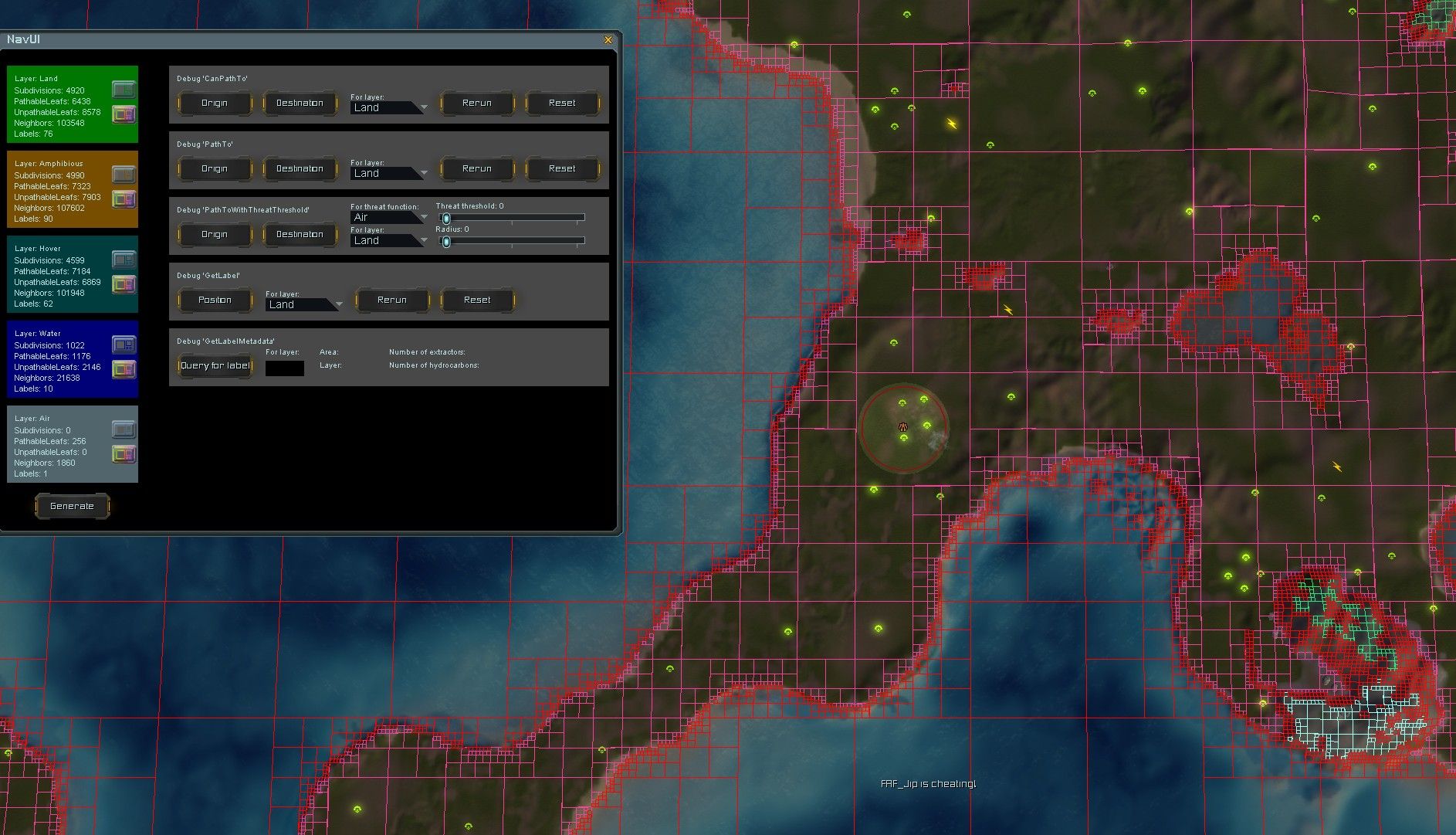
Hit the generate button at the bottom. Then use the icons for each layer to help understand the output. Each label has its own color. When the labels of position A and B match then you can be sure that the average unit can get from A to B. This is what
CanPathTois doing. I don't feel like you need to cache this. This computation is very cheap and is in some sense already cached by the navigational mesh.Note that this navigational mesh is an approximation. The engine has its own mesh that we can't access. But it's quite close as far as I am aware
. -
RE: Idea: A new game project that follows the ideas of Sup Com FA and FAF
I see... The association's position is stated very clearly.
The association did not respond to your ideas. In this topic, no board member participated at this point. And no official statement was made. This also applies to the majority of your other topics with ideas in them.
I think @indexlibrorum is telling you to approach it like Caliber, where Caliber backs up his ideas with a functional mod that implements them:
- https://forum.faforever.com/topic/10019/not-the-novax-again/1
- https://forum.faforever.com/topic/10037/chicken-storm/1
And at this moment changes to the Novax are being discussed on Discord by members of the balance team based on those changes:
I can only encourage you to try to do the same.
-
RE: Chicken Storm
Because as a mechanic the storm sucks, its only real effect on the game is slow you down, ok a storm now exists and we just have to wait 30 seconds before we can move on with the game. or to reward brain rot suicide tactics.
I guess that boils down to what this discussion is about. It's not about the damage. Even if it was two times more or less, you'd not want to walk through it. Instead, I think it is about slowing down the game by denying an area for 30 seconds.
Maybe another direction to look at is the duration of the storm, instead of emphasizing the damage output. The damage output is, uuhh - not quite reliable. But its ability to deny an area is. What if the storm only lasts 10 seconds? Would that solve your problems with it?
-
RE: Sudden desynchronization during the game
@cpahb I'm sorry but I think you are confused about what we can and can not do here in this community.
We do not have access to the original source code. We can not change the binary in a significant way. This error is unfixable for us as a community. We're not blaming Intel like you are suggesting, we're just stating you what helped for other players in the past. You don't have to follow through on it
 , but there's also nothing else that we can do to help you. Having access to your computer does not help, as I mentioned before, we lack the tools and/or ability to debug and understand it on a deeper level.
 -
RE: Sudden desynchronization during the game
@cpahb the article that Nomander is referring to uses the words 'likely' and 'may' - there's no guarantee here.
The RType registration errors are likely related to your hardware and/or drivers and/or system though. Unfortunately nobody can be more specific than this, as it's a rare error and we lack the tools and/or ability to debug and understand it on a deeper level. That you have this error on
UnitWeaponin the simulation thread is what caused the desync - other players did not have this error and therefore the state diverged.Another cause could be other software that is interfering with Supreme Commander. For example, the solutions of Citrix cause a wide range of issues with Supreme Commander when Citrix is installed on the system.
-
RE: Union control big trouble
The feature has been rolled out and I've received the first feedback that indicates the problem is solved on Discord, as long as the host of the lobby decides to use the new lobby option. Thanks to those who spent time to try it out - it helps a lot with development.
-
RE: Vet system - issue and potential improvement
@Caliber said in Vet system - issue and potential improvement:
i like the idea of being able to see oppo vet level as a progress bar but i dont believe they would ever introduce it as you also cant even see oppo shield health
The UI to see a shield health bar (similar to health bar) is determined by the engine. It's not something that can be changed trivially, even' if they (who's they in this context anyway?) wanted to. The one custom progress bar that is available (used for building, reload time, etc) has the same limitations.
@Caliber said in Vet system - issue and potential improvement:
and seing the current vet level of enemy units would be cool just like you see the faction relevent 1,2,3,4,5 star level of your own units.
This may be possible, I'm not sure.
-
RE: purpose of sera t3 subs?
@Prophet said in purpose of sera t3 subs?:
on a side note i hate how subs are allowed to be stacked, effectively making one mega unit with a huge pool of health. Another thing that is impossible to counter
The easiest solution is to make all torpedo weapons do slight splash damage. The stacking problem will resolve itself shortly after that.
@Prophet said in purpose of sera t3 subs?:
i didnt know they were looking at re-working the naval balance.
As far as I am aware there is no large rework in the works.
-
RE: 5k resolution. When I zoom out I quickly lose the "health point" bars, and building. How to fix this?
I think you're running into a limitation on how the game computes the LOD (level of detail, when to render meshes (of units, props)) The same will likely apply to elements (effects, beams). As ZLO mentions, pushing these console commands cause artifacts. In 2006 (over 20 years ago!) these type of resolutions were unthinkable. It's not ideal, but one solution is to run in windowed mode and reduce the resolution?
-
RE: visually glitched Land Factory
This model is just as finished, it just serves a different purposes. Pancakes are great for land units to get off the build pad efficiently, for one
-
RE: Union control big trouble
@prophet My suggestion would be to read the description (of the pull request) and/or give it a spin yourself by hosting a game with it. The short answer: all players gain access to the player that disconnected, in a similar fashion to how union control works. You and all team mates can switch focus back and forth to the abandoned army.
-
RE: 5k resolution. When I zoom out I quickly lose the "health point" bars, and building. How to fix this?
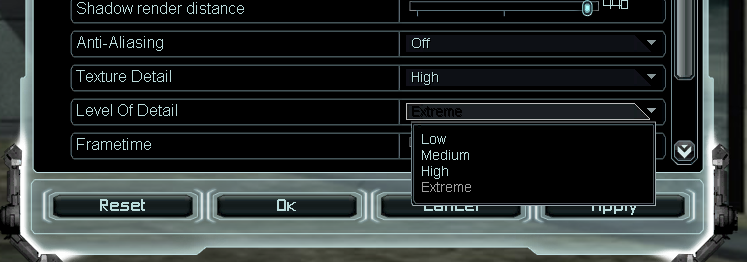
Have you set the level of detail to extreme already, under video of the game options?
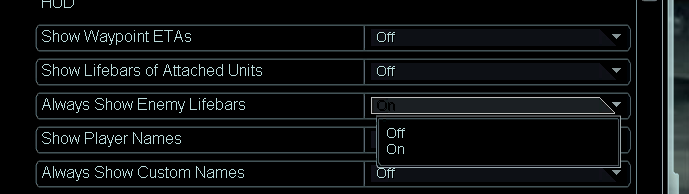
There's also the option to always show the life bars (of enemy units) in the interface tab:
Otherwise there's manually changing
cam_SetLODto a value like 0.6 or 0.5. The extreme option changes this from 1.0 to 0.7. The engine is not quite built for values lower than 0.7 though, at some point it may start to show artifacts.