The current pre-release of the client ("pioneer" in the version) is only compatible to itself. So you can only play with other testers. Please be aware!
  • Random disconnects where ICE doesn't seem to work

    1
    0 Votes
    1 Posts
    175 Views
    No one has replied
  • Client won't let me play map called "Two Corners V2"

    2
    0 Votes
    2 Posts
    178 Views
    JipJ
    It likely means that there's something wrong with the scenario files. I also think that in this particularly case, you may be getting trolled .
  • can't login to faf

    4
    1
    0 Votes
    4 Posts
    593 Views
    M
    I have same problem as Laika...
  • Infinite matchmaking

    7
    0 Votes
    7 Posts
    614 Views
    M
    @pearl12 True. I wouldn't mind getting slaughtered by a pro if only to peep their strats.
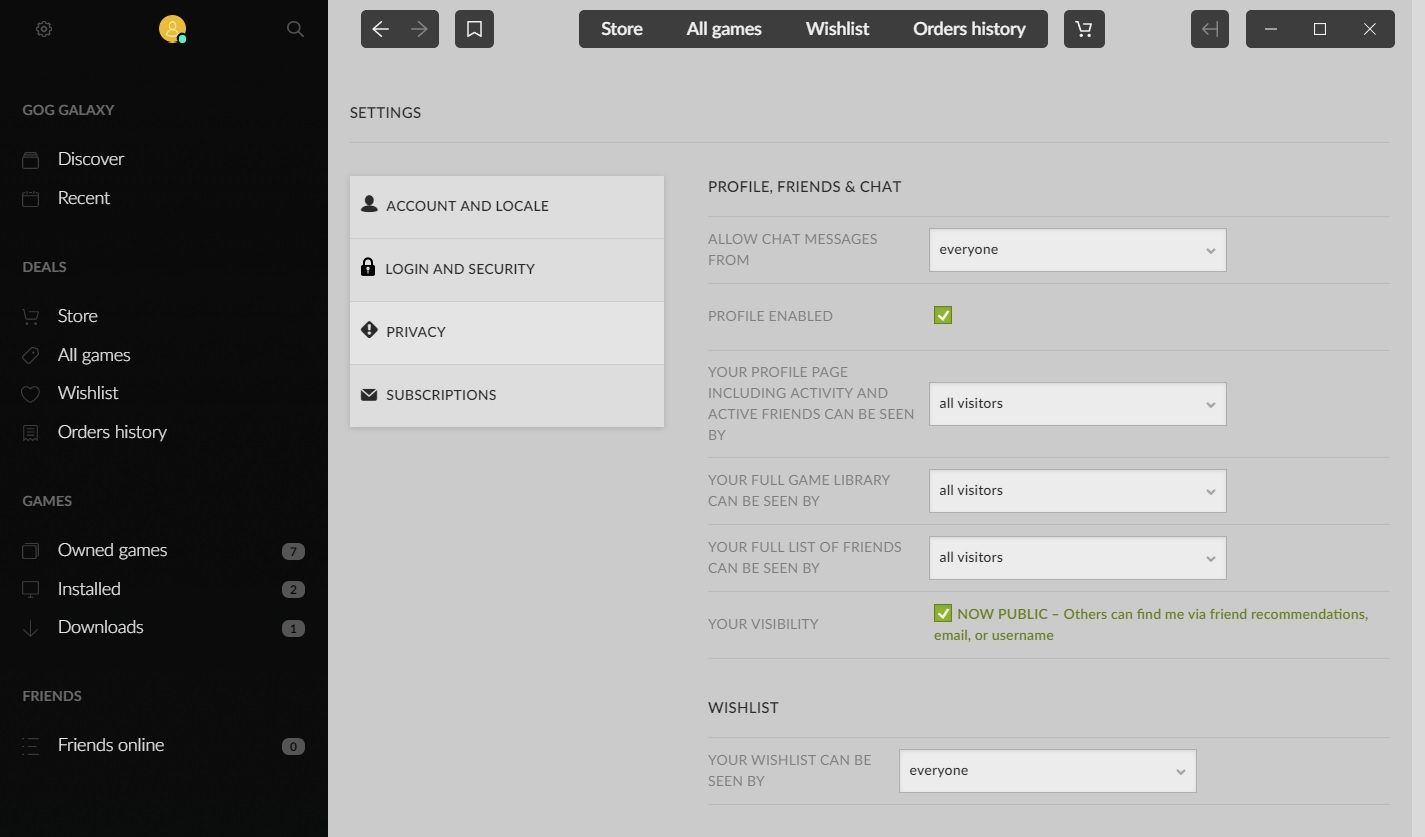
  • GOG linking problem

    3
    1
    0 Votes
    3 Posts
    179 Views
    Brutus5000B
    Yes. the url is https://www.gog.com/profile/edit
  • Error on client startup

    3
    0 Votes
    3 Posts
    229 Views
    maggeM
    @magge said in Solutions for common errors with the FAF client launcher or supreme commander: Reason Program is blocked or has wrong user rights Make sure security software is not blocking the client Make sure your windows account has rights to run the software Remove "C:\ProgramData\FAForever" folder; and reinstall FAF For testing purpose, run the client with admin rights.
  • Кража или что-то ещё.

    1
    0 Votes
    1 Posts
    105 Views
    No one has replied
  • Бесконечное скачивание ForgedAlliance.exe

    3
    0 Votes
    3 Posts
    216 Views
    H
    @eternal Barash101(Влад)#7459
  • ability to search for players and view profile

    3
    1 Votes
    3 Posts
    249 Views
    Anachronism_A
    @curious_guy @Defiant You can search by player name in the FAF client's replay vault, and then click on a game that the player was in. Then, right click the player's name, and a drop-down menu should appear with the option for you to view the player's profile. FWIW, I think they really should re-add the old leaderboards tab to the client, which allowed easier access to player rating information, among other things...
  • short Computer Names Crash Client and Scrambles logs

    3
    0 Votes
    3 Posts
    235 Views
    O
    After your healthy skepticism of my conclusion, I tried to recreate the issue, with some success, but it only leaves me more confused. Here what I've figured out, maybe someone can tell me what's going on. On the second load of my client, it crashes. It just vanishes right when you'd expect the menu to come up; logging in.... nothing. I got to that conclusion by trying to recreate the original problem, I thought I had: I renamed my computer "a". Rebooted and loaded the client and it worked (I felt foolish), tried it again and it crash. Thought well, not so foolish. Renamed(longer name), rebooted, client loaded (felt vindicated), better try again and the client crashed. I'm frustrated again. Tried reinstalling after uninstalling with remove data option and deleted the client's directory, I still cannot get it to start but once then it requires me to disable my anti-virus to work. I even though Java protection might be the issue, so I only disable Java protection, but didn't help. I've got both faf-client.exe and faf_windowes-x64_2022_8_0.exe - FAF Client in my Whitelist. It does work once, and I've never had an issue with any other programs. Don't know why the reboot on Renaming the computer helped the first time, b/c I've been fighting this all week and have been rebooting often. But I was so glad to final have a solution(not really) that i didn't want anyone else to be fighting with something that could easily be worked around, so I posted without checking more. Little embarrassed, b/c I always tell people to check twice before posting. P.S - Both User Log off/on and rebooting can get the client to start once. ----===== Last lines of the Client.log ======----------- 2022-08-26 08:18:19.821 INFO 22496 --- [JavaFX-Launcher] com.faforever.client.steam.SteamService : Starting the Steam API 2022-08-26 08:18:19.937 DEBUG 22496 --- [JavaFX-Launcher] com.faforever.client.steam.SteamService : Steam API started 2022-08-26 08:18:20.292 INFO 22496 --- [JavaFX-Launcher] o.s.boot.SpringApplication : Started application in 4.691 seconds (JVM running for 6.331) 2022-08-26 08:18:21.307 INFO 22496 --- [JavaFX Application Thread] com.faforever.client.update.Version : fromVersion '2022.8' is not newer than toVersion '2022.8'. No update is required. 2022-08-26 08:18:21.310 INFO 22496 --- [JavaFX Application Thread] com.faforever.client.user.UserService : Logging in with refresh token 2022-08-26 08:18:22.764 DEBUG 22496 --- [reactor-http-nio-5] com.faforever.commons.lobby.FafLobbyApi : Starting session listener 2022-08-26 08:18:22.767 DEBUG 22496 --- [reactor-http-nio-5] com.faforever.commons.lobby.FafLobbyApi : Starting login listener 2022-08-26 08:18:23.045 INFO 22496 --- [reactor-tcp-nio-1] com.faforever.commons.lobby.FafLobbyApi : Connected to lobby.faforever.com on port 8002
  • Cant update

    18
    0 Votes
    18 Posts
    1k Views
    maggeM
    @magge said in Cant update: You could try to change the default web browser. People with the same error got it fixed by that. Well, have you tried that? Edit: You need to change it in your windows, not FAF. Edit2: And if you do not know how to do that: Select the Start button, and then type Default apps. In the search results, select Default apps. Under Web browser, select the browser currently listed, and then select Microsoft Edge or another browser.
  • Matchmaking violations

    6
    0 Votes
    6 Posts
    281 Views
    Eternal-E
    Yeah, you have to play with client not with game. Take your timer to click.
  • This topic is deleted!

    1
    0 Votes
    1 Posts
    3 Views
    No one has replied
  • Cant join games after windows update

    10
    0 Votes
    10 Posts
    408 Views
    P
    Coturn fixed. Thanks a lot!
  • Не запускает в пользовательский матч

    1
    0 Votes
    1 Posts
    118 Views
    No one has replied
  • A problem with the FAF client. I can't log in

    15
    0 Votes
    15 Posts
    1k Views
    A
    I rebooted , reinstalled client and it still failed to login. Then I opened Steam and tried FAF client again ... logged in normally. Maybe if I waited a bit the problem could have resolved itself.
  • Client keeps crashing on startup

    3
    0 Votes
    3 Posts
    303 Views
    K
    @magge No.
  • Avast

    4
    1
    0 Votes
    4 Posts
    333 Views
    ?
    Avast was once blocking my dad's Internet connection. Uninstalling healed the PC.
  • Crash replay

    1
    0 Votes
    1 Posts
    251 Views
    No one has replied
  • I can't download maps and mods

    2
    0 Votes
    2 Posts
    173 Views
    A
    I don't have an antivirus and my windows firewall is disabled