The current pre-release of the client ("pioneer" in the version) is only compatible to itself. So you can only play with other testers. Please be aware!
  • Video settings

    3
    0 Votes
    3 Posts
    155 Views
    JipJ
    Just set it all to high, except for AA - x2 is fine.
  • cant start after upgrade

    2
    0 Votes
    2 Posts
    154 Views
    Brutus5000B
    Looks like the installation still contains some old files. Please uninstall the client, make sure to manually delete leftover files and reinstall again.
  • как исправить ошибку

    2
    0 Votes
    2 Posts
    156 Views
    Eternal-E
    Delete C:\Users\Х3К\AppData\Local\Gas Powered Games\Supreme Commander Forged Alliance\Game.prefs
  • timeout issues since 2022-09-25

    6
    3
    0 Votes
    6 Posts
    580 Views
    H
    I'm still having issues - it did get better (less errors just) for a day or so, but the last couple of days seem to be back to the new normal of hardly being able to launch/join much.
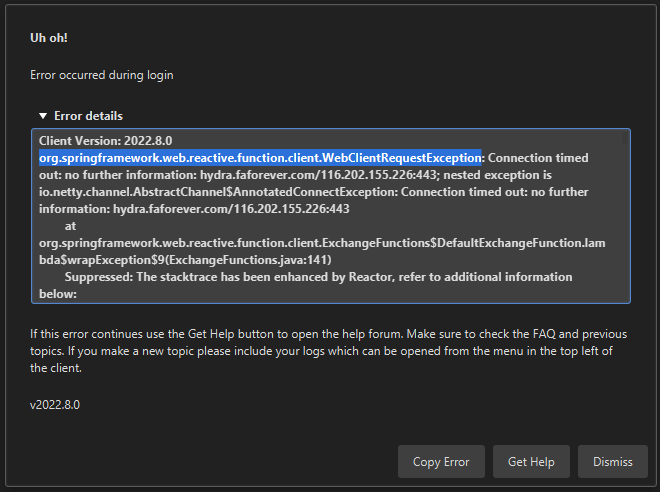
  • Unable to login - connection timed out

    3
    1
    0 Votes
    3 Posts
    199 Views
    A
    Thank you Magge for the quick reply, indeed it was my antivirus, forgot that it manages the firewall also. It works for now so again, thank you.
  • No Score Button at the end of games

    6
    0 Votes
    6 Posts
    652 Views
    J
    @Jip @Uveso Thank you both for your time and help.
  • Cant reconnect to games

    1
    0 Votes
    1 Posts
    130 Views
    No one has replied
  • FAF crashes after 10-30 min

    5
    0 Votes
    5 Posts
    352 Views
    Eternal-E
    @amygdala my mods never breaks anyone game
  • client doesnt work

    1
    0 Votes
    1 Posts
    185 Views
    No one has replied
  • Full game + computer crash

    13
    0 Votes
    13 Posts
    1k Views
    P
    Thank you @Katharsas @Uveso and @Jip so far I've not had any crashes provided I have nothing else open. This probably confirms what Katharsas was saying in that maybe my computer can't handle FAF + x. It's probably time for a new computer just holding on to the nostalgia tower abit longer.
  • How do I make a shortcut on the taskbar to close ForgedAlliance.exe

    5
    0 Votes
    5 Posts
    304 Views
    arma473A
    @katharsas Thanks, I think "always on top" will work
  • Login issue: keeps giving connection refused to api.faforever.com

    6
    0 Votes
    6 Posts
    1k Views
    Brutus5000B
    Just for the statistics: In which country do you live and who is your Internet provider? Are you on mobile lte connection or via cable/dsl/fiber? My guess is you live outside Europe and/or use a LTE connection.
  • 0 Votes
    4 Posts
    473 Views
    Eternal-E
    Test with vpn
  • The cache is not purged

    3
    0 Votes
    3 Posts
    536 Views
    Brutus5000B
    That cache is a game cache and not a FAF client cache. If you want to apply the command switch you can append it in Settings -> Forged Alliance Forever -> Command Line Format for Executable Put it behind the %s [image: 1663011115778-2b13f9c1-fc8d-4e33-a134-b0050ae573bd-image.png] (Mine might look different because I'm running on Linux)
  • FAF doesn't "know" where localisation files are !

    2
    0 Votes
    2 Posts
    528 Views
    Manimal_M
    More about this issue : I've noticed by verifying "AppData\Local\Gas Powered Games\Supreme Commander Forged Alliance\Game.prefs" that the voice volume was OFF, while it was at MAX in the Options window in-game : options = { (...) vo_volume = 0, (...) }, The localized voices are still muted in spite of my attempts to : set the volume to the MAX from the Options window in-game. click on [Apply]. click on [OK]. I've even thought I had to quit the game and launch it again after this change, to no avail. I've openned game.prefs with NP++ and noticed the value was still vo_volume = 0,. So I've changed it for vo_volume = 100,, but it's had no effect at all. FA v1.6.6 's localized voices are definitely like "broken" since I installed FAF, even by running the game without FAF. Help will be much appreciated.
  • mod folder location error

    2
    0 Votes
    2 Posts
    172 Views
    L
    Problem solved by trying to join an existing game, which updated some game files. After that, I can download mods without issues.
  • Loggin error during game lost connection

    1
    0 Votes
    1 Posts
    174 Views
    No one has replied
  • Issue Logging in to FaF

    2
    0 Votes
    2 Posts
    235 Views
    Brutus5000B
    You have issues with your DNS resolving one of our subdomains. Either you wait or you try to use a different DNS service.
  • Login Issue

    4
    0 Votes
    4 Posts
    306 Views
    S
    Thank you so much for this. How do I give the client permission?
  • Problem by Login

    1
    0 Votes
    1 Posts
    167 Views
    No one has replied