The current pre-release of the client ("pioneer" in the version) is only compatible to itself. So you can only play with other testers. Please be aware!

Subcategories

  • 29 Topics
    260 Posts
    maudlin27M
    FAF's rules are set out on the main FAForever website - by accessing FAF services, you agree to the rules outlined there, which are supplemental to the FAF Terms of Service. For details of how to report rule breaches and/or how the rules are enforced, please refer to the separate page on moderation Separate contribution guidelines exist for those considering contributing to FAF, while there are also official tournament rules that apply to official FAF tournaments.
  • 934 Topics
    5k Posts
    R
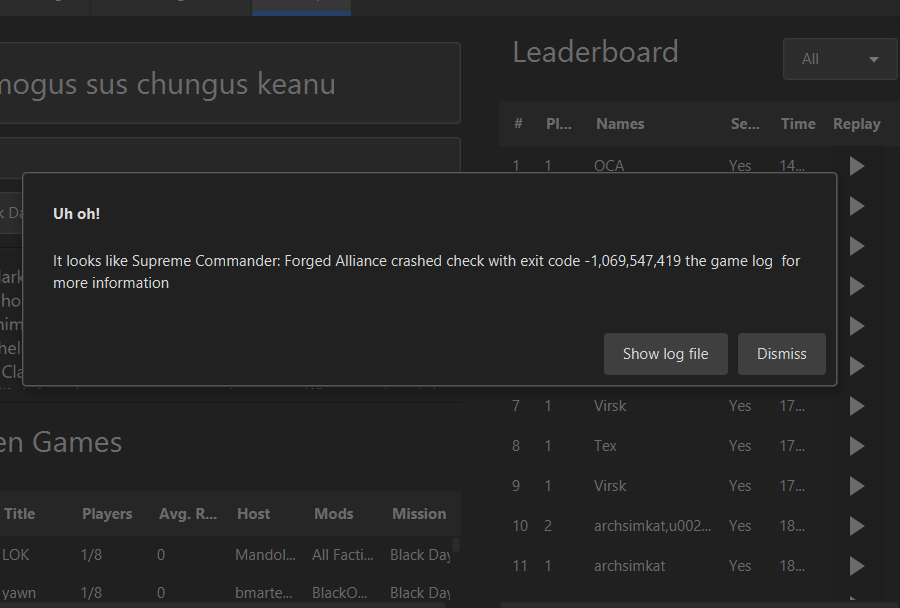
    The LOG got over-written. I did try to recreate the crash but it ran without incident today. The system updated and shutdown after Windows Update last night, so this is a fresh restart and may have been a problem caused by Windows. To confirm, crashes did not happen on other replays, and not even all doobro's replays. These weird crashes only occurred on some of doobro's replays, even though he uses the same mod list in all his games. Restarting my computer wouldn't clear up the issue. I did have a Windows Update that stalled a few weeks back, and the issue appeared to show up after that update. I had Windows 11 run a verification, and it found and replaced some corrupted files. I am guessing the verification didn't fix everything, and the Windows Update last night may have corrected whatever was causing the unexplained crashes. At this point, i believe the crashes were caused by Windows.
  • Please provide detailled logs and/or error messages!

    984 Topics
    4k Posts
    ipconfig-releaseI
    I see XACT error, please refer to the FAQs
  • 39 Topics
    155 Posts
    wilson_W
    Dear Commander, are you willing to learn and improve your game play? If your answer is yes, the FAF Dojo is the place to be. What You Can Expect From The FAF Dojo A (mostly) voice-based community of 500+ players from all over the world Like-minded people willing to improve A wide range of skill levels (0-2000+) An experienced trainer team (incl. several top 50 players) Replay reviews Training sessions (as a group) Training sessions (1on1) In-house tier lists resembling the ranks of a Judo school 1v1 Team games (”global”) A wide variety of options to practice Sparring (trainees only - unrated) Sparring (trainees and trainers - unrated) 1v1 challenges TMM queue Events Tournaments Community nights (e.g. a dedicated 1v1 Night) What The FAF Dojo Expects From You Participating requires a functioning set of headphones and microphone, or a headset Keeping a positive and supportive atmosphere Once you reach a certain level, you might want to consider giving back by becoming a trainer yourself How do I join the FAF Dojo? Check out our Notion page to find out more about our trainers (incl. several official trainers from the FAF Discord), tournaments (1v1, 2v2, 3v3), and more. If our system appeals to you, we would gladly welcome you on our Discord server. Cheers.
  • 0 Votes
    1 Posts
    124 Views
    No one has replied
  • how can i make an avatar in faf

    3
    0 Votes
    3 Posts
    331 Views
    FemboyF
    I heavily recommend asking people organizing upcoming tournaments if they need one or just the FAF leadership. A lot of old avatars could use a re-design
  • Как сделать аватар в FAF?

    1
    0 Votes
    1 Posts
    131 Views
    No one has replied
  • Map vault

    2
    0 Votes
    2 Posts
    206 Views
    MadMaxM
    yeah your maps will be visible as long as you follow the vault rules https://wiki.faforever.com/en/Vault-Rules
  • uploading mod to the vault error

    3
    0 Votes
    3 Posts
    319 Views
    L
    @magge ahh ok thanks i guess ill just try again another day
  • 0 Votes
    3 Posts
    206 Views
    ZartanZ
    Oh? That's interesting. I did feel like FAF used to be able to reconnect for me pretty much consistantly but the last while it had seemingly stopped being able to do so. If that helps any.
  • ipv6 issues?

    7
    0 Votes
    7 Posts
    630 Views
    T
    Same Issue here. Disabling ipv6 solves the issue. Recently updated to windows 11 . Maybe a change there?
  • Game crashing shows exit code- 1,069,547,419

    8
    1
    0 Votes
    8 Posts
    549 Views
    JipJ
    Could you append the game logs?
  • Enable Verbose logging for games

    4
    0 Votes
    4 Posts
    347 Views
    arma473A
    Instead of trying to find the problem, I would suggest you all obtain copies of the mods from a single source. For example, send your friends copies of your mods through discord or email or whatever. They can back up their version of the mods and then re-install the mods using the files you sent. If that doesn't work, the next thing I would try is: Use those mods (that you got from a single source) but all players disable all of their UI mods, you play and see if there's a desync. It seems unlikely that a UI mod would interact with sim mods in a way that would cause desyncs, but ya never know. Computers are complicated, in theory it could happen. So I would try that next.
  • Do I need sep. java runtime to play

    8
    0 Votes
    8 Posts
    463 Views
    ThomasHiattT
    Just use the python client. https://github.com/FAForever/client/releases
  • 0 Votes
    3 Posts
    749 Views
    F
    SOLVED: need to update java and restart pc
  • What hotkeys do you use?

    5
    0 Votes
    5 Posts
    556 Views
    Epitaph-E
    Thank you
  • Stuck on 'Connecting...' screen when joining game

    2
    0 Votes
    2 Posts
    574 Views
    G
    Disabling IPv6 fixed it.
  • Stuck in the FAF Loggin with the loading buffer

    5
    0 Votes
    5 Posts
    527 Views
    G
    I had this same issue and disabled IPV6 and it fixed the issue. I was stuck and couldn't connect to a game, stuck at the 'connecting...' screen.
  • help

    3
    0 Votes
    3 Posts
    217 Views
    A
    This is the first time since the update, there are no problems with the Internet, I do not use vpn
  • Help!!!

    2
    0 Votes
    2 Posts
    227 Views
    maggeM
    Can you reproduce that error every time? It is a simple connection timeout...
  • Can't view coop replays due to map not found

    6
    0 Votes
    6 Posts
    472 Views
    M
    @magge said in Can't view coop replays due to map not found: @Eternal Nice solution, did not know that it was a default map. @Milos_Obilic If via steam default location installed: C:\Program Files (x86)\Steam\steamapps\common\Supreme Commander Forged Alliance\maps\X1CA_001 copy whole folder "X1CA_001" to C:\Users\%username%\Documents\My Games\Gas Powered Games\Supreme Commander Forged Alliance\Maps I did this but still the same error. It appears FAF client (coop) insists on taking it from the server. So I copied it to C:\ProgramData\FAForever\user\My Games\Gas Powered Games\Supreme Commander Forged Alliance\maps But then I get some error: "Ack! unable to load replay from C:\ProgramData\FAForever\user\My Games\Gas Powered Games\Supreme Commander Forged Alliance\cache"
  • This topic is deleted!

    1
    0 Votes
    1 Posts
    3 Views
    No one has replied
  • Ошибка при входе в комнату faf

    2
    0 Votes
    2 Posts
    218 Views
    maggeM
    AccessDeniedException Easy fix, choose another directory on another disc Longterm fix: Allow access to those folders for FAF → Some windows defender setting I assume
  • I cant create or join any games.

    4
    0 Votes
    4 Posts
    392 Views
    I
    такая же проблема. бесконечный конектинг и всё