FAForever Forums
    • Categories
    • Recent
    • Tags
    • Popular
    • Users
    • Groups
    • Login
    1. Home
    2. SealingSatyr511
    The current pre-release of the client ("pioneer" in the version) is only compatible to itself. So you can only play with other testers. Please be aware!
    S
    Offline
    • Profile
    • Following 0
    • Followers 0
    • Topics 1
    • Posts 46
    • Groups 0

    SealingSatyr511

    @SealingSatyr511

    41
    Reputation
    8
    Profile views
    46
    Posts
    0
    Followers
    0
    Following
    Joined
    Last Online
    Age 55
    Location France

    SealingSatyr511 Unfollow Follow

    Best posts made by SealingSatyr511

    • [MOD UI] Advanced Target Priorities EVO - Presets management - New clean UI - Graphics enhancement - Free layout

      Advanced Target Priorities EVO

      New version 1.0 by SealingSatyr511
      29/04/2025


      • Complete new version based on Strogo 1.1 original

      • Targeting priorities now support custom presets with files management

      • UI scaling native support

      • UI orders & construction Panels : fully sizeable, dockable, moveable

      • UI orders & construction attack|Factory-Engineers : Panels auto-switch

      • UI Panels : textures has been reworked, new minimalistic colorized UI

      • UI Toolip position : unit view, details, habilities has been reworked

      • UI Textures : re-encoded (B8G8R8A8 Linear DDS compression)

      • Adapter resolution modification prevents the panels to be lost by exceeding the visible zone

      • Still compatible with Command Wheel mod (strogo1_1 preset only)

      • Ready to go with built-in Strogo1_1 and Nomander presets


      1.0.1 - Minor fixes :
      - when the separate window was disable, the auto-switch mode did not worked correctly
      - the tooltip position of the details & unit view were not set correctly when the enhancement and selection tabs were selected
      - fixed a native bug about the template tab in construction

      1.0.2 - Update
      - UI Economy panel reworked with scaling support
      - UI Mod settings window
      - fixed the scaling logic in the targeting separate window
      - reduced the minimum construction panel size limitation

      1.0.3 - Hot fix
      -Fixed the black screen and game freeze at startup

      1.0.4 - Fix
      -Added a test plan execution at startup to prevent GamePrefs issues
      (version 8 in the vault)


      Please refer to Strogo original thread for more information about the mod.
      https://forums.faforever.com/viewtopic.php?f=41&t=17047

      posted in Modding & Tools
      S
      SealingSatyr511
    • RE: [MOD UI] Advanced Target Priorities EVO - Presets management - New clean UI - Graphics enhancement - Free layout

      version 4 of the file is up. (fixed the mod icon in the vault)

      posted in Modding & Tools
      S
      SealingSatyr511
    • RE: [MOD UI] Advanced Target Priorities EVO - Presets management - New clean UI - Graphics enhancement - Free layout

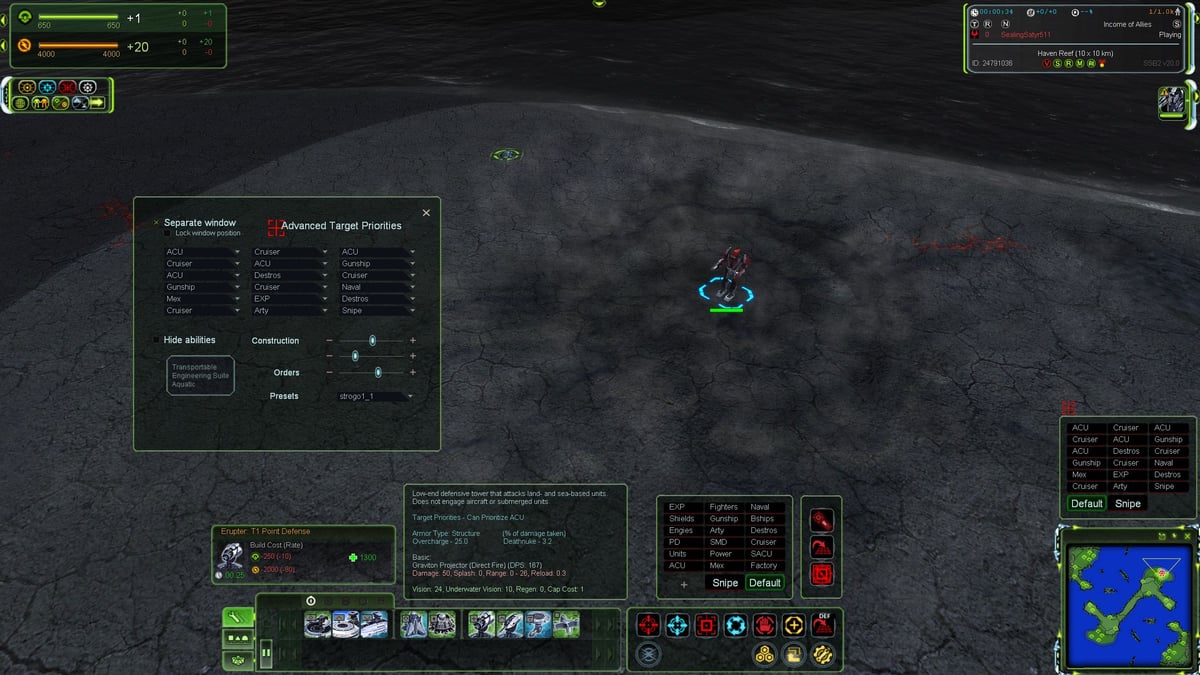
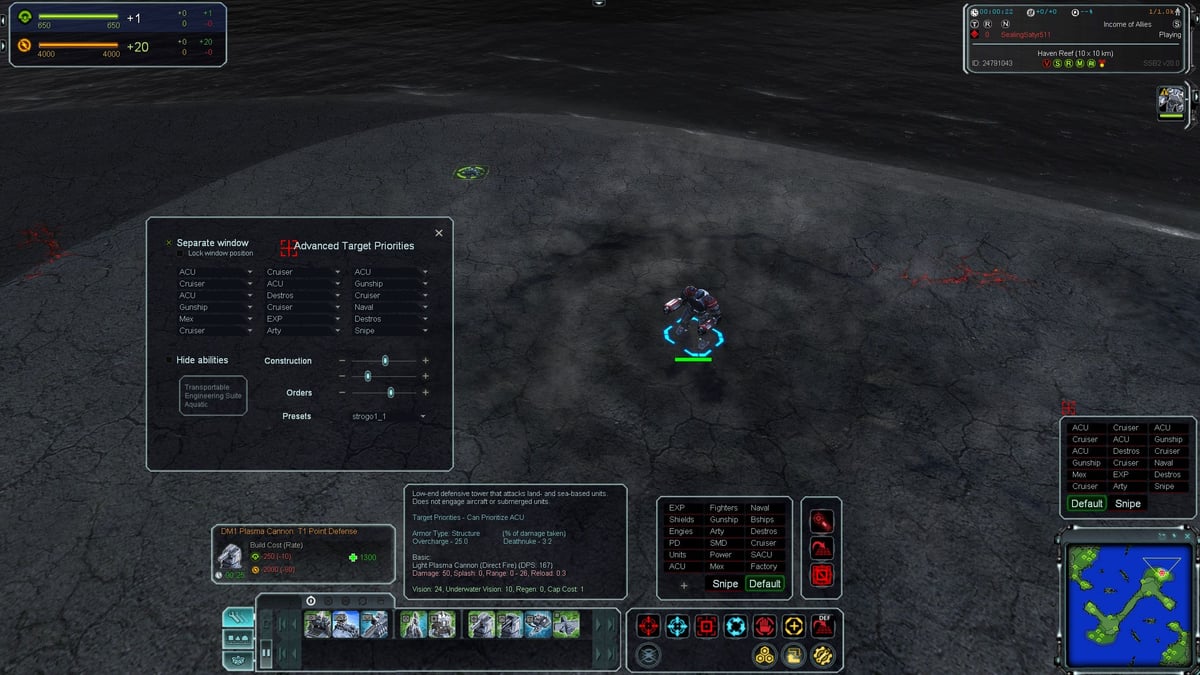
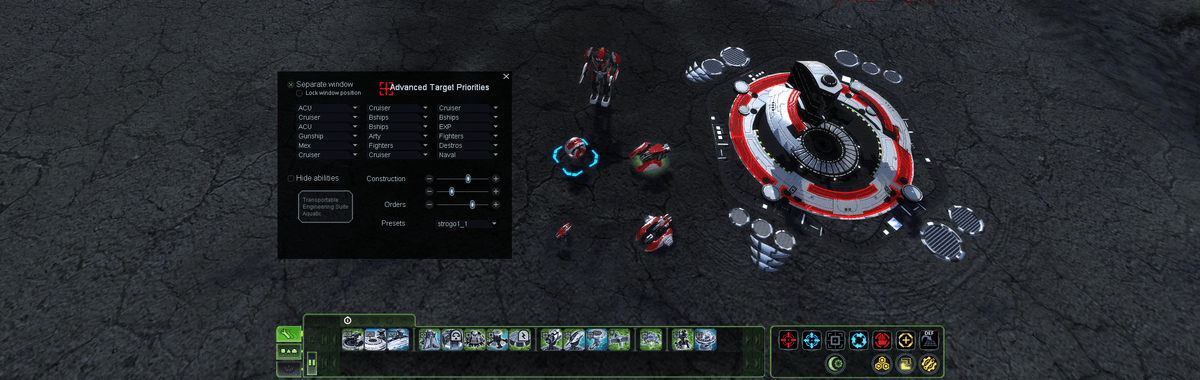
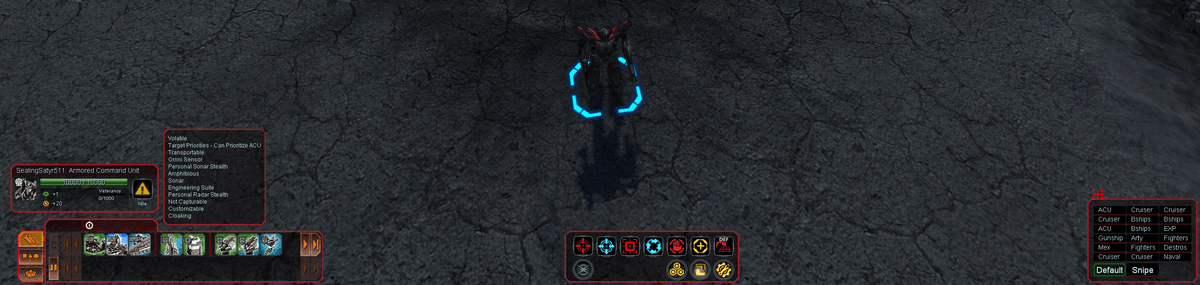
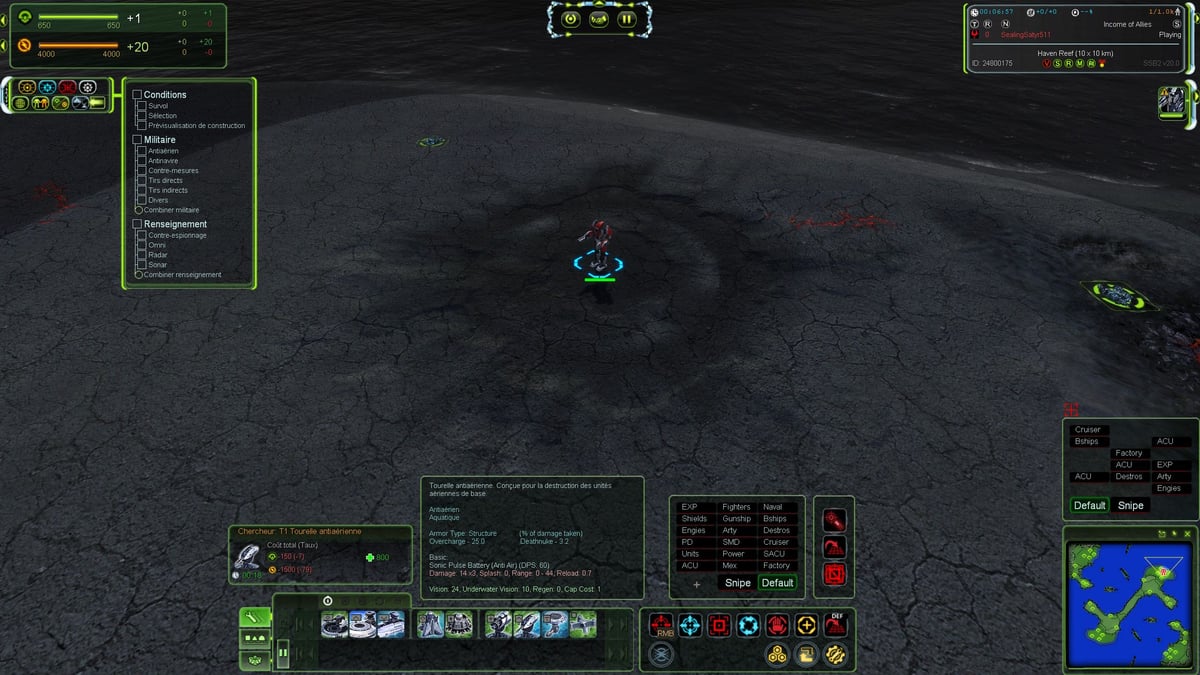
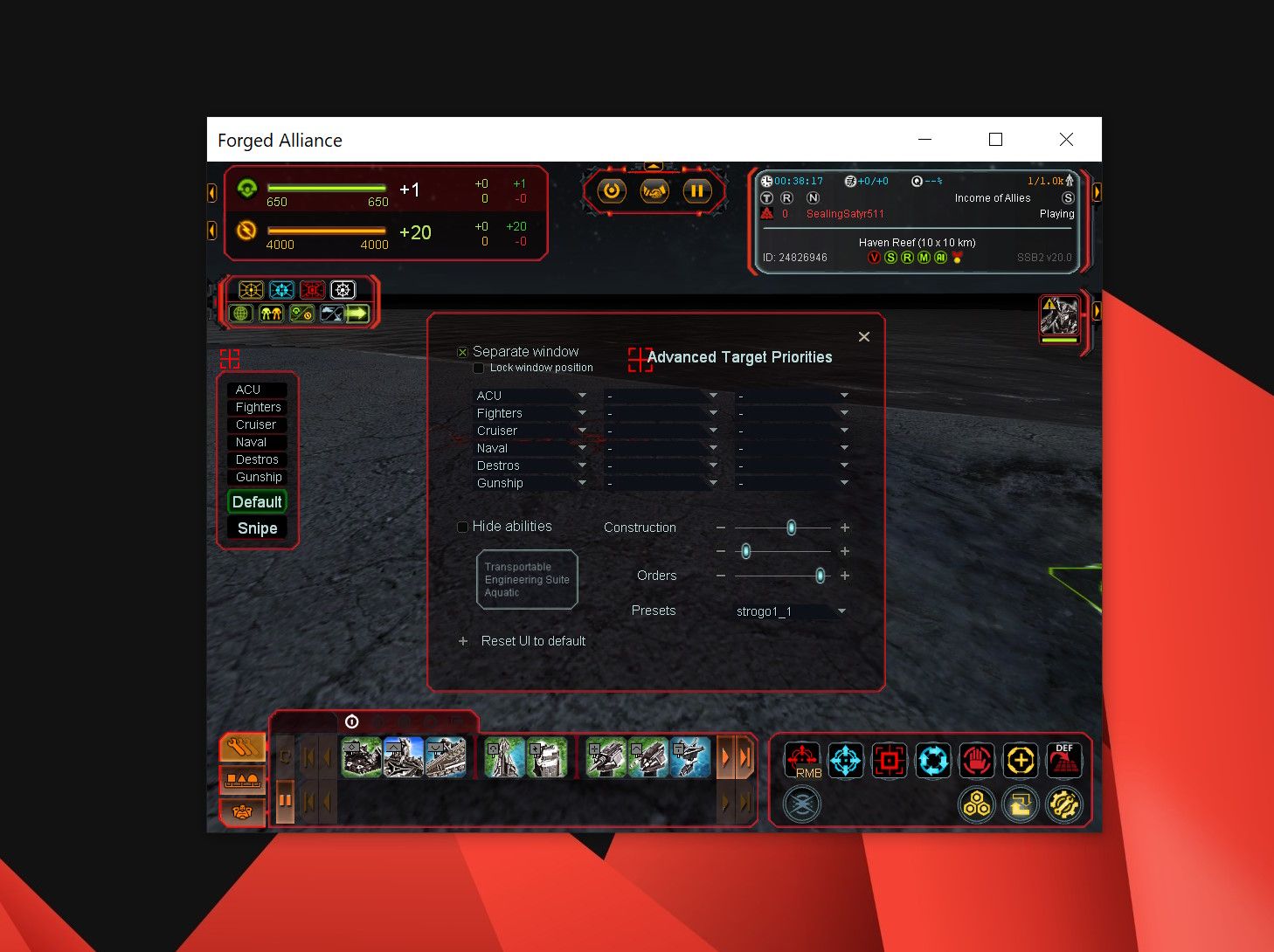
      New clean UI with reworked and colorized textures, free layout with dynamic tooltip position :

      1.jpg
      2.jpg
      3.jpg
      4.jpg

      Auto switch between Attacker | Factory-Engineer with custom layout for each mode :

      7.png

      Modify the layout panels with the new move, dock and resize features :

      8.png
      10.png

      posted in Modding & Tools
      S
      SealingSatyr511
    • RE: [MOD UI] Advanced Target Priorities EVO - Presets management - New clean UI - Graphics enhancement - Free layout

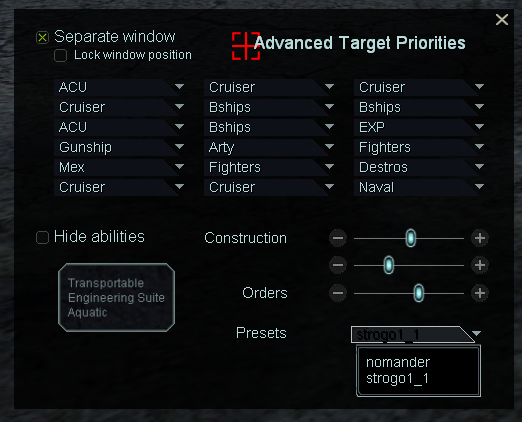
      Apply the targeting priorities presets with the dropdown from the settings window. Need restart :

      5.png

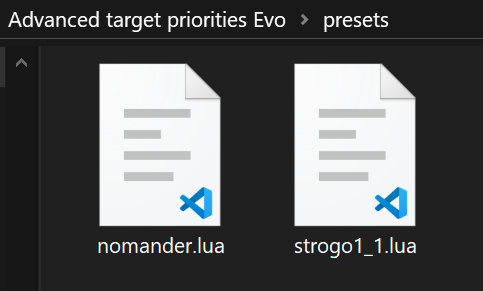
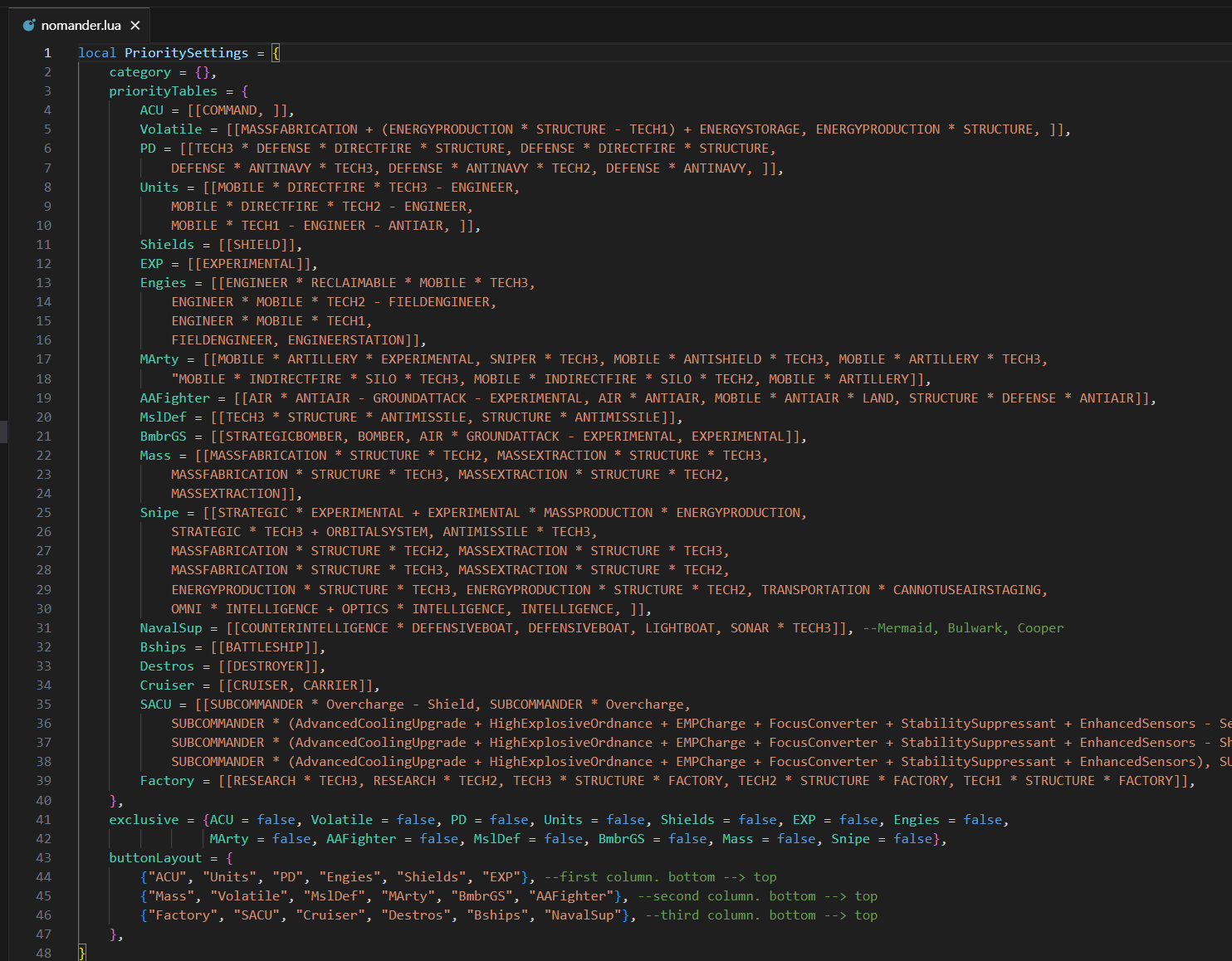
      Create your custom preset in the mod presets folder ( .lua extension) :
      The file will be available to selection from the settings window.

      6.png

      9.png

      posted in Modding & Tools
      S
      SealingSatyr511
    • RE: Black Screen with mod v6 'Advanced Target Priorities EVO'

      The gamePrefs is ok, yes it's advancedpriotities (without the r). It's easier for the dev to find in the gameprefs. it's native code of the old 1.1.

      here is the code that fails :

      -- check the serapate targeting window position
      local separateWindow = import("/lua/ui/game/orders.lua").GetSeparateWindow()
      local tableRez = mysplit(Prefs.GetFromCurrentProfile('options').primary_adapter,',')
      if (prioritySettingsPrefs.posX > tonumber(tableRez[1])-207) or  
         (prioritySettingsPrefs.posY > tonumber(tableRez[2])-145) then    
              separateWindow.Left:Set(DefaultPosX)
              separateWindow.Top:Set(DefaultPosY)
              prioritySettingsPrefs.posX = DefaultPosX
              prioritySettingsPrefs.posY = DefaultPosY
              Prefs.SetToCurrentProfile("AdvancedPriotities", prioritySettingsPrefs)
              Prefs.SavePreferences()
              resetPosition = true
      end
      

      the condition is line 802 where the bug occurs.

      but i m pretty sure it s due to resolution and coordinate retrieved from
      Prefs.GetFromCurrentProfile('options').primary_adapter

      it put the resolution 2560x1440 to a table, and i check the x and y position of the window.
      This code is designed to prevent out of range position.

      I don't reproduce this bug (i use a single monitor). the dual monitor may have an impact on how the resolution is retrieved by the game.
      Does it take the resolution of the game ? or the windows system ? that's the key i think.

      Be sure i m investigating this. I have a laptop with a dual screen (not the computer i run Faf), i m going to install faf on it and check how it works in debug. i must reproduce.

      posted in Game Issues and Gameplay questions
      S
      SealingSatyr511
    • RE: [MOD UI] Advanced Target Priorities EVO - Presets management - New clean UI - Graphics enhancement - Free layout

      Sans titre.jpg

      I think the UI is the good balance between old-school graphics and modern.
      a nostalgic feeling mixed with modern art.

      I don't have plan to add other modernized part of the UI to the Evo version.
      But i could make an optional UI mod extension to extend the modern gfx to the others parts like multifunction, avatar, and Supreme Scoreboard. Azot scoreboard have some built-in colors selectors.

      I also have an idea about promoting a new feature, as an extension mod to Evo, the group actions (create, join, leave, merge, split) The game have too much keybinds to memorize for my brain 😸

      A dedicated panel, user friendly, smooth with reactive buttons (not a panel full of buttons) should do the trick.

      i will upload another fix soon.

      posted in Modding & Tools
      S
      SealingSatyr511
    • RE: [MOD UI] Advanced Target Priorities EVO - Presets management - New clean UI - Graphics enhancement - Free layout

      Here is a screenshot of the new windowed mode. I have reworked the UI logic. the UI prevent all the out of range issues due to resolution change and window resize. All the current features still works as usual.

      100% scaling, 1024x768 minimum native windowed mode :

      Windowed_mode.jpg

      I will upload the new update soon.

      posted in Modding & Tools
      S
      SealingSatyr511
    • RE: Black Screen with mod v6 'Advanced Target Priorities EVO'

      a hotfix should be available very soon.

      I found some side effects relative to gameprefs and the preset management.
      May occurs at startup when the prioSettings are unknown, nil error that cause crash.
      and an uppercase bug on the preset filename. Stogo1_1.lua => stogo1_1.lua.
      Also, a part of the safety code was missing.

      i checked from scratch, got errors with use cases, critical, but never a black screen.
      Actually the fix is ok. it solves the issues.
      the code is way more robust now but need another testing iteration.

      posted in Game Issues and Gameplay questions
      S
      SealingSatyr511
    • RE: [MOD UI] Advanced Target Priorities EVO - Presets management - New clean UI - Graphics enhancement - Free layout

      Available in the vault :

      logo.png


      Feel free to comment, report bug, compatibility issues with others mods...

      Thanks to Strogo for his original project.

      SealingSatyr511.

      posted in Modding & Tools
      S
      SealingSatyr511
    • RE: Black Screen with mod v6 'Advanced Target Priorities EVO'

      Hot fix is available

      https://forum.faforever.com/post/66448

      I tested from scratch, fresh mod and default GamePrefs. I don't have issue or error hidden behind a tree.
      I hope it solves the game to freeze at startup some player have encountered on fresh install.

      Sorry for the inconvenience

      posted in Game Issues and Gameplay questions
      S
      SealingSatyr511

    Latest posts made by SealingSatyr511

    • RE: [MOD UI] Advanced Target Priorities EVO - Presets management - New clean UI - Graphics enhancement - Free layout

      due to personal busy time, i was not able to deliver some update since the last weeks.
      Be sure i m planning to provide an updated version.

      posted in Modding & Tools
      S
      SealingSatyr511
    • RE: [MOD UI] Advanced Target Priorities EVO - Presets management - New clean UI - Graphics enhancement - Free layout

      @ThomasHiatt it s an option i would like to provide in a new LITE version.

      posted in Modding & Tools
      S
      SealingSatyr511
    • RE: [MOD UI] Advanced Target Priorities EVO - Presets management - New clean UI - Graphics enhancement - Free layout

      @Sonny be sure you have at least one priority set to the separate window and checked the display checkbox.

      posted in Modding & Tools
      S
      SealingSatyr511
    • RE: Black Screen with mod v6 'Advanced Target Priorities EVO'

      https://forum.faforever.com/post/66617

      posted in Game Issues and Gameplay questions
      S
      SealingSatyr511
    • RE: [MOD UI] Advanced Target Priorities EVO - Presets management - New clean UI - Graphics enhancement - Free layout

      Here is a screenshot of the new windowed mode. I have reworked the UI logic. the UI prevent all the out of range issues due to resolution change and window resize. All the current features still works as usual.

      100% scaling, 1024x768 minimum native windowed mode :

      Windowed_mode.jpg

      I will upload the new update soon.

      posted in Modding & Tools
      S
      SealingSatyr511
    • RE: [MOD UI] Advanced Target Priorities EVO - Presets management - New clean UI - Graphics enhancement - Free layout

      @Katawunga The separate window was not designed to be the mirror of the priorities as shown from the action button. It's a DIY panel. But i understand the quality of life aspect of the feature you ask for. So i will see in a future update to add the capability to pre-fill the panel.

      posted in Modding & Tools
      S
      SealingSatyr511
    • RE: Black Screen with mod v6 'Advanced Target Priorities EVO'

      I just got the solution 🙂

      posted in Game Issues and Gameplay questions
      S
      SealingSatyr511
    • RE: Black Screen with mod v6 'Advanced Target Priorities EVO'

      ok. i found a way to retrieve the right/bottom position of the window, in windowed mode.
      So i get ride of the adapter logic and write something new that would be compatible in both mode.
      I m not sure there is a window resize handle event. but it works by selecting a unit. But this is not the right event for that.

      [EDIT] got it !
      local UIMain = import("/lua/ui/uimain.lua")
      UIMain.OnApplicationResize= function(head, width, height)

      This should be fixed so.

      posted in Game Issues and Gameplay questions
      S
      SealingSatyr511
    • RE: [MOD UI] Advanced Target Priorities EVO - Presets management - New clean UI - Graphics enhancement - Free layout

      Actually the mod doesn't support the windowed mode.

      I m working on a workaround to make it compatible.

      posted in Modding & Tools
      S
      SealingSatyr511
    • RE: Black Screen with mod v6 'Advanced Target Priorities EVO'

      primary_adaptor is "windowed".
      i can reproduce. Well i m going tomorrow to find a workaround to the fact that i can't retrieve the window width and height in windowed mode.
      So actually the mod does not support the windowed mode.

      I think there is a solution. The adapter does not provide any data, not that way, but the maths works with the native panels so.... i will investigate.

      Thanks for the report.

      posted in Game Issues and Gameplay questions
      S
      SealingSatyr511