The current pre-release of the client ("pioneer" in the version) is only compatible to itself. So you can only play with other testers. Please be aware!
  • Refresh token is invalid

    3
    0 Votes
    3 Posts
    382 Views
    M
    client.log Sorry if this was needed first. First time asking for help
  • Maps and mods

    3
    1
    0 Votes
    3 Posts
    620 Views
    MostLostNoobM
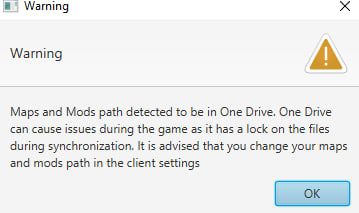
    @blackhart All versions of SCFA have a difficult time with using network storage systems like OneDrive, Dropbox, etc.. To get around this for FAF, you'll need to: go to FAF client > top left menu > Settings > Forged Alliance Forever > Maps and Mods Location > Choose... navigate to a location outside of OneDrive either select an already existing folder or create a new folder for where FAF will store your maps/mods & then select the new folder double-check the new path to ensure that it's not in OneDrive
  • Can't login after update faf. Need help

    4
    0 Votes
    4 Posts
    210 Views
    N
    2024-04-23T22:50:47.702+03:00 DEBUG 1088 --- [FAF Client] [JavaFX Application Thread] c.faforever.client.steam.SteamService : Steam API stopped omg=/ if steam app closed, faf not working. thx
  • Ejected: Invalid Player Data

    11
    0 Votes
    11 Posts
    743 Views
    JipJ
    This should now be fixed
  • FAF Client: Nothing works.

    7
    0 Votes
    7 Posts
    517 Views
    B
    @karbonforms said in FAF Client: Nothing works.: java.lang.RuntimeException: java.io.IOException: Cannot run program "rundll32": CreateProcess error=740, The requested operation requires elevation Caused by: java.io.IOException: Cannot run program "rundll32": CreateProcess error=740, The requested operation requires elevation Caused by: java.io.IOException: CreateProcess error=740, The requested operation requires elevation > java.io.IOException: Cannot run program "C:\ProgramData\FAForever\bin\ForgedAlliance.exe" (in directory "C:\ProgramData\FAForever\bin"): CreateProcess error=2, The system cannot find the file specified > Caused by: java.io.IOException: CreateProcess error=2, The system cannot find the file specified These lines suggest that you have insufficent permissions to run whatever was passed to rundll32, I'm guessing that's launching the browser or You haven't linked the FAF binary correctly.
  • I was banned from my account

    Locked
    5
    1
    0 Votes
    5 Posts
    422 Views
    maggeM
    He has already contacted the Moderator Team.
  • Problem when authorizing Client - ERR_CONNECTION_REFUSED

    7
    0 Votes
    7 Posts
    614 Views
    B
    @mostlostnoob said in Problem when authorizing Client - ERR_CONNECTION_REFUSED: @samae1 Try either changing the Default Browser in Windows Settings &/or clearing your browser cache. @Samae1 May I suggest Vivaldi. I know Windows is getting increasingly obtuse with how you go about changing your default applications like the browser.
  • 0 Votes
    3 Posts
    313 Views
    S
    Still an issue. Any update?
  • Checksum installation problem

    2
    1
    0 Votes
    2 Posts
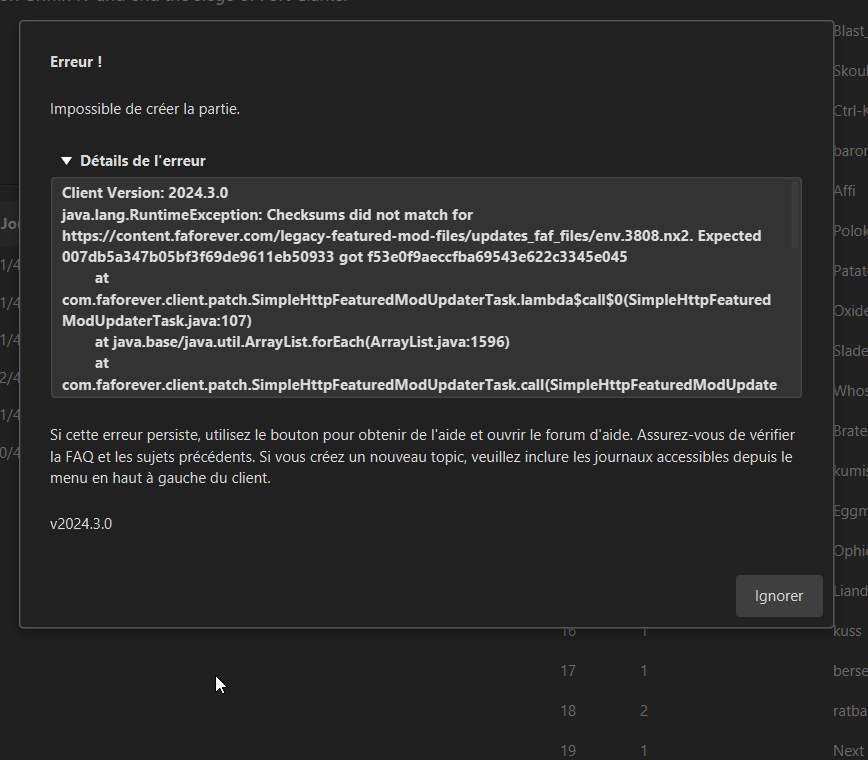
    163 Views
    P
    Well, we found the problem and it was the anti-virus he had, everything works fine now, thanks to those who have readed my post
  • Ошибка при (авторизоваться)

    4
    0 Votes
    4 Posts
    437 Views
    A
    Короче я исправил баг В командной строке ( через администратора) Я вёл sfc /scannow
  • Error when (login)

    1
    0 Votes
    1 Posts
    93 Views
    No one has replied
  • Bug when changing maps&mod folder

    8
    1
    0 Votes
    8 Posts
    1k Views
    A
    Thanks, magge!
  • This topic is deleted!

    1
    0 Votes
    1 Posts
    3 Views
    No one has replied
  • Error Message when attempting to launch a SC: 1 game.

    2
    0 Votes
    2 Posts
    168 Views
    AmygdalaA
    @rumtin most likely some Antivirus/Firewall setting is blocking FAF. Check both and include exceptions for FAF/SC.
  • My FAF keeps giving me this code, Any advice/help.

    9
    1
    0 Votes
    9 Posts
    383 Views
    MostLostNoobM
    @diobolical OK, 2 things to do for further troubleshooting: Go to your Steam SCFA folder > DirectX, then run the DXSETUP.exe installer to re-install the DirectX files that SCFA uses (just in case those weren't installed correctly). Go to Steam > Library > right-click SCFA > Properties > General > Launch Options > copy/paste this into that field: /log "A:\SteamLibrary\steamapps\common\Supreme Commander Forged Alliance\logs\steamfa.log" I grabbed that file path from your client.log, so you'll need to change it if that's not the correct path to your Steam SCFA install. Try Steam SCFA again after doing the above.
  • Linking to GOG

    2
    0 Votes
    2 Posts
    183 Views
    D
    ok, I figured it out. For anyone else: You have to link GOG account with FAForever using the website, not using the GOG Galaxy client. Once I figured that out, i was able to get it completed.
  • Unable to create or join games

    5
    0 Votes
    5 Posts
    389 Views
    G
    Got it working, turns out it was an issue with my connection. Feel like a moron, but thanks for helping
  • ^ key crashes the game. (under linux?)

    14
    1
    0 Votes
    14 Posts
    957 Views
    tatsuT
    @mostlostnoob sorry, that's a missreading of what's written. the operative "it" in the context of this thread was the FAF crash. I said "running it from steam". which implies it did run.
  • can I talk to a discord mod?

    6
    0 Votes
    6 Posts
    439 Views
    T
    @deribus thank you very much
  • CANT LOGIN

    5
    0 Votes
    5 Posts
    316 Views
    MostLostNoobM
    GLHF!