Great work!
Perhaps the current version and variant 2 are better gameplay wise because they allow to easier see whats beeing built.
Are there any changes that effect the hitbox size (relevant for shielding, TML etc)?
The current pre-release of the client ("pioneer" in the version) is only compatible to itself. So you can only play with other testers. Please be aware!
 A
Offline
A
Offline
Posts
-
RE: Redesign of all HQ and support factories
-
RE: FAF Statistics Megathread 2 Statistics Boogaloo
@derMarc117 Nice one! A bunch of those players are still hanging around from time to time. @zlo
-
RE: Game could not be created issue.
Try and start a game once via steam and then try again on the FAF client.
-
RE: very slow game that make go out
@DoriShlomo From the picture it appears you are using the stock AI which is known to be rather inefficient in CPU usage.
There are a bunch of way better (gameplay wise and CPU wise) AI mods availble in the the FAF-vault.
M28AI is often the go to AI for many players.
The creator of the mod (@maudlin27) has a thread about it in the forum with details of the AI.
https://forum.faforever.com/topic/5331/m28ai-devlog-v276If you both are rather new to the game, I suggest you pick M28AIx and reduce the cheat values below 1. The AI is way smarter then the stock one so you might need to adjust it a bit and find the right settings for your needs.
Oh, I just realize you played on a 80x40km map. Thats really huge and CPU intensive. Sooner or later, you will run into performance issues on maps bigger than 20x20km. Different AI does help but can only bring you so far. If you really wann slug it out on super huge maps, the LOUD project ist arguably the way to go.
-
RE: Game bugs out (runs 1 frame per 5 sec) after someone dies and leaves
@legendofthestars Supreme Score Board got broken some time ago, so be sure to use the fixed version "Supreme score board 2"
-
RE: Error Message when attempting to launch a SC: 1 game.
@rumtin most likely some Antivirus/Firewall setting is blocking FAF. Check both and include exceptions for FAF/SC.
-
RE: Unable to create or join games
@grindalf1 based on this list of common errors in the FAQ (https://forum.faforever.com/topic/4256/solutions-for-common-errors-with-the-faf-client-launcher-or-supreme-commander) yours seem to be case 1.
Problem:
RuntimeException: javax.net.ssl.SSLException: Tag mismatch!Solution:
The client is unable to establish a secure connection to the content server for downloading the game files.- Disable security software for testing purpose
- Check firewall settings, if it blocks anything related to secure connection/FAF Launcher
-
RE: Stage Comparison Chart
@reckless_charger They are and the recent range buff made them even better. However, the lack of mobile shields is a big disadvantage which gets abused quite a bit in the higher rating range.
-
RE: i can't install faf
@gavgav Did you click on "more info" when opening the installer as outlined on the FAF website (https://faforever.com/play) in section 1?
If that doesnt work, here is another workaround:
https://forum.faforever.com/topic/7246/unable-to-install-faf-client?_=1710689766922 -
RE: Game Startup Issue
@thehonorablegeff Try to change your default browser and/or clear browser cache
-
RE: Mod: Selection Depriorizer
@donnie Yeah its pretty archaic and not excatly user friendly xD. Otherwise, the mod works fine.
-
RE: Mod: Selection Depriorizer
@hoschmosch I am using the exact same mod version as the one from the vault (version 6) and it works fine. If you enable a toggle, there is feedback written in the lower middle screen e.g
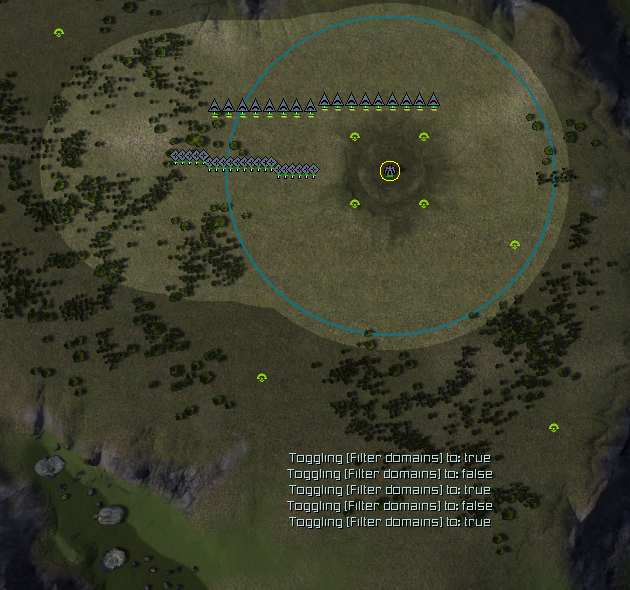
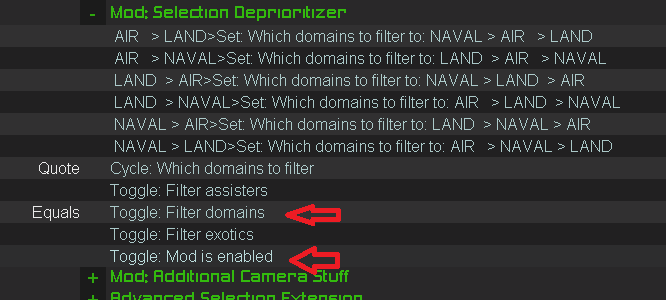
For the mod to work, both below need to be enabled via hotkey
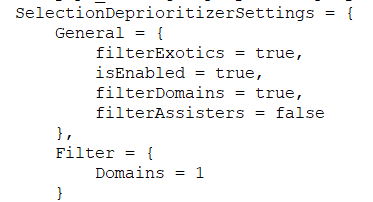
The personal settings of the mod are safed in your game.prefs file (Guess you could even enable it in the file as well by setting the right argument as true). Here is how it looks on my end (search for SelectionDeprioritizerSettings).
-
RE: Mod: Selection Depriorizer
@hoschmosch The mod needs to be enabled via hotkey which isnt obvious on first glance. Furthermore there are toggles for filitering domain/exotic/assisters which need to be enabled as well via hotkey.
-
RE: Unable to install FAF Client.
@darkorange Its a bit odd that you dont have the "more Info" sections which lets you install the file regardless of your PC beeing overprotective. Anyway, alternatively you can right click the installer file and get to the properties window. There, in the general tab, you should have the option to unblock the installer by hand and try again. That should do it.
Just out of curiosity, do you have limited admin rights on this PC? Would explain the behaviour.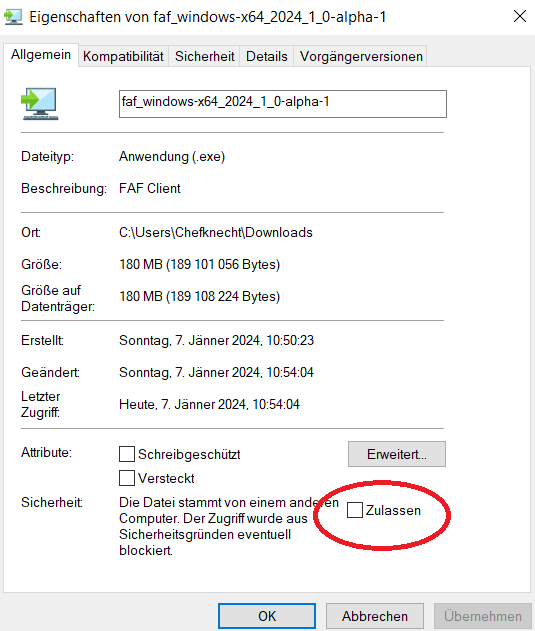
-
RE: FAF Client crashes on launch / Startup error
@anybody00 did you restart your PC? I remember that that fixed it for someone with with a similar issue as Avast was still lurking around after it got uninstalled
-
RE: Issues using cheats to practice
@PopSniper
yes i think its some Nvidia related stuff which is bound to Alt+F2. You have to either unbind that in Nvidia software settings, or in FA, open up the keybindings window and set the cheat menu keybind to something else. -
RE: Issues using cheats to practice
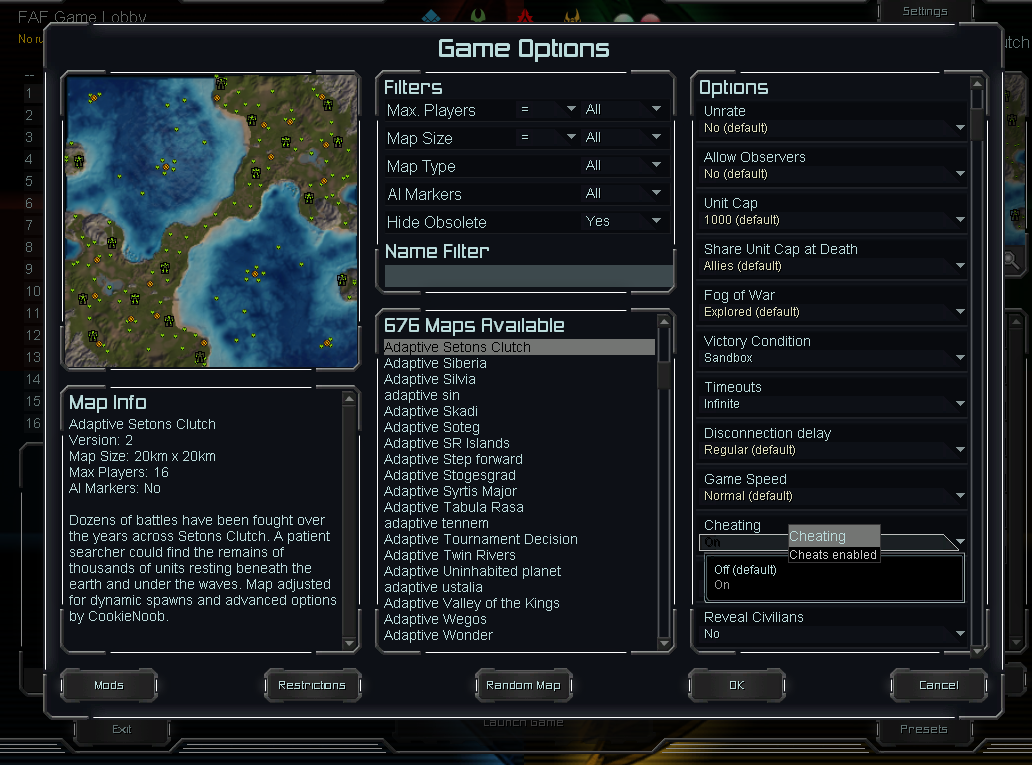
@popsniper are you sure that you enabled cheating in the lobby options menu?
see here
-
RE: Nomads Gametype AI not working
@mrziplays afaik nomads is buged with the vanilla AI. It should work though with M27/M28 AIs or Sorian edit(perhaps some others as well), all of which you can download in the mods tab.
-
RE: Client won't recognize game, tried all
@s7rm7rpr have you tried changing your default web browser temporarily for the online authorization? Its known that there are issues with some browsers in that stage.