FAForever Forums
    • Categories
    • Recent
    • Tags
    • Popular
    • Users
    • Groups
    • Login
    The current pre-release of the client ("pioneer" in the version) is only compatible to itself. So you can only play with other testers. Please be aware!

    Dark Mode

    Scheduled Pinned Locked Moved General Discussion
    27 Posts 7 Posters 1.7k Views
    Loading More Posts
    • Oldest to Newest
    • Newest to Oldest
    • Most Votes
    Reply
    • Reply as topic
    Log in to reply
    This topic has been deleted. Only users with topic management privileges can see it.
    • S Offline
      snoog @magge
      last edited by snoog

      @magge Interesting, your screenshot still looks like the old forum. Mine looks much different now. It might be you that needs to clear cache?
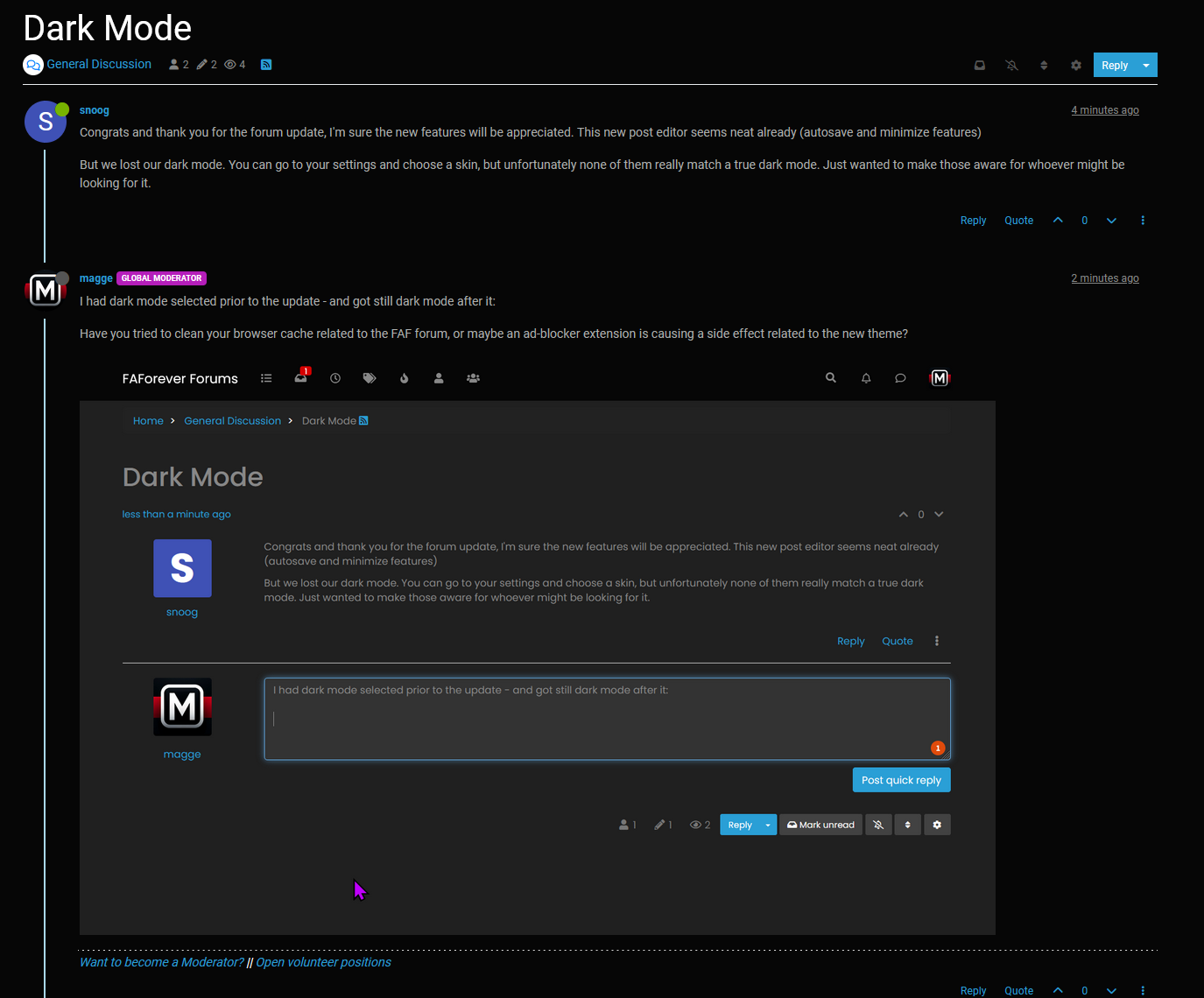
      a3c2da2c-c8ab-4031-892e-b921264cda06-image.png

      Cleared my cache anyway but no luck.

      1 Reply Last reply Reply Quote 0
      • maggeM Offline
        magge Moderator FAF Association Board
        last edited by

        Ha! Nice catch. Thanks for pointing it out. Yeah, I somehow did not realize it, because it looked so smooth. I experience the same issue as you after deleting the cache. I believe it should be added to the announcement, not sure when the cache expires by default.

        Join a FAFtastic Team | Join the FAForever Association

        1 Reply Last reply Reply Quote 0
        • maggeM Offline
          magge Moderator FAF Association Board
          last edited by magge

          You have to select the design "Darkly" "Cyborg" in your user profile settings and hit the save button, and you should have dark mode again:
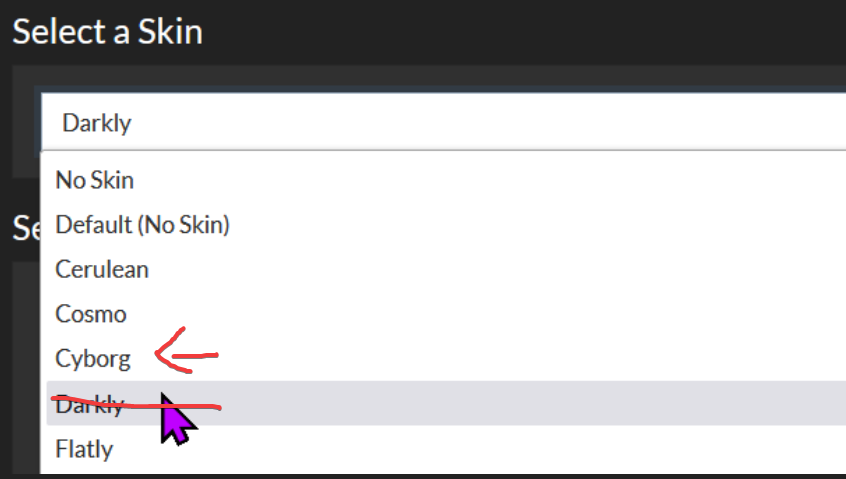
          8a4fb9c4-fdb4-4484-a50e-b19e26facb88-image.png

          Join a FAFtastic Team | Join the FAForever Association

          1 Reply Last reply Reply Quote 1
          • S Offline
            snoog
            last edited by

            Yea, I tried that one and Cyborg. Neither one are really true dark mode. There's still plenty of fields like this text box that's bright white. Compare this screenshot to yours.

            image.png

            Also, in terms of readability, it's kind of a downgrade. I don't mean to complain, I understand a forum update was bound to happen eventually. Just unfortunate

            1 Reply Last reply Reply Quote 3
            • S Offline
              Sainse Balance Team
              last edited by

              Similar problem including mobile devices where there is no ad block whatsoever

              GiebmasseG 1 Reply Last reply Reply Quote 0
              • GiebmasseG Offline
                Giebmasse Team Lead FAF Association Board Moderator Admin
                last edited by

                Had a look for other themes, but many seem just outdated/broken. There were like 3-4 dark'ish themes in the updated version but each had some "plain" layout stuff or like in this post noted eye burning bright boxes. Perhaps one can be easily edited by simply changing two color values?

                1 Reply Last reply Reply Quote 1
                • GiebmasseG Offline
                  Giebmasse Team Lead FAF Association Board Moderator Admin @Sainse
                  last edited by Giebmasse

                  @SainseRow said in Dark Mode:

                  Similar problem including mobile devices where there is no ad block whatsoever

                  Like this slate theme, just change color value of the input box and its text would go a long way.
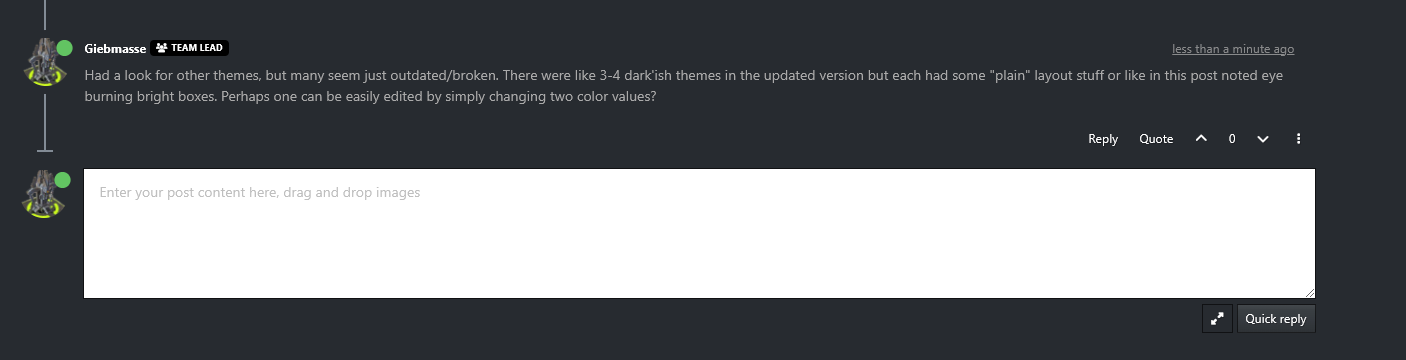
                  a8d12caf-1122-483e-88d5-81bccbe30410-image.png

                  1 Reply Last reply Reply Quote 0
                  • GiebmasseG Offline
                    Giebmasse Team Lead FAF Association Board Moderator Admin
                    last edited by

                    Wow, I pressed quote on my own message but it replied to SainseRow 🙂

                    1 Reply Last reply Reply Quote 0
                    • BlackYpsB Offline
                      BlackYps
                      last edited by

                      I'm pretty sure that brutus doesn't know better than anyone else here how to edit forum themes. So everyone is welcome to make contributions

                      1 Reply Last reply Reply Quote 0
                      • S Offline
                        snoog
                        last edited by

                        I can give it a shot if allowed. I used to host forums back in the day and am a software dev now.

                        1 Reply Last reply Reply Quote 2
                        • IndexLibrorumI Offline
                          IndexLibrorum Moderator
                          last edited by

                          Please do! The available darkmodes are pretty bad.

                          "Design is an iterative process. The required number of iterations is one more than the number you have currently done. This is true at any point in time."

                          See all my projects:

                          1 Reply Last reply Reply Quote 0
                          • S Offline
                            snoog
                            last edited by

                            Is there a repo for the forums? I'm not seeing it

                            1 Reply Last reply Reply Quote 0
                            • Brutus5000B Offline
                              Brutus5000 FAF Server Admin
                              last edited by

                              https://github.com/NodeBB/NodeBB/

                              He said, "I've been to the year 3000
                              Not much has changed, but they live underwater
                              And your great-great-great-granddaughter
                              Is playin' FAF, playin' FAF"

                              1 Reply Last reply Reply Quote 0
                              • S Offline
                                snoog
                                last edited by

                                I meant for the FAF forum

                                1 Reply Last reply Reply Quote 0
                                • BlackYpsB Offline
                                  BlackYps
                                  last edited by

                                  That is the forum we are using. There are no modifications made by faf

                                  1 Reply Last reply Reply Quote 1
                                  • S Offline
                                    snoog
                                    last edited by

                                    Following this simple tutorial, I was able to setup a decent dark mode /w toggle in ~5 minutes of copy/pasting and figuring out where things were in the admin panel. There's a couple minor colors that could probably use changing, but it's much better than the skins we have access to right now.
                                    https://community.nodebb.org/topic/17109/manual-build-a-night-mode-for-harmony/2

                                    Unfortunately it only works well for the Harmony theme, and we're using the Persona theme. So either we can switch to Harmony and use the dark mode from that tutorial as is, or we can tweak the CSS for Persona. If Persona, I just want to know if I go through the effort that it'll be implemented. Will someone take the time to add it in the admin panel if I provide the CSS & JS or give me access to do so?

                                    Demo:
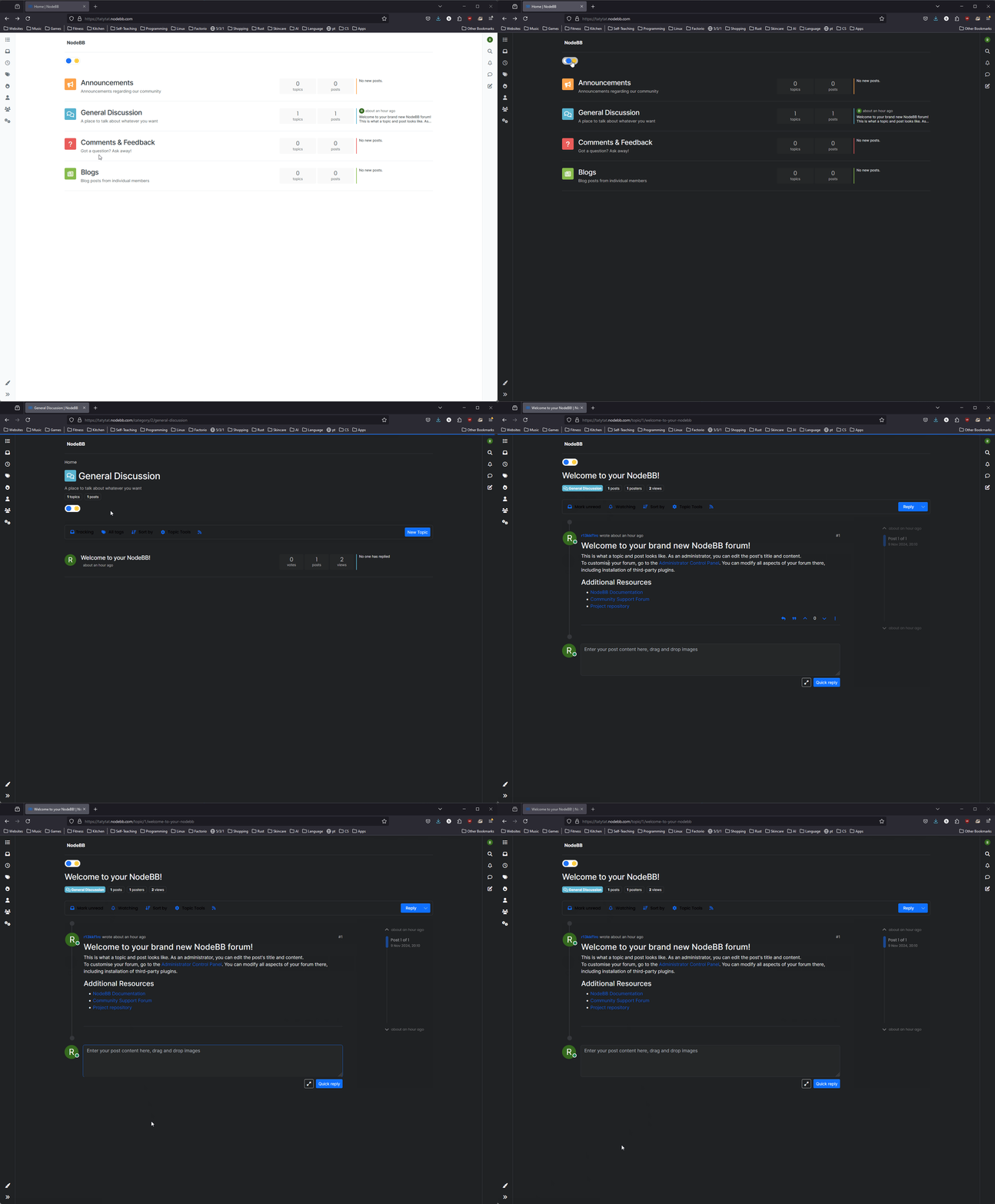
                                    firefox_WlgNiKZN4d.gif

                                    Fun fact, that admin panel has a dark mode toggle already 😠

                                    1 Reply Last reply Reply Quote 3
                                    • BlackYpsB Offline
                                      BlackYps
                                      last edited by

                                      Is it possible to modify the font size as well? Text is very small, both on mobile and desktop

                                      1 Reply Last reply Reply Quote 0
                                      • maggeM Offline
                                        magge Moderator FAF Association Board
                                        last edited by magge

                                        Indeed, the default 100% zoom makes everything too small for the FAF website template, I have changed the zoom via my browser to 140% for the website. Font size can also be changed by your browser. You can change it in your settings or use CTRL+mouse wheel to zoom in.

                                        Join a FAFtastic Team | Join the FAForever Association

                                        1 Reply Last reply Reply Quote 0
                                        • S Offline
                                          snoog
                                          last edited by

                                          Font size should definitely be modifiable, if not by an option in the admin panel then by custom CSS like the dark mode.

                                          1 Reply Last reply Reply Quote 2
                                          • S Offline
                                            snoog
                                            last edited by

                                            I've made some progress adapting to the Persona theme (which FAF is using). Not perfect but definitely useable.

                                            1 Reply Last reply Reply Quote 3

                                            Hello! It looks like you're interested in this conversation, but you don't have an account yet.

                                            Getting fed up of having to scroll through the same posts each visit? When you register for an account, you'll always come back to exactly where you were before, and choose to be notified of new replies (either via email, or push notification). You'll also be able to save bookmarks and upvote posts to show your appreciation to other community members.

                                            With your input, this post could be even better 💗

                                            Register Login
                                            • First post
                                              Last post