FAForever Forums
    • Categories
    • Recent
    • Tags
    • Popular
    • Users
    • Groups
    • Login
    The current pre-release of the client ("pioneer" in the version) is only compatible to itself. So you can only play with other testers. Please be aware!

    Dark Mode

    Scheduled Pinned Locked Moved General Discussion
    27 Posts 7 Posters 1.7k Views
    Loading More Posts
    • Oldest to Newest
    • Newest to Oldest
    • Most Votes
    Reply
    • Reply as topic
    Log in to reply
    This topic has been deleted. Only users with topic management privileges can see it.
    • BlackYpsB Offline
      BlackYps
      last edited by

      I'm pretty sure that brutus doesn't know better than anyone else here how to edit forum themes. So everyone is welcome to make contributions

      1 Reply Last reply Reply Quote 0
      • S Offline
        snoog
        last edited by

        I can give it a shot if allowed. I used to host forums back in the day and am a software dev now.

        1 Reply Last reply Reply Quote 2
        • IndexLibrorumI Offline
          IndexLibrorum Moderator
          last edited by

          Please do! The available darkmodes are pretty bad.

          "Design is an iterative process. The required number of iterations is one more than the number you have currently done. This is true at any point in time."

          See all my projects:

          1 Reply Last reply Reply Quote 0
          • S Offline
            snoog
            last edited by

            Is there a repo for the forums? I'm not seeing it

            1 Reply Last reply Reply Quote 0
            • Brutus5000B Offline
              Brutus5000 FAF Server Admin
              last edited by

              https://github.com/NodeBB/NodeBB/

              He said, "I've been to the year 3000
              Not much has changed, but they live underwater
              And your great-great-great-granddaughter
              Is playin' FAF, playin' FAF"

              1 Reply Last reply Reply Quote 0
              • S Offline
                snoog
                last edited by

                I meant for the FAF forum

                1 Reply Last reply Reply Quote 0
                • BlackYpsB Offline
                  BlackYps
                  last edited by

                  That is the forum we are using. There are no modifications made by faf

                  1 Reply Last reply Reply Quote 1
                  • S Offline
                    snoog
                    last edited by

                    Following this simple tutorial, I was able to setup a decent dark mode /w toggle in ~5 minutes of copy/pasting and figuring out where things were in the admin panel. There's a couple minor colors that could probably use changing, but it's much better than the skins we have access to right now.
                    https://community.nodebb.org/topic/17109/manual-build-a-night-mode-for-harmony/2

                    Unfortunately it only works well for the Harmony theme, and we're using the Persona theme. So either we can switch to Harmony and use the dark mode from that tutorial as is, or we can tweak the CSS for Persona. If Persona, I just want to know if I go through the effort that it'll be implemented. Will someone take the time to add it in the admin panel if I provide the CSS & JS or give me access to do so?

                    Demo:
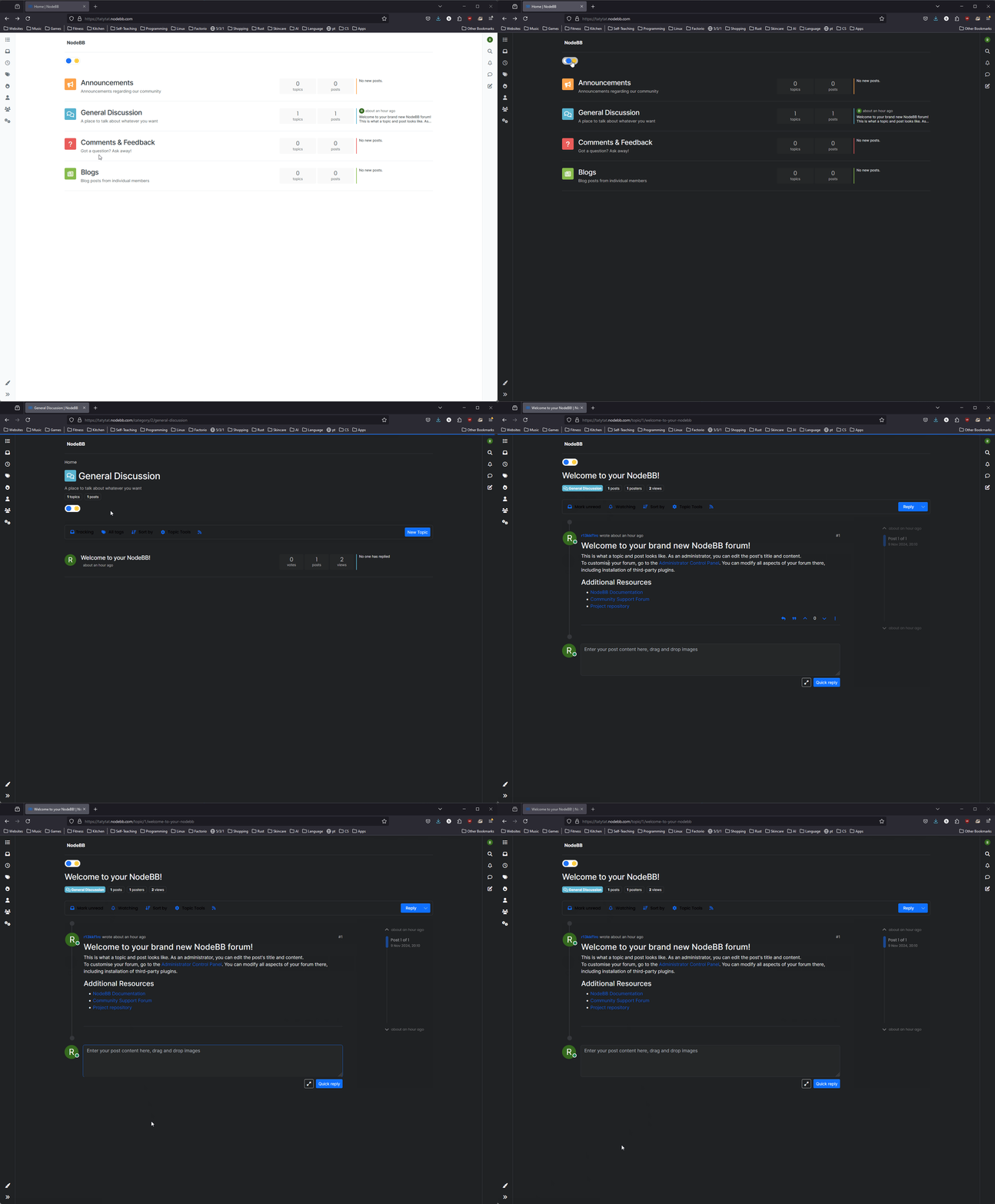
                    firefox_WlgNiKZN4d.gif

                    Fun fact, that admin panel has a dark mode toggle already 😠

                    1 Reply Last reply Reply Quote 3
                    • BlackYpsB Offline
                      BlackYps
                      last edited by

                      Is it possible to modify the font size as well? Text is very small, both on mobile and desktop

                      1 Reply Last reply Reply Quote 0
                      • maggeM Offline
                        magge Moderator FAF Association Board
                        last edited by magge

                        Indeed, the default 100% zoom makes everything too small for the FAF website template, I have changed the zoom via my browser to 140% for the website. Font size can also be changed by your browser. You can change it in your settings or use CTRL+mouse wheel to zoom in.

                        Join a FAFtastic Team | Join the FAForever Association

                        1 Reply Last reply Reply Quote 0
                        • S Offline
                          snoog
                          last edited by

                          Font size should definitely be modifiable, if not by an option in the admin panel then by custom CSS like the dark mode.

                          1 Reply Last reply Reply Quote 2
                          • S Offline
                            snoog
                            last edited by

                            I've made some progress adapting to the Persona theme (which FAF is using). Not perfect but definitely useable.

                            1 Reply Last reply Reply Quote 3
                            • S Offline
                              snoog
                              last edited by

                              I only have trial access to NodeBB for another few days. I don't know if one of the current FAF forum admins wants to implement the changes, or allow me to do it but if I don't hear anything I'll just post the custom css here for someone else to work with.

                              1 Reply Last reply Reply Quote 2
                              • S Offline
                                snoog
                                last edited by

                                For the Persona Theme:
                                Custom CSS:


                                /* css for night mode */


                                [data-theme="dark"] {
                                
                                    --font-color: #e1e1ff;
                                
                                    --bs-body-bg: #202124;
                                
                                    --bs-body-color: #f1f3f4;
                                
                                    --bs-body-color-rgb: 255,255,255;
                                
                                    --bs-nav-link-color: #fff;
                                
                                    --bs-border-color: #35363a;
                                
                                    --bs-body-bg-rgb: 32,33,36;
                                
                                    --bs-light-rgb: 32,33,36;
                                    
                                    --bs-secondary-color: #337ab7;
                                    
                                    --bs-navbar-brand-color: 128, 128, 128;
                                    
                                    --bs-emphasis-color-rgb: 128, 128, 128;
                                
                                }


                                [data-theme="dark"] hr { border-top-color: #262729;  }
                                
                                [data-theme="dark"] .active .chat-room-btn { background-color: #262729; }
                                
                                [data-theme="dark"] { .btn-outline { border-color: #b6b6b6; } }
                                
                                [data-theme="dark"] { .btn-outline.active, .btn-outline:hover, .btn-link.active, .btn-link:hover { background-color: #35363a; } }
                                
                                [data-theme="dark"] { .btn-ghost.active, .btn-ghost:hover, .btn-ghost-sm.active, .btn-ghost-sm:hover { background-color: #262729; } }
                                
                                [data-theme="dark"] .skin-noskin .composer { background-color: #262729!important; }
                                
                                [data-theme="dark"] .skin-noskin .bottombar-nav .dropdown-menu { background-color: #262729 !important; }
                                
                                [data-theme="dark"]  .bottombar-nav .nav-text { color: #ffffff; }
                                
                                [data-theme="dark"] .composer .resizer { background: linear-gradient(transparent,#262729); }
                                
                                [data-theme="dark"] .skin-noskin .bottombar-nav { background-color: #262729!important; }
                                
                                [data-theme="dark"] .page-topic .pagination-block.ready { background-color: #202124 !important; border-color: #262729 !important; }
                                
                                [data-theme="dark"] .form-control { background-color: #262729; border: 1px solid #35363a; color: #b6b6b6; }
                                
                                [data-theme="dark"] .form-control:focus { color: white; background-color: #262729; border-color: #262729; box-shadow: inset 0px 0px 0px rgba(0,0,0,.075), 0 0 0 0.05rem rgb(27 115 249); }
                                
                                [data-theme="dark"] .dropdown-item:hover { color: white; background-color: #262729; }
                                
                                [data-theme="dark"] .tag-list .tag { background-color: #262729; color: white; }
                                
                                [data-theme="dark"] .breadcrumb .breadcrumb-item span { color: #b6b6b6; }
                                
                                [data-theme="dark"] .card { --bs-card-cap-bg: rgba(38,39,41); background-color: #262729; }
                                
                                [data-theme="dark"] .skin-noskin nav.sidebar { background-color: #202124!important; }
                                
                                [data-theme="dark"] .sidebar .nav-link.active { background-color: #35363a; }
                                
                                [data-theme="dark"] { .sidebar .nav-link:focus, .nav-link:hover { background-color: #35363a !important; color: white; } }
                                
                                [data-theme="dark"] .sticky-tools { background-color: #202124; }
                                
                                [data-theme="dark"] .text-muted { color: #b6b6b6!important; }
                                
                                [data-theme="dark"] nav-btn:hover { background-color: #35363a; }
                                
                                [data-theme="dark"] .btn-ghost-sm:hover { background-color: #35363a; }
                                
                                [data-theme="dark"] .btn:hover { background-color: #202124; border-color: #62656f; }
                                
                                [data-theme="dark"] { .dropdown-menu, .dropdown-item { background-color: #202124; color: #f1f3f4; } }
                                
                                [data-theme="dark"] .border-gray-300 { border-color: #35363a!important; }
                                
                                [data-theme="dark"] ul.topics-list li.selected { background-color: #262729; }
                                
                                [data-theme="dark"] .modal-content { background-color: #35363a; }
                                
                                [data-theme="dark"] .account .avatar-wrapper { border: 4px solid #262729; }
                                
                                [data-theme="dark"] .topic-list-header {background-color: var(--bs-body-bg); border-color: #35363a; }
                                
                                [data-theme="dark"] .topic-header {background-color: var(--bs-body-bg); border-color: #35363a; }
                                
                                [data-theme="dark"] .category-item .title {color: red;}
                                
                                [data-theme="dark"] .description {color: red;}


                                @media (min-width: 576px) {
                                
                                [data-theme="dark"] .topic .pagination-block .scroller-container { border-left: 2px solid #35363a; }
                                
                                [data-theme="dark"] .page-topic .topic .posts.timeline>[component=post] { border-left: 2px solid #35363a; }
                                
                                [data-theme="dark"] .page-topic .topic .posts.timeline>[component=post]:first-child:before { background-color: #35363a; }
                                
                                [data-theme="dark"] .page-topic .topic .posts.timeline>[component=post]:last-child:after { background-color: #35363a; }
                                
                                }


                                /* css for the switch a night/light */


                                .theme-switch {
                                
                                  display: inline-block;
                                
                                  height: 26px;
                                
                                  position: relative;
                                
                                  width: 55px;
                                
                                }


                                .theme-switch input { display:none; }


                                .slider {
                                
                                  background-color: #ffffff;
                                
                                  bottom: 0;
                                
                                  cursor: pointer;
                                
                                  left: 0;
                                
                                  position: absolute;
                                
                                  right: 0;
                                
                                  top: 0;
                                
                                  transition: .4s;
                                
                                }


                                .slider:before {
                                
                                  background-color: #1b73f9;
                                
                                  bottom: 3px;
                                
                                  content: "";
                                
                                  height: 18px;
                                
                                  width: 18px;
                                
                                  left: 4px;
                                
                                  position: absolute;
                                
                                  transition: .4s;
                                
                                  border-radius: 50px;
                                
                                }


                                input:checked + .slider { background-color: #262729; }
                                
                                input:checked + .slider:before { transform: translateX(28px); }
                                
                                [data-theme="dark"] [component="brand/logo"] { content: url(/link/to/logo-for-dark-mode.png); }


                                Custom JS:

                                
                                const toggleSwitch = document.querySelector('.theme-switch input[type="checkbox"]');
                                const currentTheme = localStorage.getItem('theme');
                                 
                                if (currentTheme) {
                                    document.documentElement.setAttribute('data-theme', currentTheme);
                                  
                                    if (currentTheme === 'dark') {
                                        toggleSwitch.checked = true;
                                    }
                                }
                                 
                                function switchTheme(e) {
                                    if (e.target.checked) {
                                        document.documentElement.setAttribute('data-theme', 'dark');
                                        localStorage.setItem('theme', 'dark');
                                    }
                                    else { document.documentElement.setAttribute('data-theme', 'light');
                                          localStorage.setItem('theme', 'light');
                                    }    
                                }
                                 
                                toggleSwitch.addEventListener('change', switchTheme, false);
                                
                                
                                1 Reply Last reply Reply Quote 2
                                • Brutus5000B Offline
                                  Brutus5000 FAF Server Admin
                                  last edited by

                                  @snoog I enabled it on forum.faforever.xyz, but where should that toogle show up? I do not see it

                                  He said, "I've been to the year 3000
                                  Not much has changed, but they live underwater
                                  And your great-great-great-granddaughter
                                  Is playin' FAF, playin' FAF"

                                  1 Reply Last reply Reply Quote 0
                                  • S Offline
                                    snoog
                                    last edited by

                                    @Brutus5000 It should be in the top left corner, you can see it in the demo gif I posted above.

                                    You added both the custom CSS & JS?

                                    1 Reply Last reply Reply Quote 0
                                    • Brutus5000B Offline
                                      Brutus5000 FAF Server Admin
                                      last edited by Brutus5000

                                      I added both CSS & JS and also retested it after update to 4.3.2.
                                      CSS and JS are active, but I see no button to switch it on (forum.faforever.xyz)

                                      Don't we somehow need to add the input box with class .theme-switch?

                                      He said, "I've been to the year 3000
                                      Not much has changed, but they live underwater
                                      And your great-great-great-granddaughter
                                      Is playin' FAF, playin' FAF"

                                      1 Reply Last reply Reply Quote 0

                                      Hello! It looks like you're interested in this conversation, but you don't have an account yet.

                                      Getting fed up of having to scroll through the same posts each visit? When you register for an account, you'll always come back to exactly where you were before, and choose to be notified of new replies (either via email, or push notification). You'll also be able to save bookmarks and upvote posts to show your appreciation to other community members.

                                      With your input, this post could be even better 💗

                                      Register Login
                                      • First post
                                        Last post