The current pre-release of the client ("pioneer" in the version) is only compatible to itself. So you can only play with other testers. Please be aware!
  • Crash on game launch with exit code 2

    1
    0 Votes
    1 Posts
    7 Views
    No one has replied
  • Poor internet connection

    2
    0 Votes
    2 Posts
    34 Views
    ipconfig-releaseI
    You aren't really giving a lot of information so it's hard to help you. Start by listing your reported connection speed, how you connect (cable, wifi), if you connect directly to the router or if you have repeaters set up, your location, whether or not you use VPNs, your system information (desktop or laptop, cpu, ram, gpu...), etc.
  • Thinking of returning, not sure if I can

    9
    1 Votes
    9 Posts
    96 Views
    S
    Also setons lobbies are friendly and supportive, people there want new souls and are willing to help out a new player rather then flame them for not knowing something, so I recommend those
  • Game Locked up, no data senteven after everyone left

    1
    0 Votes
    1 Posts
    18 Views
    No one has replied
  • ingame chat function seems to no longer work

    9
    0 Votes
    9 Posts
    74 Views
    N
    ok, thanks for letting me know.
  • FAF crash: EXCEPTION_ACCESS_VIOLATION attempted to write memory

    6
    0 Votes
    6 Posts
    102 Views
    miki1900M
    https://forum.faforever.com/topic/4084/solutions-for-snd-error-xact-invalid-arg-xact3dapply-failed?_=1786902722640
  • TWO MONITOR PROBLEM AFTER YEARS OF WORKING GOOD, SAME HARDWARE

    7
    0 Votes
    7 Posts
    73 Views
    W
    I have the same issue in vanilla FA and FAF. When the 2nd monitor is enabled the game flickers on both monitors, when only 1 is enabled it works flawlessly. Been playing FA weekly on this configiration for the last 5 years, unsure what caused the change, its sucks though
  • ICE adapter crash

    1
    0 Votes
    1 Posts
    53 Views
    No one has replied
  • track mark glitch

    2
    1
    0 Votes
    2 Posts
    59 Views
    SaverS
    Hi, The issue is known, and a fix is currently being worked on. https://github.com/FAForever/fa/pull/7119
  • YYYY-MM-DD 2026-07-09 Cant upload maps

    6
    0 Votes
    6 Posts
    88 Views
    Z
    When I upload a "map" I choose a computer-map/folder and the upload process manage the rest. Before I could open the uploaded and downloded maps in the editor (the new folder name of the map in the map folder) But now the uploaded/downloaded map/files are corruped and cant be open in the editor any more. All previous maps (50 or so) works 100%, its only the majoriry of files the last week that dont work. Please write if its the scenatrio or save file u want me to upload? Do u want the files that have been uploaded/downloded and becae corrupted, and/or the once I cant upload? U want me to zip the whole folder and add here so u have all the files? Since it have workes 100% before it seems to be something have happend with the process that check and manage the zip file process. I have tried editor 1,0 and 1,2 with same results. Best regards Magnus
  • 0 Votes
    6 Posts
    68 Views
    MostLostNoobM
    @star_light1 If you haven't already done so, I'd suggest that you & the others you play with download the missions you're going to play from the #getting-started channel of the Co-Op/Campaign Development Discord to ensure that you're running the most up-to-date mission files as I know there's ongoing issues getting them updated in the client & GitHub. After downloading the mission you're going to play, follow these steps to get the game going with the correct mission map. If you have further issues, then the best way to get help with a co-op/campaign mission would be to get your most recent game log & post in the #bug-reporting-general channel of that discord.
  • Colossus follows the enemy commander and doesn't fire

    3
    1 Votes
    3 Posts
    90 Views
    N
    The target priorities are making it try to aim at the tanks behind it. I don't think there is an easy way we devs can fix it. Players can fix it by changing the target priorities by using ui mods, the "prioritize unit type" hotkey, or right click the attack order button to enable snipe priorities (acu is at the top in that priority list).
  • SMD Not Firing

    3
    0 Votes
    3 Posts
    73 Views
    N
    FAF uses the desired shooter cap to decide who gets to fire on what, which is engine behavior where once a weapon locks on to a target, it adds towards the cap, and weapons can't target entities whose shooter cap is full. The issue is that the weapon takes up the cap while it is targeting, so if it misses or is reloading then its still taking up the cap. We fixed these issues with TMDs; try using DisableWhileReloading = true (used by tmd) or TargetResetWhenReady = true (used by antitorps) in the weapon blueprint.
  • Voice problems in the co-op missions of SC1

    39
    2
    0 Votes
    39 Posts
    1k Views
    SaverS
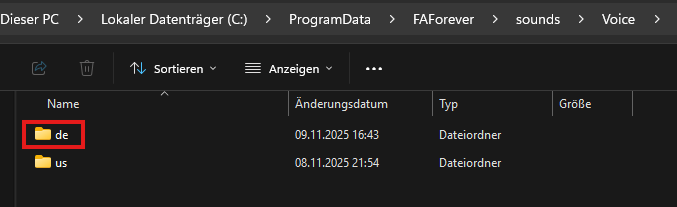
    @stasko Hello, The same procedure also applies to the Russian sound files. However, since I don't speak Russian, I'm unfortunately not able to implement it myself. The process described earlier in this thread applies to all language files. If you'd like to implement it and need any assistance, feel free to reach out.
  • Ground texture bug

    5
    1
    1 Votes
    5 Posts
    528 Views
    L
  • Crash on Watching Replay if I Try Zooming In

    3
    0 Votes
    3 Posts
    46 Views
    R
    The LOG got over-written. I did try to recreate the crash but it ran without incident today. The system updated and shutdown after Windows Update last night, so this is a fresh restart and may have been a problem caused by Windows. To confirm, crashes did not happen on other replays, and not even all doobro's replays. These weird crashes only occurred on some of doobro's replays, even though he uses the same mod list in all his games. Restarting my computer wouldn't clear up the issue. I did have a Windows Update that stalled a few weeks back, and the issue appeared to show up after that update. I had Windows 11 run a verification, and it found and replaced some corrupted files. I am guessing the verification didn't fix everything, and the Windows Update last night may have corrected whatever was causing the unexplained crashes. At this point, i believe the crashes were caused by Windows.
  • Game Error On joining Match

    6
    0 Votes
    6 Posts
    45 Views
    S
    it was smart app control was blocking my games xD issue has been resolved
  • Error running OnNotAdjacentTo

    2
    0 Votes
    2 Posts
    43 Views
    N
    It's a faf bug caused by uef engi drones being near a structure when it completes or dies
  • Game sound/music stops randomly

    3
    0 Votes
    3 Posts
    75 Views
    R
    @Saver I installed VoiceMeeter and the problem is solved. Thanks a lot.
  • 0 Votes
    18 Posts
    764 Views
    maggeM
    Possible things to try (preferably on Windows 11 with the latest updates and newest drivers): Prefer maximum performance and select the high-performance GPU for your graphic card. Clear NVIDIA shader caches (DXCache / GLCache) Reinstall DirectX 9 Run Supreme Commander in window mode, not just alt+tab it into the background Disable full screen optimizations for SC (Advanced) Some people, including myself a few years ago, have had good results with multi-monitor setups using dgVoodoo2. It may also help resolve your issue even on a single monitor: https://dege.freeweb.hu/dgVoodoo2/ReadmeGeneral/ If you have trouble understanding the suggestions, or AI does not help you out, just create a new support thread and 'imme a ping.