Yes, the game interprets the pixels in diferent ways, i havent found a fix for this, just try new colors and shapes
The current pre-release of the client ("pioneer" in the version) is only compatible to itself. So you can only play with other testers. Please be aware!
 W
Offline
W
Offline
Best posts made by wolfred
-
RE: strategic icons and creating .dds file problem
-
[MOD UI] NextUI.Icons
NextUI.Icons - A Modern Strategic Icon Overhaul
Hi everyone!
I've been working on a new strategic icon mod, and I'd love to share it with the community.
The goal of this project is to preserve the original Forged Alliance strategic icon artwork while adding subtle, elegant visual cues that make important information easier to recognize at a glance.
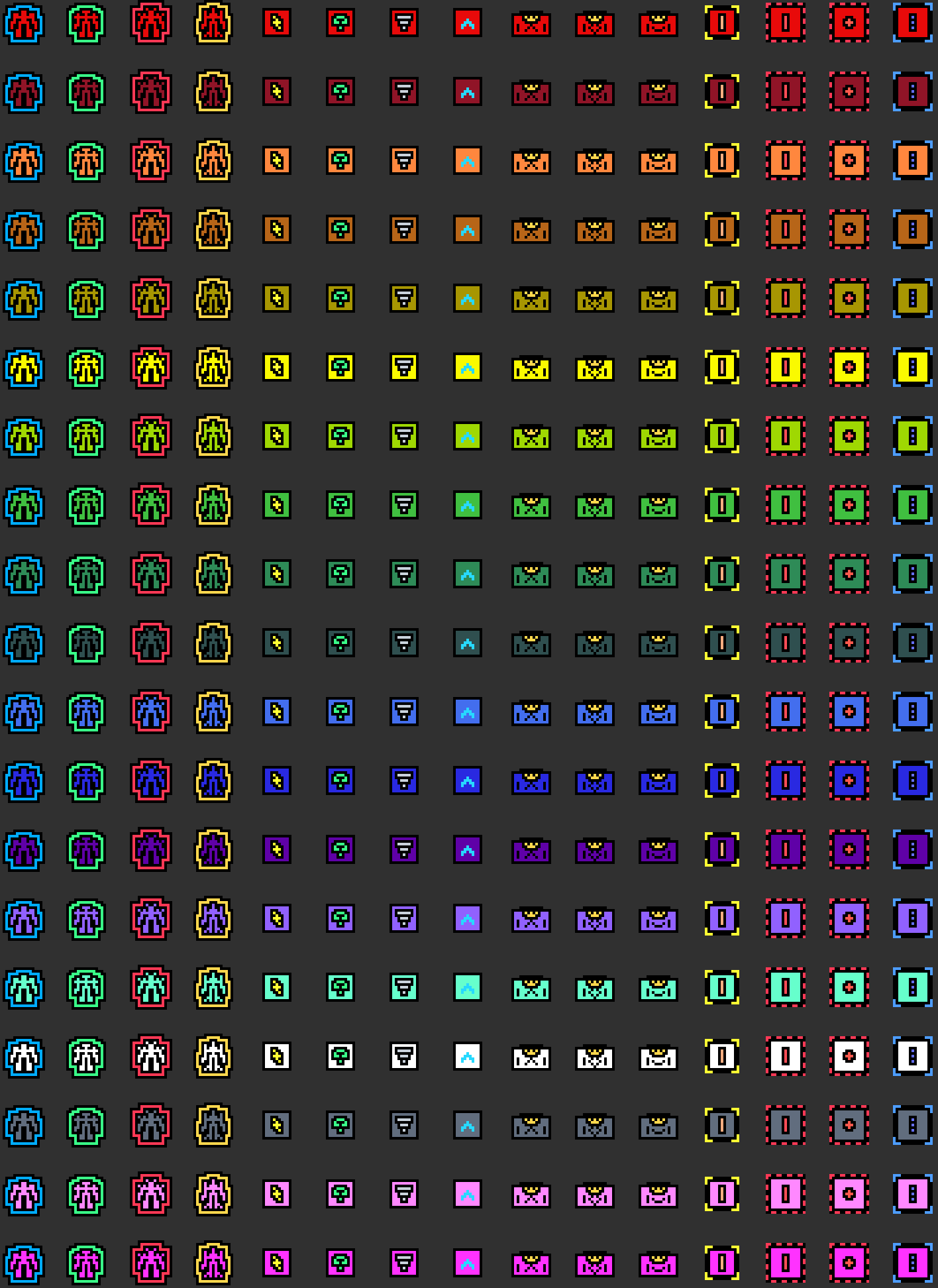
The mod will also add an upgrade animation to all the upgrading structures.
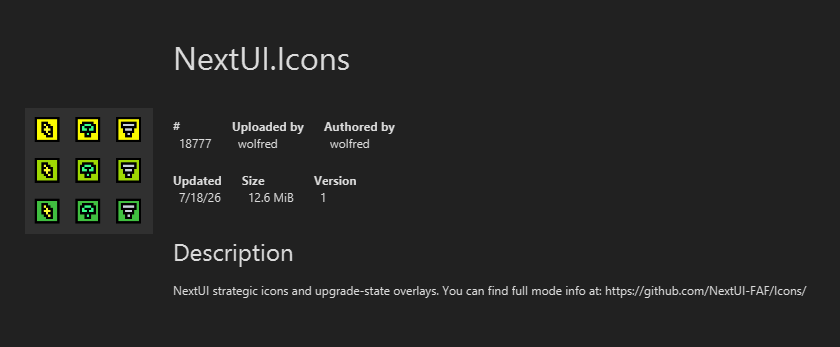
The project is open source and available at the FAF client:
And Github:
https://github.com/NextUI-FAF/Icons
The philosophy behind this mod is simple:
Keep the original FAF strategic icons while enhancing them with essential visual information without cluttering the UI.
Icon Generator
To make creating and maintaining icons easier, I also developed Icon Generator, a Python-based tool included in the repository.
It allows you to:
- Generate new strategic icons
- Modify existing ones
- Customize colors and symbols
- Automatically generate preview galleries of all icons
Complete documentation is available in the repository.
Generated previews are automatically saved to:
icon-generator/previews/
About the Colors
Finding colors that survived DXT5 compression while remaining distinguishable in-game turned out to be much harder than expected.
After a lot of testing, these are the colors that consistently produced good results:
# Working colors with DXT5 compression, tested in-game.
# These colors are safe for strategic icon symbols in the tested layouts.

black = "#000000"
white = "#ffffff"

blue_tactical_navy = "#051C33"
silver_bright = "#c9d2dc"

red_signal = "#ff4d57"
red_bright = "#ff3855"
red_orange = "#ff594d"
coral_warning = "#ff6b57"

orange_safety = "#ff9f43"
peach_bright = "#ffad80"

yellow = "#ffff33"
gold_bright = "#ffd84d"
amber_signal = "#ffbf24"
ochre_bright = "#dba82b"
sand_bright = "#e8cf91"

green = "#4dff70"
lime_energy = "#b8ff4d"
green_neon = "#39ff88"
mint_bright = "#66ffd1"
turquoise_bright = "#33e6c4"

cyan_ice = "#66f2ff"
cyan_pale = "#bffcff"

blue_light = "#27d9ff"
blue_electric = "#4d9dff"
indigo_bright = "#6670ff"
periwinkle = "#91a1ff"

pink_signal = "#ff5cce"
violet_electric = "#9d5cff"
purple_bright = "#c45cff"
magenta_vivid = "#f238ff"
lavender_bright = "#c7a6ff"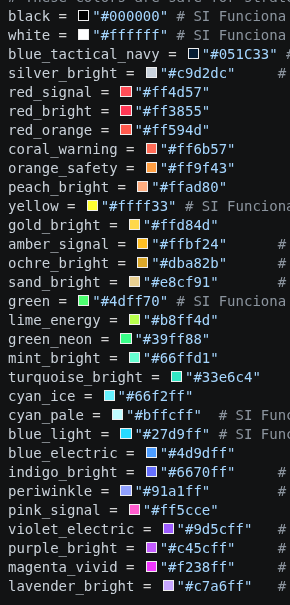
Player Color
The game replaces the following color with the owning player's color:
player_color = "#7b7d7b"Avoid using this color for custom symbols unless you intentionally want them to inherit the player's color.
Additional Candidate Colors
I didn't have time to test these in-game, but based on previous results there's a good chance they'll also survive DXT5 compression.
If anyone tests these, I'd love to hear the results.
copper_bright = "#d98245"
orange_bright = "#ffb347"
yellow_soft = "#fff066"

chartreuse_bright = "#c8ff57"
green_spring = "#57ff7a"
emerald_bright = "#4dff9a"
seafoam_bright = "#8affd1"

teal_neon = "#33ffd6"
sky_bright = "#66d9ff"
blue_ice = "#8abfff"

rose_bright = "#ff6ba8"
pink_soft = "#ff8fd8"
FAF Player Colors
For reference, these are the colors defined in
GameColors.lua.I don't recommend using them for strategic icon symbols, since they can easily be confused with player ownership or become difficult to distinguish against friendly units.
FAF_PLAYER_COLORS = {
    "cybran_red": "#e80a0a",
    "dark_red": "#901427",
    "nomads_orange": "#ff873e",
    "brown": "#b76518",
    "sera_golden": "#a79602",
    "yellow": "#fafa00",
    "order_green": "#9fd802",
    "mid_green": "#40bf40",
    "green": "#2e8b57",
    "olive_dark_green": "#2f4f4f",
    "blue": "#436eee",
    "uef_blue": "#2929e1",
    "dark_purple": "#5f01a7",
    "purple": "#9161ff",
    "aqua": "#66ffcc",
    "white": "#ffffff",
    "grey": "#616d7e",
    "pink": "#ff88ff",
    "fuschia": "#ff32ff",
}
I'd really appreciate any feedback, suggestions, or ideas for additional icons.
If you create your own icons with the generator, feel free to share them!
-
RE: Creating new Hotkeys / Shortcuts error
@indexlibrorum Im creating new hotkeys that are not actually in the F1 menu.
As you can see i created hotkeys to select my Shield mobile units on screen, antoher one to select AA land units on screen, etc. And they work fine but the the game crashes when i press my newly created hotkesy for the 8th or 7th time.
-
Who wins the Infinity war? Wich one is the canon / true ending of Supreme commander first campaign?
I believe it is the Aeon ending Because:
The Aeon ending is the true one, because the Black Sun was indeed fired, even though Burke stood in the way of the beam. The energy of the beam was necessary for the Seraphim to cross the galaxy, and even though Burke intervened and no planets were destroyed by the beam, the Black Sun was "FIRED" (thats the important) towards Burke and it was destroyed. We see this in the final mission of Forged Alliance, in the following dialogue:
-
Fletcher wants to fire the Black Sun out of paranoia, saying "You sold us out Hall. Allied us with monsters and freaks. Once I get my hands on the Black Sun, I'll be able to REBUILT it and end this once and for all."
-
To which Hall responds, "What the hell are you talking about? The Black Sun is DESTROYED. The Aeon and Cybran are our allies.
So yes, the Aeon ending is the true one, but anyone who says that Burke's consciousness merged with all of humanity after receiving the blow of the beam is mistaken. The reality is that after she was struck by the Black Sun's beam, she became one with the quantum realm (There is no exact definition for what this means, but she mentions that now her vision is perfectly clear, nothing scapes her sight, ), but her consciousness was not transmitted to all creatures. Therefore, the alliance between all factions is achieved.
Burke says,
- "Black Suns make me one with the quantum realm. For the first time, my vision is perfectly clear, I see everything, nothing escapes my sight" (at the beginning of the Supreme Commander campaign, we can see her saying that something obstructs her vision, so she achieved a step towards something greater).
- "I am truly one with the Way" (she became one with her doctrine, she embodied the doctrine itself, she did not expand her consciousness to all creatures, but rather, she embodied the doctrine as a "God").
- "Humanity (only humanity, not the Seraphim) has been pulled back from the edge. The future is free from war, conflict, and tyranny.
- My path now lies elsewhere. I must explore what I have become" (she still doesn't understand what she has become and the extent and repercussions of this).
- "You are my champion, you will care for those I leave behind."
This is the true ending, a peace between factions, between humans. All three factions, Cybran, UEF, and Aeon, are humans. Aeon are humans taken from the Seraphim to show them the "Way", . Cybran are also humans with mechanical parts, but they are humans. Now that there is peace between them and "no war between them," they must fight an external threat. THIS IS WHY THIS IS THE TRUE ENDING.
Remember that the seraphym were recruiting species from around the galaxy to show them the way and cleanse the universe of all species that opposed them, just like Marxon did. And the Aeon are the individuals of the human species recruited by the Seraphym. But Princess Burke had another "path" another "inspiration" she reached a step further in enlightenment, she preached a different doctrine than the one the Seraphym taught them, a different one than the one Marxon preached.
-
Cybran ending: Quantum Gates still works, so Cybran ending cant be.
-
UEF ending: Balck Sun were not destroyed, and core planets werent destroyed by black sun beam, so UEF ending cant be.
BONUS: i recomend you to read the princess Burke dialogue at the end of Supreme Commander 1 campaign, it is sublime. About the symbols, ther meaning, and the freedom.
-
-
How do you think Sanctuary: Shattered Sun will affect FAF daily player count?
Do you think the player count is steadily dropping now that we have the spiritual successor to Supreme Commander?
Latest posts made by wolfred
-
How do you think Sanctuary: Shattered Sun will affect FAF daily player count?
Do you think the player count is steadily dropping now that we have the spiritual successor to Supreme Commander?
-
How to add a logo to a mod?
Hi everyone,
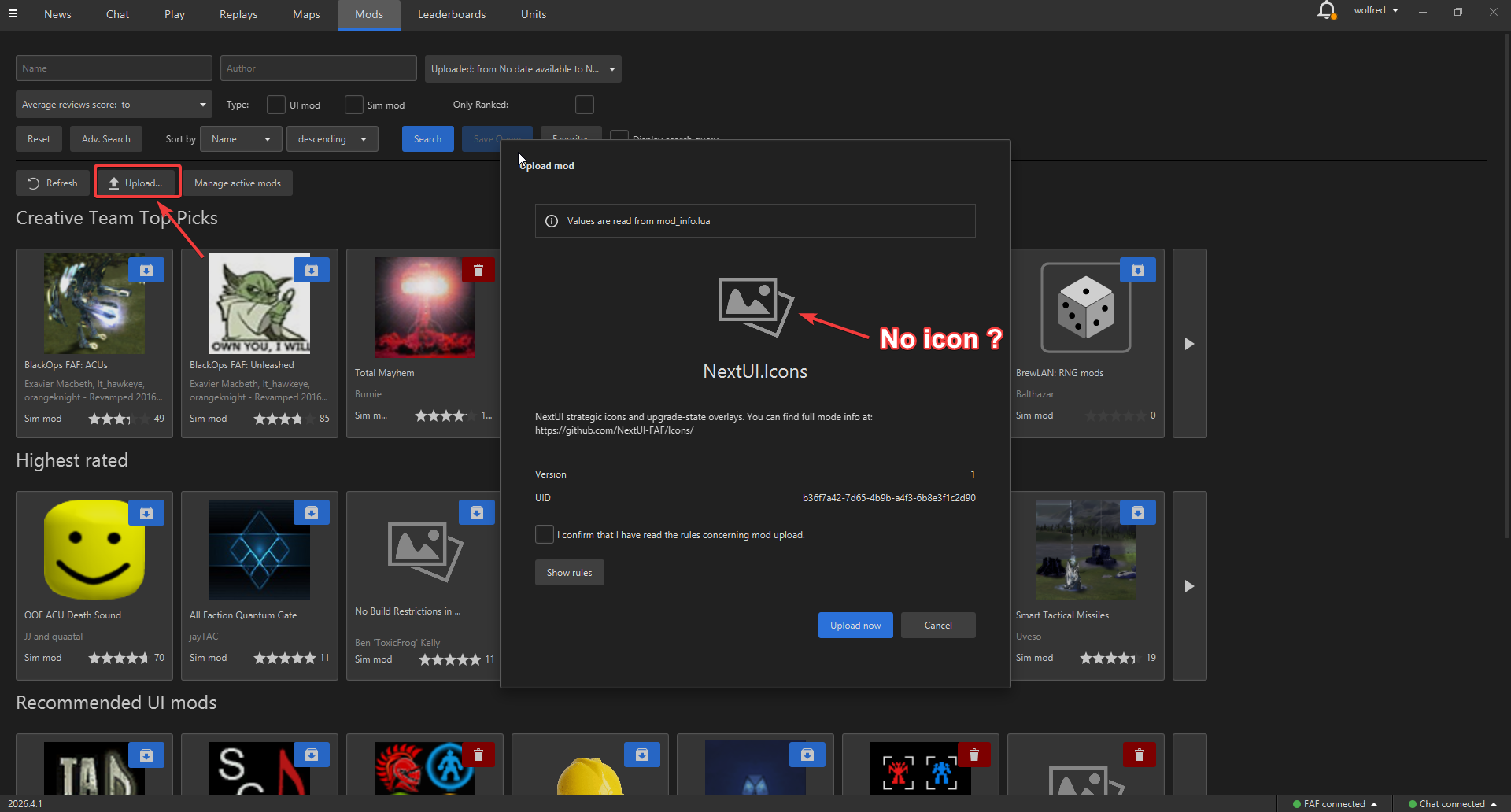
I'm having an issue with my mod icon on the FAF mod vault.
I added the
iconfield to mymod_info.lua, but the icon still doesn't show up on the FAF mods page.name = "NextUI.Icons" uid = "b36f7a42-7d65-4b9b-a4f3-6b8e3f1c2d90" version = 1 author = "wolfred" description = "NextUI strategic icons and upgrade-state overlays. You can find full project information at: https://github.com/NextUI-FAF/Icons/" icon = "/mods/Icons/icon.png" ...I've already verified that:
- The path is correct.
- The file exists.
- I compared my configuration with other mods that display their icons correctly, and it looks the same.
- I tested it on both Linux and Windows with the same result.
Here's the evidence:
The icon file is located at:
C:\Users\fred_\Documents\My Games\Gas Powered Games\Supreme Commander Forged Alliance\mods\Icons\icon.pngAm I missing something? Is there anything else that needs to be configured for the icon to appear on the FAF mod vault?
-
RE: [MOD UI] NextUI.Icons
@HotCheeseInRear I'm not entirely sure what the best approach is for making the icons look good at 1440p and 4K yet, but I'll take a look at how other mods handle it and see what I can learn.
-
RE: [MOD UI] NextUI.Icons
@Nomander Thanks for the suggestions!
Regarding the ACU outline, my original idea was to use a different outline color for each faction. However, I agree that it can become a bit confusing when combined with the player's color. I've changed it so the outline now uses the player's color instead of the faction color.
As for the AA icons, I intentionally didn't add an outline to keep them as subtle as possible. However, you're right that they can get visually lost with certain player colors, so I've added an outline to improve their visibility.
I also removed all the T1 tech markers. My reasoning is that if an icon doesn't have a tech marker, it is implicitly T1. I found this approach surprisingly useful because it makes T2 and T3 units stand out much more at a glance. I know it feels a bit unusual at first since we're all used to seeing T1 markers, but after playing with it for a while, I found it much easier to instantly recognize when either I or my opponent has reached T2 or T3.
I also added dedicated icons for Point Defenses.
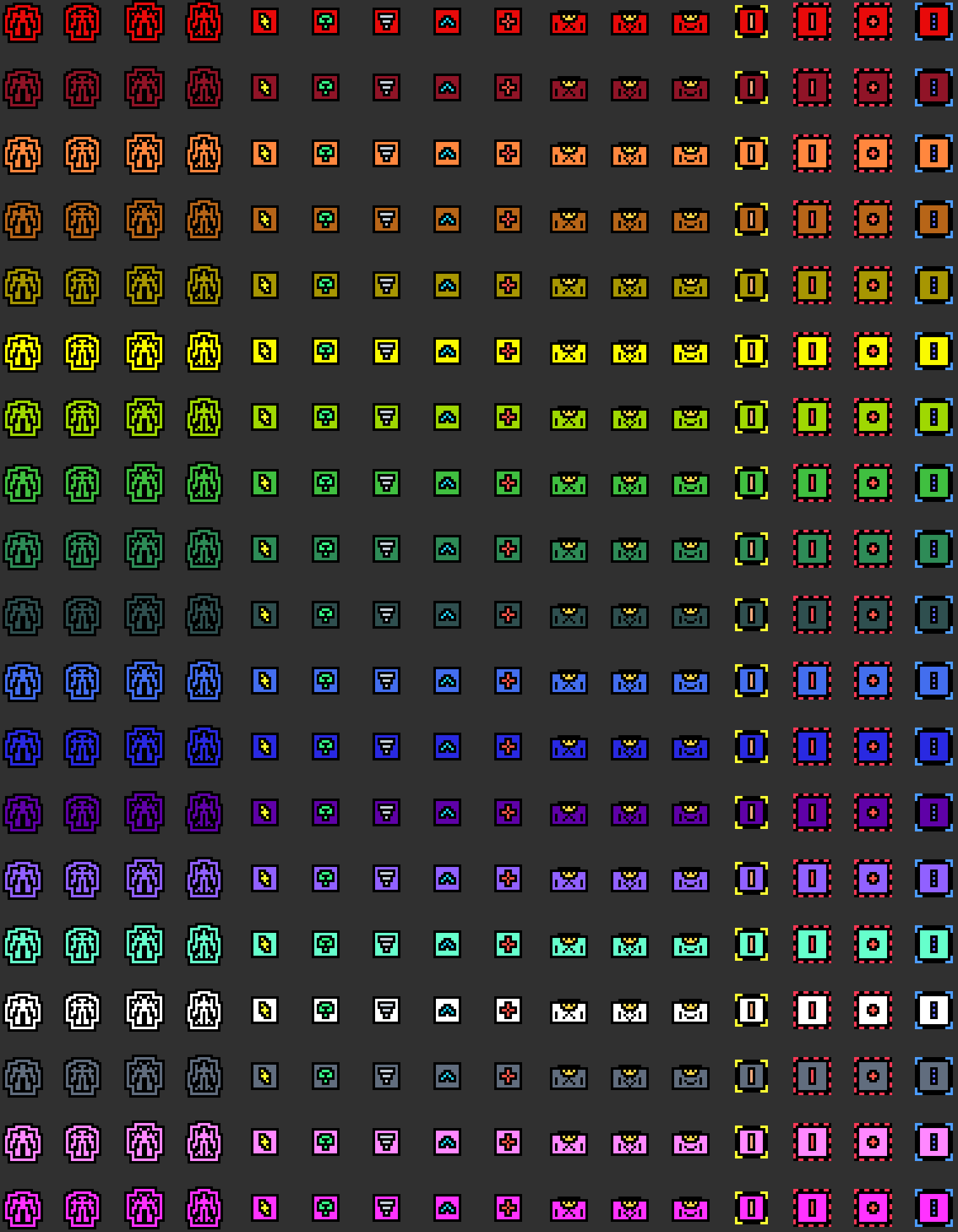
I can also update the preview gallery to include the T2 and T3 variants, so the tech markers are visible in the preview. The image will be larger, but I think it could be useful.
By the way, the HQ icon
.ddsfiles are already included in the./custom-strategic-iconsdirectory, just like all the other icons.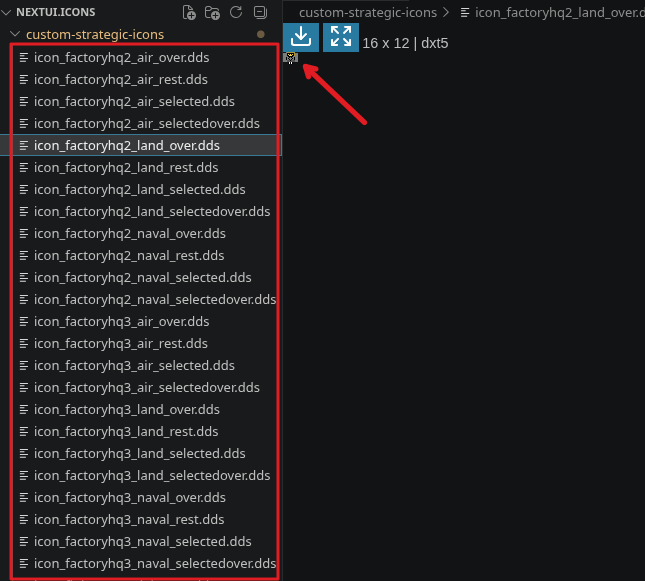
I'd recommend using the preview gallery as the main reference, since it shows every available icon in one place:
./icon-generator/previews/gallery_custom_colored_icons.png -
RE: [MOD UI] NextUI.Icons
@nullptr They look good. Finding colors that would withstand DXT5 compression and remain distinguishable in-game proved to be much more difficult than expected.
After much testing, I included a list of the colors that gave me good results in my post.
-
[MOD UI] NextUI.Icons
NextUI.Icons - A Modern Strategic Icon Overhaul
Hi everyone!
I've been working on a new strategic icon mod, and I'd love to share it with the community.
The goal of this project is to preserve the original Forged Alliance strategic icon artwork while adding subtle, elegant visual cues that make important information easier to recognize at a glance.
The mod will also add an upgrade animation to all the upgrading structures.
The project is open source and available at the FAF client:
And Github:
https://github.com/NextUI-FAF/Icons
The philosophy behind this mod is simple:
Keep the original FAF strategic icons while enhancing them with essential visual information without cluttering the UI.
Icon Generator
To make creating and maintaining icons easier, I also developed Icon Generator, a Python-based tool included in the repository.
It allows you to:
- Generate new strategic icons
- Modify existing ones
- Customize colors and symbols
- Automatically generate preview galleries of all icons
Complete documentation is available in the repository.
Generated previews are automatically saved to:
icon-generator/previews/
About the Colors
Finding colors that survived DXT5 compression while remaining distinguishable in-game turned out to be much harder than expected.
After a lot of testing, these are the colors that consistently produced good results:
# Working colors with DXT5 compression, tested in-game.
# These colors are safe for strategic icon symbols in the tested layouts.

black = "#000000"
white = "#ffffff"

blue_tactical_navy = "#051C33"
silver_bright = "#c9d2dc"

red_signal = "#ff4d57"
red_bright = "#ff3855"
red_orange = "#ff594d"
coral_warning = "#ff6b57"

orange_safety = "#ff9f43"
peach_bright = "#ffad80"

yellow = "#ffff33"
gold_bright = "#ffd84d"
amber_signal = "#ffbf24"
ochre_bright = "#dba82b"
sand_bright = "#e8cf91"

green = "#4dff70"
lime_energy = "#b8ff4d"
green_neon = "#39ff88"
mint_bright = "#66ffd1"
turquoise_bright = "#33e6c4"

cyan_ice = "#66f2ff"
cyan_pale = "#bffcff"

blue_light = "#27d9ff"
blue_electric = "#4d9dff"
indigo_bright = "#6670ff"
periwinkle = "#91a1ff"

pink_signal = "#ff5cce"
violet_electric = "#9d5cff"
purple_bright = "#c45cff"
magenta_vivid = "#f238ff"
lavender_bright = "#c7a6ff"
Player Color
The game replaces the following color with the owning player's color:
player_color = "#7b7d7b"Avoid using this color for custom symbols unless you intentionally want them to inherit the player's color.
Additional Candidate Colors
I didn't have time to test these in-game, but based on previous results there's a good chance they'll also survive DXT5 compression.
If anyone tests these, I'd love to hear the results.
copper_bright = "#d98245"
orange_bright = "#ffb347"
yellow_soft = "#fff066"

chartreuse_bright = "#c8ff57"
green_spring = "#57ff7a"
emerald_bright = "#4dff9a"
seafoam_bright = "#8affd1"

teal_neon = "#33ffd6"
sky_bright = "#66d9ff"
blue_ice = "#8abfff"

rose_bright = "#ff6ba8"
pink_soft = "#ff8fd8"
FAF Player Colors
For reference, these are the colors defined in
GameColors.lua.I don't recommend using them for strategic icon symbols, since they can easily be confused with player ownership or become difficult to distinguish against friendly units.
FAF_PLAYER_COLORS = {
    "cybran_red": "#e80a0a",
    "dark_red": "#901427",
    "nomads_orange": "#ff873e",
    "brown": "#b76518",
    "sera_golden": "#a79602",
    "yellow": "#fafa00",
    "order_green": "#9fd802",
    "mid_green": "#40bf40",
    "green": "#2e8b57",
    "olive_dark_green": "#2f4f4f",
    "blue": "#436eee",
    "uef_blue": "#2929e1",
    "dark_purple": "#5f01a7",
    "purple": "#9161ff",
    "aqua": "#66ffcc",
    "white": "#ffffff",
    "grey": "#616d7e",
    "pink": "#ff88ff",
    "fuschia": "#ff32ff",
}
I'd really appreciate any feedback, suggestions, or ideas for additional icons.
If you create your own icons with the generator, feel free to share them!
-
RE: strategic icons and creating .dds file problem
Yes, the game interprets the pixels in diferent ways, i havent found a fix for this, just try new colors and shapes
-
How to cap t3 Power gens and T3 mass fabricators?
Is there any method to cap T3 power gens and T3 mass fabricators with a single key ? I tried with the cap structure keybind but it didnt work for those structures, it only work for Mass stractors, shield, t2 artillery, etc.
-
RE: Creating new Hotkeys / Shortcuts error
Thanks Nomander! It is working now.
-
RE: Creating new Hotkeys / Shortcuts error
This is the crashing log:
EXCEPTION_ACCESS_VIOLATION (0xc0000005) at address 0x00a976d7
attempted to read memory at 0x00002000Program : C:\ProgramData\FAForever\bin\ForgedAlliance.exe
Cmd line arguments : /init init.lua /nobugreport /log C:\Users\fred_\AppData\Roaming\Forged Alliance Forever\logs\game_24729789.log /gpgnet 127.0.0.1:50896 /mean 1308.06005859375 /deviation 99.00479888916016 /savereplay gpgnet://127.0.0.1:50897/24729789/wolfred.SCFAreplay /country MX /numgames 521 /numgames 138Callstack:
Unknown symbol (address 0x00a976d7)Last 100 lines of log...
info: Active mods in session:
debug: MEM: -5247026 bytes STIMap
debug: MEM: -5247026 bytes LoadTexturing
debug: MEM: -5247026 bytes WaterMask
debug: MEM: -12252683 bytes TERRAIN
info: Background task "Map loader /maps/8 - badlands_v4.v0001/8 - badlands_v4.scmap" finished.
info: Saving replay to "gpgnet://127.0.0.1:50897/24729789/wolfred.SCFAreplay"
debug: MEM: 0 bytes LUABP
debug: Lua sim environment initialized with game version 3821, game type FAF and at commit hash 1c49154e84dd4829b84fb742a443ccd5c67e7d4d
debug: MEM: 0 bytes OGRID
info: Loading save file: /maps/8 - Badlands_v4.v0001/8 - Badlands_v4_save.lua
info: Loading script file: /maps/8 - Badlands_v4.v0001/8 - Badlands_v4_script.lua
warning: NUM PROPS = 5312
info: Initialize Armies brain nickname is wolfred
info: CreateArmy group ARMY_1
warning: Shift modifier for Hotbuild action "build factories & quantum gateway + engineers & SCUs" (A) is already bound to action "Attack - SHIFT version" (Shift-A)
warning: The Shift modifier of the Hotbuild action will not work!
warning: Alt modifier for Hotbuild action "build factories & quantum gateway + engineers & SCUs" (A) is already bound to action "Select land units on screen" (Alt-A)
warning: The Alt modifier of the Hotbuild action will not work!
warning: Shift modifier for Hotbuild action "build static AA + air staging + mobile AA & flaks + air fighters + aircrafts carriers / cruisers / attack boat" (C) is already bound to action "Capture - SHIFT version" (Shift-C)
warning: The Shift modifier of the Hotbuild action will not work!
warning: Alt modifier for Hotbuild action "build static AA + air staging + mobile AA & flaks + air fighters + aircrafts carriers / cruisers / attack boat" (C) is already bound to action "Select all Battleships" (Alt-C)
warning: The Alt modifier of the Hotbuild action will not work!
warning: Alt modifier for Hotbuild action "build shields + mobiles Shields & shield disruptors + shield boat" (E) is already bound to action "Select all Air Fighters" (Alt-E)
warning: The Alt modifier of the Hotbuild action will not work!
warning: Shift modifier for Hotbuild action "build power generators / storage + snipers & Loyalist / titan & gattling / rocket bots & LABs + gunships" (D) is already bound to action "Dive - SHIFT version" (Shift-D)
warning: The Shift modifier of the Hotbuild action will not work!
warning: Alt modifier for Hotbuild action "build power generators / storage + snipers & Loyalist / titan & gattling / rocket bots & LABs + gunships" (D) is already bound to action "Select all Land Indirect-Fire units" (Alt-D)
warning: The Alt modifier of the Hotbuild action will not work!
warning: Alt modifier for Hotbuild action "cycle user templates & build T2 Hover Tanks + T2 Gunships + T2 Cruisers" (G) is already bound to action "Select Defense Units On Screen" (Alt-G)
warning: The Alt modifier of the Hotbuild action will not work!
warning: Alt modifier for Hotbuild action "build mass extractors / fabricators + tanks + bombers + frigates / destroyers / battlecruisers / battleships" (S) is already bound to action "Select all Land Direct-Fire units" (Alt-S)
warning: The Alt modifier of the Hotbuild action will not work!
warning: Shift modifier for Hotbuild action "build radars (+ perimeter & eye of Rhianne) + land scouts + air scouts" (R) is already bound to action "Repair - SHIFT version" (Shift-R)
warning: The Shift modifier of the Hotbuild action will not work!
warning: Alt modifier for Hotbuild action "build radars (+ perimeter & eye of Rhianne) + land scouts + air scouts" (R) is already bound to action "Select all Gunships" (Alt-R)
warning: The Alt modifier of the Hotbuild action will not work!
warning: Alt modifier for Hotbuild action "build tactical missiles defense & strategic missile defense" (V) is already bound to action "Cycle through unit types in selection (Land, Sea, Air)" (Alt-V)
warning: The Alt modifier of the Hotbuild action will not work!
warning: Shift modifier for Hotbuild action "build static artilleries + mobile artilleries" (F) is already bound to action "Ferry - SHIFT version" (Shift-F)
warning: The Shift modifier of the Hotbuild action will not work!
warning: Alt modifier for Hotbuild action "build point defenses & walls + structure upgrades" (X) is already bound to action "Select all anti-Navy Submarines" (Alt-X)
warning: The Alt modifier of the Hotbuild action will not work!
warning: Alt modifier for Hotbuild action "build TML & SML + mobile missile launchers + nuke subs / battleship & missile ship & sera / uef cruisers" (T) is already bound to action "Select only transports" (Alt-T)
warning: The Alt modifier of the Hotbuild action will not work!
debug: Preloading 1418 batch textures
debug: Preloading 0 d3d textures
debug: Preloading 0 models
debug: Preloading 0 animations
info: creating high fidelity terrain
info: creating high fidelity water
info: creating high fidelity terrain
info: creating high fidelity water
debug: Context based templates: Found template: AppendPowerGeneratorsToTML with name Power generators
debug: Context based templates: Found template: AppendT3FabricatorWithStorages with name Storages
debug: Context based templates: Found template: TorpedoDefense with name Torpedo defense
debug: Context based templates: Found template: T3ExtractorWithStorages with name Extractor and storages
debug: Context based templates: Found template: AppendPowerGeneratorsToSalvation with name Power generators
debug: Context based templates: Found template: AppendWallsToPointDefense with name Walls
debug: Context based templates: Found template: AppendOpticsWithPower with name Power generators
debug: Context based templates: Found template: AppendAirGrid with name Air grid
debug: Context based templates: Found template: AppendPowerGeneratorsToEnergyStorage with name Power generators
debug: Context based templates: Found template: AppendExtractorWithFabs with name Storages and fabricators
debug: Context based templates: Found template: AppendPowerGeneratorsToT3Artillery with name Power generators
debug: Context based templates: Found template: AppendRadarWithPower with name Power generators
debug: Context based templates: Found template: AppendPowerGeneratorsToT2Artillery with name Power generators
debug: Context based templates: Found template: T1Hydrocarbon with name Hydrocarbon
debug: Context based templates: Found template: T3ExtractorWithStoragesAndFabs with name Extractor, storages and fabricators
debug: Context based templates: Found template: AppendT3ArtilleryWithPower with name Power generators
debug: Context based templates: Found template: PointDefense with name Point defense
debug: Context based templates: Found template: AppendT2ArtilleryWithPower with name Power generators
debug: Context based templates: Found template: AirDefenseLand with name Anti-air defense
debug: Context based templates: Found template: AppendExtractorWithStorages with name Storages
debug: Context based templates: Found template: T3Extractor with name Extractor
debug: Context based templates: Found template: AirDefenseWater with name Anti-air defense
debug: Context based templates: Found template: AppendSalvationWithPower with name Power generators
debug: Context based templates: Found 23 templates
info: /savereplay
warning: GetResource: Invalid name ""
info: Can't find texture "" -- trying fallback.
warning: GetResource: Invalid name ""
info: Can't find texture "" -- trying fallback.
warning: GetResource: Invalid name ""
info: Can't find texture "" -- trying fallback.
warning: GetResource: Invalid name ""
info: Can't find texture "" -- trying fallback.
warning: GetResource: Invalid name ""
info: Can't find texture "" -- trying fallback.
info: Exe GitSHA: 63718d16151cd7b2e3232ddc865879a4ecba292d
debug: Session time: 00:00:17 Game time: 00:00:00 Heap: 256.0M / 222.4M
info: Exe GitSHA: 63718d16151cd7b2e3232ddc865879a4ecba292d
info: Exe GitSHA: 63718d16151cd7b2e3232ddc865879a4ecba292d
info: Exe GitSHA: 63718d16151cd7b2e3232ddc865879a4ecba292d
info: Exe GitSHA: 63718d16151cd7b2e3232ddc865879a4ecba292d
info: Exe GitSHA: 63718d16151cd7b2e3232ddc865879a4ecba292d
info: Exe GitSHA: 63718d16151cd7b2e3232ddc865879a4ecba292d
info: Exe GitSHA: 63718d16151cd7b2e3232ddc865879a4ecba292d
info: Exe GitSHA: 63718d16151cd7b2e3232ddc865879a4ecba292d
debug: Session time: 00:00:28 Game time: 00:00:09 Heap: 256.0M / 230.8M
debug: Time to process CheatSpawnUnit from 0: 1.000000