EternalStrategicIcons [UI]
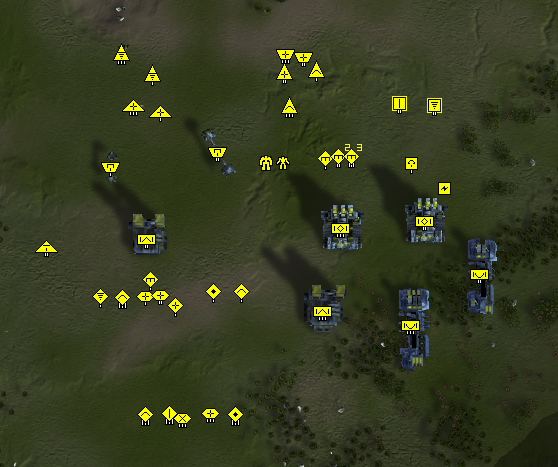
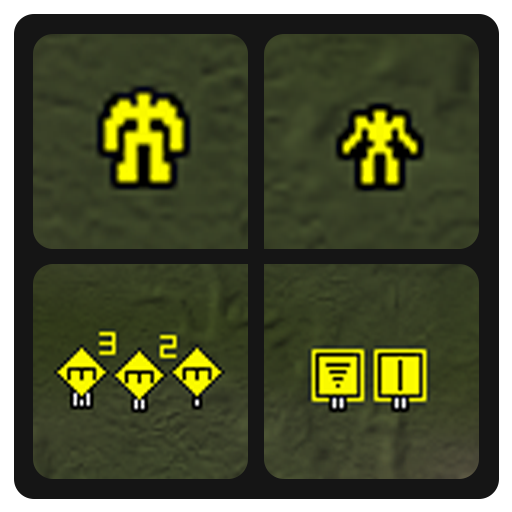
-
Hello, I have a question. Not quite for this mod, but more for the problem with the loading of any "Strategic Icons mods". But this topic is the most recently updated, so...
First the background: I installed "Supreme Commander" and the "FAF client" into a clean system. I launched one replay from the online vault, go «F10» -> «End Replay» to the "Main Menu", created a "Game Profile", changed the game settings, and exited. I installed several mods in "FAF client", watched a few more replays and noticed that the "Strategic Icons mod" does not work.
I started checked the "Strategic Icons mods" «SACU Icons», «Redux Strategic Icons Small», «ACUhighlight», «Penguins Icon Mod» and «EternalStrategicIcons». One by one, I activated them in the "FAF client" via the «Mods» -> «Manage active mods» and launched a replay (fresh, from 11.04.2022) to check. In the panel of «SupremeScoreBoard» mod, they are shown in the list as active, but the "Strategic Icons" do not change.
I found out experimentally that by launching the "Skirmish" from the "Main Menu" after exiting the replay (and skipping the "Tutorial" offer), or later after creating and launching the map in the "FAF client", the "Strategic Icons" from the mod loading and begin to be displayed, including in replays. If you activate another "Strategic Icons mod" in the client, but do not create a game, then the new mod will be shown in the panel of «SupremeScoreBoard» mod in the list of active mods, but the "Strategic Icons" of the old mod will remain in the replays.
At the end I tried to delete the file "\AppData\Local\Gas Powered Games\Supreme Commander Forged Alliance\game.prefs" (also, I don't have a «UI-Party» mod). First I had to re-create the "Game Profile" through someone else's replays (from my replay, whether local or from online vault, game did not go to the main menu ), then I turned on the mods. The "Strategic Icons" have not loaded again.
How can I try fix the "Strategic Icons" loading process? -
 E Eternal- referenced this topic on
-
What would it take to create an option to scale up the icons for 4k?
-
@desertwolf216 Some hours

-
@Eternal tried the mod today and i like it. However, the 150% icons are to big for my screen. Do you have a smaller version or the icons as well?
-
@Amygdala Sorry, i made them to myself to fit in 1920x1080 screen xD
-
@eternal a then nevermind. thanks for coming back so quickly
-
@Eternal would be great if u make 200% scale of icons mod
-
@VIP I would also suggest typing in game console
ui_StrategicIconScalewhich allows you to set scale for strategic icons. By default to open console press tilda (`). For exampleui_StrategicIconScale 2 -
@azath0th said in EternalStrategicIcons [UI]:
@VIP I would also suggest typing in game console
ui_StrategicIconScalewhich allows you to set scale for strategic icons. By default to open console press tilda (`). For exampleui_StrategicIconScale 2Dark knowledge from The Blind Idiot God
-
This post is deleted! -
@azath0th thank you for advice
ui_StrategicIconScale 1.3 value suit good for QHD resolution, too bad scaled icons look not that good but its better than nothing. -
Yeah, not rounded scale values are not good for sure, but that's at least possible after my patch
-
Hey I have been trying to install ui mods and have it installed in faf client mods page but it does not work in the game. Other mods do work but just not the ui icon mods. Also I have an acu highlight icon that works too. Do you know any reason as to why its not working?
-
Maybe try to deactivate all the other UI mods you're running to check if some other mod does interfere with this one.
-
@RaiqGG I mean, some mods are unfortunately outdated and don't work perfectly anymore. So please check how up-to-date this one is. Of course, I could be wrong. ^^
-
I use this icon mod and it works fine. There are two things to take into account:
- Icon mods are often not compatible with one another. You should run only one. The ACU Highlight UI mod is another icon mod.
- Because of how icon mods work internally it may not apply immediately. Without being too technical, the use of the icon mod needs to be written to the preference file. This often happens after you launched the lobby. That means that if you selected the icon mod in the same lobby then it will be available in the next lobby. This can be quite confusing as you try out icon mods. But unfortunately, there's not much that we can do about it.


Hello! It looks like you're interested in this conversation, but you don't have an account yet.
Getting fed up of having to scroll through the same posts each visit? When you register for an account, you'll always come back to exactly where you were before, and choose to be notified of new replies (either via email, or push notification). You'll also be able to save bookmarks and upvote posts to show your appreciation to other community members.
With your input, this post could be even better 💗
Register Login