FAForever Forums
    • Categories
    • Recent
    • Tags
    • Popular
    • Users
    • Groups
    • Login
    The current pre-release of the client ("pioneer" in the version) is only compatible to itself. So you can only play with other testers. Please be aware!

    UI Party Mod

    Scheduled Pinned Locked Moved Modding & Tools
    55 Posts 17 Posters 7.7k Views 2 Watching
    Loading More Posts
    • Oldest to Newest
    • Newest to Oldest
    • Most Votes
    Reply
    • Reply as topic
    Log in to reply
    This topic has been deleted. Only users with topic management privileges can see it.
    • B Offline
      BlackburnUTG
      last edited by

      Hm, it makes sense, but at the same time useless information covers big part of my screen (in mid game there are very many icons) Can you please make checkbox with toggle jump around and stay state for such icons?
      Maybe set a delay before icon get deleted, so when a new production phase started - icon stays

      1 Reply Last reply Reply Quote 0
      • nine2N Offline
        nine2
        last edited by

        I haven't worked on the mod for years sorry. Delay is a good idea tho.

        nullptrN 1 Reply Last reply Reply Quote 0
        • nine2N Offline
          nine2
          last edited by

          You could try the Supreme economy 2 mod. It does a similar thing but worse imo. You might like that better.

          1 Reply Last reply Reply Quote 0
          • nullptrN Offline
            nullptr @nine2
            last edited by

            @nine2 I would like to collaborate and make brand new version of UI party 😁

            “Be a yardstick of quality. Some people aren’t used to an environment where excellence is expected.”
            — Steve Jobs.
            My UI Mods
            Support me

            1 Reply Last reply Reply Quote 1
            • nine2N Offline
              nine2
              last edited by

              He'll yeah do it bro. What are you going to put in it?

              nullptrN 1 Reply Last reply Reply Quote 0
              • nullptrN Offline
                nullptr @nine2
                last edited by

                @nine2 firstly wanna know what to leave and what to remove from existing mod, and then I add my own stuff 😉

                “Be a yardstick of quality. Some people aren’t used to an environment where excellence is expected.”
                — Steve Jobs.
                My UI Mods
                Support me

                1 Reply Last reply Reply Quote 0
                • True_GuesserT Offline
                  True_Guesser
                  last edited by

                  Decided to give this another try after cleaning my Game.prefs (so much old junk, lol). Is there a way to move the Resource Viewer portion of Econtrol separate from the rest of the UI? I like having the Party menu and Mex list next to my main eco bar at the top left, but then the resource manager extends down, effectively cutting my screen by a third.

                  1 Reply Last reply Reply Quote 0
                  • nine2N Offline
                    nine2
                    last edited by

                    Nope

                    1 Reply Last reply Reply Quote 0
                    • J Offline
                      JamesEllis
                      last edited by

                      This post is deleted!
                      1 Reply Last reply Reply Quote 0
                      • J Offline
                        JamesEllis
                        last edited by

                        This post is deleted!
                        1 Reply Last reply Reply Quote 0
                        • nullptrN Offline
                          nullptr
                          last edited by nullptr

                          Add few lines to the gamemain.lua in order to fix compatibility with other mods

                          function OnSelectionChanged(oldSelection, newSelection, added, removed)
                          		if ignoreSelection then
                          			return
                          		end
                          	--if not SelectHelper.IsAutoSelection() then 
                          		UnitSplit.SelectionChanged()
                          
                          		local selectionChanged = UnitLock.OnSelectionChanged(oldSelection, newSelection, added, removed)
                          		if not selectionChanged then
                          			oldOnSelectionChanged(oldSelection, newSelection, added, removed)
                          		end
                          	--end
                          end
                          

                          specifically ignoreSelection stuff

                          “Be a yardstick of quality. Some people aren’t used to an environment where excellence is expected.”
                          — Steve Jobs.
                          My UI Mods
                          Support me

                          1 Reply Last reply Reply Quote 0
                          • True_GuesserT Offline
                            True_Guesser
                            last edited by True_Guesser

                            Has anyone else had an issue with this as of version 2022.6.0? EControl has vanished, and I no longer have the wrench icon to change anything. The other settings seem to remain, like moving the menu buttons to the right and starting with a factory selected. Last time I tried a clean reinstall, all the settings remained, so I was unable to get the wrench back. Attempting to manually remove the mod's settings from my game.prefs resulted in a complete game crash, so I had to reinstall the game in full (lost all my templates & hotkeys).

                            1 Reply Last reply Reply Quote 0
                            • maggeM Offline
                              magge Moderator FAF Association Board
                              last edited by

                              @nine2

                              • After the recent patch, all player colors are black (only mod activated + common mod tools)

                              5ae99c62-a8d4-461d-bb8c-d59ca92a523c-image.png

                              Join a FAFtastic Team | Join the FAForever Association

                              1 Reply Last reply Reply Quote 0
                              • nine2N Offline
                                nine2
                                last edited by

                                I can't test right now but 2 out of 2 other people have told me they can't replicate your bug. Does it work fine with uiparty disabled?

                                Doesn't look like something a ui mod can even break.

                                1 Reply Last reply Reply Quote 0
                                • nine2N Offline
                                  nine2
                                  last edited by

                                  @magge ^^

                                  1 Reply Last reply Reply Quote 0
                                  • maggeM Offline
                                    magge Moderator FAF Association Board
                                    last edited by magge

                                    I could pinpoint it to "Start with Player Colors on". If that is selected, every unit in the game will be black after a new game. Friend and Enemies. That was 100% not the case before the last patch(s). I reinstalled the mod again to be sure.

                                    It saved me for every game two thankful clicks, because I always play with those colors enabled.

                                    If they can not reproduce that bug in that way, then something is really odd.
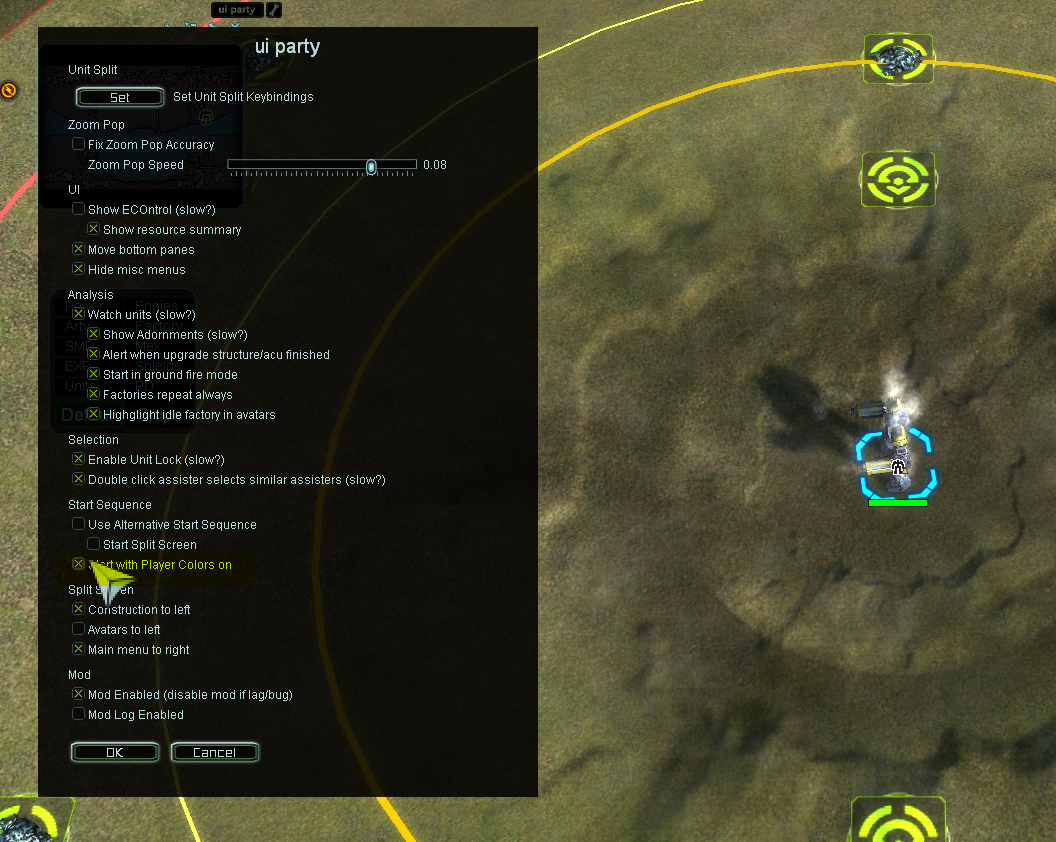
                                    00a3a0a0-e714-4db8-bdc0-1e01bf38c739-image.png

                                    Join a FAFtastic Team | Join the FAForever Association

                                    JipJ 1 Reply Last reply Reply Quote 0
                                    • nine2N Offline
                                      nine2
                                      last edited by

                                      Nice work. And presumably team colors itself is fine if you do it manually?

                                      1 Reply Last reply Reply Quote 0
                                      • JipJ Offline
                                        Jip @magge
                                        last edited by

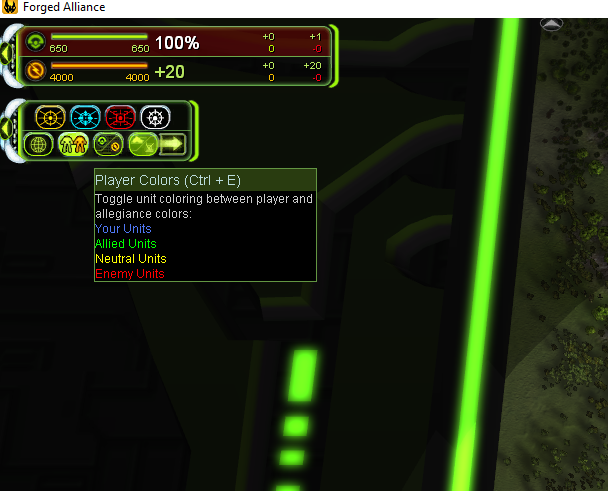
                                        @magge You can right click this button:

                                        b370362f-f5a6-4290-a77c-c65484fc2059-image.png

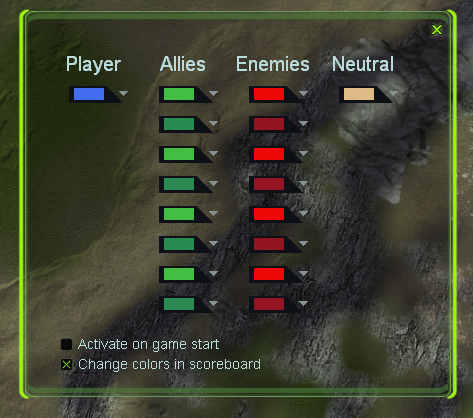
                                        That opens up this:

                                        54788af1-2d7b-4702-8480-f3b8f7ef78b0-image.png

                                        Where you can enable it by default too.

                                        A work of art is never finished, merely abandoned

                                        True_GuesserT 1 Reply Last reply Reply Quote 5
                                        • maggeM Offline
                                          magge Moderator FAF Association Board
                                          last edited by

                                          OMG, I did not know you can right-click this icon. I changed the default colors. Thanks Jip.

                                          Join a FAFtastic Team | Join the FAForever Association

                                          1 Reply Last reply Reply Quote 1
                                          • RoweyR Offline
                                            Rowey
                                            last edited by

                                            I did not know this either

                                            "The needs of the many outweigh the needs of the few" - Spock

                                            1 Reply Last reply Reply Quote 1

                                            Hello! It looks like you're interested in this conversation, but you don't have an account yet.

                                            Getting fed up of having to scroll through the same posts each visit? When you register for an account, you'll always come back to exactly where you were before, and choose to be notified of new replies (either via email, or push notification). You'll also be able to save bookmarks and upvote posts to show your appreciation to other community members.

                                            With your input, this post could be even better 💗

                                            Register Login
                                            • First post
                                              Last post