FAForever Forums
    • Categories
    • Recent
    • Tags
    • Popular
    • Users
    • Groups
    • Login
    The current pre-release of the client ("pioneer" in the version) is only compatible to itself. So you can only play with other testers. Please be aware!

    Desync issue

    Scheduled Pinned Locked Moved I need help
    30 Posts 6 Posters 2.2k Views
    Loading More Posts
    • Oldest to Newest
    • Newest to Oldest
    • Most Votes
    Reply
    • Reply as topic
    Log in to reply
    This topic has been deleted. Only users with topic management privileges can see it.
    • A Offline
      Aurahead @nullptr
      last edited by

      @Ctrl-K said in Desync issue:

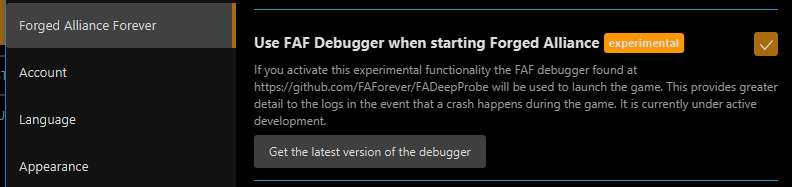
      image.png

      game_24272254.log

      Here is the log file now after we just got desync like a min ago. I have enable that you showed.

      1 Reply Last reply Reply Quote 0
      • nullptrN Offline
        nullptr
        last edited by

        A-Volute thing can cause it by injecting itself into game memory.

        “Be a yardstick of quality. Some people aren’t used to an environment where excellence is expected.”
        — Steve Jobs.
        My UI Mods
        Support me

        A 1 Reply Last reply Reply Quote 0
        • A Offline
          Aurahead @nullptr
          last edited by

          @Ctrl-K said in Desync issue:

          A-Volute thing can cause it by injecting itself into game memory.

          What does it mean? 😕

          1 Reply Last reply Reply Quote 0
          • nullptrN Offline
            nullptr
            last edited by

            It means some software you use can cause problems for game.

            “Be a yardstick of quality. Some people aren’t used to an environment where excellence is expected.”
            — Steve Jobs.
            My UI Mods
            Support me

            A 1 Reply Last reply Reply Quote 0
            • A Offline
              Aurahead @nullptr
              last edited by Aurahead

              @Ctrl-K said in Desync issue:

              It means some software you use can cause problems for game.

              I tried to understand the log but just get confused. Does it say specific what software it can be?

              EDIT: I did saw a program running that called A-Valute, seems to be Sonic Studio. I will try and manually terminate that one and see if desync still persist.

              1 Reply Last reply Reply Quote 0
              • A Offline
                Aurahead
                last edited by

                game_24280385.log

                I have removed A-Volute but still desync

                1 Reply Last reply Reply Quote 0
                • maggeM Offline
                  magge Moderator FAF Association Board
                  last edited by

                  From the first log I saw:

                  warning: SND: XACT3DApply failed.
                  

                  So, I would guess try to solve it via this: https://forum.faforever.com/topic/4084/solutions-for-snd-error-xact-invalid-arg-xact3dapply-failed

                  Join a FAFtastic Team | Join the FAForever Association

                  A 1 Reply Last reply Reply Quote 0
                  • A Offline
                    Aurahead @magge
                    last edited by

                    @magge said in Desync issue:

                    From the first log I saw:

                    warning: SND: XACT3DApply failed.
                    

                    So, I would guess try to solve it via this: https://forum.faforever.com/topic/4084/solutions-for-snd-error-xact-invalid-arg-xact3dapply-failed

                    I have tried most of on list but still cannot find issue, now I use cable headphone gonna see if that is the issue. Was using wireless with usb dongle. Here is latest crash. game_24297012.log

                    A 1 Reply Last reply Reply Quote 0
                    • maggeM Offline
                      magge Moderator FAF Association Board
                      last edited by

                      Seems like you fixed the xact error - that is good progress.

                      Can you reproduce the issue without any mods?
                      If it happens with mods, you have to enable them one by one to find the mod that is causing the issue. It is tedious, but there is no other way.

                      Join a FAFtastic Team | Join the FAForever Association

                      A 2 Replies Last reply Reply Quote 0
                      • A Offline
                        Aurahead @magge
                        last edited by

                        @magge said in Desync issue:

                        Seems like you fixed the xact error - that is good progress.

                        Can you reproduce the issue without any mods?
                        If it happens with mods, you have to enable them one by one to find the mod that is causing the issue. It is tedious, but there is no other way.

                        I guess that is the only way, funny is that on my laptop I can play it without any desync with same mods that I use on my desktop. I will try tonight with cable headphone instead of wireless since I haven't got time to test that yet.

                        1 Reply Last reply Reply Quote 0
                        • A Offline
                          Aurahead @Aurahead
                          last edited by

                          @Aurahead said in Desync issue:

                          @magge said in Desync issue:

                          From the first log I saw:

                          warning: SND: XACT3DApply failed.
                          

                          So, I would guess try to solve it via this: https://forum.faforever.com/topic/4084/solutions-for-snd-error-xact-invalid-arg-xact3dapply-failed

                          I have tried most of on list but still cannot find issue, now I use cable headphone gonna see if that is the issue. Was using wireless with usb dongle. Here is latest crash. game_24297012.log

                          This is super weird, I have played 6 games tonight without any desync, I removed my USB wireless headphone and use wired. If this was the issue lol then I am happy.

                          1 Reply Last reply Reply Quote 1
                          • A Offline
                            Aurahead
                            last edited by

                            I will keep trying with same method and see if the USB wireless headphone is the one that cause desync. Feels like I need more games to really be sure about it.

                            1 Reply Last reply Reply Quote 1
                            • DoompantsD Offline
                              Doompants
                              last edited by

                              Our playgroup is trying to solve some of its own desync issues. I am assuming that this snippit from my log suggests that Docsyn is the person whose logs will shed more light? I have asked them to send them to me.
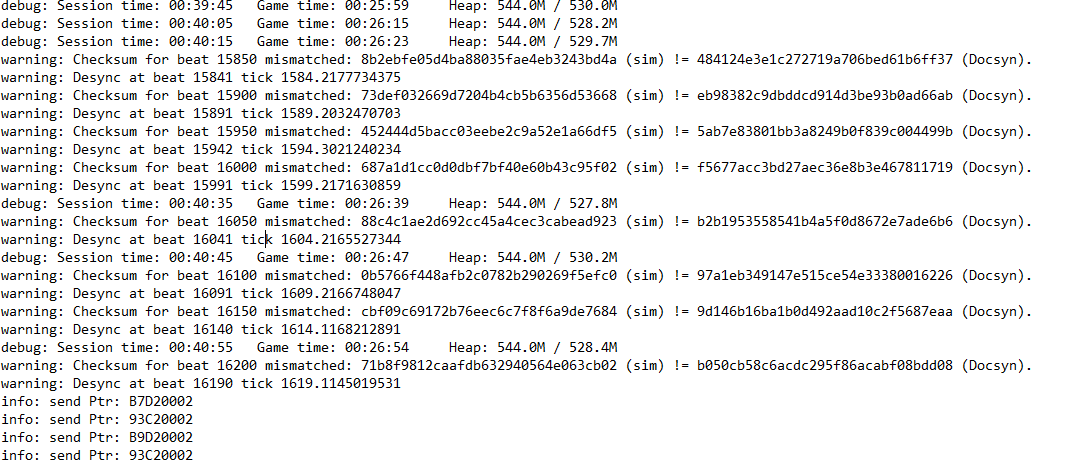
                              image.png

                              But what intrigues me is that I always assumed it was just mods or perhaps bad installs that caused this, but y'all are saying hardware or drivers can cause game desyncs too? That's wild.

                              I'll probably post some logs here soon as soon as he gets them to me. It's not happening every game, but ruining one game a week is annoying enough.

                              1 Reply Last reply Reply Quote 0
                              • DoompantsD Offline
                                Doompants
                                last edited by

                                game_24325122.log

                                Here is the log from Docsyn if any of y'all could spare your eyes to look into it for a moment. I've combed through it but don't know what to look for.

                                Thx in advance.

                                A 1 Reply Last reply Reply Quote 0
                                • A Offline
                                  Aurahead @Doompants
                                  last edited by Aurahead

                                  @Doompants said in Desync issue:

                                  game_24325122.log

                                  Here is the log from Docsyn if any of y'all could spare your eyes to look into it for a moment. I've combed through it but don't know what to look for.

                                  Thx in advance.

                                  I did a run yesterday with 4 buddies against 5 AI and yea I got desync and it pointed to me. And later that night me and another friend played without desync. A couple night before we were 3 against 3 AI and we played 6 games without any desync. It seems that more human player it trigger desync for me.

                                  I heard some people say it can be hardware related like you are having a certain chips or network card etc etc or even usb wireless headphone. I have never got any desync on my laptop and I have played like 50 games, I only get it on my desktop and I have exactly same stuff installed (program wise).

                                  1 Reply Last reply Reply Quote 0
                                  • DoompantsD Offline
                                    Doompants
                                    last edited by

                                    Would still love some help tracking this down if anyone who knows their way around a log file could take a look, or give me some idea what I'm looking for. We play with a few mods, but nothing obscure, and these desyncs are recent and seem to be ruining at least 1 game every week or two. I know I had Docsyn turn on the FAF Debugger. Hopefully that's reflected in the log.

                                    S 1 Reply Last reply Reply Quote 0
                                    • S Offline
                                      Sturmgewehr @Doompants
                                      last edited by

                                      @Doompants

                                      Check your game files of Supreme Commander Forged Alliance via Steam.

                                      https://support.rebellion.com/hc/en-gb/articles/5226744283549-How-do-I-verify-my-game-files

                                      alt text

                                      A 1 Reply Last reply Reply Quote 0
                                      • A Offline
                                        Aurahead @Sturmgewehr
                                        last edited by

                                        @Salz said in Desync issue:

                                        @Doompants

                                        Check your game files of Supreme Commander Forged Alliance via Steam.

                                        https://support.rebellion.com/hc/en-gb/articles/5226744283549-How-do-I-verify-my-game-files

                                        alt text

                                        Already done that.

                                        S 1 Reply Last reply Reply Quote 0
                                        • A Offline
                                          Aurahead @magge
                                          last edited by

                                          @magge said in Desync issue:

                                          Seems like you fixed the xact error - that is good progress.

                                          Can you reproduce the issue without any mods?
                                          If it happens with mods, you have to enable them one by one to find the mod that is causing the issue. It is tedious, but there is no other way.

                                          By the way I found this funny. I have been experiment lots lately. Doesn't matter if I play with mods or not still desync. BUT! I only get desync if we have more then 4 AI. With 2 or 3 AI it works fine without any desync 😂

                                          I tried with my laptop, that one doesn't have any desync with any numbers of AI. So I am not sure what is going on. I start to think FAF doesn't like 14gen cpu lol

                                          1 Reply Last reply Reply Quote 0
                                          • UvesoU Offline
                                            Uveso
                                            last edited by

                                            No, I have an i9-14900K, and it works flawlessly with SupCom, including multiplayer.
                                            But I also use an older SupCom .exe because I experienced occasional desyncs with the newer ones, but only in AI matches.
                                            I haven't tested the latest version, so I can't say for sure whether a desync could actually be caused by the .exe.


                                            A 1 Reply Last reply Reply Quote 0

                                            Hello! It looks like you're interested in this conversation, but you don't have an account yet.

                                            Getting fed up of having to scroll through the same posts each visit? When you register for an account, you'll always come back to exactly where you were before, and choose to be notified of new replies (either via email, or push notification). You'll also be able to save bookmarks and upvote posts to show your appreciation to other community members.

                                            With your input, this post could be even better 💗

                                            Register Login
                                            • First post
                                              Last post