FAForever Forums
    • Categories
    • Recent
    • Tags
    • Popular
    • Users
    • Groups
    • Login
    1. Home
    2. Sturmgewehr
    The current pre-release of the client ("pioneer" in the version) is only compatible to itself. So you can only play with other testers. Please be aware!
    S
    Offline
    • Profile
    • Following 0
    • Followers 0
    • Topics 12
    • Posts 50
    • Groups 0

    Sturmgewehr

    @Sturmgewehr

    57
    Reputation
    16
    Profile views
    50
    Posts
    0
    Followers
    0
    Following
    Joined
    Last Online

    Sturmgewehr Unfollow Follow

    Best posts made by Sturmgewehr

    • Dedicated Relay Server - looking for testers and feedback

      To start, I'm looking for a few players to test compatibility between the faf-sturm-relay-adapter and the faf-ice-adapter (java-ice-adapter) across different computers and check for bugs (every computer and Internet connection is different).

      The goal is then to get together in the coming days or weeks and play a full match with 12 or 16 players via the Dedicated Relay Server connection.
      In other words, game traffic no longer uses faf ICE/STUN/TURN or direct peer-to-peer connections (P2P). Instead, all game traffic is routed through a central Dedicated Relay Server.

      Of course, groups such as clans or individual players can also test the Dedicated Relay Server connection independently and provide feedback (there is no restriction).
      However, you should label the lobby accordingly (example: sturm adapter - forum).

      Note: Login or other FAF client traffic is not affected here. It only affects player packets when someone joins a game and plays.
      In other words, it does not fix login problems if you have any.

      46456546.jpg

      There have been a few people in this forum who had the same idea. There was also a test with a modified ice-adapter that routes all game traffic through a central server via TCP instead of peer-to-peer ICE connections (faf-star-adapter).
      There was one test, and the feedback was “it didn't feel any better,” so apparently it wasn't pursued further.
      This "feeling" of "no better" may well have come from TCP (TCP introduces head-of-line blocking which is problematic for real-time game traffic - may cause stuttering/jerkiness in-game).
      https://forum.faforever.com/post/62248

      But since CnCNet has been doing something similar for a decade and it seems to work quite well there, I came to the conclusion that there's no reason why it shouldn't be successful at faf as well.
      Of course, CnCNet has implemented this better with a selection of multiple servers, but that's obvious because what I'm doing here is a test so far.

      And yes, I am aware that the argument (DDoS kills every central server) exists.
      But I would argue that with the filter settings in place, it should work.
      Otherwise, there would be no regular game servers on the Internet (every successful game server project will sooner or later face a DDoS attack from competitors or p*-off players, and they have survived that too).
      If not, we'll see.

      Expected behavior (Dedicated Relay Server connection):

      • Reduces 66 complex individual connections for 12 players to 12 stable dedicated server connections.
      • Reduces upload usage for players.
      • DDoS protected (private IPs are not exposed to other players).
      • Reconnecting to a match is possible without any problems within the set "Disconnection delay" in-game time if ForgedAlliance.exe does not crash or the IP address changes for the player who lost the connection (WiFi down or LAN cable pulled out by the cat...).
      • Primarily UDP with fallback TCP option (TCP is unsuitable for real-time RTS games and can impair connection quality). But just in case, some players might not be able to play at all with UDP...
      • Compatible with the old faf-ice-adapter (if the host/lobby creator uses the old faf-ice-adapter). Matchmaking works as usual.
      • Better stability (maybe - it hasn't been tested with 12 players in a match yet).

      So far, I've only tested it with two players under increased latency conditions (VPN connections to Canada, the US, and Brazil), and it worked without any lag.
      But a two-player match isn't really representative, because you can only see how well it all works when there are several players in a match (+also, every computer is different, as is every Internet connection...).
      FAF rating works, replay works.
      Basically, everything works normally, except that game traffic no longer uses faf ICE/STUN/TURN or direct peer-to-peer connections, but is routed through the Dedicated Relay Server.
      This means that the private player IP remains protected (every other player only sees the Dedicated Relay Server IP).

      The only limitation is that if the host/lobby creator uses Dedicated Relay Server Mode in faf-sturm-relay.conf (Use_official_FAF_connections_as_lobby_creator_host = false), all players who want to connect to this lobby must use the faf-sturm-relay adapter.
      Joining players automatically detect the host's mode when using the faf-sturm-relay-adapter (Dedicated Relay Server <-> Official FAF ICE Game Connections).

      Source code:
      https://github.com/Sturmgewehrx1/fafsturmudprelay1

      What needs to be changed:
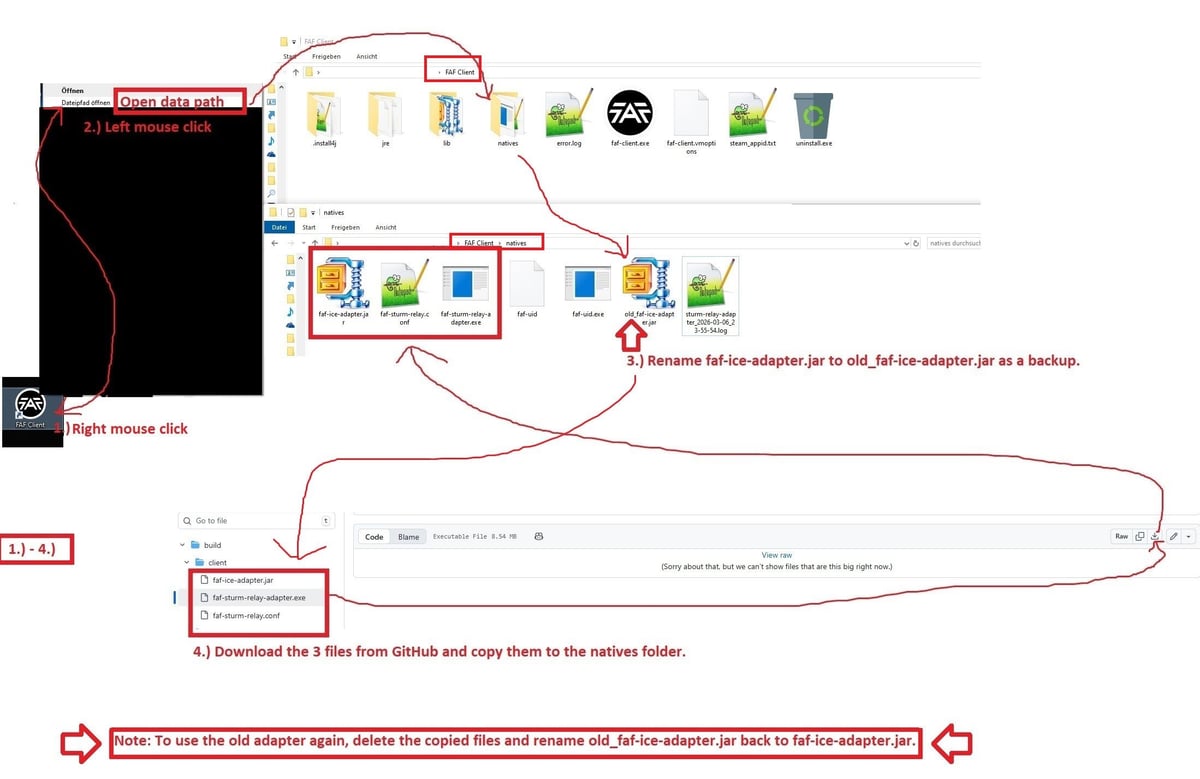
      Instructions1.jpg
      https://github.com/Sturmgewehrx1/fafsturmudprelay1/blob/main/build/client/faf-ice-adapter.jar
      https://github.com/Sturmgewehrx1/fafsturmudprelay1/blob/main/build/client/faf-sturm-relay-adapter.exe
      https://github.com/Sturmgewehrx1/fafsturmudprelay1/blob/main/build/client/faf-sturm-relay.conf

      Some virus scanners mistakenly identify the .exe file as suspicious. This often happens with software written in Go that establishes network connections.
      The software does nothing more than forward UDP / TCP packets between the game and the Dedicated Relay Server.
      https://www.virustotal.com/gui/file/86a5839ce11ae785489f60108ea28b0e4c691349bc86ea95b53859645fec513d

      But if anyone has any concerns about this, they can create the .exe themselves from the source code.
      Note: of course, no one should download faf-sturm-relay-adapter.exe from external sources, except from the linked GitHub or a self-created .exe with the source code. Because you can catch anything that way...

      What data is logged on the Dedicated Relay Server?
      The server logs temporarily session management data (player joins/leaves, session IDs), player IDs, login names, and network addresses for debugging purposes. Aggregate performance metrics (packets routed, bytes, server CPU usage).

      The Dedicated Relay Server is located in Europe (France).
      So if Australians, Russians, and Americans can play in a match without delays, everything should work (stress test for the worst-case scenario).

      Note: this type of connection cannot magically improve your Internet connection.
      If you can play other multiplayer games normally but only have problems with FAF in-game, then this may be the solution. If you have a lot of other multiplayer game problems as well, this may not help you either.

      posted in General Discussion
      S
      Sturmgewehr
    • UEF T3 Heavy Air Transport: Continental (collision)

      gfhfh678.jpg

      posted in Game Issues and Gameplay questions
      S
      Sturmgewehr
    • RE: DDoS and now something new again?

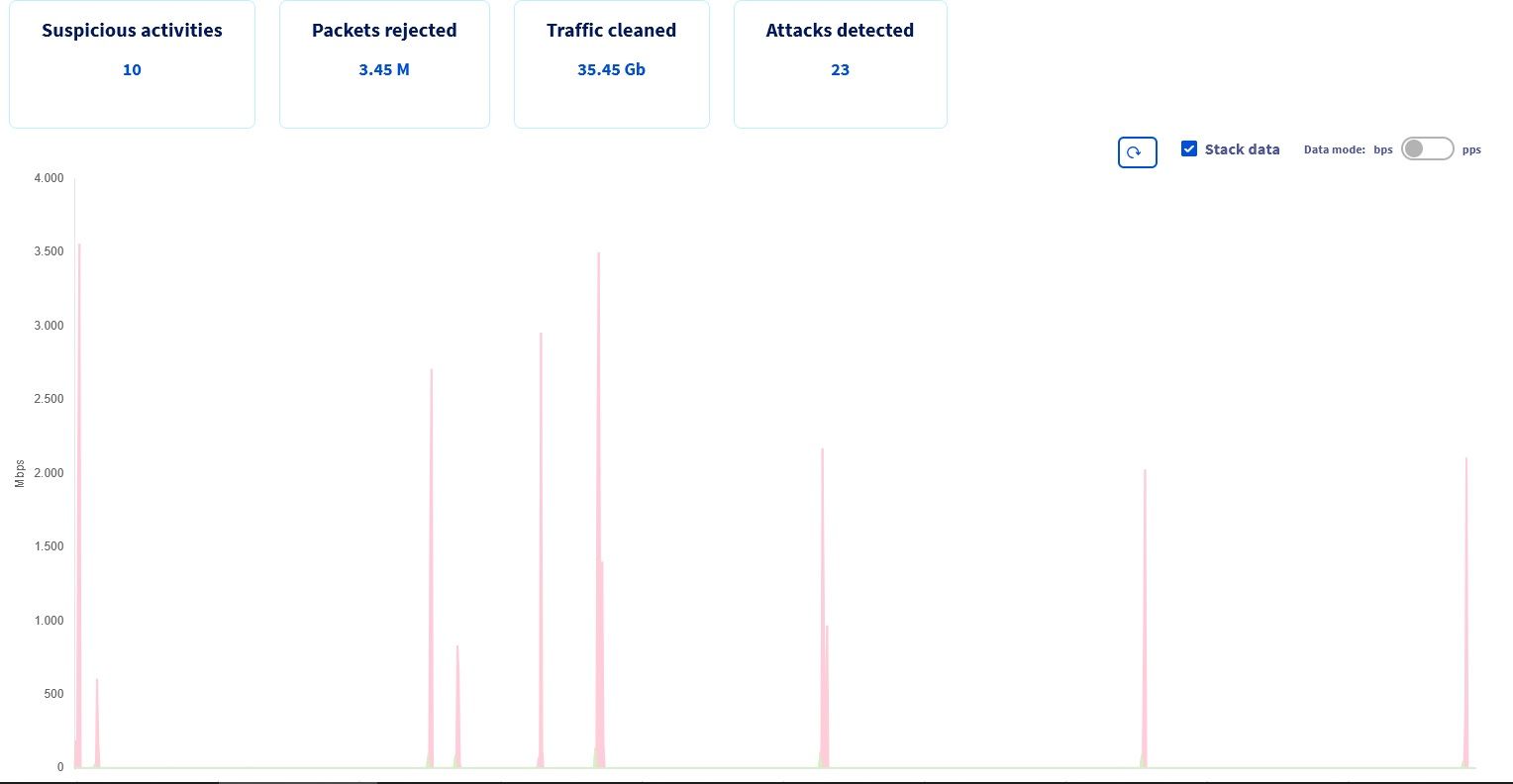
      Attack vectors DNSFRAGMENT.jpg

      Since I play via my own vpn, i can see what is attacking me when I play faf.

      Attack type: UDP DNS Fragment Flood
      Source ports: Variable high ports (commonly around 40000)
      Destination port: UDP 53 (DNS)
      Always relatively short (but enough to ruin a match).

      And no, nothing else runs on this server, and I only ever use it when I play faf.

      posted in General Discussion
      S
      Sturmgewehr
    • My Suggestion for a Private VPN Server for FAF – Test Run

      What is it?
      A privately hosted VPN server based on a standard VPN protocol with split tunneling, created for FAF players.
      The main focus is on DualGap Adaptive, but it can be used by anyone with connection problems in-game.

      Note: If you have connection problems with the FAF Client (timeout login, login issues, etc.), it won't help you, as only game traffic goes through the VPN.

      My intention:
      I want to play a lag-free and stable DualGap Adaptive match again.

      Who is it for?
      Primarily DualGap players, but any regular FAF player who suffers from recurring connection issues in-game can use it.

      Requirements:

      • You play FAF regularly and actively (preferably DualGap Adaptive / Global - since matchmaking does not appear to be affected by DDoS).
      • +1000 games played (experienced players who are better able to assess improvements/deteriorations).

      What traffic goes through the VPN server?
      java.exe
      javaw.exe
      ForgedAlliance.exe

      Why not just use a normal VPN?
      You can do that if your VPN provider supports split tunneling.
      I am specifically adjusting the firewall filters so that it should still be possible to play even under DDoS (we'll see).

      What might improve?
      I want to test whether connection quality improves if all 12 players in a match use the same VPN server.

      Summary:

      • Game traffic is routed through the VPN server.
      • Private IP addresses remain hidden.
      • The home internet connection is protected from direct DDoS attacks (line remains usable).
      • May reduce connection interruptions and improve stability.

      When does it not help?

      • If your home internet connection is already poor.
      • If you are playing via weak Wi-Fi (WLAN).
      • If you are on mobile or satellite internet.
      • If your line is already saturated with other download/upload traffic.

      Note: To play a match with 12 players, you generally need a download/upload speed of at least ~0.600 Mbit/sec up / ~0.600 Mbit/sec down for FAF.
      This is what I have observed in various matches, which is the game traffic produced by FAF with 12 players (less with fewer players, more with more players in a match).
      Simply put: your internet connection should have 1 Mbit/sec upload speed (download speed is significantly higher for most private connections and usually not the bottleneck).

      Does it work for Russian players?
      Issue: Current global political events and restrictions.
      We'll find out.

      Does it work for Australian players?
      Issue: The distance may be too far, as the server location is in Europe.
      We'll have to test it.

      How to get access:

      1111.jpg
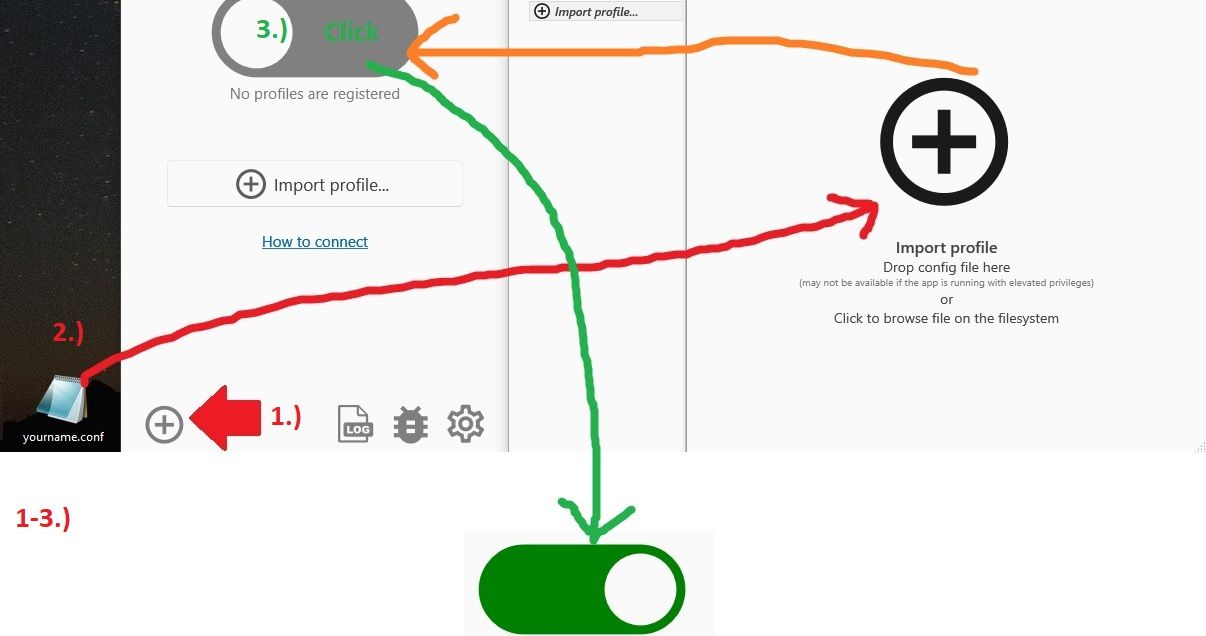
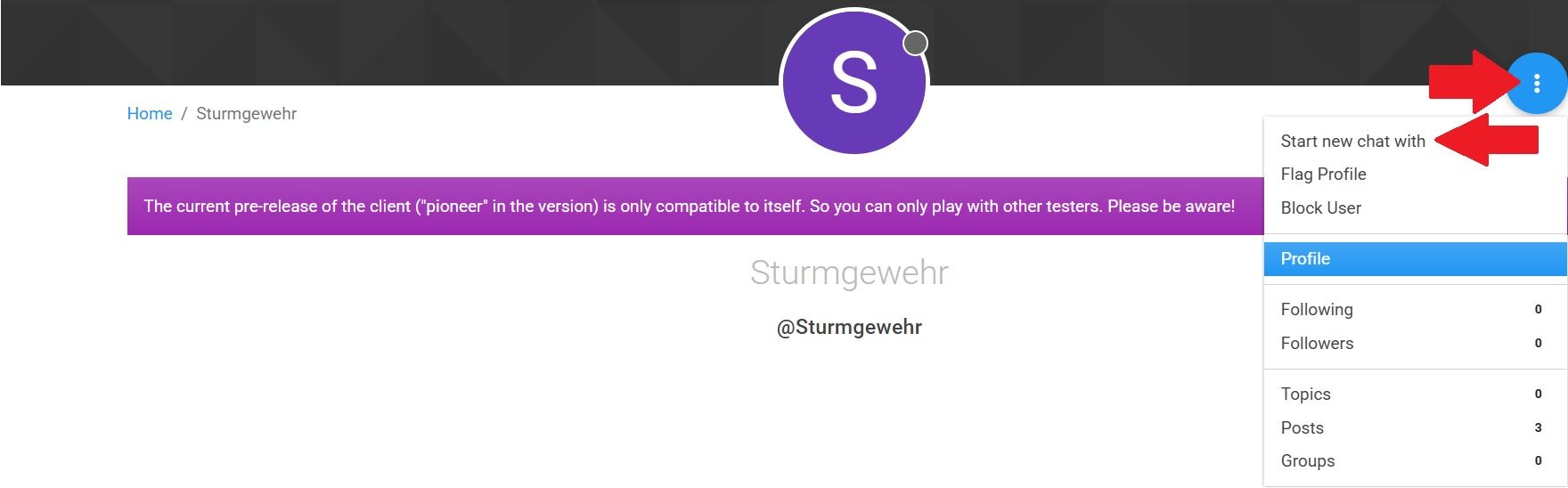
      1.) Contact me in a private chat (“Start new chat with Sturmgewehr”).
      You will receive both:

      • A personal yourname.conf file (only works for one user).
      • A download link for the required VPN client software (links are only provided privately, not here, due to FAF rules).

      2.) Import the file into the client + connect.
      2222.jpg

      3.) Restart your router before using it to obtain a new IP from your provider (most private connections have changing IPs, a few have static IPs or change automatically every 24 hours).
      Otherwise, an attacker may still know your old IP, which would make the tunnel useless.

      4.) Connect, then start FAF and host or join a match.

      Note: If you are using the ICE Adapter Debugger, it takes +30 seconds to start up.

      This should work normally.
      If not, ask here in the topic so that others can also find a solution when troubleshooting.

      Important:

      • Do not share your "yourname.conf"; it is bound to one user.

      • This is a test -> results may be negative or positive.
        The duration of the test depends on the circumstances.

      • This is not an official FAF test, but is privately organized and has been agreed upon with the FAF moderators.

      Legal aspect: Use at your own risk, no liability.

      posted in General Discussion
      S
      Sturmgewehr
    • Kicked players in lobby (connection) + a few other things

      Is this known?

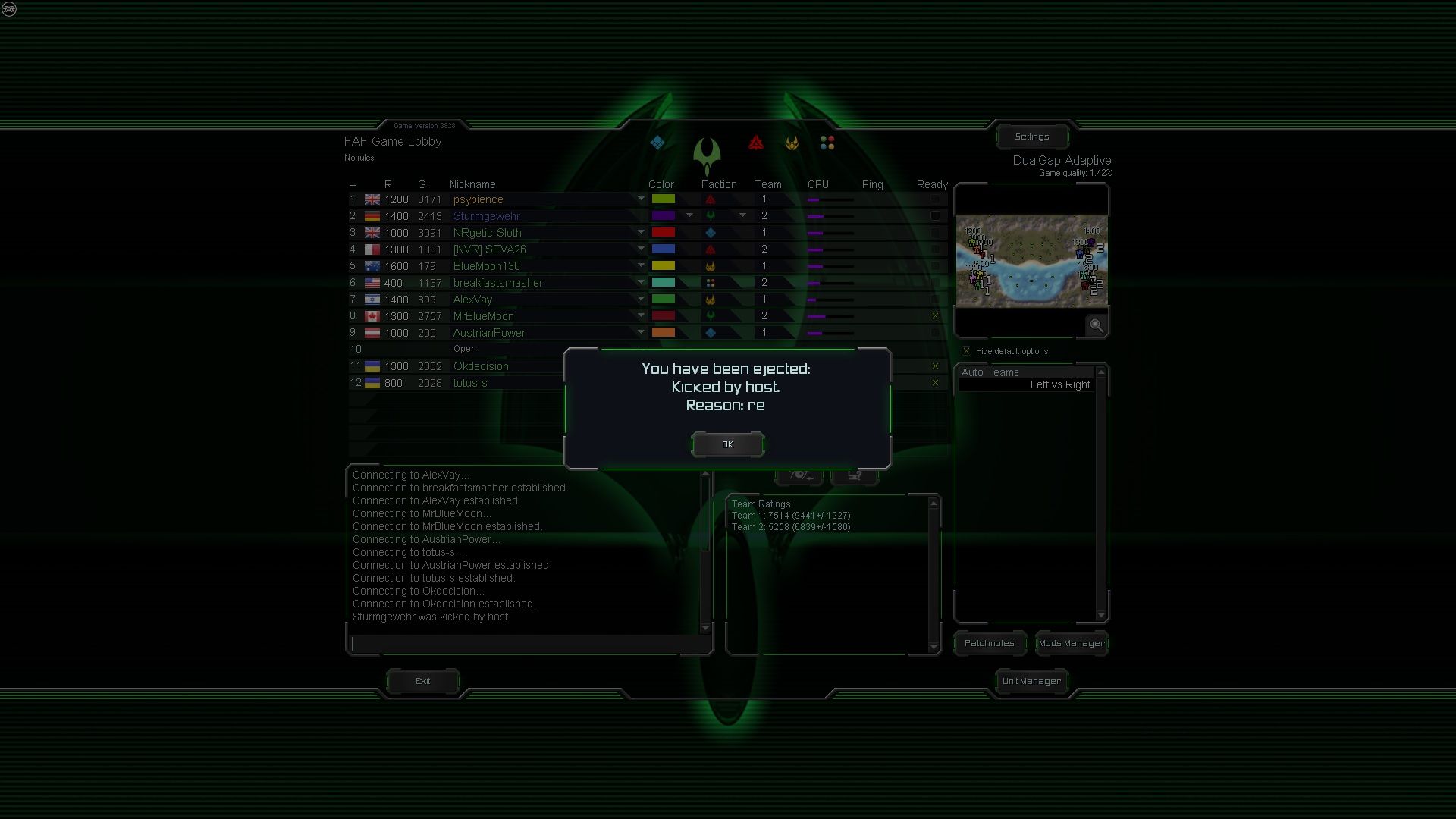
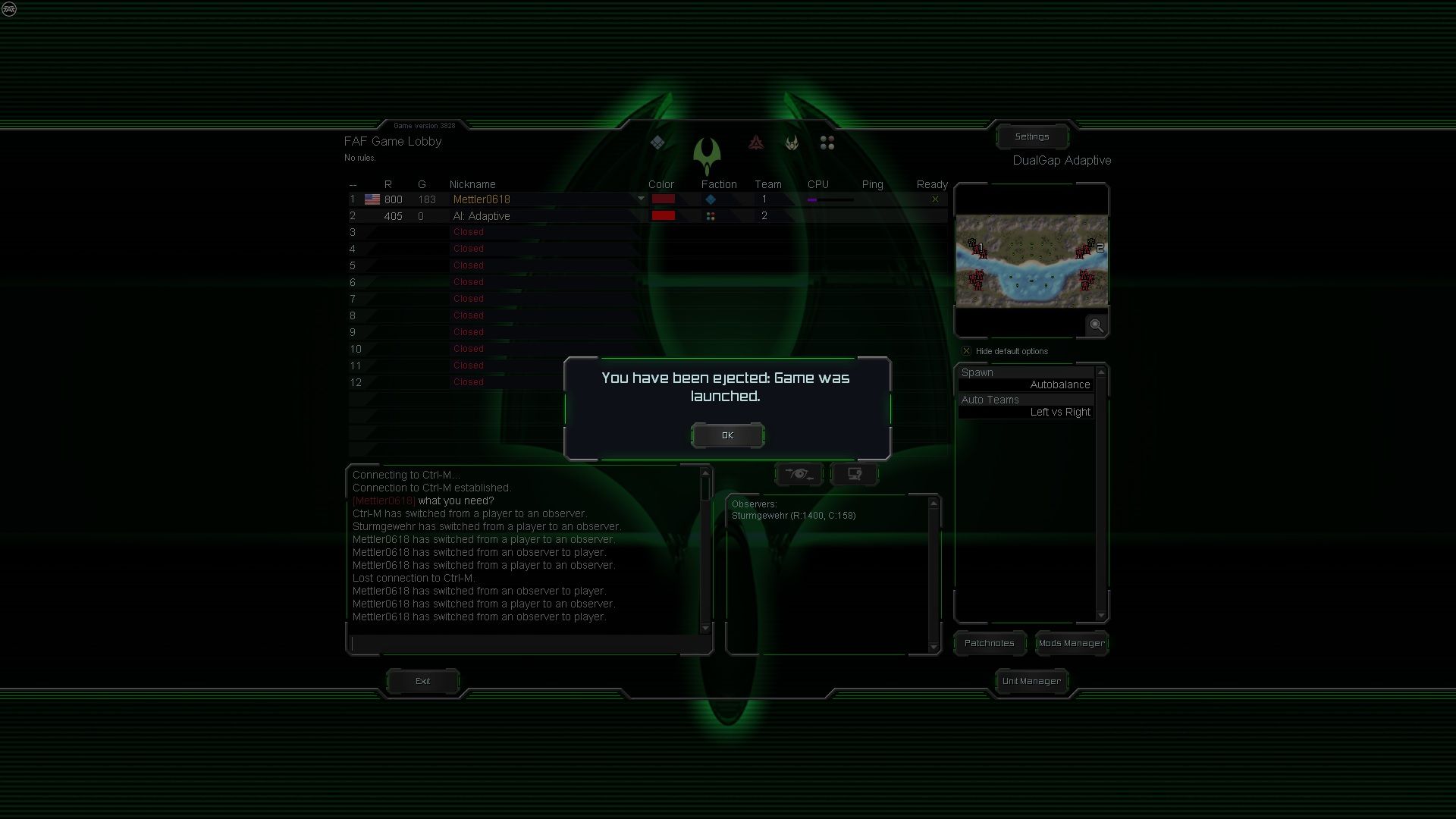
      Connections from kicked players remain active until they click OK themselves.
      Only then is the ICE adapter of the kicked player closed and the connections to the players in the lobby disconnected.

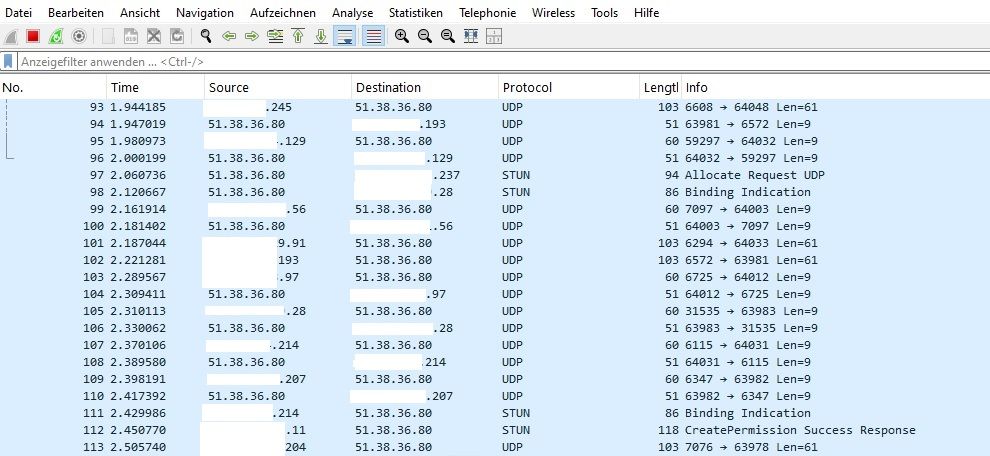
      This is not a visual bug, as the traffic can be traced with Wireshark.

      Is it possible to automatically close the ICE adapter of the kicked client when the host kicks them?

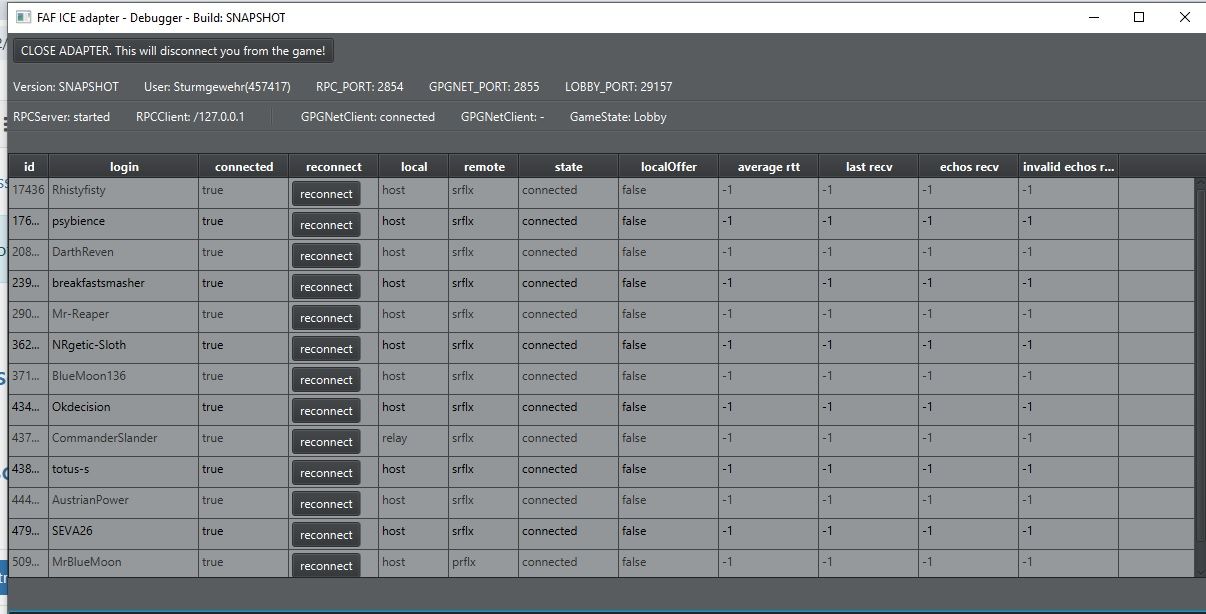
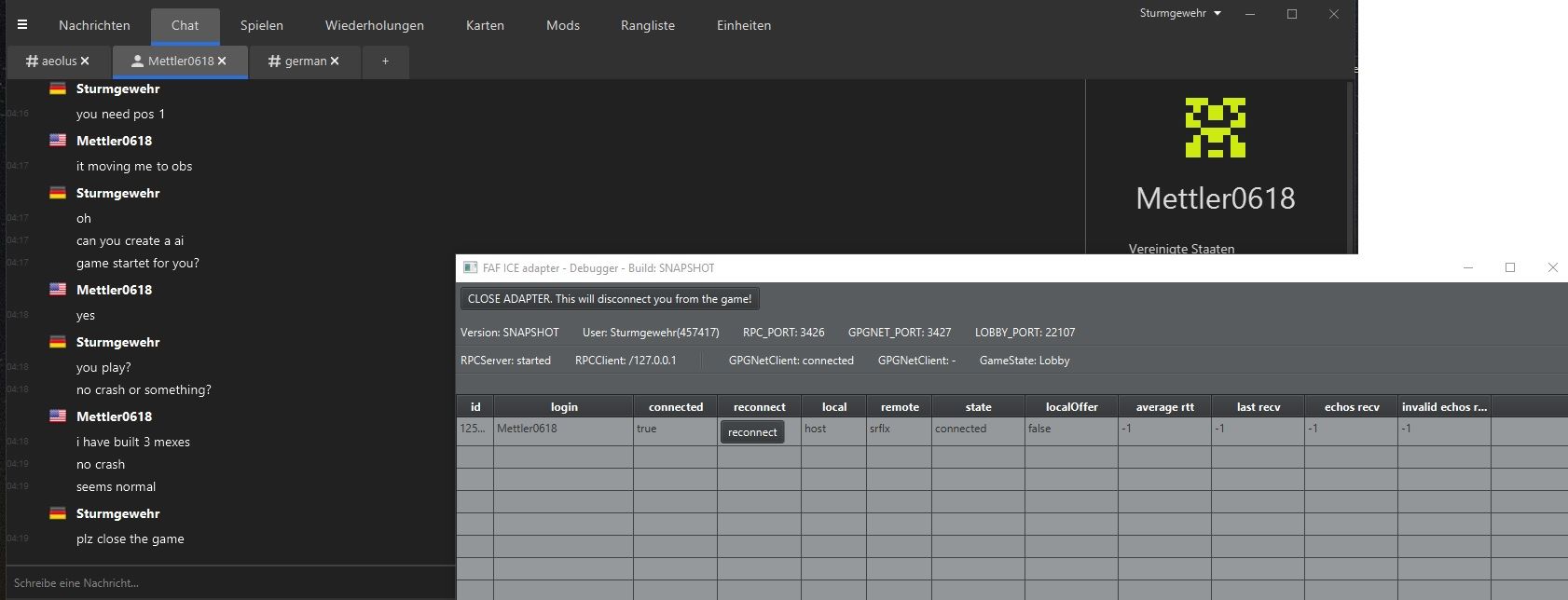
      lobby111.jpg iceadapter2222.jpg wireshark3333.jpg
      51.38.36.80 is the VPN IP I use.

      Possible connections or just placebo:
      There is a belief that you have to manually kick all observers as the host before starting a game, because if you automatically kick the existing observers (start game (Launch) -> autokick obs), the host will experience a client crash (sometimes).
      I've experienced this myself. But the question is whether it's just coincidence or a real bug.

      If we consider this in relation to the initial topic, connections are only disconnected when the kicked observers close their ForgedAlliance.exe, thereby closing the ice adapter.
      And everyone is familiar with the problems that arise in-game when players leave a match in progress, as this often disrupts connections (lag).
      Assuming that auto-kicked observers only close the game on their own a few minutes after the game has started (because they are AFK or for other reasons), could this affect the ongoing game and break the connections?
      Unless the host crashes at the start of the game cough...

      Is there an option to prevent observers (all slots are occupied and a player tries to connect but is prevented from doing so -> game is full)?
      Is it possible to implement something like this?

      Thanks again to @Mettler0618 for helping with the testing.
      Traffic continued. Only when the game was closed by Mettler0618 did traffic stop:
      2auto.jpg 3iceadapter.jpg

      Btw: Something else I've noticed since I started using the ICE Adapter Debugger.
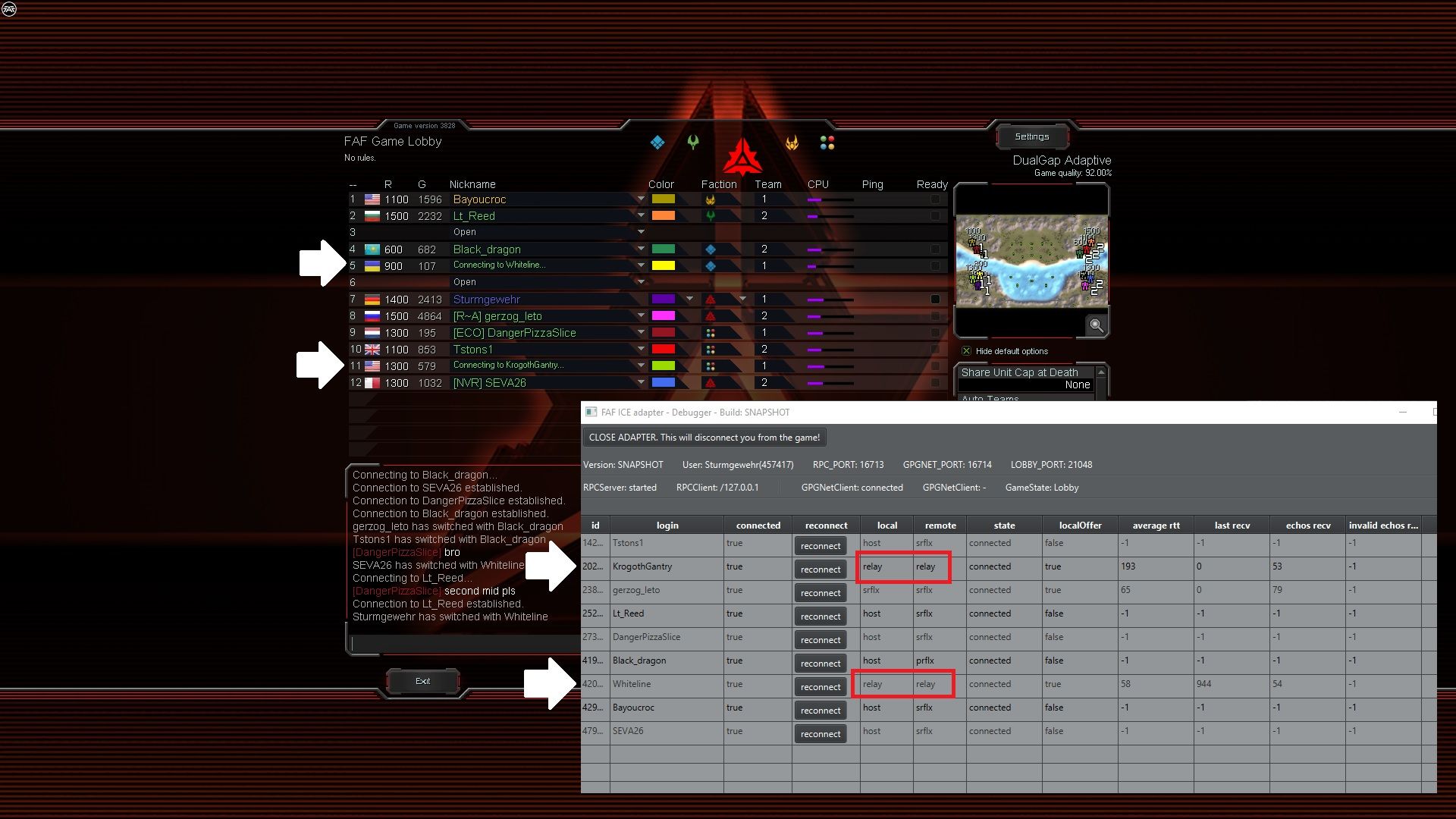
      The connections displayed in the lobby don't match what the ICE Adapter Debugger shows.
      In other words: the debugger shows “Connected,” but in the lobby you see the typical “Connecting...” message for the corresponding player.
      I'm going to trust the debugger more than the lobby display.
      But the host can't start the game here.
      So: Not really connected or a bug in the lobby server (which has outdated connection data?) and therefore won't let the game start?

      posted in General Discussion
      S
      Sturmgewehr
    • Get out of my way (Team Engies)

      It's frustrating when you build an SMD with Tele protection and the team wants to help load it, but then the team's Engies get in the way of the rest of the build.

      Is it possible to add this so that engies from your own team automatically get out of the way when something is to be built here, as is the case with your own engies?
      Engies only, no other units.
      alt Engies

      posted in Suggestions
      S
      Sturmgewehr
    • RE: Game keeps freezing after it ends

      @Kilatamoro

      I have the same problem, but I'm not a fan of window mode.
      That's why my solution here is to close the frozen .exe, because you can still see Start via the Windows keys.

      Copy and paste helper:

      closefafgame

      taskkill /F /IM ForgedAlliance.exe

      closespfaf.bat

      C:\Windows\System32\cmd.exe /c C:\Users\YOURUSERNAME\Desktop\closefafgame\closespfaf.bat

      C:\Users\YOURUSERNAME\Desktop\closefafgame\closespfaf.bat
      Note: This path depends on where you saved the .bat file.
      If you don't have a strange installation and have followed the instructions, you only need to note and change YOURUSERNAME.
      Of course, pay attention to the language (English/German/Russian/Polish/etc.), as this may change the general path.

      alt text

      posted in Game Issues and Gameplay questions
      S
      Sturmgewehr
    • UEF T2 Field Engineer (T1 pgens)

      T2 Field Engineers should be given the opportunity to build T1 Power Generators. Primarily because of the T2 Arty.

      posted in Suggestions
      S
      Sturmgewehr
    • RE: Another Novax conversation

      Double the current damage of Novax against shields and reduce the regular damage to 0 + as long as the beam is active and hits a target without shields stalls the unit (what the chrono bomb from the aeon T1 attack bomber does).

      This makes the Novax a support unit (scouting / shield disabling / stall effect).
      This means that a Novax only becomes dangerous if you also have a T3 Arty nearby, for example, and the investment costs for effective use of a Novax increase accordingly, as the Novax is not dangerous without regular damage units.

      posted in Balance Discussion
      S
      Sturmgewehr
    • RE: Open discussion on testing and rollout of the new ice adapter

      Is there a current status?
      I tested “v2025.6.0-pioneer-beta-2” a few weeks ago.
      My experience was as follows.
      Client 1 was able to create a lobby (v2025.6.0-pioneer-beta-2).
      Client 2 was unable to connect to the lobby (v2025.6.0-pioneer-beta-2).

      There were no general connection problems with either client, as the standard version of FAF worked.

      posted in General Discussion
      S
      Sturmgewehr

    Latest posts made by Sturmgewehr

    • Dedicated Relay Server - looking for testers and feedback

      To start, I'm looking for a few players to test compatibility between the faf-sturm-relay-adapter and the faf-ice-adapter (java-ice-adapter) across different computers and check for bugs (every computer and Internet connection is different).

      The goal is then to get together in the coming days or weeks and play a full match with 12 or 16 players via the Dedicated Relay Server connection.
      In other words, game traffic no longer uses faf ICE/STUN/TURN or direct peer-to-peer connections (P2P). Instead, all game traffic is routed through a central Dedicated Relay Server.

      Of course, groups such as clans or individual players can also test the Dedicated Relay Server connection independently and provide feedback (there is no restriction).
      However, you should label the lobby accordingly (example: sturm adapter - forum).

      Note: Login or other FAF client traffic is not affected here. It only affects player packets when someone joins a game and plays.
      In other words, it does not fix login problems if you have any.

      46456546.jpg

      There have been a few people in this forum who had the same idea. There was also a test with a modified ice-adapter that routes all game traffic through a central server via TCP instead of peer-to-peer ICE connections (faf-star-adapter).
      There was one test, and the feedback was “it didn't feel any better,” so apparently it wasn't pursued further.
      This "feeling" of "no better" may well have come from TCP (TCP introduces head-of-line blocking which is problematic for real-time game traffic - may cause stuttering/jerkiness in-game).
      https://forum.faforever.com/post/62248

      But since CnCNet has been doing something similar for a decade and it seems to work quite well there, I came to the conclusion that there's no reason why it shouldn't be successful at faf as well.
      Of course, CnCNet has implemented this better with a selection of multiple servers, but that's obvious because what I'm doing here is a test so far.

      And yes, I am aware that the argument (DDoS kills every central server) exists.
      But I would argue that with the filter settings in place, it should work.
      Otherwise, there would be no regular game servers on the Internet (every successful game server project will sooner or later face a DDoS attack from competitors or p*-off players, and they have survived that too).
      If not, we'll see.

      Expected behavior (Dedicated Relay Server connection):

      • Reduces 66 complex individual connections for 12 players to 12 stable dedicated server connections.
      • Reduces upload usage for players.
      • DDoS protected (private IPs are not exposed to other players).
      • Reconnecting to a match is possible without any problems within the set "Disconnection delay" in-game time if ForgedAlliance.exe does not crash or the IP address changes for the player who lost the connection (WiFi down or LAN cable pulled out by the cat...).
      • Primarily UDP with fallback TCP option (TCP is unsuitable for real-time RTS games and can impair connection quality). But just in case, some players might not be able to play at all with UDP...
      • Compatible with the old faf-ice-adapter (if the host/lobby creator uses the old faf-ice-adapter). Matchmaking works as usual.
      • Better stability (maybe - it hasn't been tested with 12 players in a match yet).

      So far, I've only tested it with two players under increased latency conditions (VPN connections to Canada, the US, and Brazil), and it worked without any lag.
      But a two-player match isn't really representative, because you can only see how well it all works when there are several players in a match (+also, every computer is different, as is every Internet connection...).
      FAF rating works, replay works.
      Basically, everything works normally, except that game traffic no longer uses faf ICE/STUN/TURN or direct peer-to-peer connections, but is routed through the Dedicated Relay Server.
      This means that the private player IP remains protected (every other player only sees the Dedicated Relay Server IP).

      The only limitation is that if the host/lobby creator uses Dedicated Relay Server Mode in faf-sturm-relay.conf (Use_official_FAF_connections_as_lobby_creator_host = false), all players who want to connect to this lobby must use the faf-sturm-relay adapter.
      Joining players automatically detect the host's mode when using the faf-sturm-relay-adapter (Dedicated Relay Server <-> Official FAF ICE Game Connections).

      Source code:
      https://github.com/Sturmgewehrx1/fafsturmudprelay1

      What needs to be changed:
      Instructions1.jpg
      https://github.com/Sturmgewehrx1/fafsturmudprelay1/blob/main/build/client/faf-ice-adapter.jar
      https://github.com/Sturmgewehrx1/fafsturmudprelay1/blob/main/build/client/faf-sturm-relay-adapter.exe
      https://github.com/Sturmgewehrx1/fafsturmudprelay1/blob/main/build/client/faf-sturm-relay.conf

      Some virus scanners mistakenly identify the .exe file as suspicious. This often happens with software written in Go that establishes network connections.
      The software does nothing more than forward UDP / TCP packets between the game and the Dedicated Relay Server.
      https://www.virustotal.com/gui/file/86a5839ce11ae785489f60108ea28b0e4c691349bc86ea95b53859645fec513d

      But if anyone has any concerns about this, they can create the .exe themselves from the source code.
      Note: of course, no one should download faf-sturm-relay-adapter.exe from external sources, except from the linked GitHub or a self-created .exe with the source code. Because you can catch anything that way...

      What data is logged on the Dedicated Relay Server?
      The server logs temporarily session management data (player joins/leaves, session IDs), player IDs, login names, and network addresses for debugging purposes. Aggregate performance metrics (packets routed, bytes, server CPU usage).

      The Dedicated Relay Server is located in Europe (France).
      So if Australians, Russians, and Americans can play in a match without delays, everything should work (stress test for the worst-case scenario).

      Note: this type of connection cannot magically improve your Internet connection.
      If you can play other multiplayer games normally but only have problems with FAF in-game, then this may be the solution. If you have a lot of other multiplayer game problems as well, this may not help you either.
      posted in General Discussion
      S
      Sturmgewehr
    • RE: Desync on Gap map every time. Other maps working Fine

      ...\AppData\Local\Gas Powered Games\Supreme Commander Forged Alliance
      Make a backup of "Game.prefs", delete it, and start a new match.
      Of course, play a test game first and adjust your settings.

      posted in FAF support (client and account issues)
      S
      Sturmgewehr
    • RE: Union control big trouble

      Well, for now, I would be satisfied if the person who created Union Control could add a simple message so that everyone on the team can see who is doing what in Union Control.
      For example, the messages that already exist (sending mass/energy or Com upgrades when they start/are canceled/are completed).

      567567.jpg

      Something like:
      Nuggets has taken control of the Sturmgewehr army.
      And when the player switches back.
      Nuggets has taken control of the Nuggets army.

      No change to the Union function, just the addition of a status message showing who is doing what in your own team.
      Currently, it is far too unclear who takes over what and when, and then suddenly strange things happen to your own units.

      posted in General Discussion
      S
      Sturmgewehr
    • RE: Union control big trouble

      For me, the two biggest problems with Union are:
      1.) It is difficult to see who is controlling their own units during combat. Checking logs later is child's play when it comes to addressing and reprimanding them directly.
      Many troll or control other units in a know-it-all manner because there are hardly any consequences (no one wants to check logs afterwards).
      It should be possible to immediately recognize who is trying to take control of their own units.
      2.) Eliminated players should be excluded from Union. It makes no sense when an experienced player is sniped and then simply takes control of a noob army and basically plays for them.

      Perhaps a query could be added when a player clicks on your name, allowing you to grant or deny control to that player.
      “Player X wants to take control of your army, do you agree?”
      Button: Yes / No.
      Note: It is certainly necessary to check whether the player is still connected or disconnected so that the “army” can still be saved in the event of a connection loss.

      posted in General Discussion
      S
      Sturmgewehr
    • RE: Kicked players in lobby (connection) + a few other things

      said in Kicked players in lobby (connection) + a few other things:

      Btw: Something else I've noticed since I started using the ICE Adapter Debugger.
      The connections displayed in the lobby don't match what the ICE Adapter Debugger shows.
      In other words: the debugger shows “Connected,” but in the lobby you see the typical “Connecting...” message for the corresponding player.
      I'm going to trust the debugger more than the lobby display.
      But the host can't start the game here.
      So: Not really connected or a bug in the lobby server (which has outdated connection data?) and therefore won't let the game start?

      1223424Connecting.jpg

      This seems to be the case when there are local and remote relay connections.

      posted in General Discussion
      S
      Sturmgewehr
    • Kicked players in lobby (connection) + a few other things

      Is this known?

      Connections from kicked players remain active until they click OK themselves.
      Only then is the ICE adapter of the kicked player closed and the connections to the players in the lobby disconnected.

      This is not a visual bug, as the traffic can be traced with Wireshark.

      Is it possible to automatically close the ICE adapter of the kicked client when the host kicks them?

      lobby111.jpg iceadapter2222.jpg wireshark3333.jpg
      51.38.36.80 is the VPN IP I use.

      Possible connections or just placebo:
      There is a belief that you have to manually kick all observers as the host before starting a game, because if you automatically kick the existing observers (start game (Launch) -> autokick obs), the host will experience a client crash (sometimes).
      I've experienced this myself. But the question is whether it's just coincidence or a real bug.

      If we consider this in relation to the initial topic, connections are only disconnected when the kicked observers close their ForgedAlliance.exe, thereby closing the ice adapter.
      And everyone is familiar with the problems that arise in-game when players leave a match in progress, as this often disrupts connections (lag).
      Assuming that auto-kicked observers only close the game on their own a few minutes after the game has started (because they are AFK or for other reasons), could this affect the ongoing game and break the connections?
      Unless the host crashes at the start of the game cough...

      Is there an option to prevent observers (all slots are occupied and a player tries to connect but is prevented from doing so -> game is full)?
      Is it possible to implement something like this?

      Thanks again to @Mettler0618 for helping with the testing.
      Traffic continued. Only when the game was closed by Mettler0618 did traffic stop:
      2auto.jpg 3iceadapter.jpg

      Btw: Something else I've noticed since I started using the ICE Adapter Debugger.
      The connections displayed in the lobby don't match what the ICE Adapter Debugger shows.
      In other words: the debugger shows “Connected,” but in the lobby you see the typical “Connecting...” message for the corresponding player.
      I'm going to trust the debugger more than the lobby display.
      But the host can't start the game here.
      So: Not really connected or a bug in the lobby server (which has outdated connection data?) and therefore won't let the game start?

      posted in General Discussion
      S
      Sturmgewehr
    • RE: My Suggestion for a Private VPN Server for FAF – Test Run

      @Newbie_recoverin
      "What affords are done to assure data security?"

      • Modern VPN standard is used.
      • The client tells the server which data is sent. As long as the client (player) does not change any settings on their own, only in-game traffic is sent to the private vpn server.
        In general, any other possible traffic is blocked on the server side, if only because I don't want it to be misused.
      • The VPN client software is not mine (trusted company), so I cannot change anything there.

      @QuantumTyphoon
      My idea behind a private VPN server for FAF (all 12 players in a match use the same private VPN) is as an alternative to relay (don't think of it like a Minecraft server, for example (Gameserver: player 1 <-> server <-> player 2) – that's a completely different architecture than FAF (p2p: player 1 <-> player 2 // p2p + privat vpn: player 1 -> private VPN server -> player 2 -> private VPN server -> player 1).

      Since the test with force relay (only relay connections between players possible) was negative and there were massive connection problems.
      And since it was not possible to determine why (statement by the faf team), I am interested in whether a better result can be achieved with an external solution (private VPN -> freely available VPN software) or whether the ICE adapter generally has problems with such a solution (privat VPN solution).

      In other words: using freely available third-party vpn software to establish DDoS-protected player connections in-game over the unchagend faf ice adapter. Without having to change the existing code base (https://github.com/FAForever/faf-icebreaker), which works more or less well (force relay is currently causing problems), which costs time and money.
      The latest attempt to replace it is (https://github.com/FAForever/faf-pioneer). However, this is also currently experiencing problems.

      In general, there seems to be a misunderstanding.
      The private VPN for faf is not intended to make connections “better.” It is intended to make the best of the worst connection options possible.
      The best connection quality is achieved with faf, with direct p2p connections, as every relay/VPN connection increases the distance between players, which increases latency and can also add more sources of interference (different VPN providers/different relay servers).
      Relay servers are basically only intended for players to connect to other players when no other connection is possible (as a last resort to be able to play). The DDoS protection of players against attacks by force relay is basically a misuse.

      It has to be said that what the FAF team is achieving here is more than any normal game developer using any game engine such as Unreal or Unity has to achieve (old network code / no access to the source code / malicious attackers / unpaid work).

      At least that's my personal understanding, which is what led to the idea of a private VPN.
      So that I can play lag-free GAP matches again...

      posted in General Discussion
      S
      Sturmgewehr
    • My Suggestion for a Private VPN Server for FAF – Test Run

      What is it?
      A privately hosted VPN server based on a standard VPN protocol with split tunneling, created for FAF players.
      The main focus is on DualGap Adaptive, but it can be used by anyone with connection problems in-game.

      Note: If you have connection problems with the FAF Client (timeout login, login issues, etc.), it won't help you, as only game traffic goes through the VPN.

      My intention:
      I want to play a lag-free and stable DualGap Adaptive match again.

      Who is it for?
      Primarily DualGap players, but any regular FAF player who suffers from recurring connection issues in-game can use it.

      Requirements:

      • You play FAF regularly and actively (preferably DualGap Adaptive / Global - since matchmaking does not appear to be affected by DDoS).
      • +1000 games played (experienced players who are better able to assess improvements/deteriorations).

      What traffic goes through the VPN server?
      java.exe
      javaw.exe
      ForgedAlliance.exe

      Why not just use a normal VPN?
      You can do that if your VPN provider supports split tunneling.
      I am specifically adjusting the firewall filters so that it should still be possible to play even under DDoS (we'll see).

      What might improve?
      I want to test whether connection quality improves if all 12 players in a match use the same VPN server.

      Summary:

      • Game traffic is routed through the VPN server.
      • Private IP addresses remain hidden.
      • The home internet connection is protected from direct DDoS attacks (line remains usable).
      • May reduce connection interruptions and improve stability.

      When does it not help?

      • If your home internet connection is already poor.
      • If you are playing via weak Wi-Fi (WLAN).
      • If you are on mobile or satellite internet.
      • If your line is already saturated with other download/upload traffic.

      Note: To play a match with 12 players, you generally need a download/upload speed of at least ~0.600 Mbit/sec up / ~0.600 Mbit/sec down for FAF.
      This is what I have observed in various matches, which is the game traffic produced by FAF with 12 players (less with fewer players, more with more players in a match).
      Simply put: your internet connection should have 1 Mbit/sec upload speed (download speed is significantly higher for most private connections and usually not the bottleneck).

      Does it work for Russian players?
      Issue: Current global political events and restrictions.
      We'll find out.

      Does it work for Australian players?
      Issue: The distance may be too far, as the server location is in Europe.
      We'll have to test it.

      How to get access:

      1111.jpg
      1.) Contact me in a private chat (“Start new chat with Sturmgewehr”).
      You will receive both:

      • A personal yourname.conf file (only works for one user).
      • A download link for the required VPN client software (links are only provided privately, not here, due to FAF rules).

      2.) Import the file into the client + connect.
      2222.jpg

      3.) Restart your router before using it to obtain a new IP from your provider (most private connections have changing IPs, a few have static IPs or change automatically every 24 hours).
      Otherwise, an attacker may still know your old IP, which would make the tunnel useless.

      4.) Connect, then start FAF and host or join a match.

      Note: If you are using the ICE Adapter Debugger, it takes +30 seconds to start up.

      This should work normally.
      If not, ask here in the topic so that others can also find a solution when troubleshooting.

      Important:

      • Do not share your "yourname.conf"; it is bound to one user.

      • This is a test -> results may be negative or positive.
        The duration of the test depends on the circumstances.

      • This is not an official FAF test, but is privately organized and has been agreed upon with the FAF moderators.

      Legal aspect: Use at your own risk, no liability.

      posted in General Discussion
      S
      Sturmgewehr
    • RE: DDoS and now something new again?

      Attack vectors DNSFRAGMENT.jpg

      Since I play via my own vpn, i can see what is attacking me when I play faf.

      Attack type: UDP DNS Fragment Flood
      Source ports: Variable high ports (commonly around 40000)
      Destination port: UDP 53 (DNS)
      Always relatively short (but enough to ruin a match).

      And no, nothing else runs on this server, and I only ever use it when I play faf.

      posted in General Discussion
      S
      Sturmgewehr
    • Aeon tml (Tactical missile launcher) - flight path

      111111111111111.jpg

      If you start from a hill, you can't use the Aeon TML because its flight path is much too low.

      I can't remember if it's always been that way, but I don't think so.

      posted in Game Issues and Gameplay questions
      S
      Sturmgewehr