FAF cannot be installed
-
Hi, a friend has been trying to install FAF but something strange happens.
The FAF client installs and opens fine, but when pressing “Log In” it does nothing.
When looking in the installed files we saw that in C:\ProgramData\FAForever there are not the necessary files.Any idea what might be going on?
The FAF installer says “Installed successfully”.
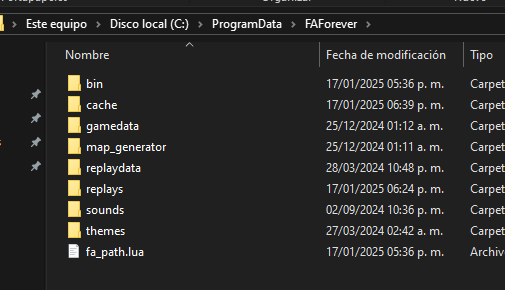
I have checked my friend's PC and we have already uninstalled all antiviruses.My C:\ProgramData\FAForever:
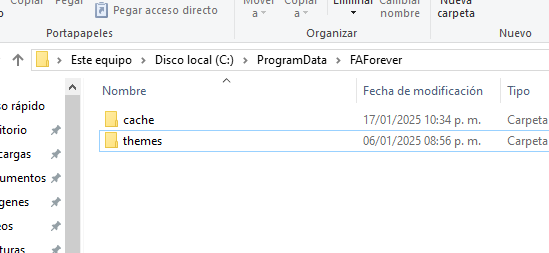
Friend's:
-
My friend sent me an error message:
Client Version: 2025.1.0
java.io.IOException: Cannot run program "C:\ProgramData\FAForever\bin\ForgedAlliance.exe" (in directory "C:\ProgramData\FAForever\bin"): CreateProcess error=2, The system cannot find the specified file
at java.base/java.lang.ProcessBuilder.start(ProcessBuilder.java:1170)
at java.base/java.lang.ProcessBuilder.start(ProcessBuilder.java:1089)
at com.faforever.client.fa.ForgedAllianceLaunchService.launch(ForgedAllianceLaunchService.java:161)
at com.faforever.client.fa.ForgedAllianceLaunchService.launchOfflineGame(ForgedAllianceLaunchService.java:49)
at com.faforever.client.game.GameRunner.lambda$startOffline$35(GameRunner.java:552)
at java.base/java.util.concurrent.CompletableFuture$AsyncSupply.run(CompletableFuture.java:1768)
at java.base/java.util.concurrent.CompletableFuture$AsyncSupply.exec(CompletableFuture.java:1760)
at java.base/java.util.concurrent.ForkJoinTask.doExec(ForkJoinTask.java:387)
at java.base/java.util.concurrent.ForkJoinPool$WorkQueue.topLevelExec(ForkJoinPool.java:1312)
at java.base/java.util.concurrent.ForkJoinPool.scan(ForkJoinPool.java:1843)
at java.base/java.util.concurrent.ForkJoinPool.runWorker(ForkJoinPool.java:1808)
at java.base/java.util.concurrent.ForkJoinWorkerThread.run(ForkJoinWorkerThread.java:188)
Caused by: java.io.IOException: CreateProcess error=2, The system cannot find the specified file
at java.base/java.lang.ProcessImpl.create(Native Method)
at java.base/java.lang.ProcessImpl.<init>(ProcessImpl.java:500)
at java.base/java.lang.ProcessImpl.start(ProcessImpl.java:159)
at java.base/java.lang.ProcessBuilder.start(ProcessBuilder.java:1126) -
- Can he start the game via GOG/Steam at least?
- Have you set the correct game path in the FAF client for SC?
- Afterwards, can you start SC via FAF?
-
- Yes
- i don't see any option for this, only the login window opens, no option for changing game path
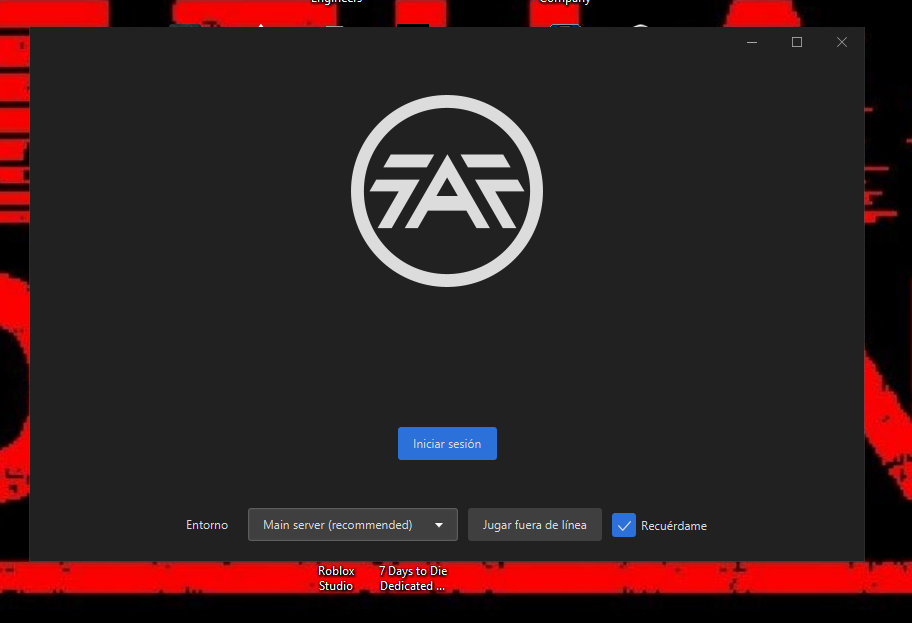
- Nope, the blue button does nothing
-
Attach the client.log as a file, please
%USERPROFILE%/AppData\Roaming\Forged Alliance Forever\logs -
Thanks for your report @SplashGG
Please tell your friend to enable dark mode on windows.
-
Hello, just installed the game again since it was on sale on steam this weekend. Launched the game, created a profile and a skirmish, quit, installed FAF.
There are no fields to enter my login and password, also no option regarding the game install folder.
Dods someone has a fix for this ?
Running Windows 10 latest update -
Are you correctly using the launcher?
You can join the discord for some faster responses to your questions."Design is an iterative process. The required number of iterations is one more than the number you have currently done. This is true at any point in time."
See all my projects:

-
This post is deleted! -
@IndexLibrorum Hi, thanks for the reply but could you be more specific by "correctly using" ?
Installation process : next next next all in default location, finish.
When I double clic the desktop shortcut I get the very same image from OP.
A screen with a few buttons bu nothing happens when clicking "connection" (blue button) and no fileds to enter my username or password.
Will try discord, thx for the tip. -
@GuiGuiSch I see, that's strange: clicking the button should open up a browser window, where you'll login on the login website. That'll then communicate that login to the launcher automatically.
Check if there's any reason why your internet browser might not be opening.
-
@IndexLibrorum Hi, it definitely was the browser.
Cleaned everything (unistall faf and sc:fa), deleted folder is user and roaming, changed defaunt browser to chrome, reboot, reinstall sc:fa, launch a skirmish, install faf -> done



Hello! It looks like you're interested in this conversation, but you don't have an account yet.
Getting fed up of having to scroll through the same posts each visit? When you register for an account, you'll always come back to exactly where you were before, and choose to be notified of new replies (either via email, or push notification). You'll also be able to save bookmarks and upvote posts to show your appreciation to other community members.
With your input, this post could be even better 💗
Register Login