Problem with moving to the next step in cooperative missions. desynchronization.
-
I'm playing co-op missions. Red Flag, Meltdown, and when one task is supposed to end and another begins, it shows that my allies are slightly out of sync. We're playing, but progress isn't moving. What to do? Maybe it's because we completed the second task too quickly after the first one and broke the script?
-
It sends a notification that there is a synchronization error with several players. At the same time, we are playing, but the progress is not moving (we are not moving to a new stage of the mission, and the map is not expanding), and after a while (10 minutes) they are kicked out.
-
 D Deribus moved this topic from FAF support (client and account issues) on
-
Please attach logs
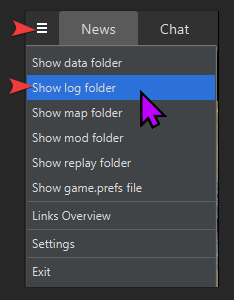
-
@Deribus [game_27363124.log](Invalid MIME type)
-
-
If you haven't already done so, I'd suggest that you & the others you play with download the missions you're going to play from the #getting-started channel of the Co-Op/Campaign Development Discord to ensure that you're running the most up-to-date mission files as I know there's ongoing issues getting them updated in the client & GitHub. After downloading the mission you're going to play, follow these steps to get the game going with the correct mission map.
If you have further issues, then the best way to get help with a co-op/campaign mission would be to get your most recent game log & post in the #bug-reporting-general channel of that discord.

Hello! It looks like you're interested in this conversation, but you don't have an account yet.
Getting fed up of having to scroll through the same posts each visit? When you register for an account, you'll always come back to exactly where you were before, and choose to be notified of new replies (either via email, or push notification). You'll also be able to save bookmarks and upvote posts to show your appreciation to other community members.
With your input, this post could be even better 💗
Register Login