Black Screen with mod v6 'Advanced Target Priorities EVO'
-
The gamePrefs is ok, yes it's advancedpriotities (without the r). It's easier for the dev to find in the gameprefs. it's native code of the old 1.1.
here is the code that fails :
-- check the serapate targeting window position
local separateWindow = import("/lua/ui/game/orders.lua").GetSeparateWindow()
local tableRez = mysplit(Prefs.GetFromCurrentProfile('options').primary_adapter,',')
if (prioritySettingsPrefs.posX > tonumber(tableRez[1])-207) or
   (prioritySettingsPrefs.posY > tonumber(tableRez[2])-145) then
        separateWindow.Left:Set(DefaultPosX)
        separateWindow.Top:Set(DefaultPosY)
        prioritySettingsPrefs.posX = DefaultPosX
        prioritySettingsPrefs.posY = DefaultPosY
        Prefs.SetToCurrentProfile("AdvancedPriotities", prioritySettingsPrefs)
        Prefs.SavePreferences()
        resetPosition = true
end
the condition is line 802 where the bug occurs.
but i m pretty sure it s due to resolution and coordinate retrieved from
Prefs.GetFromCurrentProfile('options').primary_adapterit put the resolution 2560x1440 to a table, and i check the x and y position of the window.
This code is designed to prevent out of range position.I don't reproduce this bug (i use a single monitor). the dual monitor may have an impact on how the resolution is retrieved by the game.
Does it take the resolution of the game ? or the windows system ? that's the key i think.Be sure i m investigating this. I have a laptop with a dual screen (not the computer i run Faf), i m going to install faf on it and check how it works in debug. i must reproduce.
-
I just tried with the same configuration, dual screen, 1 ON 2 ON, 1080p on both, the 1 up, 2 down. dual screen disabled in FA
I have zero issue, even with dual screen activated in FACan you have a try by switching off your second screen ? and put the code in comment to disable it ? (modules/settings.lua)
Is there other guy who experiment the same bug ?
Does it work well for you ?Thanks for your help, it s a weird bug.
-
V8 has been tested under dual screen conditions, and the display mod is normal regardless of left-right, and up-down.
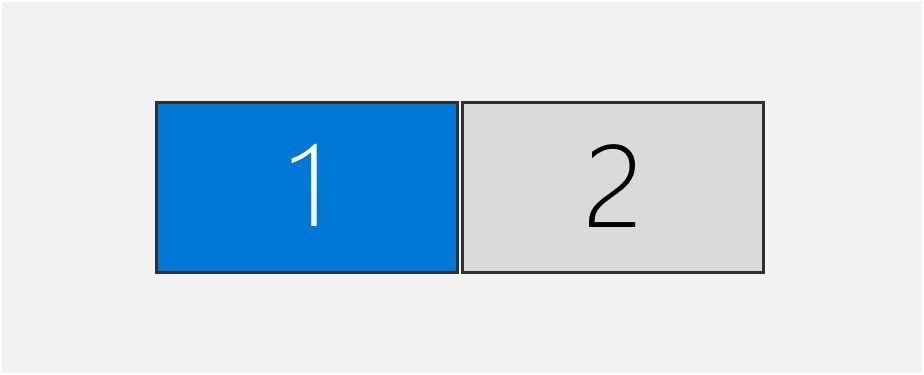
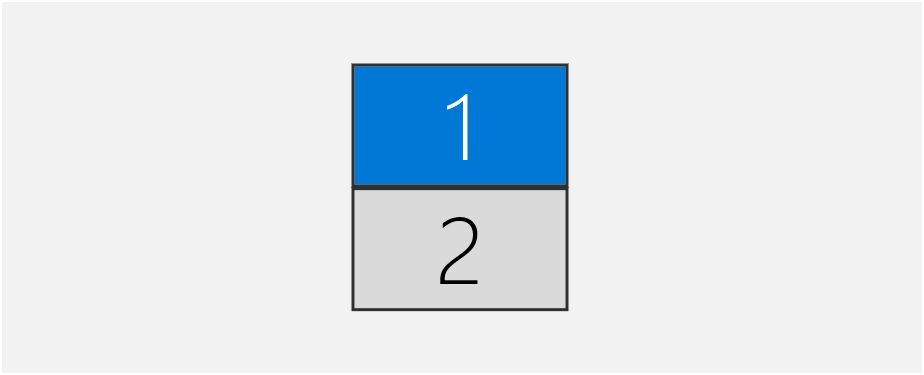
Conclusion for reference:
- It seems that only the main screen has a UI toolbar
- It is recommended to set your preferred screen as the main screen in the system settings before playing the game; The relative position of the screen doesn't matter, just adjust it according to personal habits.
-
Only main screen have UI toolbar yes, it s the native behavior.
So Nomads, you don't have issue if i understand well. -
yes,thank you.
-
i don t like this kind of bug, because something is wrong somewhere, maybe in the adapter code of the engine itself.. i don't know.
But i would like to find a way to prevent this. It should not be. -
About multi monitors,I think it may not be a problem with your mod, but rather with the player's hardware configuration and system settings.At present, I feel that everything is ok while using version 8.
-
it seems the adapter code is weak.
I tried with very low resolution and 200% scaling, the lobby is broken. i must delete the gameprefs to recover a good display even in FAF lobby.i switched the 2nd monitor to primary. It works in that mode too.
-
magge, what scaling do you use ?
-
magge, you can backup your GamePrefs files and delete it to force the game to create a new one from scratch and try again.
-
in your gamePrefs :
            primary_adapter = '2560,1440,60',
            SSB2_Auto_Toggle_Mass_Column = true,
            SSB2_MessageWhen_SharingUnits = true,
            SSB2_MessageWhen_SharingEngy = false,
            secondary_adapter = 'disabled',
maybe your primary-adapter is disabled, and all the good values are on the second adapter.
It could explain why it return nil when i check the primary_adapter. Normally is it not possible by logic, but your may have an old GamePrefs with values that should not be. It depends on how the game detects your screens and how it decides what is primary for itself, and paint the UI on.if it s due to that, i can fix it but it s not a normal situation or i did not understood how the engine works with adapters.
Reseting the gameprefs may be the solution for this strange behavior. -
I can pinpoint my issue to the state of the in-game window.
If it is set to 'windowed' (does not matter which resolution) the bottom build panel does not show up.
As soon I switch to full screen (again, does not matter which resolution, even 800*600 works now) the build panel shows up. I do not even have to restart SC to reproduce that.
Is it possible to fix that behaviour?
-
primary_adaptor is "windowed".
i can reproduce. Well i m going tomorrow to find a workaround to the fact that i can't retrieve the window width and height in windowed mode.
So actually the mod does not support the windowed mode.I think there is a solution. The adapter does not provide any data, not that way, but the maths works with the native panels so.... i will investigate.
Thanks for the report.
-
ok. i found a way to retrieve the right/bottom position of the window, in windowed mode.
So i get ride of the adapter logic and write something new that would be compatible in both mode.
I m not sure there is a window resize handle event. but it works by selecting a unit. But this is not the right event for that.[EDIT] got it !
local UIMain = import("/lua/ui/uimain.lua")
UIMain.OnApplicationResize= function(head, width, height)This should be fixed so.
-
Thanks for the effort, appreciated. Looking forward to using the mod.
-
I just got the solution

-

Hello! It looks like you're interested in this conversation, but you don't have an account yet.
Getting fed up of having to scroll through the same posts each visit? When you register for an account, you'll always come back to exactly where you were before, and choose to be notified of new replies (either via email, or push notification). You'll also be able to save bookmarks and upvote posts to show your appreciation to other community members.
With your input, this post could be even better 💗
Register Login