FAF/SCFA Replay Parser Library
-
For the web app written by @PattogoTehen see https://fafafaf.github.io
Intro
Some time ago I started working on a replay parser library for FAF/SCFA replays, and now it's gotten to the point where I think it deserves a forum post.
This project started as my own rewrite of a Parser library written by @dragonite and quickly evolved to include a more versatile replay inspection tool. I think this tool can be useful for many people in the FAF community who want to understand the replay format and what information is/isn't available in a replay. I hope that by sharing it, we can figure out the last few unknowns about the replay format, and that people will be empowered to explore new ways of extracting useful data from FAF replays. I have been impressed by the work that @teolicy has done on this front so far (hopefully he will make a post about his work soon).
So what the heck does this tool do? Read on to find out...
Quick Reference
- Install for Windows/Mac/Linux:
cargo install faf-replay-parser --features=cli - Download for Linux only from GitLab CI: https://gitlab.com/Askaholic/faf-replay-parser/-/jobs/8901869924/artifacts/raw/target/release/fafreplay
Command Line Interface
The tool currently has 3 functions:
- Unpack compressed
fafreplayfiles intoscfareplayfiles. - Show basic info about the replay. Mostly constrained to the replay header.
- Show the replay command stream.
Unpack
I expect this to be the most widely useful feature of the tool, as a lot of other software that can parse replays only knows about the
scfareplayformat. The tool can handle the newest version of thefafreplayformat as of release 0.5.0. Unpacking is very simple:$ fafreplay unpack 9000556.fafreplay Extracting... Done Writing 9000556.scfareplay Wrote 12314246 bytesNote that you do not need to unpack replays before using them with the other features of this tool. Files ending in
.fafreplaywill be converted in memory automatically.Info
The info subcommand displays the sort of stuff you would expect to see for instance on the vault page. Stuff like the name of the map, the name of the players and what mods were used. It can also be configured to go into more detail with certain flags enabled.
$ fafreplay info 14210327.fafreplay
processing replay: 14210327.fafreplay

14210327.fafreplay
Supreme Commander v1.50.3719 Replay v1.9

Operation Trident (00:25:40)
    Operation Trident

Mods
    Resource Rich v1

Team 1
    Civilians (AI) UEF
    Melanol (0) Cybran
With additional info enabled:
$ fafreplay info --mods --options 14210327.fafreplay
processing replay: 14210327.fafreplay

14210327.fafreplay
Supreme Commander v1.50.3719 Replay v1.9

Operation Trident (00:25:40)
    Operation Trident

Options
    Victory: sandbox
    Share: FullShare
    Score: yes
    Unit Cap: 1000
    No Rush: Off
    Game Speed: adjustable
    CheatsEnabled: false

Mods
    Resource Rich v1
        Increases resource production. (X2)
        Author: Gas Powered Games
        Copyright: Copyright � 2006, Gas Powered Games
        UID: 74A9EAB2-E851-11DB-A1F1-F2C755D89593
        URL: http://www.gaspoweredgames.com
        Location: /mods/resourcerich

Team 1
    Civilians (AI) UEF
    Melanol (0) Cybran
Note that this subcommand doesn't show every bit of information available in the replay header. It aims to provide more of a summary of the most relevant information.
Command stream
Here is where things get really interesting, although it requires a lot more work to extract useful information. The commands subcommand lets you explore the meat of the replay file.
By default only a small subset of commands are parsed as these are the most useful:
$ fafreplay commands 9000556.scfareplay --limit 10
processing replay: 9000556.scfareplay
Supreme Commander v1.50.3701 Replay v1.9

├── SetCommandSource { id: 0 }
├── VerifyChecksum { digest: a8377a57463c1191e0ae3447028f6d02, tick: 0 }
├── Advance { ticks: 1 }
├── Advance { ticks: 1 }
├── Advance { ticks: 1 }
├── Advance { ticks: 1 }
├── Advance { ticks: 1 }
├── Advance { ticks: 1 }
├── Advance { ticks: 1 }
├── Advance { ticks: 1 }

Total commands parsed: 10
However, you can select exactly the command types you are interested in with the
--commandsflag. For a list of all available commands run:$ fafreplay commands --helpThere are also a few options for printing additional information such as the offset of the command in the file (useful when paired with a hex editor) and the in game time at which the command happened.
For example to select only two specific commands and print additional info:
$ fafreplay commands 9000556.scfareplay --time --offset --commands IssueCommand --commands ProcessInfoPair --limit 1000
processing replay: 9000556.scfareplay
Supreme Commander v1.50.3701 Replay v1.9

Time option used without including Advance commands, Advance will be parsed implicitly

0x000042c0 00:00:00 ├── ProcessInfoPair { unit: 0, arg1: "CustomName", arg2: "king_shrike" }
0x0000cc6a 00:00:06 ├── ProcessInfoPair { unit: 1, arg1: "SetFireState", arg2: "HoldGround" }
0x0000cc89 00:00:06 ├── ProcessInfoPair { unit: 0, arg1: "SetFireState", arg2: "HoldGround" }
0x0005e804 00:00:47 ├── IssueCommand(GameCommand { entity_ids: [0], id: 0, coordinated_attack_cmd_id: -1, type: BuildMobile, arg2: -1, target: Position { x: 667.5, y: 18.679688, z: 357.5 }, arg3: 0, formation: None, blueprint: "urb1103", arg4: 0, arg5: 1, arg6: 1, upgrades: Nil, clear_queue: None })
0x00062acb 00:00:49 ├── ProcessInfoPair { unit: 2, arg1: "SetFireState", arg2: "HoldGround" }

Total commands parsed: 1000
Keep in mind that determining the in game time requires parsing Advance commands and using the time option will force these to be included (but not displayed).
Some commands will have a number of fields called
arg1,arg2,arg3, etc. This usually means I haven't figured out what they do or don't know a better name for them.If anyone finds a replay containing a
SetCommandCellscommand please send it my way as thus far I have been unable to locate any occurrences of this command.Installation
At this time you are best off installing from source. Luckily this is really easy once you have the Rust toolchain installed. See the next section for details.
There are Linux binaries built on each tagged release, but they are a little hard to track down in GitLab CI. Version 0.6.0 for Linux can be downloaded here.
From Source
The parser is written in Rust so you will need to use cargo to compile it. Once you have cargo installed, you can install the latest stable version with:
$ cargo install faf-replay-parser --features=cliIf you want to install the very latest development version I've been working on before it's published to crates.io, you can also install directly from GitLab.
$ cargo install --git https://gitlab.com/Askaholic/faf-replay-parser.git --features=cliNote that you need to make sure that the
~/.cargo/bindirectory is in your path to be able to run the tool once it's compiled.Python Bindings
The parser is available as a python package for convenience. The bindings are written in Rust using pyo3.
Here's an example of using the bindings, copied over from the README with comments removed for brevety:
from datetime import timedelta
from fafreplay import Parser, commands

parser = Parser(
    commands=[
        commands.Advance,           # For the tick counter
        commands.VerifyChecksum,    # For desync detection
    ],
    save_commands=False,
)

with open("12345.scfareplay", "rb") as f:
    data = f.read()

replay = parser.parse(data)

print("Game time:", timedelta(milliseconds=replay["body"]["sim"]["tick"]*100))
if replay["body"]["sim"]["desync_ticks"]:
    print("Replay desynced!")
Note that the bindings themselves don't currently provide a function for converting from the
fafreplayformat to thescfareplayformat because I didn't want to redistribute the needed dependencies. However, you can achieve this with the following bit of code (shoutout to @teolicy for porting this over from my Rust code):import base64 import json import zlib import zstd with open("somefile.fafreplay", "rb") as f: header = json.loads(f.readline().decode()) buf = f.read() version = header.get("version", 1) if version == 1: decoded = base64.decodebytes(buf) decoded = decoded[4:] # skip the decoded size extracted = zlib.decompress(decoded) elif version == 2: extracted = zstd.decompress(buf)For more information see the project page at https://pypi.org/project/faf-replay-parser/.
Installation
Thanks to
cibuildwheeland the fact that GitHub Actions can run Linux, Windows, and even MacOS instances, binary wheels for the latest version (0.6.0) are available on pretty much all major platforms, and all cpython versions from 3.8 to 3.12, as well as pypy 3.8, 3.9, and 3.10. Install with pip:$ pip install faf-replay-parserA source distribution is also available in case you are running something really exotic (or old). You will need to have rustc installed to build the package.
Rust Crate
This is actually the OG project, but it gets mentioned last because I'm guessing the overlap between people who are interested in extracting information from SCFA replays, and people who would rather do so in Rust than Python is quite small. If you happen to be such a person, let me buy you a beer sometime. Also check out this project's crates.io page for documentation.
Final Thoughts
I would be interested to hear what cool things people find in their replays, especially if they are things that seem to cause any errors with the parser. If you run into a panic (other than
Broken pipe), let me know how you caused it.I would also be curious about which commands people can find in their replays, as there are some commands which should theoretically exist, but I haven't found in any replays that I've parsed. There are also some arguments/bytes which seem to always be the same for a given command.
Of course I would also be open to some suggestions for improving the parser, ALTHOUGH please only make suggestions once you have a good grasp of the replay format. There is a lot of information that we all wish we could read straight from the replay file, but is actually impossible to obtain without fully simulating the game (which this tool cannot do because I have not re-implemented SupCom).
Project Links
Binary and Rust crate: https://gitlab.com/Askaholic/faf-replay-parser
Python Bindings: https://github.com/Askaholic/faf-replay-parser-python - Install for Windows/Mac/Linux:
-
This thing is good, it parses tick count real fast, it's thanks to this thing that we get to preview in-game time for replays, you should adore it
-
Really clean. Great work
-
I updated the development version to clean up the command output a bit.
Old:
├── VerifyChecksum { digest: [168, 55, 122, 87, 70, 60, 17, 145, 224, 174, 52, 71, 2, 143, 109, 2], tick: 0 }
├── IssueCommand(GameCommand { entity_ids: [0], id: 0, coordinated_attack_cmd_id: 4294967295, type_: 8, arg2: -1, target: Position(Position { x: 667.5, y: 18.679688, z: 357.5 }), arg3: 0, formation: None, blueprint: "urb1103", arg4: 0, arg5: 1, arg6: 1, upgrades: Nil, clear_queue: None })
├── LuaSimCallback { func: "SyncValueFromUi", args: Table({Unicode("id"): String("0"), Unicode("Specialization"): String("ALL"), Unicode("AffectName"): String("PowerDamage")}), selection: [] }
New:
├── VerifyChecksum { digest: a8377a57463c1191e0ae3447028f6d02, tick: 0 }
├── IssueCommand(GameCommand { entity_ids: [0], id: 0, coordinated_attack_cmd_id: -1, type: BuildMobile, arg2: -1, target: Position { x: 667.5, y: 18.679688, z: 357.5 }, arg3: 0, formation: None, blueprint: "urb1103", arg4: 0, arg5: 1, arg6: 1, upgrades: Nil, clear_queue: None })
├── LuaSimCallback { func: "SyncValueFromUi", args: {"id": "0", "Specialization": "ALL", "AffectName": "PowerDamage"}, selection: [] }
The commands should be a lot easier to read now. New versions of the pre-compiled binaries are also pushed, link in the OP.
-
I have downloaded a few thousand replays and used your python libary to parse all chat in them. 12MB of text was parsed for this.
I have quite a big text file for each FAF username. I know it would be better to use userID and I will in future things. Does anyone want this data?
The chat has been filtered to remove "notify" events and also "Units / Mass / Power sent"
I do plan to do some kind of node analysis on who plays with who next
who is associated with which map
association of maps with ratings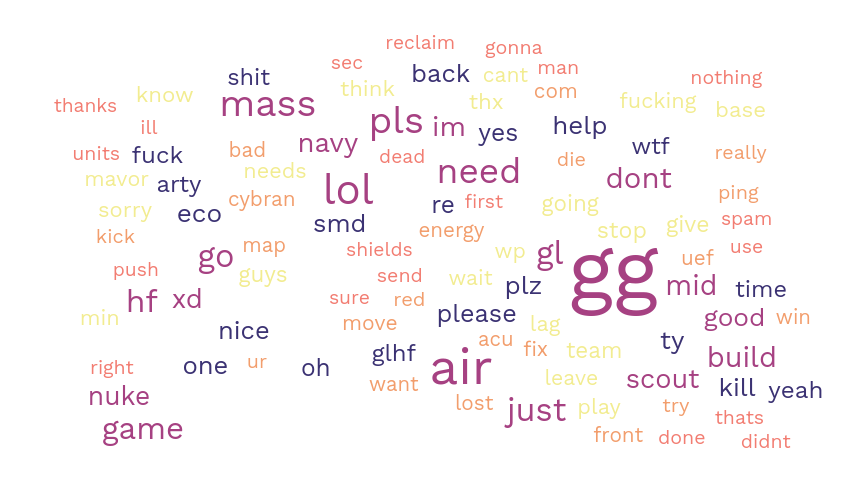
-
Mavor most iconic unit confirmed.
-
Lol "air".
-
im need mass pls
Could be interesting seeing more replays parsed and data analyzed/presented.
-
I have tested a python binding and it is OK. What kind of the data analyze do you want ?
Winning fraction? most killed fraction ? popular (unpopular) units ? -
@meatontable What information can you extract here?
Relationship of unit experemental built to winning in next 10 mins would be good
-
Sorry for delay. I'm doing this for fun when I'm free. Of course, a detecting winning conditions is a good goal.
-
 A Askaholic referenced this topic on
-
Found this thread after ages to be here. Unbelievable. Guys, you're great!

-
After almost 3 years I have finally released another version of the rust crate, and CLI tool. I also published a new version of the python package which adds binary wheels for python 3.11 and 3.12, and removes support for python 3.7. Note, the version numbers happen to correspond between the rust/python packages but that is just coincidence, I have not updated the python library to use the new changes from the rust one yet.
Rust: https://crates.io/crates/faf-replay-parser/0.6.0
Python: https://pypi.org/project/faf-replay-parser/0.6.0/What's new?
Many, many refactors to the API. If you wrote some rust code that used version 0.5.2 of the rust crate, you'll have to update some syntax to get it to work with 0.6.0. See the improved docs page for the new syntax.
For CLI users things you'll notice are:
- The improvement to the command output is now released on 0.6.0
- Some additional output like game title and game quality in
fafreplay info - A new
fafreplay info --rawoption for dumping out the entire contents of the replay header - Better detection of file type which does not rely on the file extension
- Some basic support for Supreme Commander 2 replays
Enjoy!
-
This is pretty incredible! I've been wondering if you could theoretically train an AI on the incredible amount of supcom replays out there. To do this though you'd need more than just a list of orders; presumably you'd need things like each player's intel, unit counts and locations, current resources, and more. It doesn't look to me like this is available from the replay data, does that sound right? No idea if this is truly possible, just curious
-
That is correct. In order to figure out that information you’d have to run the replay through the actual game simulation (I.e. watch the replay). You could probably create some sort of mod that would dump that info out while the replay is running, but I’m not very familiar with that side of things. A mod like that might even exist already.
-
I have created a mod that dumps unit information and economy information into the game log. It is on the vault called unit logger.
I created some python code that runs multiple instances of FAF at once on a linux server with this mod enabled and goers through a folder full of replays at high gamespeed generating this data.
I created a seperate python program to parse out the log into an unitfile displaying
"GameTick,Army,EntityId,UnitId,FractionComplete,Position.x,Position.y,Position.z,MaxHealth,Health,ShieldRatio,IsIdle,MassKilled"and an economy file displaying
GameTick,Army,lastUseRequested.MASS,lastUseRequested.ENERGY,lastUseActual.MASS,lastUseActual.ENERGY,stored.MASS,stored.ENERGY,income.MASS,income.ENERGY,maxStorage.MASS,maxStorage.ENERGY,reclaimed.MASS,reclaimed.ENERGYThis was done a year ago or so. I have processed 659 replays creating 12GB of CSV files (compressed to ~ 300mb) of unit positions with time, player economies, and if players won or lost. From this data you can absolutley get insight into what units built at what time correlate to a win. If you would like this data please message me.
https://forum.faforever.com/topic/7746/unit-logger-mod?_=1756499882431


Hello! It looks like you're interested in this conversation, but you don't have an account yet.
Getting fed up of having to scroll through the same posts each visit? When you register for an account, you'll always come back to exactly where you were before, and choose to be notified of new replies (either via email, or push notification). You'll also be able to save bookmarks and upvote posts to show your appreciation to other community members.
With your input, this post could be even better 💗
Register Login