FAForever Forums
    • Categories
    • Recent
    • Tags
    • Popular
    • Users
    • Groups
    • Login
    The current pre-release of the client ("pioneer" in the version) is only compatible to itself. So you can only play with other testers. Please be aware!

    Voice problems in the co-op missions of SC1
    Scheduled Pinned Locked Moved Game Issues and Gameplay questions
    37 Posts 3 Posters 927 Views 2 Watching
    Loading More Posts
    • Oldest to Newest
    • Newest to Oldest
    • Most Votes
    Reply
    • Reply as topic
    Log in to reply
    This topic has been deleted. Only users with topic management privileges can see it.
    • SaverS Offline
      Saver
      last edited by

      ok 🙂

      auch mal fünf gerade sein lassen

      1 Reply Last reply Reply Quote 0
      • SaverS Offline
        Saver @speed2
        last edited by

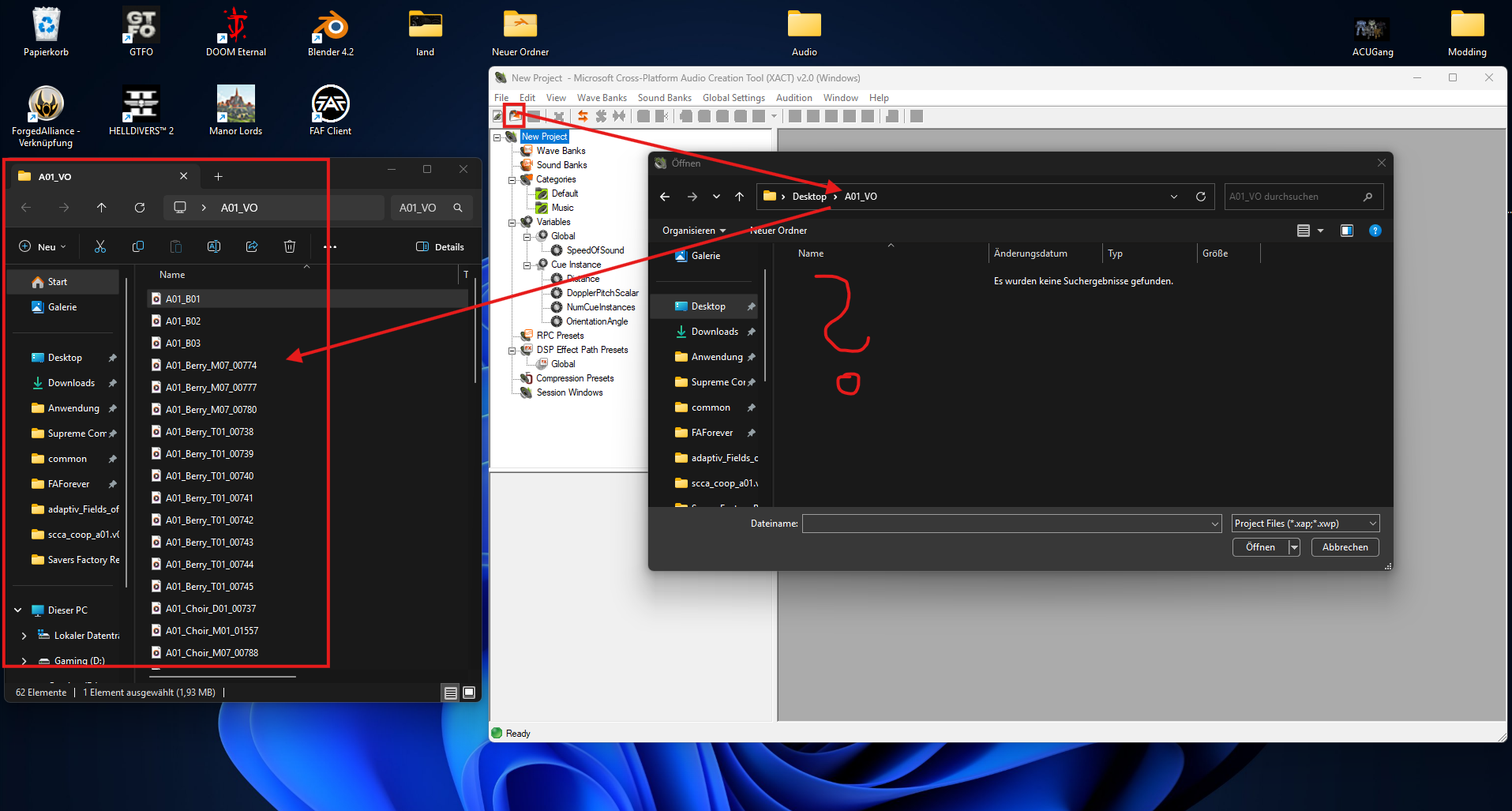
        @speed2 Unfortunately, I have to bother you a few more times. I seem to be a bit slow on the uptake again. On the wiki page, I read that I can edit the file using the Cross Platform Audio Creation Tool Version 2.0 (XACT). Unfortunately, the tool doesn't recognize the converted files. Do you have any further advice?
        de079b93-9eee-4712-a378-5090418c0b44-image.png

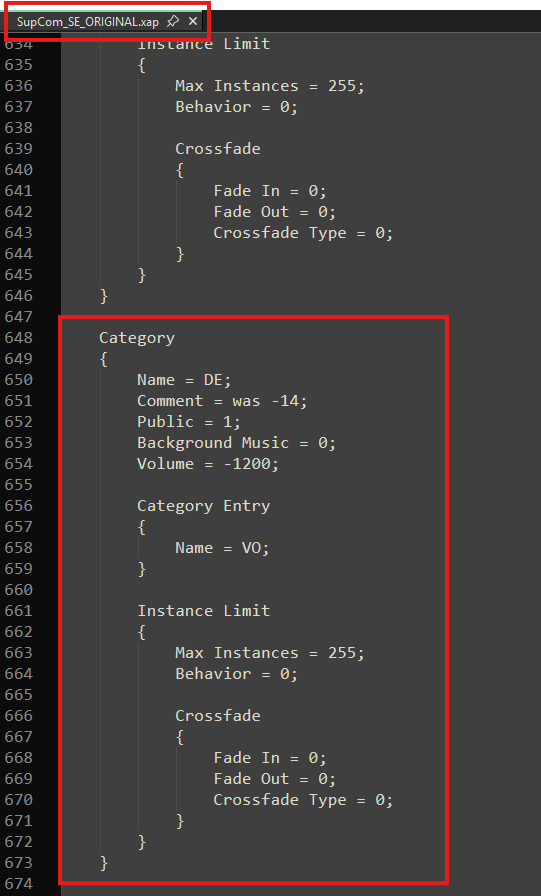
        And before I forget anything else, I assume this is the setting for the voice settings, right?
        30f861f1-0693-4716-b1b7-f78e1d4d7919-image.png

        Please excuse me if the questions are already becoming annoying, but I've never dealt with this before.

        auch mal fünf gerade sein lassen

        1 Reply Last reply Reply Quote 0
        • speed2S Offline
          speed2
          last edited by

          If you double click the FA project, it should open the xact tool and load all the settings.
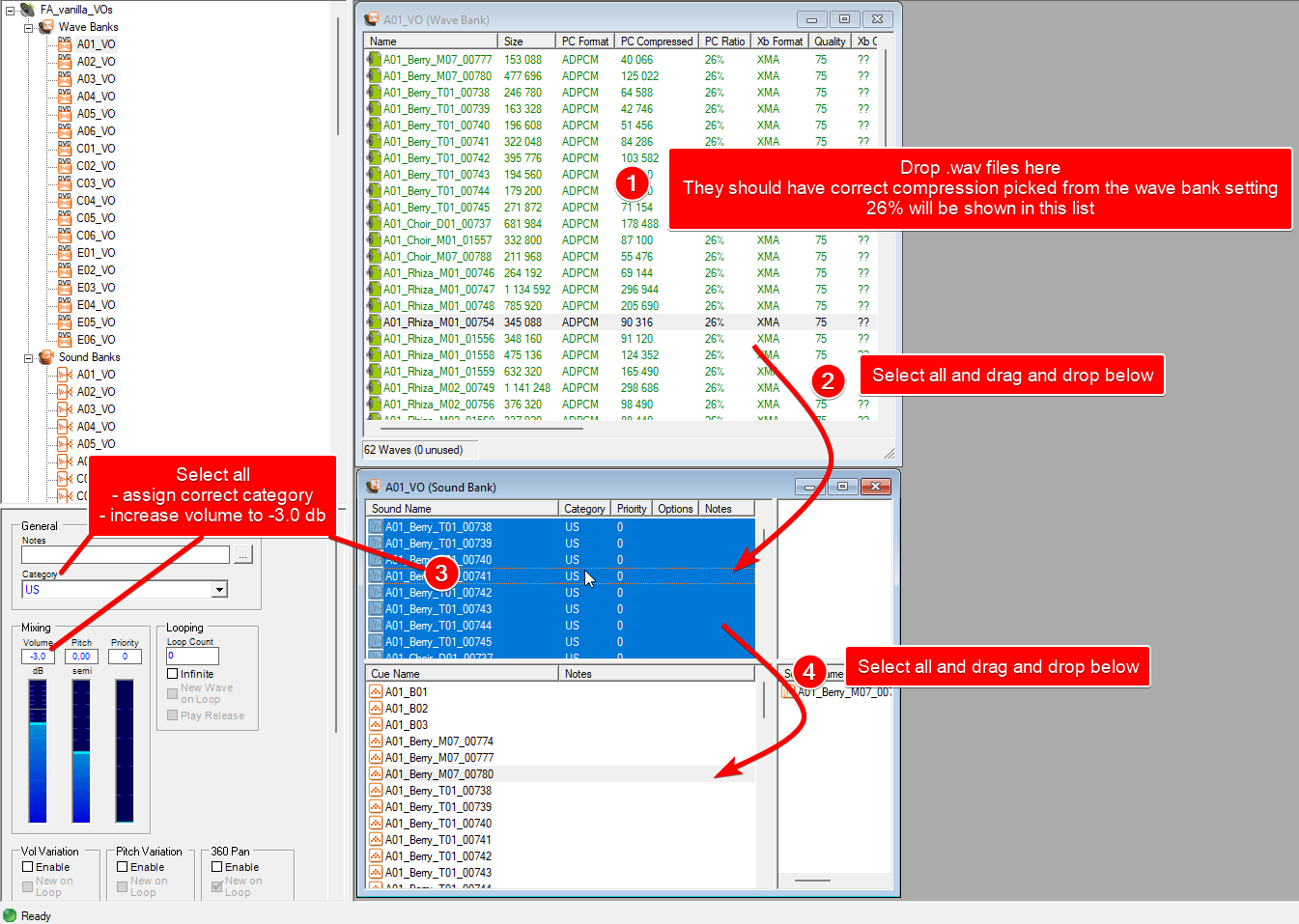
          You then need to create the sound and wave banks for the mission voice files and set them correctly (there will be all other kinds of sound banks loaded from the project, so just click through things to see how they are set up)
          You can then drag and drop the wav files into the opened wave bank you've created.

          SaverS 1 Reply Last reply Reply Quote 0
          • SaverS Offline
            Saver @speed2
            last edited by

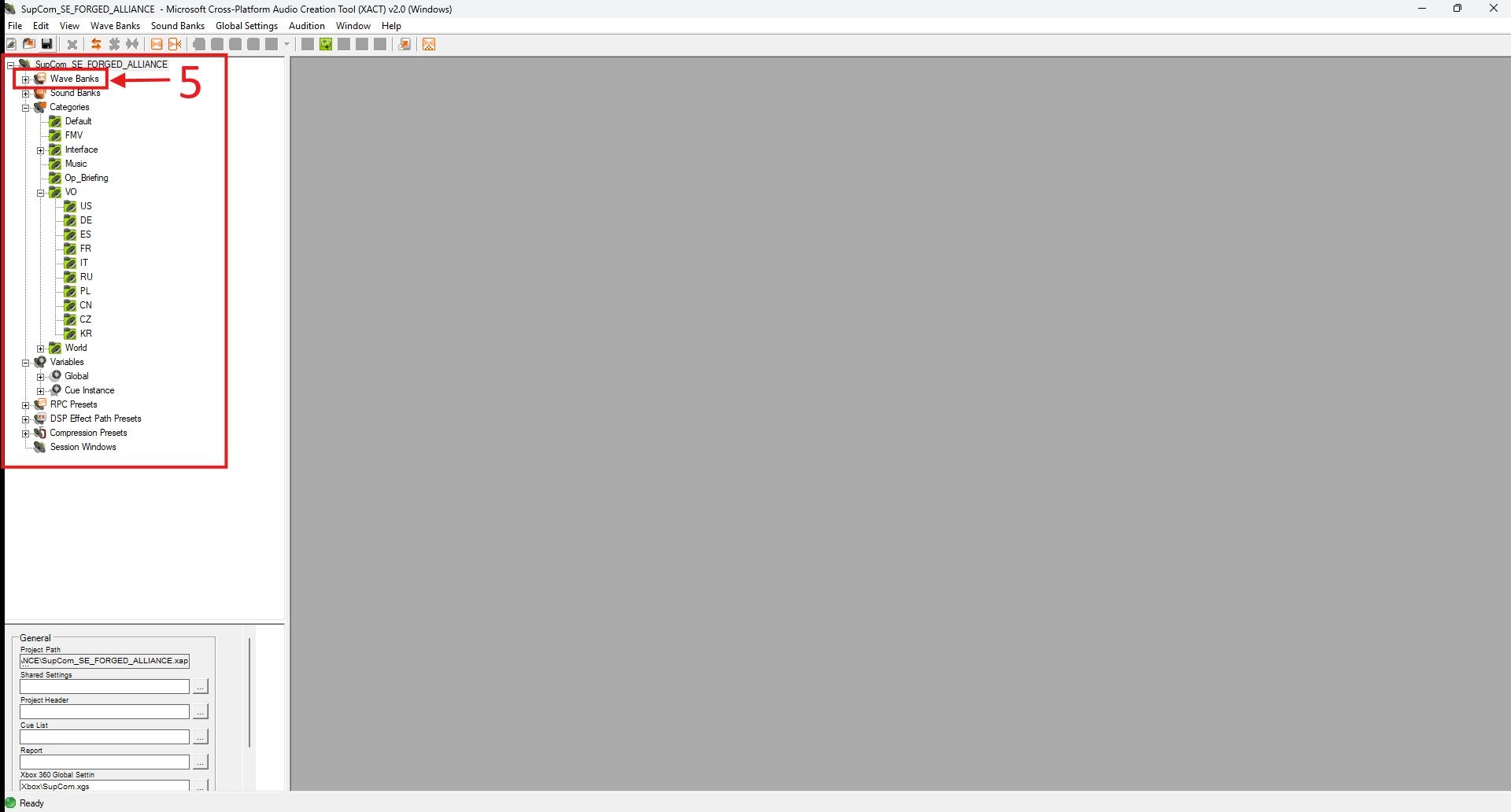
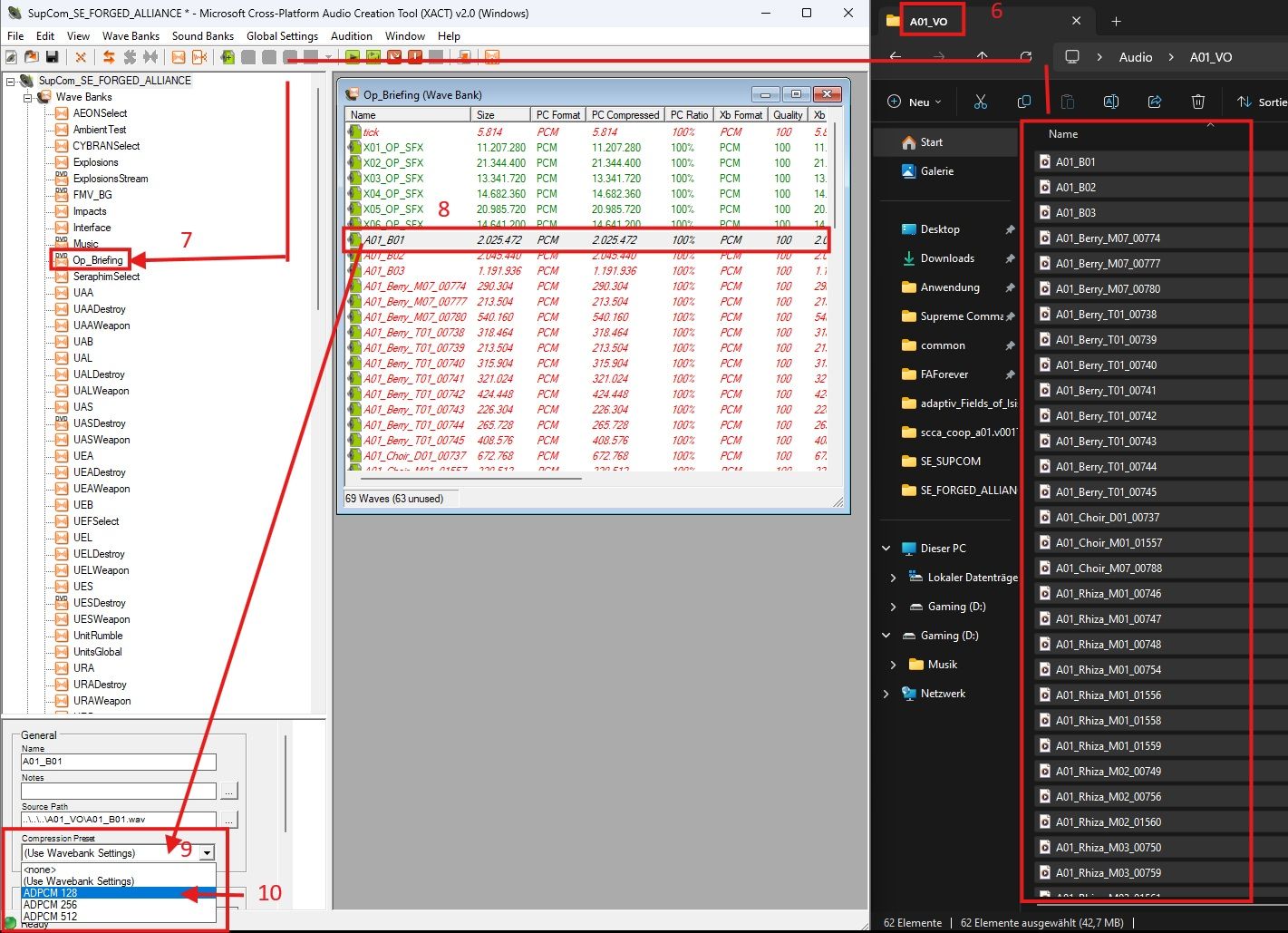
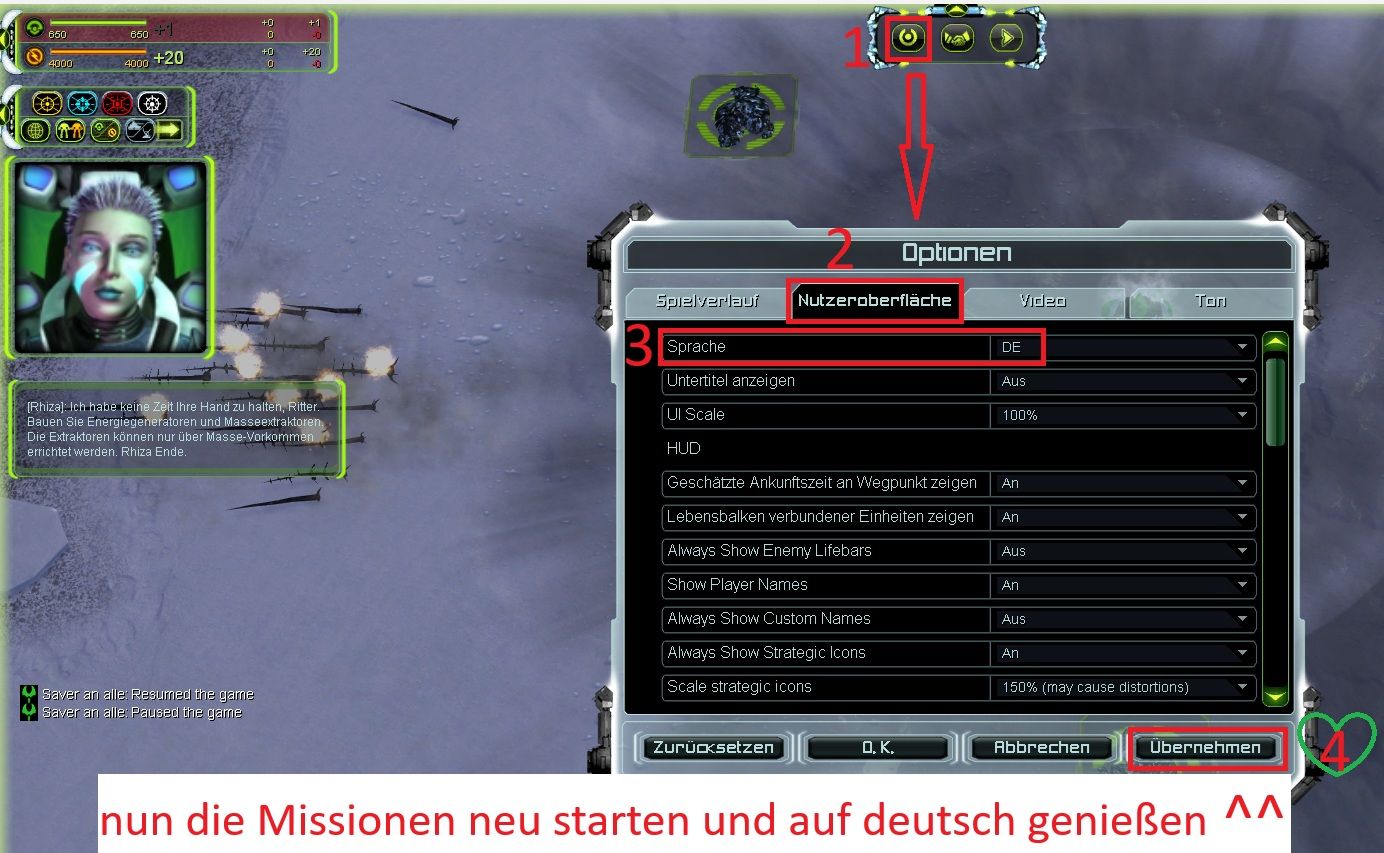
            @speed2 Hi, I'm really grateful for the explanations. Unfortunately, I don't quite understand you or the program. Here are the steps I've taken so far, as far as I can tell. This might serve as a reminder later on.
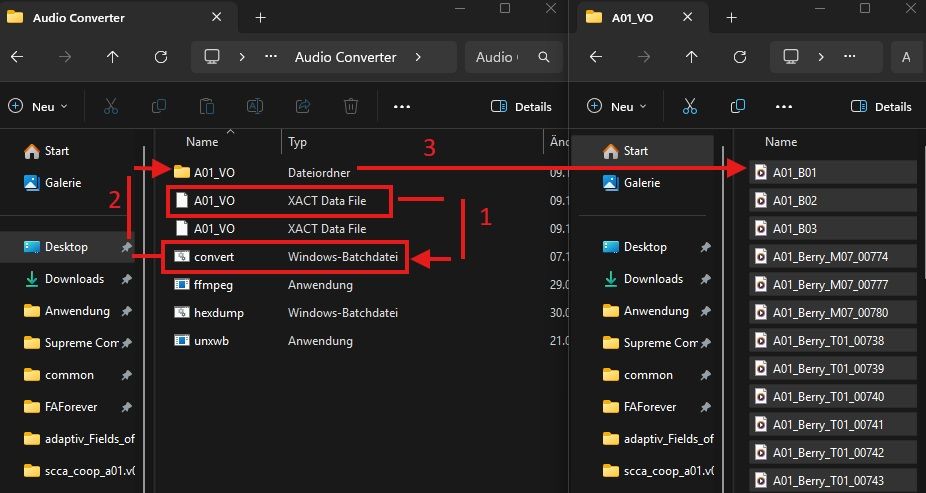
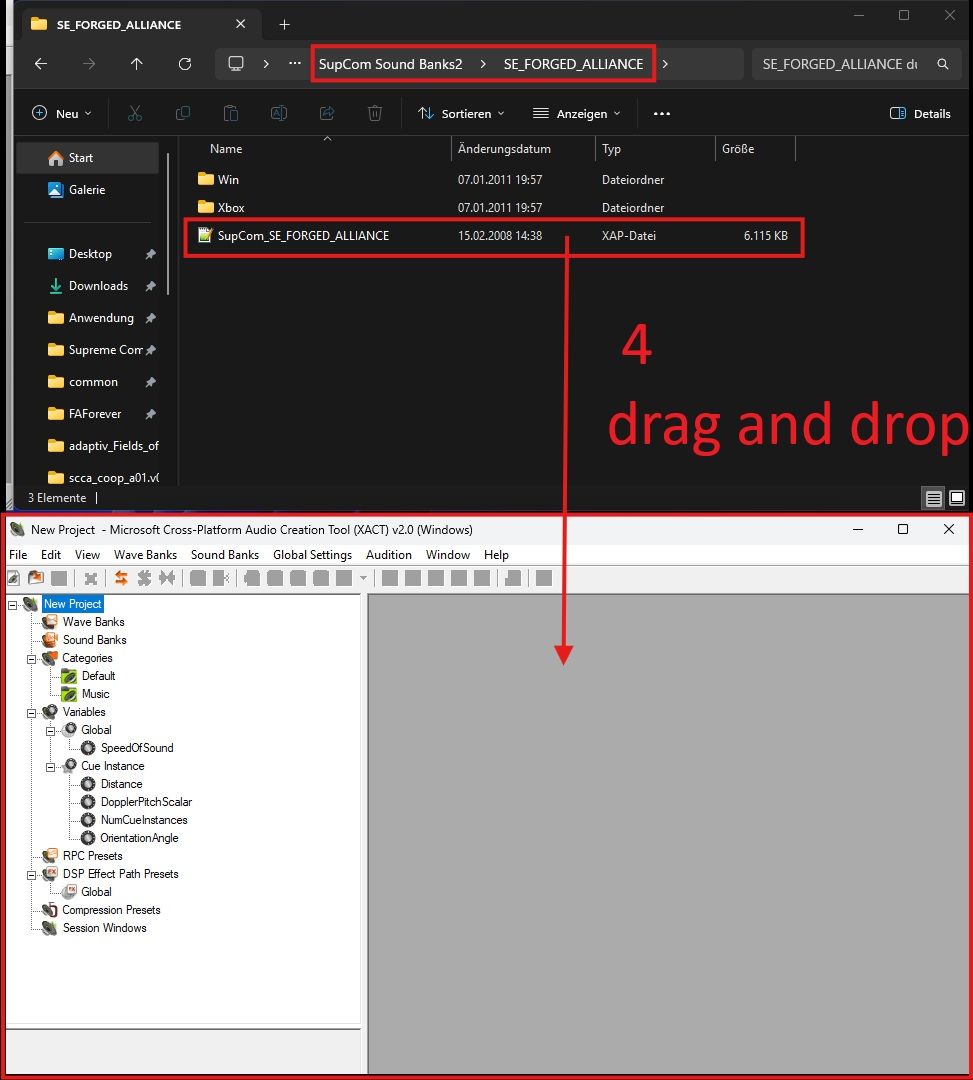
            1.jpg

            2.jpg

            3.jpg

            4.jpg

            Unfortunately, I couldn't find a tab for Voice in Wave Banks. Therefore, I initially used the OP_Briefing tab. I selected all the files and compressed them to the ADPCM 128 format, as described in the wiki.

            But what's next? How do I create a SoundBank from this?

            Again, I apologize if I seem slow on the uptake. 😖

            auch mal fünf gerade sein lassen

            1 Reply Last reply Reply Quote 0
            • speed2S Offline
              speed2
              last edited by

              I found the project from when I was fixing the VOs https://mega.nz/file/lphxUJRA#7zCGIq4WFNDsdibmb8xqkIyH6hqg_YKfKqEVVAF2NSI
              So it has all the things set up already
              You wanna to through all the wave/sound banks, you have to delete the existing entries and add them again from your unpacked files

              1. Select wave and sound bank of 1 mission, delete the entries in this orders (for each select all, delete):
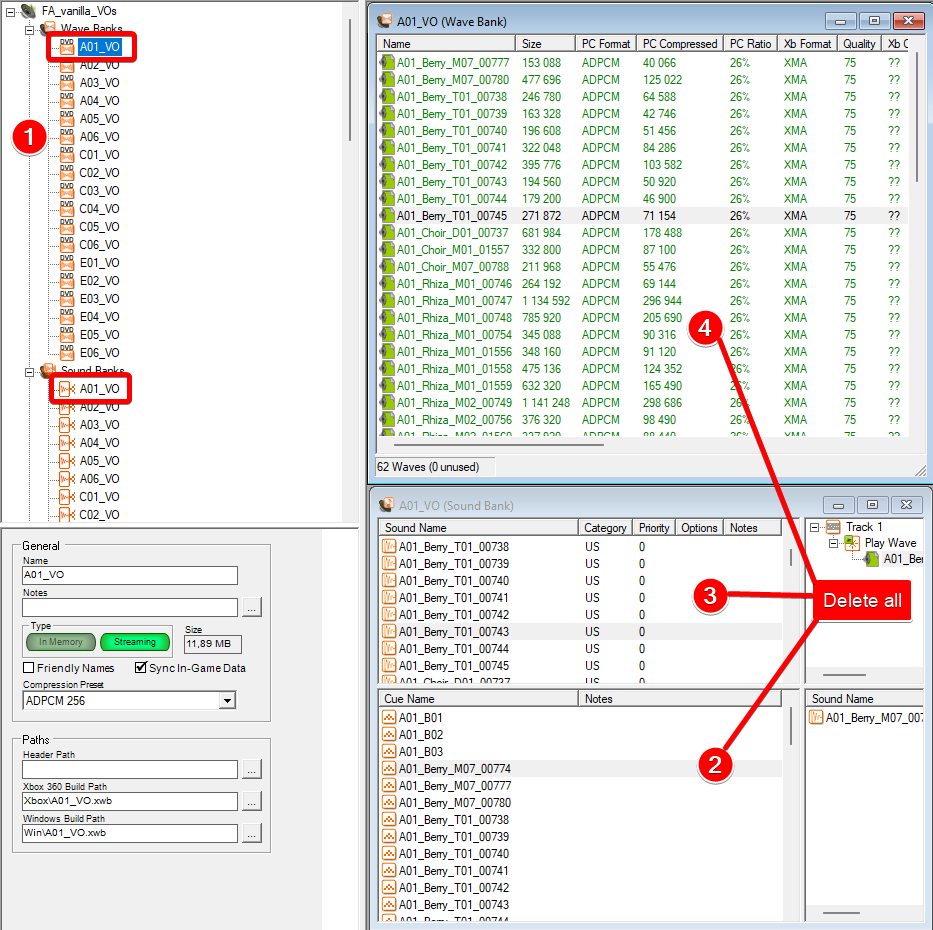
                Xact_2025-11-11_10-34-57.png

              2. Add new files and set them up
                Xact_2025-11-11_10-48-29.png

              3. repeat for all other missions

              4. File - Build...

              5. test ingame, adjust the volume as mentioned above ^^, rebuild and test again

              SaverS 2 Replies Last reply Reply Quote 1
              • SaverS Offline
                Saver @speed2
                last edited by

                @speed2 Thank you very much. I'll take a look at it. At least I can take the tests for the German section 🙂

                auch mal fünf gerade sein lassen

                1 Reply Last reply Reply Quote 0
                • SaverS Offline
                  Saver @speed2
                  last edited by

                  @speed2 Hi again. Thank you so much for your help. It's working perfectly. I'll change all the sound files on Sunday. I haven't looked at the other languages ​​yet, but I could adjust them as well. Unfortunately, testing them will be very difficult.

                  So, before I get too excited/euphoric again, let's wait and see how it goes on Sunday. I'll gladly give you an update 🙂 See you soon.

                  auch mal fünf gerade sein lassen

                  1 Reply Last reply Reply Quote 1
                  • SaverS Offline
                    Saver
                    last edited by Saver

                    Hi everyone,
                    I was able to test the first line of the Aeon campaign. And so far, everything sounds as it should ^^

                    !!!!Thanks again @speed2 !!!!!!

                    If desired, I can gladly share the modified voice files (German). But I don't think that's possible via a mod in this case.

                    Or is it?

                    auch mal fünf gerade sein lassen

                    1 Reply Last reply Reply Quote 1
                    • SaverS Offline
                      Saver
                      last edited by

                      Hi, I wanted to test whether I could add the voice as a mod, but it kept not being recognized.

                      So I used the Mod Vault as a file distributor. I hope that's okay.
                      Saver.jpg

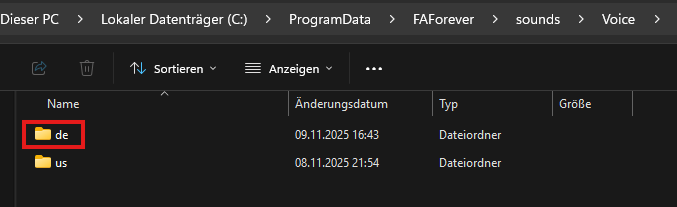
                      If you want to use the voice files, you just need the file in the folder and place it as shown in the mod images and described here.

                      Step 1
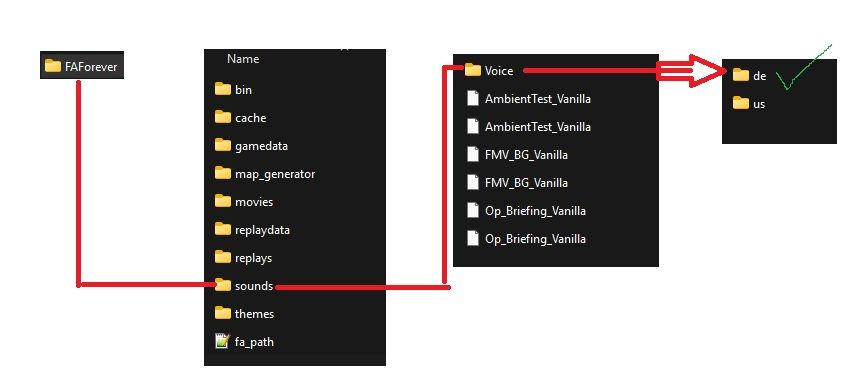
                      Erklärbild 1.jpg

                      Step 2
                      Erklärbild 2.jpg

                      Then everything should work. If anyone notices any errors, please let me know. I'll try to fix them if possible.

                      I wish the users lots of fun.

                      auch mal fünf gerade sein lassen

                      1 Reply Last reply Reply Quote 1
                      • SaverS Offline
                        Saver
                        last edited by

                        Hello, unfortunately the UEF Mission 3 Metal Shark is not working correctly. The sound files are mixed up. I will go through the scripts and assign them to the correct sound files.

                        auch mal fünf gerade sein lassen

                        1 Reply Last reply Reply Quote 1
                        • SaverS Offline
                          Saver
                          last edited by

                          Fix mission 3 UEF Update v2

                          auch mal fünf gerade sein lassen

                          1 Reply Last reply Reply Quote 1
                          • SaverS Offline
                            Saver
                            last edited by

                            Okay, I now understand Speed2's comment better. At least in the UEF missions, most of the names seem to differ significantly from those in Strings.lua. So that I don't have to post every update, I'll get in touch when a faction is complete. Well then, let's get started ^^

                            auch mal fünf gerade sein lassen

                            1 Reply Last reply Reply Quote 1
                            • SaverS Offline
                              Saver
                              last edited by

                              A quick question for the FAF team: once I've fixed all the language issues, is it possible to integrate them into the base game of FAF?

                              auch mal fünf gerade sein lassen

                              1 Reply Last reply Reply Quote 0
                              • SaverS Offline
                                Saver
                                last edited by

                                UEF completed

                                auch mal fünf gerade sein lassen

                                1 Reply Last reply Reply Quote 3
                                • SaverS Offline
                                  Saver
                                  last edited by

                                  Hi everyone, I've now been able to review all the Aeon voice lines and haven't found any errors. Now all that's left is to check the Cybran voice lines.

                                  auch mal fünf gerade sein lassen

                                  1 Reply Last reply Reply Quote 1
                                  • SaverS Offline
                                    Saver
                                    last edited by

                                    So, all sound files for all factions are now complete.

                                    Within the Cybran missions, I found several sound files mentioned in the string files that are missing from the German audio output
                                    (example:
                                    Cybran Mission 6 -
                                    -- Taunt 20 TAUNT20 = { {text = '<LOC A05_T01_140_010>[{i Blake}]: Soon the Aeon will be extinct.', vid = 'A05_Blake_T01_00951.sfd', bank = 'A05_VO', cue = 'A05_Blake_T01_00951', faction = 'UEF'},} ).

                                    However, I didn't find any errors during testing.

                                    I hope you won't find any errors either ^^, but if you do, please let me know 🙂

                                    Otherwise, I hope you have fun playing.

                                    auch mal fünf gerade sein lassen

                                    1 Reply Last reply Reply Quote 3
                                    • SaverS Offline
                                      Saver
                                      last edited by

                                      Thank you @negnag for reporting a bug in the version 4 update. Not all of the new Cybran sound files were included. This bug has been fixed in version 5. If you find any other bugs, please report them here. I hope all users enjoy the game.

                                      auch mal fünf gerade sein lassen

                                      1 Reply Last reply Reply Quote 1
                                      • N Offline
                                        Negnag
                                        last edited by

                                        In all Cybran missions, the tutorial dialogue has noticeable pauses between the lines. In Aeon and UEF missions, there are none or only very short pauses. Is this an inherent limitation caused by the significantly longer duration of the original Cybran dialogue audio, or is it a bug that could potentially be corrected?

                                        1 Reply Last reply Reply Quote 0
                                        • SaverS Offline
                                          Saver
                                          last edited by

                                          @negnag Thanks for your feedback.

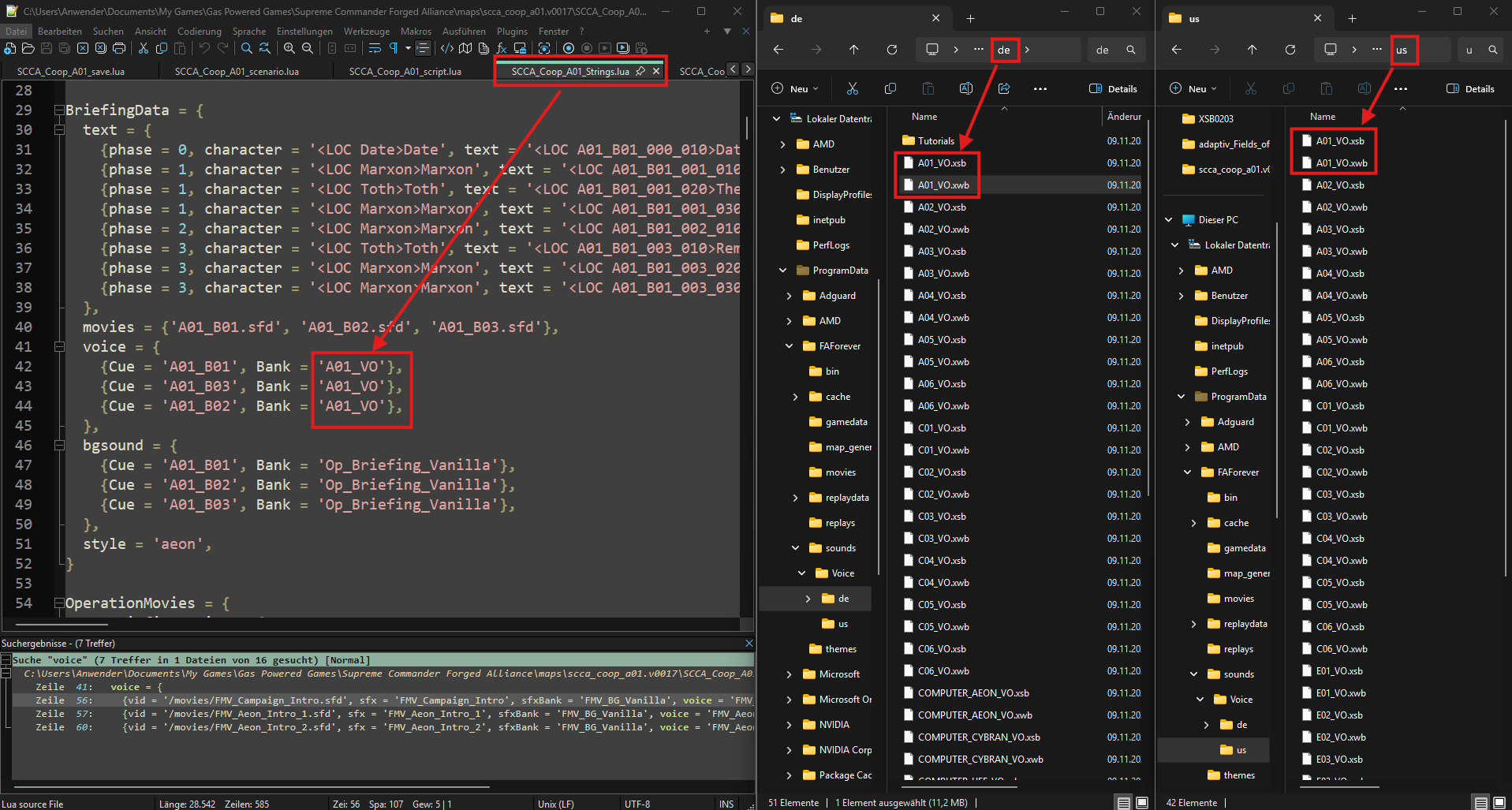
                                          Unfortunately, I don't know where I could shorten these phases specifically for the German voiceover, as the corresponding files control both the German and American voiceovers. I suspect the pauses were built in so that both voiceovers sound good. However, I'm still quite new to this.

                                          Let me take the first Cybran mission as an example.

                                          The file "SCCA_Coop_R01_Strings" specifies which voiceover belongs to which text.
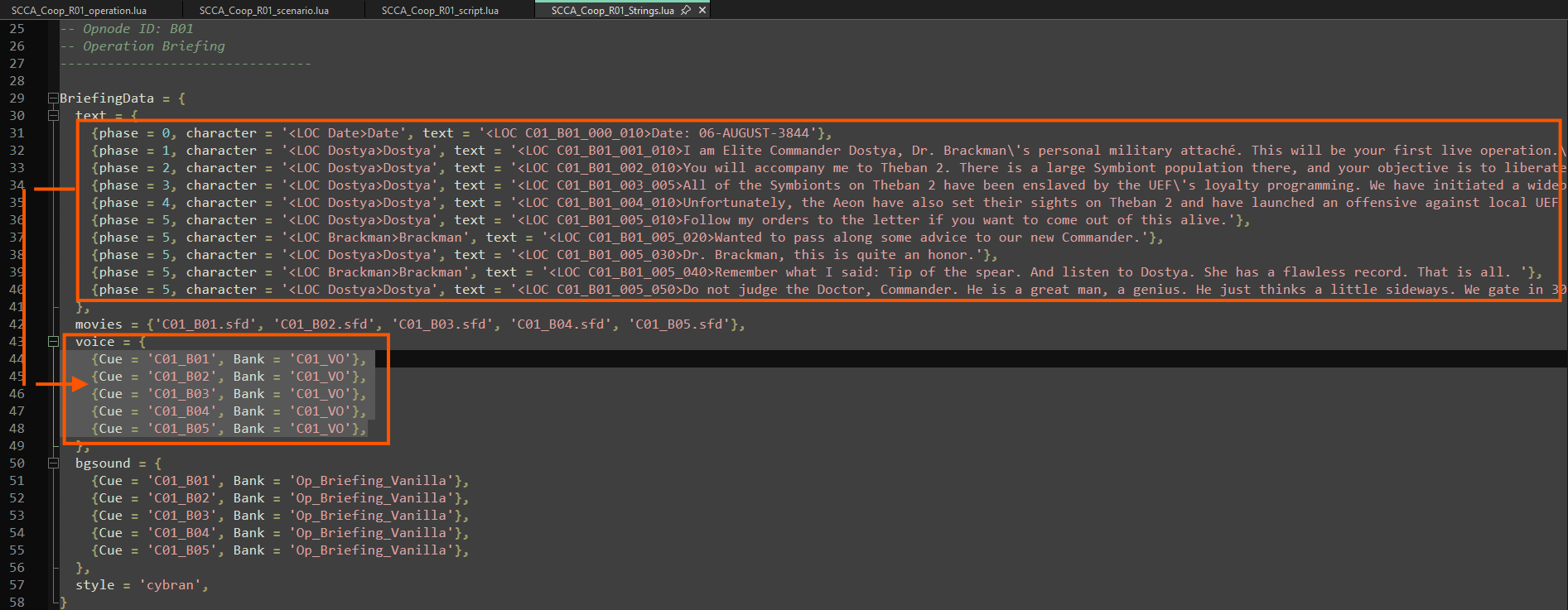
                                          e28c1287-4f05-4f3a-8ae6-0501f5bebb9d-image.png
                                          6899ecf5-cb45-41b6-971b-11091097d536-image.png

                                          The file "SCCA_Coop_R01_script," in turn, controls when this voiceover should be played.
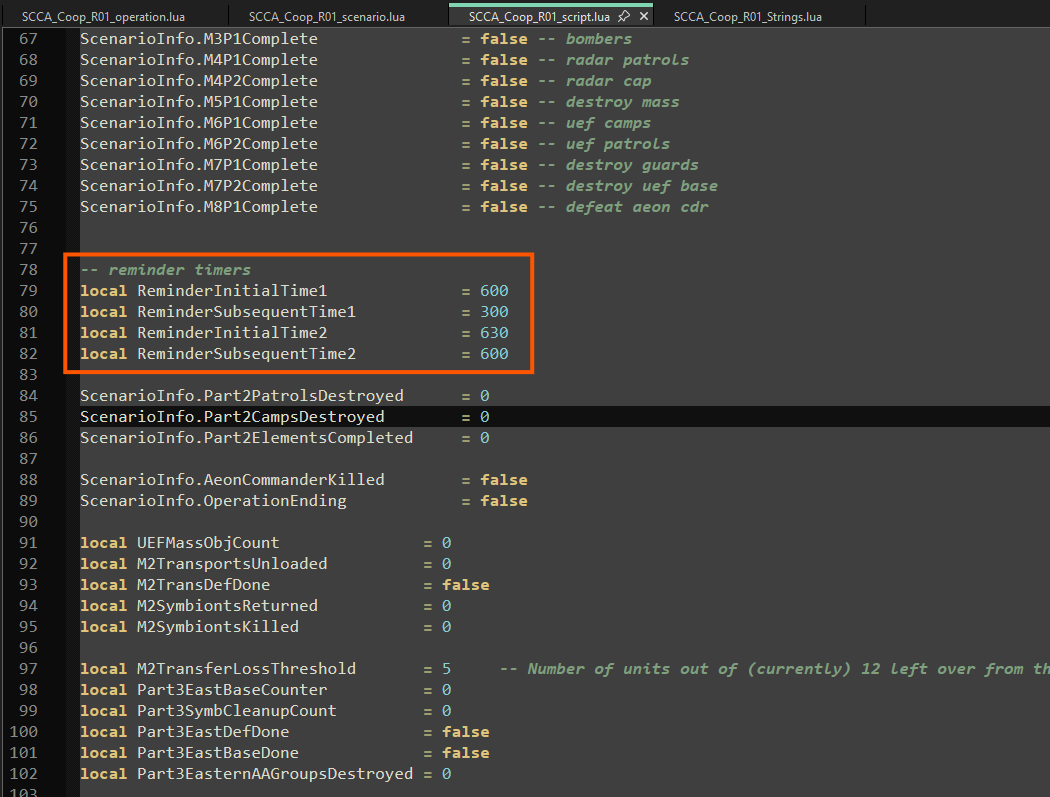
                                          3954fdd9-9c33-4b9a-9ac7-0488b1c02711-image.png

                                          The briefing file itself is called by the file scca_coop_r01.v0019/SCCA_Coop_R01_operation.lua
                                          , but no time setting is specified here either.
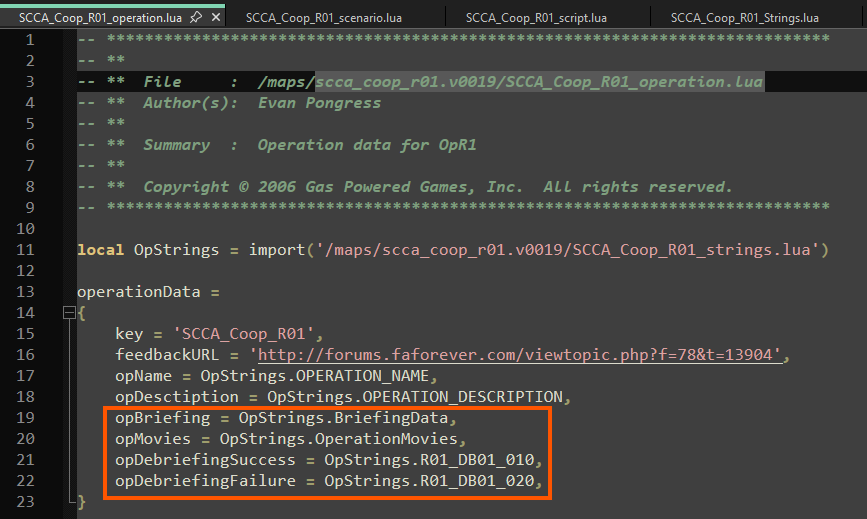
                                          678069f2-d47f-4d3d-919f-70e17c00abed-image.png

                                          I can't see a direct setting for this, only when it should be played.

                                          I hope this gives you a better understanding of your question. Of course, I could be wrong, and there might be other settings. But I'm not aware of them.

                                          auch mal fünf gerade sein lassen

                                          1 Reply Last reply Reply Quote 1
                                          • speed2S Offline
                                            speed2
                                            last edited by

                                            The video length is used

                                            1 Reply Last reply Reply Quote 1

                                            Hello! It looks like you're interested in this conversation, but you don't have an account yet.

                                            Getting fed up of having to scroll through the same posts each visit? When you register for an account, you'll always come back to exactly where you were before, and choose to be notified of new replies (either via email, or push notification). You'll also be able to save bookmarks and upvote posts to show your appreciation to other community members.

                                            With your input, this post could be even better 💗

                                            Register Login
                                            • First post
                                              Last post