FAForever Forums
    • Categories
    • Recent
    • Tags
    • Popular
    • Users
    • Groups
    • Login
    The current pre-release of the client ("pioneer" in the version) is only compatible to itself. So you can only play with other testers. Please be aware!

    Error - client out of date

    Scheduled Pinned Locked Moved I need help
    13 Posts 5 Posters 725 Views
    Loading More Posts
    • Oldest to Newest
    • Newest to Oldest
    • Most Votes
    Reply
    • Reply as topic
    Log in to reply
    This topic has been deleted. Only users with topic management privileges can see it.
    • G Offline
      ginandtonicbot
      last edited by

      i am seeing the same - just installed 2025.2.1 but says i have 2024.8.0

      1 Reply Last reply Reply Quote 0
      • maggeM Offline
        magge Moderator FAF Association Board
        last edited by magge

        Have you tried to manually uninstall it, then install it via the latest release from the website? https://faforever.com/play#

        Join a FAFtastic Team | Join the FAForever Association

        1 Reply Last reply Reply Quote 0
        • T Offline
          ThKracken
          last edited by

          Thanks magge. I have tried that - full uninstall, and reinstall from faf website. I got the same error results.

          1 Reply Last reply Reply Quote 0
          • Brutus5000B Offline
            Brutus5000 FAF Server Admin
            last edited by

            Make sure after uninstall to delete the remaining files from the program files folder. This is a common problem for whatever reason the installer does not always clean up properly.

            He said, "I've been to the year 3000
            Not much has changed, but they live underwater
            And your great-great-great-granddaughter
            Is playin' FAF, playin' FAF"

            1 Reply Last reply Reply Quote 0
            • T Offline
              ThKracken
              last edited by

              Brutus500 - Thank you ! It worked. I deleted the entire folder and reinstalled and it worked. Having the installer overwrite existing files did not work. I appreciate your post, Hopefully Ginandtonicbot above will see this and do the same. GLHF !

              1 Reply Last reply Reply Quote 0
              • T Offline
                The_Aussie_Greek
                last edited by

                I'm having trouble with the same issue can someone clarify what files need to go for the newest version to work.

                1 Reply Last reply Reply Quote 0
                • maggeM Offline
                  magge Moderator FAF Association Board
                  last edited by

                  @magge said in Error - client out of date:

                  Have you tried to manually uninstall it, then install it via the latest release from the website? https://faforever.com/play#

                  @The_Aussie_Greek At which step do you face trouble?

                  Join a FAFtastic Team | Join the FAForever Association

                  T 1 Reply Last reply Reply Quote 0
                  • T Offline
                    The_Aussie_Greek @magge
                    last edited by

                    @magge i use the updater that is prompted but it wont actually update it even though it is at the latest version it doesn't get rid of the previous files that it doesn't like. so im not sure what to manually uninstall otherwise it looks like i lose my mods and other save game data. if we have to organise a Discord then so be it. Haha, Thanks

                    1 Reply Last reply Reply Quote 0
                    • maggeM Offline
                      magge Moderator FAF Association Board
                      last edited by

                      To be on the safe side, you can back up your 'game.prefs' file. It contains the mods, keys, and basically everything about any setting. Then uninstall it, and install it from the link above.

                      Join a FAFtastic Team | Join the FAForever Association

                      T 1 Reply Last reply Reply Quote 1
                      • T Offline
                        The_Aussie_Greek @magge
                        last edited by

                        @magge Can't seen to find that folder/File, should i just completely uninstall SC and FAF cause i can't even seem to locate the actual FAF folder

                        1 Reply Last reply Reply Quote 0
                        • maggeM Offline
                          magge Moderator FAF Association Board
                          last edited by

                          You can navigate to the prefs file via FAF client top left option menu. If you do not have that, then just reinstall FAF like described above.
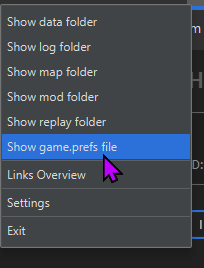
                          image.png

                          Join a FAFtastic Team | Join the FAForever Association

                          1 Reply Last reply Reply Quote 0
                          • T Offline
                            The_Aussie_Greek
                            last edited by

                            Got there in the end thanks for all the help guys GLHF happy commanding o7

                            1 Reply Last reply Reply Quote 1

                            Hello! It looks like you're interested in this conversation, but you don't have an account yet.

                            Getting fed up of having to scroll through the same posts each visit? When you register for an account, you'll always come back to exactly where you were before, and choose to be notified of new replies (either via email, or push notification). You'll also be able to save bookmarks and upvote posts to show your appreciation to other community members.

                            With your input, this post could be even better 💗

                            Register Login
                            • First post
                              Last post