FAForever Forums
    • Categories
    • Recent
    • Tags
    • Popular
    • Users
    • Groups
    • Login
    The current pre-release of the client ("pioneer" in the version) is only compatible to itself. So you can only play with other testers. Please be aware!

    Game Score recap screen

    Scheduled Pinned Locked Moved General Discussion
    7 Posts 2 Posters 389 Views
    Loading More Posts
    • Oldest to Newest
    • Newest to Oldest
    • Most Votes
    Reply
    • Reply as topic
    Log in to reply
    This topic has been deleted. Only users with topic management privileges can see it.
    • ZartanZ Offline
      Zartan
      last edited by

      Two random thoughts about the score recap screen:

      1. The data is shows must obviously be accumulated during the game. Would it increase performance at all if this data wasn't captured?

      2. Regardless of prior point, is there an option to disable the end game score screen. It's been many years since I needed to look at the information there.

      maggeM 1 Reply Last reply Reply Quote 0
      • maggeM Offline
        magge Moderator FAF Association Board @Zartan
        last edited by magge

        @just_norm said in Game Score recap screen:

        is there an option to disable the end game score screen.

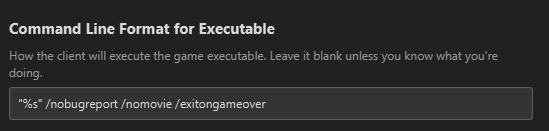
        Command line in the FAF, and it will instantly quit when game is over:

        "%s" /exitongameover
        

        b34c3ac5-8a33-4e1a-a2c9-e980dfc9da05-image.png

        Join a FAFtastic Team | Join the FAForever Association

        1 Reply Last reply Reply Quote 2
        • ZartanZ Offline
          Zartan
          last edited by

          I think I would have to do that every game wouldn't I ? Is there a one-time and permanent option?

          1 Reply Last reply Reply Quote 0
          • maggeM Offline
            magge Moderator FAF Association Board
            last edited by

            Of course, it is permanent, until you remove the command from the line.

            Join a FAFtastic Team | Join the FAForever Association

            ZartanZ 1 Reply Last reply Reply Quote 1
            • ZartanZ Offline
              Zartan @magge
              last edited by

              @magge Great thanks!

              1 Reply Last reply Reply Quote 1
              • ZartanZ Offline
                Zartan
                last edited by

                Just in case anyone else is unsure how to do this, right click on your "FAF Client" icon (probably on your desktop) and make changes as such :
                https://i.imgur.com/C1E3iXR.png

                1 Reply Last reply Reply Quote 0
                • maggeM Offline
                  magge Moderator FAF Association Board
                  last edited by

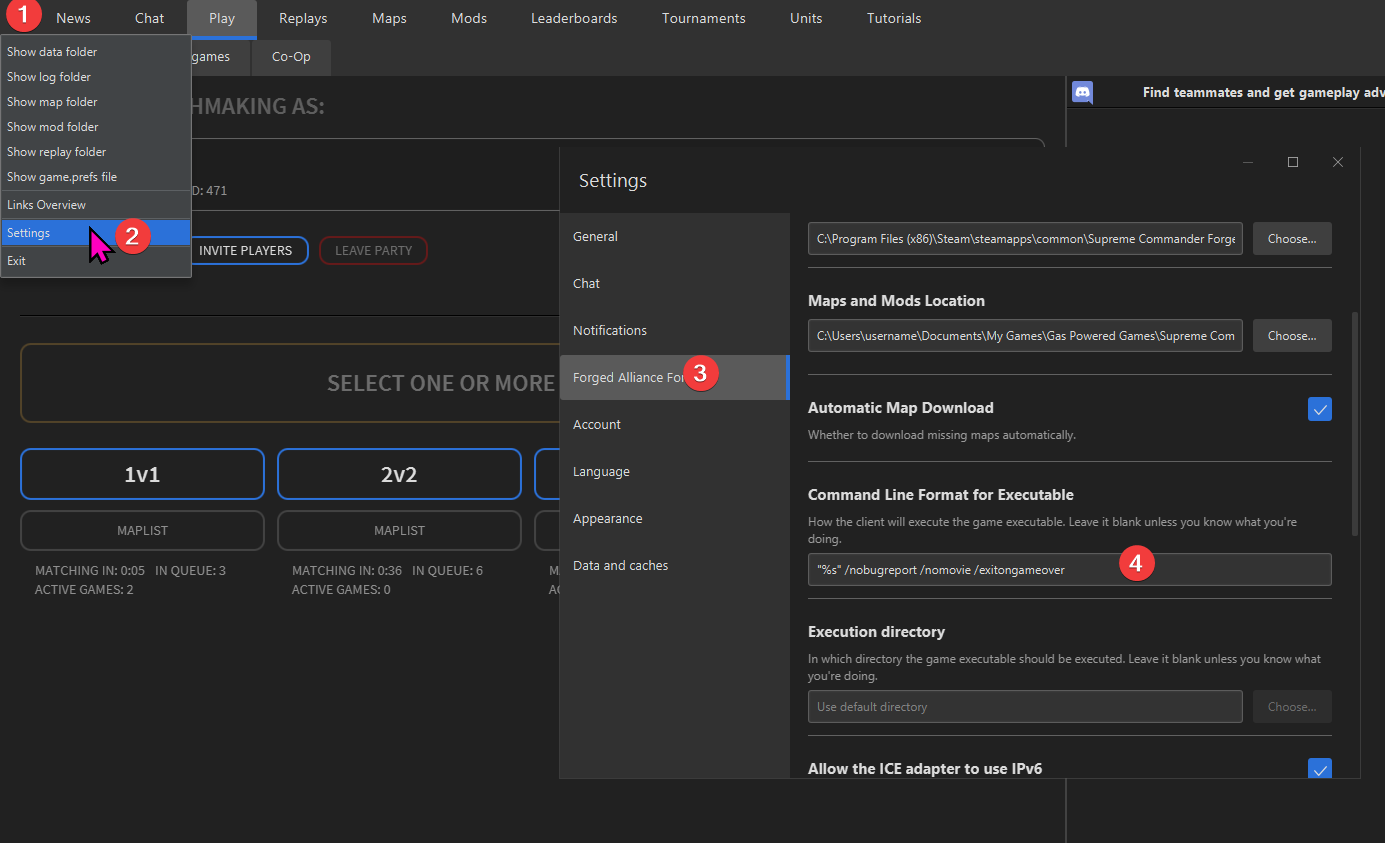
                  That would be a solution, preferable is:
                  a62743d5-6b43-473a-aad2-8f86bdbfdb68-image.png

                  I thought it was clear, because I added the screenshot from the FAF client earlier.

                  Join a FAFtastic Team | Join the FAForever Association

                  1 Reply Last reply Reply Quote 1

                  Hello! It looks like you're interested in this conversation, but you don't have an account yet.

                  Getting fed up of having to scroll through the same posts each visit? When you register for an account, you'll always come back to exactly where you were before, and choose to be notified of new replies (either via email, or push notification). You'll also be able to save bookmarks and upvote posts to show your appreciation to other community members.

                  With your input, this post could be even better 💗

                  Register Login
                  • First post
                    Last post
