FAForever Forums
    • Categories
    • Recent
    • Tags
    • Popular
    • Users
    • Groups
    • Login
    The current pre-release of the client ("pioneer" in the version) is only compatible to itself. So you can only play with other testers. Please be aware!

    Crash Upon FAF Client Create Game Start Up - ID3DXEffectCompiler: Compilation failed

    Scheduled Pinned Locked Moved Game Issues and Gameplay questions
    18 Posts 4 Posters 724 Views
    Loading More Posts
    • Oldest to Newest
    • Newest to Oldest
    • Most Votes
    Reply
    • Reply as topic
    Log in to reply
    This topic has been deleted. Only users with topic management privileges can see it.
    • S Offline
      Superlemon65
      last edited by magge

      Hello,
      Running:
      Client 2025.1
      Win 11, RTX3080, i7-14th, 32gb DDR5

      Used to be able to launch this game with no problems, but had to wipe my SSD's and now when launching the game, i get a crash log with this being the primary warning:

      warning: c:\programdata\faforever\gamedata\effects.nx2\effects\mesh.fx: unable to compile effect: c:\programdata\faforever\gamedata\effects.nx2\effects\mesh.fx reason: (716): error X4502: invalid input semantic 'TEXCOORD5'
      (1707): error X4502: invalid input semantic 'TEXCOORD6'
      ID3DXEffectCompiler: Compilation failed


      Full Log:
      game_24051089.log

      If anyone has seen this before or could lend assistance, would be greatly appreciated.

      Thanks

      1 Reply Last reply Reply Quote 0
      • maggeM Offline
        magge Moderator FAF Association Board
        last edited by magge

        Have the same, or at least very similar, case via Discord tech-help. I have found no solution so far, and have not seen such error before.

        Edit: Have added 'ID3DXEffectCompiler: Compilation failed' to your title to make it more searchable.

        Join a FAFtastic Team | Join the FAForever Association

        1 Reply Last reply Reply Quote 0
        • S Offline
          Superlemon65
          last edited by

          I had little luck when I messed with some permissions within the hidden program data folder for the client, but would only work for one game instance then changes were auto reverted.... I have had hit and miss luck with purging the gamedata folder, and letting the client regather the data, but at this point, I am completely stuck and no consistently working solutions... depressing

          1 Reply Last reply Reply Quote 0
          • S Offline
            Superlemon65
            last edited by Superlemon65

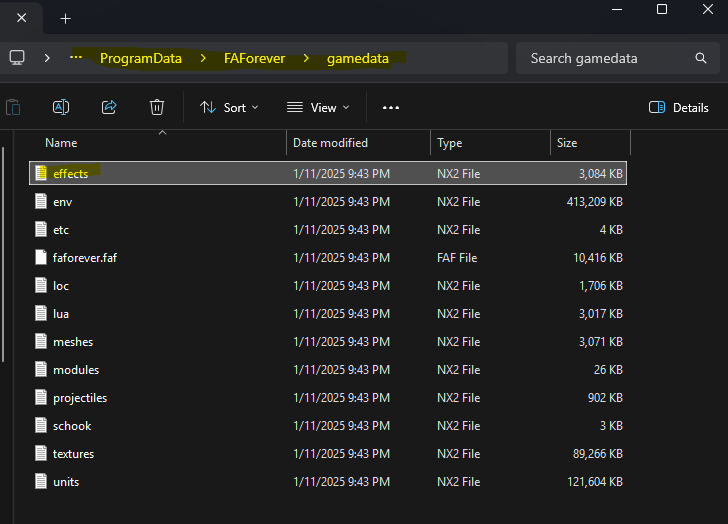
            image.png

            The effects file highlighted appears to be the issue, and works with low success rate when deleting it, but mostly it just re-populates and throws the error again...

            Been troubleshooting for HOURS at this point

            1 Reply Last reply Reply Quote 0
            • maggeM magge referenced this topic on
            • D Offline
              DrColtraine
              last edited by

              I'm getting the same issue. I've try multiple things to fix for example re-installing graphic driver (old and new) and audio drivers and also full re-installing window and removing all data on the machine and installing old version DirectX's and Microsoft visual C++
              also I've delete C:\ProgramData\FAForever\gamedata multiple time but keep coming with the fatal error.
              ID3DXEffectCompiler.png

              1 Reply Last reply Reply Quote 0
              • D Offline
                DrColtraine
                last edited by

                I've also added my system info as well
                System info.png

                hope there is a solution soon.

                D 1 Reply Last reply Reply Quote 0
                • maggeM Offline
                  magge Moderator FAF Association Board
                  last edited by

                  @DrColtraine Just a shot in the dark, but could you try adding /D3D9 to the command line and see if that resolves it?

                  image.png

                  Join a FAFtastic Team | Join the FAForever Association

                  1 Reply Last reply Reply Quote 0
                  • D Offline
                    DrColtraine
                    last edited by

                    different error come up.

                    uh oh .png

                    D3D9.png

                    1 Reply Last reply Reply Quote 0
                    • D Offline
                      DrColtraine @DrColtraine
                      last edited by

                      d3d9    2.png

                      1 Reply Last reply Reply Quote 0
                      • maggeM Offline
                        magge Moderator FAF Association Board
                        last edited by

                        Please attach the whole error and the log. The screenshots unfortunately dont offer enough information.

                        Join a FAFtastic Team | Join the FAForever Association

                        1 Reply Last reply Reply Quote 0
                        • D Offline
                          DrColtraine
                          last edited by magge

                          wall of stack trace removed by Moderator magge

                          D 1 Reply Last reply Reply Quote 0
                          • maggeM Offline
                            magge Moderator FAF Association Board
                            last edited by magge

                            Please avoid pasting large stack traces directly into messages. Instead, attach the error logs as a file for easier review.

                            However, you have a wrong command line. Try this line:

                            "%s" /D3D9
                            

                            Edit: I just noticed in your previous messages that you tried both command lines. If it doesnt work, then I am out of ideas - sorry!

                            Join a FAFtastic Team | Join the FAForever Association

                            1 Reply Last reply Reply Quote 0
                            • D Offline
                              DrColtraine
                              last edited by

                              have try copy command line and creating the game but but still doesn't work. I've attach the log file just in case you need a log.

                              game_25256806.log

                              1 Reply Last reply Reply Quote 0
                              • D Offline
                                DrColtraine @DrColtraine
                                last edited by DrColtraine

                                As there was a new Nvidia driver 577.00 fort to give it a try and good new it creating a game. I've tested 2 fall games what over 30min and no issue. tested 5 more time each time (just launching the game) has worked.

                                step 1 update to 577.00 Nvidia driver
                                step 2 delete gamedata folder within C:\ProgramData\FAForever

                                I hope this help's

                                1 Reply Last reply Reply Quote 1
                                • maggeM magge referenced this topic on
                                • L Offline
                                  LV-426
                                  last edited by

                                  I am experiencing the exact same TEXCOORD1 / (particle.fx or mesh.fx) compilation error on my new PC Win 11. I've tried all the standard fixes with no success: cleaning gamedata caches, windowed mode, clean reinstalls of both FA and the FAF client, driver updates, DX9 files updates, and even a clean install of Windows 10.
                                  Symptoms:
                                  - Game crashes during lobby initialization with the log like TS provided.
                                  - Occasionally, the lobby loads with a "Connecting..." hang or a broken, non-interactive UI.
                                  Note: Vanilla Supreme Commander: Forged Alliance runs perfectly fine.

                                  The "Background Game" Workaround:
                                  I've discovered a strange but consistent workaround: If I launch another modern game first (not every game, but e.g., Tiny Glade, Frostpunk, or X4 Foundations) and leave it running at the main menu (no need to play this game), I can Alt-Tab back to the FAF client and launch into a lobby without any crashes. Everything works perfectly as long as that other game is open... o_O
                                  It seems like having another 3D application active forces the GPU/DirectX into a state that allows FAF to compile its shaders correctly. Hopefully, this helps others play or assists in pinning down the root cause.

                                  1 Reply Last reply Reply Quote 0
                                  • maggeM Offline
                                    magge Moderator FAF Association Board
                                    last edited by

                                    @lv-426 Are you playing on a laptop? Those can switch between integrated and dedicated graphics cards.

                                    Join a FAFtastic Team | Join the FAForever Association

                                    L 1 Reply Last reply Reply Quote 0
                                    • L Offline
                                      LV-426 @magge
                                      last edited by

                                      @magge No, I have a desktop with the only one display adapter: RTX4090.

                                      1 Reply Last reply Reply Quote 0
                                      • maggeM Offline
                                        magge Moderator FAF Association Board
                                        last edited by

                                        Possible things to try (preferably on Windows 11 with the latest updates and newest drivers):

                                        • Prefer maximum performance and select the high-performance GPU for your graphic card.

                                        • Clear NVIDIA shader caches (DXCache / GLCache)

                                        • Reinstall DirectX 9

                                        • Run Supreme Commander in window mode, not just alt+tab it into the background

                                        • Disable full screen optimizations for SC

                                        • (Advanced) Some people, including myself a few years ago, have had good results with multi-monitor setups using dgVoodoo2. It may also help resolve your issue even on a single monitor:
                                          https://dege.freeweb.hu/dgVoodoo2/ReadmeGeneral/

                                        If you have trouble understanding the suggestions, or AI does not help you out, just create a new support thread and 'imme a ping.

                                        Join a FAFtastic Team | Join the FAForever Association

                                        1 Reply Last reply Reply Quote 0

                                        Hello! It looks like you're interested in this conversation, but you don't have an account yet.

                                        Getting fed up of having to scroll through the same posts each visit? When you register for an account, you'll always come back to exactly where you were before, and choose to be notified of new replies (either via email, or push notification). You'll also be able to save bookmarks and upvote posts to show your appreciation to other community members.

                                        With your input, this post could be even better 💗

                                        Register Login
                                        • First post
                                          Last post