Faster Way to Check Terrain Pathability
-
I wrote a script that test thousands of map positions to see if they are pathable for either Amphibious or Land units, and adds those positions to appropriate lists. The script is a bit resource heavy.
Is there a way to check quickly if:
- Terrain is Water
- Slope of terrain is passable
Then I wouldn't be checking the pathability of positions that aren't going to work.
I looked through the NavUtils.lua on Github, but did I miss these functions?
-
You can check the amphibious pathing using the NavUtils functionality which should tell you if the sloep of terrain is passable.
For water, one approach is to check if the surface height is higher than the terrain height (although it returns a false positive on maps like theta passage that have an arch/tunnel units can go under). You could also check if it's pathable by naval units using navutils.
For example:
if (NavUtils.GetTerrainLabel('Amphibious', {x1,y1,z1}) or -1) == NavUtils.GetTerrainLabel('Amphibious', {x2,y2,z2}) then
'I can path from location 1 to location 2 with an amphibious unit
endGetTerrainLabel considers the precise position, GetLabel adds a bit more tolerance I think (e.g. if the precise position isnt pathable but is by pathable locations)
-
Is GetTerrainLabel a faster process than the below code I've been using?
startPos = Position testing path to
AccurateTest = NavUtils.CanPathTo('Amphibious', startPos, {BposX, terrainAttitude, BposZ})
if AccurateTest == true then
AccurateTest = NavUtils.CanPathTo('Land', startPos, {BposX, terrainAttitude, BposZ})This script is only run once, at start of game when not much is going on, so it isn't a huge concern. Though, it does have to run for both Land and Amphibious, and may need to run for multiple locations. It does look like GetPathTo checks Terrain Layer first, and I may just be adding an unnecessary redundancy that actually adds unnecessary computations.
-
CanPathTo should also work
One way to check if it makes a noticeable difference would be GetSystemTimeSecondsOnlyForProfileUse
E.g. create a test function that runs the check 100k times, compare GetSystemTimeSecondsOnlyForProfileUse() before and after running, using the two methods, and see if there's enough of a difference.I've not checked the code for CanPathTo but my assumption would be it wouldn't take noticeably longer
-
@rama can you tell us what the end goal is?
@maudlin27 is spot on. Have you tried the debugging utilities of the navigational mesh? It can help you understand the output. In the hotkey menu, search for these:

The highlighted will open this:
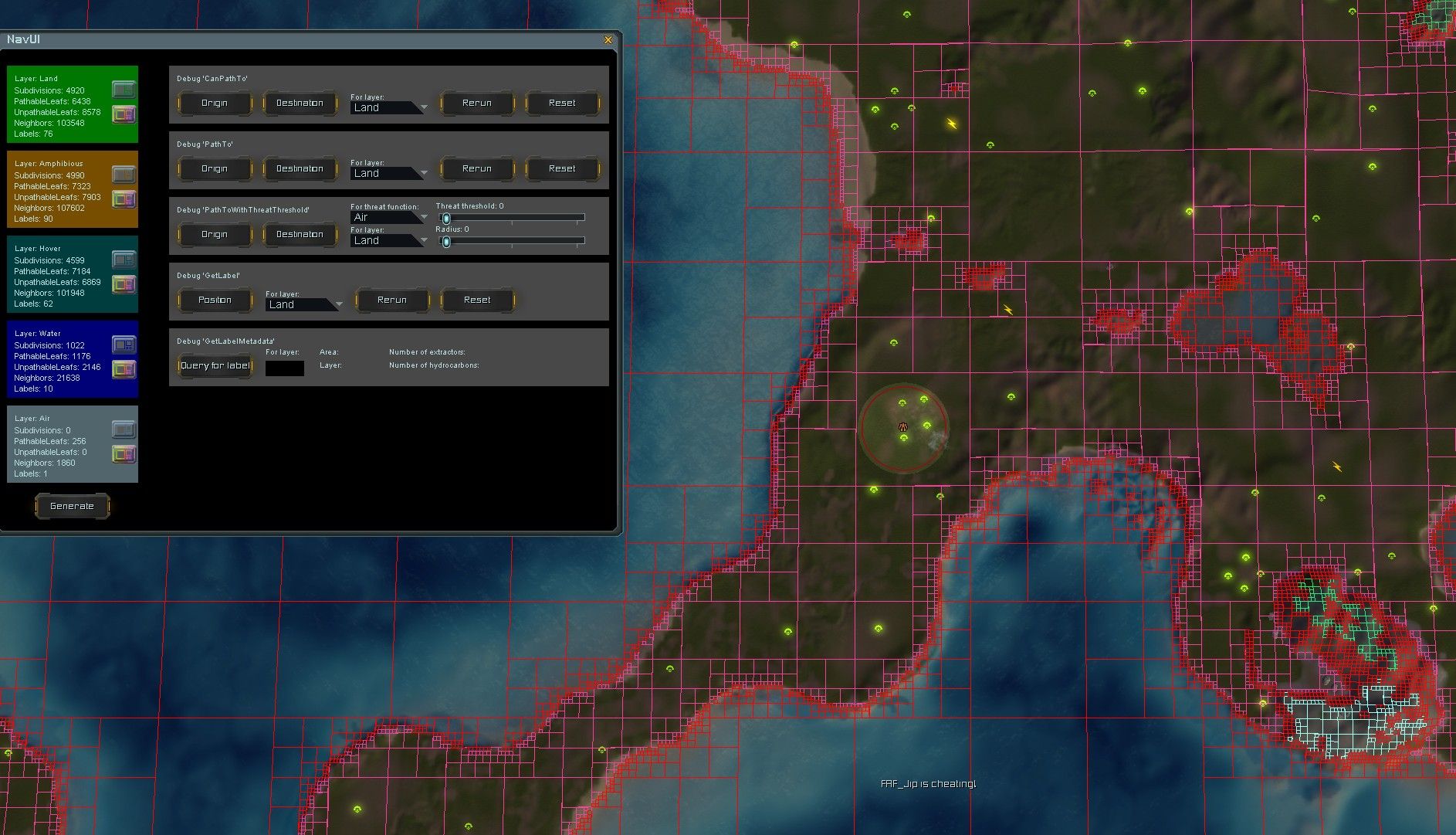
Hit the generate button at the bottom. Then use the icons for each layer to help understand the output. Each label has its own color. When the labels of position A and B match then you can be sure that the average unit can get from A to B. This is what
CanPathTois doing. I don't feel like you need to cache this. This computation is very cheap and is in some sense already cached by the navigational mesh.Note that this navigational mesh is an approximation. The engine has its own mesh that we can't access. But it's quite close as far as I am aware
 .
. -
I'm trying to generate a list of pathable spawn points for the mod AI Wave Survival.
Sometimes, players use a map that has impassable terrain or water near where they set the HQ Spawn points. Currently, spawn points are chosen at random around the HQ to spawn in units, meaning units can get stuck or immediately die if they are a land unit that spawns on water. So, I am adding tables of approved spawn points that will alleviate the issue.
Like I mentioned, the scripts run at the start of the game, so don't really affect performance much. Just seeing if I can optimize them a bit.
Thanks!
-
@Rama
There are several ways to check whether a position is on water or on land to prevent Units to be spawned on an incorrect Layer.
I have use some of them in my Mods several Times.First Example is from Mechdivers
I use the Code below in an While Loop to get the current Layer of an Drone Position in Realtime :local position = self:GetPosition() local terrain = GetTerrainType(position[1], position[3]) self.check = string.find(terrain.Name, "Water") -- self.check = nil (The drone is over Water) -- self.check = 1 or any Value which is not nil (The drone is over Land) If self.check ~= nil then -- Position is on Land -> Spawn Reinforcement Beacon Unit else -- Position is on Water endExample two is from the Commander Survival Kit
local location = self:GetPosition()
local SurfaceHeight = GetSurfaceHeight(location[1], location[3]) -- Get Water layer
local TerrainHeight = GetTerrainHeight(location[1], location[3]) -- Get Land Layer
LOG("Water: ", SurfaceHeight)
LOG("Land: ", TerrainHeight)

-- Check for preventing Land Reinforcements to be spawned in the Water.
if SurfaceHeight == TerrainHeight then
-- Position is on Land -> Spawn Unit
else
-- Position is on Water
end
Maybe this can help you to fix the Issue.you have.
Best regards
CDRMV -
I'm trying to generate a list of pathable spawn points for the mod AI Wave Survival.
Sometimes, players use a map that has impassable terrain or water near where they set the HQ Spawn points. Currently, spawn points are chosen at random around the HQ to spawn in units, meaning units can get stuck or immediately die if they are a land unit that spawns on water. So, I am adding tables of approved spawn points that will alleviate the issue.
Like I mentioned, the scripts run at the start of the game, so don't really affect performance much. Just seeing if I can optimize them a bit.
Thanks!
The navigational mesh only checks for pathability, not buildability. But it's often quite close. What may work is this: loop over all the compressed trees of the land layer, then loop over all the sections of a compressed tree. A section has an
Areafield, which helps you differentiate between small and large area's. The leaves of an area are sorted from large to small. If an area matches your requirements, pick the largest leaf and compute its center. Use that as a possible candidate for a spawn point.You could then further refine it by checking the size of the leaf itself. If it's really large, then you may want to pick a random point in the leaf to make sure two games never look identical and to break the feeling of the 'grid'.
Relevant references:
- Class of
NavGrids: https://github.com/FAForever/fa/blob/develop/lua/sim/NavGenerator.lua#L62-L68 - Class of
NavGrid: https://github.com/FAForever/fa/blob/develop/lua/sim/NavGenerator.lua#L185-L189 - Class of
NavTree: https://github.com/FAForever/fa/blob/develop/lua/sim/NavGenerator.lua#L413-L420 - Class of
NavSection: https://github.com/FAForever/fa/blob/develop/lua/sim/NavGenerator.lua#L404-L411
You can then further refine the set of leaves by checking whether they can (not) path to where the players spawn, or use that as input to determine what the spawn point should initially spawn (amphibious + air vs land, etc). Some utilities for this are in
NavUtils.lua. Or use the area as input, for 'small' and 'large' spawn points.All of this can run in less than 2-5ms, meaning you could technically even do it dynamically. But I do not think that would be necessary for your case.
There's also some debug utilites to make drawing out the leaves you picked easier. See also the following for inspiration:
- Class of
-
Thank you for all the detailed responses.
@jip
I did have one question, what is a leaf? Is it one of the grids shown in the image you posted above?I'll have to get a better understanding of how the NavGenerator works. The script I wrote takes 6 seconds to run at start to generate up to 8 lists of 3000 positions, and I added breaks in it so it doesn't take over the CPU's time. Still would like to get a better grasp of NavGenerator, so I can keep Navy Units from spawning in small, isolated ponds on maps like Seton's Crutch.
-
Yes, a leaf is one of the squares. The colors of a connected area are the labels. A tree is the equivalent of a cell in the imap grid. The imap grid is often a coarse 16x16 grid across the entire map, used by AIs for threat analysis. Each tree can have one or more sections, one for each label (color) in the area. In practice, the air grid is equivalent to the imap grid.
You can loop over all labels, filter on layer, then compute the area to find all water regions and then filter on the Area field to remove small ponds that you can't use for your purpose.
-
we need the functionality of the mapeditor in the base game to see where passable slopes are and where not
-
You can just hold down the spacebar and right-click to see the height. Is it really that difficult and confusing?
-
It's probably as hard as, say, pressing ctrl+shift to view an reckaim, not to mention T1 scouts, which are so difficult to send out that a separate scouting mod is needed. A separate fucking mod for him to click the mouse would also be useful, since playing the game is also difficult; let the AI do the job.
-
And this game is complicated, please make the AI so it plays the way I want, and I'll just watch and drink beer. But then I'll say, despite the quality of life improvements, that your game is still not user-friendly, and I'll skip it, and you don't understand anything (crying)
-
If you're playing solo, with friends, or vs AI there's a sim mod that lets you give your scouts to the AI to control for you (M28AI with the combined armies option enabled - toggle the icon when selecting your scouts to hand control of them to the AI for as long as you want).
It's unrelated to this topic though so if you had further queries on this best to ask in discord or the separate thread on M28AI.
-
Hi Jip, read through the provided links a few times. Is there a function I use to get information on leafs? Or a mod that would be a good example of how to use these functions that I could look at to better understand how to use?


Hello! It looks like you're interested in this conversation, but you don't have an account yet.
Getting fed up of having to scroll through the same posts each visit? When you register for an account, you'll always come back to exactly where you were before, and choose to be notified of new replies (either via email, or push notification). You'll also be able to save bookmarks and upvote posts to show your appreciation to other community members.
With your input, this post could be even better 💗
Register Login