5k resolution. When I zoom out I quickly lose the "health point" bars, and building. How to fix this?

-
Hello everyone,
I recently switched to a 5k monitor (Samsung Odyssey G9), and I am a bit annoyed when I play because when I zoom out ingame, the health bar become invisible "too early" in the zoom out. Also, building are disappearing in display too early.
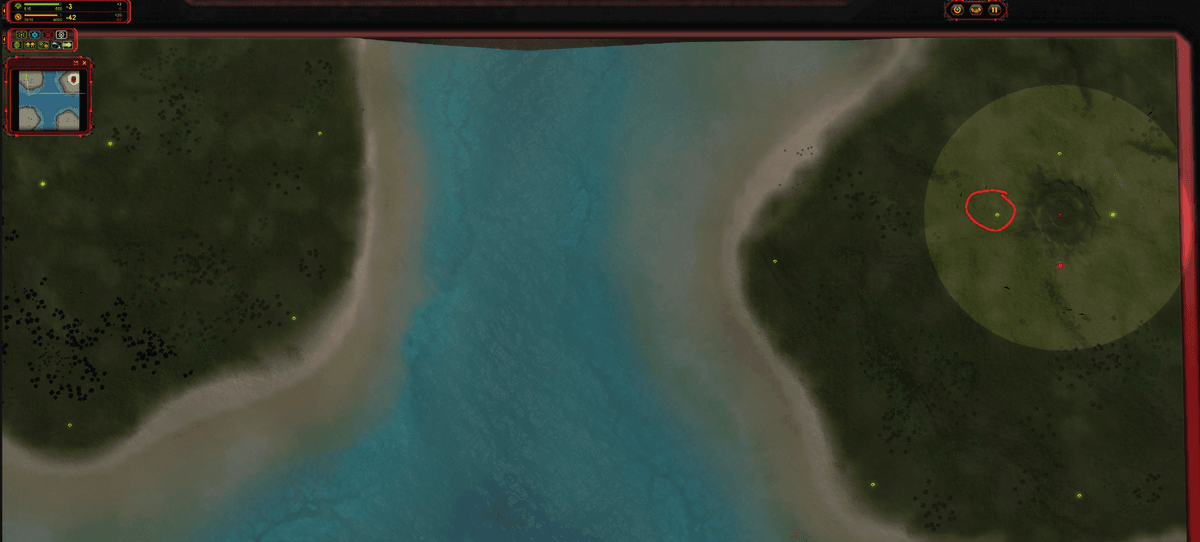
For instance, in the following picture, the commander is building a t1 mass extractor on the left spot (inside my red circle) but it is not visible. Similarly, no health bar is visible on units.Is there a way to increase the range at which such thing display? It becomes quite difficult to play the game because of this now.
Thanks a lot.
-
There are some console commands https://supcom.fandom.com/wiki/Console
you can search by keyword "cutoff", "LOD", "ren_" or ask some AI chatbot
So entering those commands with correct values could fix the issue
afaik as you enter commands they apply in game instantly, no need to restart or anything like that.
you will need to experiment with values.
It is also pretty easy to make a UI mod that would enter those commands for you at the beginning of every game (possibly with a slight delay in case of weird issues)I have found one for health bars:
ui_LifebarLODFor example, there is a mod called "FPS Unlocked"
all it does is waiting for 1 second and then enters a console command "sc_FrameTimeClamp 7"
you can replace console command in that mod for your own and it should work -
Thanks for your help.
I used your advice (and also got help from AI).
I managed to solve some of the issues but not all of them.Basically, I managed to render the lifebar from a far away distance, using, e.g. ui_LifebarLOD 1000
I also managed to display part of the buildings from arbitrary distance activating ren_IgnoreDecalLODMy remaining issue is in my last sentence: basically only the "floor" below the building now renders from an arbitrary distance, but not the building themselves.
See my below picture to understand what I mean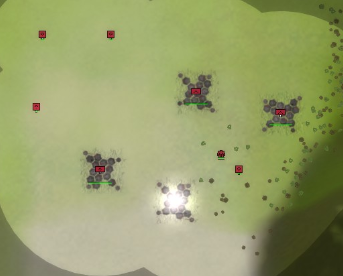
As you can see here, the "floor texture" below the building displays, but not the building themselves. This is still annoying because when I build a building there is no floor texture below, and for this reason I cannot see built in progress from a large distance.
Does anyone has an idea of how to solve this?
-
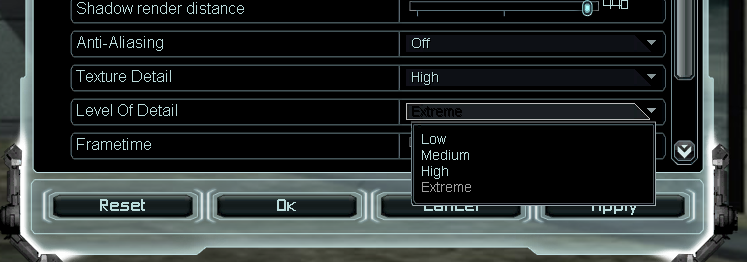
Have you set the level of detail to extreme already, under video of the game options?
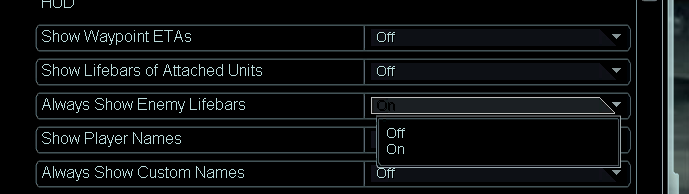
There's also the option to always show the life bars (of enemy units) in the interface tab:
Otherwise there's manually changing
cam_SetLODto a value like 0.6 or 0.5. The extreme option changes this from 1.0 to 0.7. The engine is not quite built for values lower than 0.7 though, at some point it may start to show artifacts. -
I have put to extreme (it was high before). It does improve a bit but it is still annoying.
I tried to change cam_SetLOD but it didn't change anything. A lower value for this parameter is supposed to be better right? Do I understand correctly that High means cam_SetLOD 1.0, while "extreme" puts it at 0.7 (is that what you meant?).
Thanks.
-
@freemp said in 5k resolution. When I zoom out I quickly lose the "health point" bars, and building. How to fix this?:
I also managed to display part of the buildings from arbitrary distance activating ren_IgnoreDecalLOD
Decal is the texture under the buildings and textures on the map, and marks after explosions and other textures on the map.
So that is just a wrong thing/console command
you probably don't want to have them always rendered, depending on how powerful your GPU is and as game is progressing, you may get more and more decals on the map (not sure if there is a limit)i have briefly looked through some console commands again and i can't find the right one... but i am sure i have used it before to do this

i think i have tryed cam_SetLOD and it didn't help
SC_CameraScaleLOD - this have helped but made my map glitch all dark and laggy -
Thanks for your help. Yes, for decals this is what I meant by "part of the building". It was the texture below them.
Actually an "alternative fix" for me would be to display a strategic icon for building under construction.
Basically the main annoying thing is that when I'm "far but not too far", I cannot see which building are going under construction as they disappear, and they have no strategic icon associated before they are built.
Having such an icon would not solve my problem ideally but could be an ok-ish work around. Is there a way to do so?
-
I think you're running into a limitation on how the game computes the LOD (level of detail, when to render meshes (of units, props)) The same will likely apply to elements (effects, beams). As ZLO mentions, pushing these console commands cause artifacts. In 2006 (over 20 years ago!) these type of resolutions were unthinkable. It's not ideal, but one solution is to run in windowed mode and reduce the resolution?


Hello! It looks like you're interested in this conversation, but you don't have an account yet.
Getting fed up of having to scroll through the same posts each visit? When you register for an account, you'll always come back to exactly where you were before, and choose to be notified of new replies (either via email, or push notification). You'll also be able to save bookmarks and upvote posts to show your appreciation to other community members.
With your input, this post could be even better 💗
Register Login