FAForever Forums
    • Categories
    • Recent
    • Tags
    • Popular
    • Users
    • Groups
    • Login
    The current pre-release of the client ("pioneer" in the version) is only compatible to itself. So you can only play with other testers. Please be aware!

    Client doesn't start

    Scheduled Pinned Locked Moved FAF support (client and account issues)
    7 Posts 7 Posters 363 Views
    Loading More Posts
    • Oldest to Newest
    • Newest to Oldest
    • Most Votes
    Reply
    • Reply as topic
    Log in to reply
    This topic has been deleted. Only users with topic management privileges can see it.
    • S Offline
      Sainse Balance Team
      last edited by Sainse

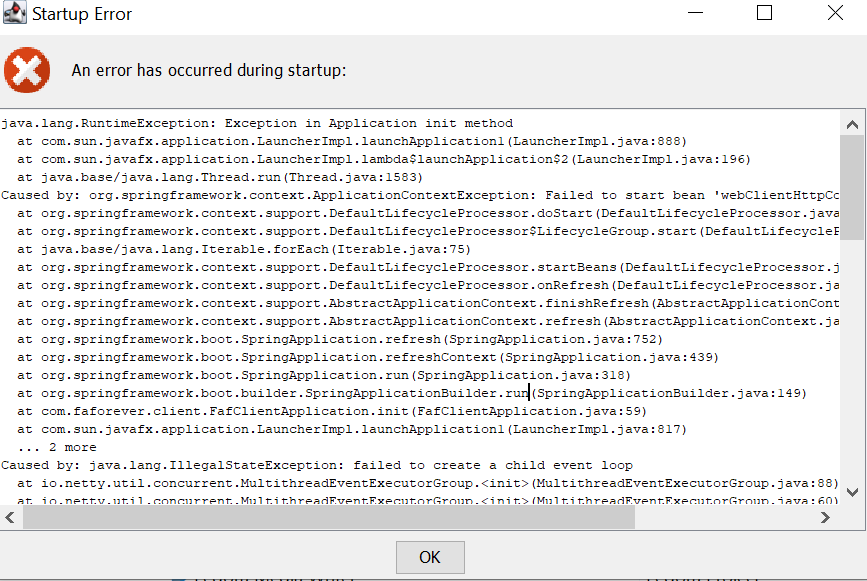
      While starting a client I see a FAF icon preview, after which this pops up. This error occurred on installation that previously worked for no updates. The path is ascii only.
      f7402bb7-12be-453e-ae28-9d9dc8f3837e-image.png
      error.log

      Things I've tried:

      • Reinstall client
      • Clear %AppData/faf
      • Clear %ProgramData/faf
      • Reinstall java

      Nothing helped

      1 Reply Last reply Reply Quote 1
      • D Offline
        DonJon
        last edited by

        I have this same problem, hope someone can help.

        1 Reply Last reply Reply Quote 0
        • H Offline
          HaloFreak5
          last edited by

          Same problem

          1 Reply Last reply Reply Quote 0
          • F Offline
            fafan12512
            last edited by

            I think (looking at the stack trace in the log) the issue is similar to this one (ignore that it's for minecraft, minecraft uses Java too): https://bugs.mojang.com/browse/MC/issues/MC-34749

            Quote from source:

            1. This issue is most commonly caused by a broken installation of Avast! free edition Anti-virus software. A reinstallation of Avast! and a reboot usually fixes it.
            
            *   McAfee anti-virus software (and derivatives) are also know to cause this issue, and currently the only known solution is to uninstall this software to correct the problem.
            *   Also Outpost security may cause that issue.
            

            So most likely it's your antivirus software that causes troubles.

            1 Reply Last reply Reply Quote 0
            • K Offline
              Kilatamoro
              last edited by

              I also can't login. But I don't even have an active antivirus. New DDoS wave? Mine just says "504 Gateway Timeout".

              1 Reply Last reply Reply Quote 0
              • B Offline
                Burka_0103
                last edited by

                same problem

                1 Reply Last reply Reply Quote 0
                • S Online
                  Sheikah
                  last edited by

                  This should be fixed in https://github.com/FAForever/downlords-faf-client/releases/tag/v2025.11.2

                  1 Reply Last reply Reply Quote 0

                  Hello! It looks like you're interested in this conversation, but you don't have an account yet.

                  Getting fed up of having to scroll through the same posts each visit? When you register for an account, you'll always come back to exactly where you were before, and choose to be notified of new replies (either via email, or push notification). You'll also be able to save bookmarks and upvote posts to show your appreciation to other community members.

                  With your input, this post could be even better 💗

                  Register Login
                  • First post
                    Last post