APM monitoring
-
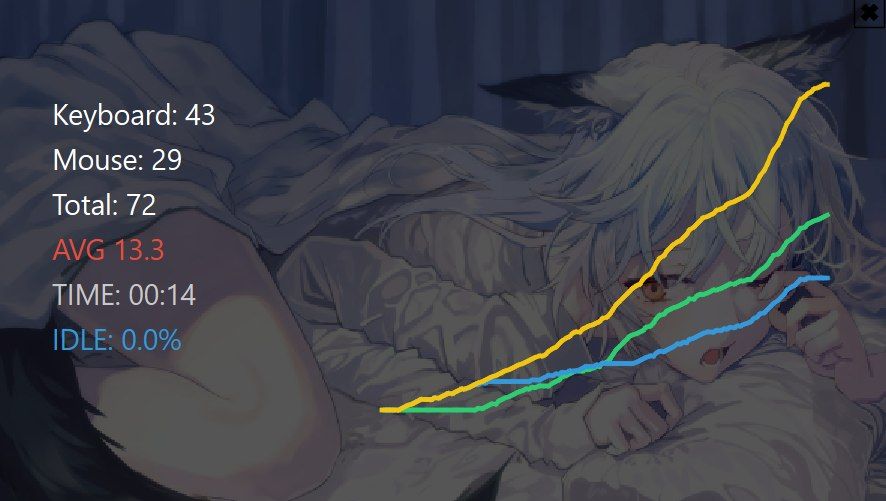
This tool is written entirely in python. I will attach the source code, as well as the script, to check for suspicious code sections. This APM tracker allows you to track your APM right during the game by dividing it into Mouse/Keyboard, and Total. And there are also internal parameters of the Micro/A macro APM that compares your APM with professional players at every moment of time every second, this is reflected in the colors in the legend on the AVG indicator, red is a bad APM, green is a good APM, purple is a perfect APM. Different timings are also loaded for different stages of the game (Early game, Mid-game, Late game, Ultralight game), where at each stage of the game the APM is compared with the pro level by different variables. There is also an IDLE line to track your inactivity, the color also matters, blue is perfect, green is good, red is bad. IDLE is also compared with the performance of pro players.
Among other things, an internal APM graph is built in, as well as the amount of clicks is displayed. It is recommended to reset the tool after each game (F3 - played the game - F3) so the script will not break and all stages of the game will be considered correctly.
Also, for visual lovers, there is a "wallpapers" folder in the root folder where you can add your own wallpapers for the tracker and change them by pressing the F4 key. By default, an anime girl picture is downloaded there.
The archive with the software is too big, I'll upload it to my Google drive: https://drive.google.com/drive/folders/16TDPYbPbpfU8r8H6qHu1ACJ93QJnO58K?usp=sharing
CODE:
import sys
import time
import os
from collections import deque
from datetime import datetimeimport numpy as np
import matplotlib.pyplot as pltfrom PyQt6 import QtCore, QtGui, QtWidgets
from pynput import keyboard, mouseWINDOW_SIZE = (600, 350)
class Overlay(QtWidgets.QWidget):
def init(self):
super().init()self.setWindowFlags( QtCore.Qt.WindowType.FramelessWindowHint | QtCore.Qt.WindowType.WindowStaysOnTopHint | QtCore.Qt.WindowType.Tool ) self.setAttribute(QtCore.Qt.WidgetAttribute.WA_TranslucentBackground) self.setGeometry(300, 200, *WINDOW_SIZE) # ========================= # DRAG # ========================= self.dragging = False self.drag_offset = None # ========================= # DATA # ========================= self.session_active = False self.start_time = 0 self.events = deque() self.last_event_time = None self.idle_time = 0.0 self.k_hist = [] self.m_hist = [] self.t_hist = [] # ========================= # WALLPAPERS # ========================= self.wallpapers = [] self.wp_index = 0 self.load_wallpapers() # ========================= # TIMER # ========================= self.timer = QtCore.QTimer() self.timer.timeout.connect(self.loop) self.timer.start(100) # ========================= # INPUT # ========================= self.k_listener = keyboard.Listener(on_press=self.on_key) self.k_listener.start() self.m_listener = mouse.Listener(on_click=self.on_mouse) self.m_listener.start() self.hot_listener = keyboard.Listener(on_press=self.hotkeys) self.hot_listener.start() self.camera_keys = {"w", "a", "s", "d", "W", "A", "S", "D"} self.arrow_keys = {keyboard.Key.up, keyboard.Key.down, keyboard.Key.left, keyboard.Key.right} # ========================= # SCREAM # ========================= self.scream_active = False self.scream_end = 0 # ========================= # CLOSE BUTTON # ========================= self.close_rect = QtCore.QRect(WINDOW_SIZE[0]-25, 5, 20, 20) # ========================= # WALLPAPER # ========================= def load_wallpapers(self): base = os.path.dirname(os.path.abspath(__file__)) folder = os.path.join(base, "wallpapers") if not os.path.exists(folder): os.makedirs(folder) for f in os.listdir(folder): if f.lower().endswith((".png", ".jpg", ".jpeg")): pix = QtGui.QPixmap(os.path.join(folder, f)) if not pix.isNull(): self.wallpapers.append(pix) def current_wallpaper(self): if not self.wallpapers: return None return self.wallpapers[self.wp_index % len(self.wallpapers)] def next_wallpaper(self): if self.wallpapers: self.wp_index += 1 # ========================= # DRAG # ========================= def mousePressEvent(self, event): if event.button() == QtCore.Qt.MouseButton.LeftButton: if self.close_rect.contains(event.position().toPoint()): QtWidgets.QApplication.quit() return self.dragging = True self.drag_offset = event.globalPosition().toPoint() - self.frameGeometry().topLeft() def mouseMoveEvent(self, event): if self.dragging: self.move(event.globalPosition().toPoint() - self.drag_offset) def mouseReleaseEvent(self, event): self.dragging = False # ========================= # INPUT # ========================= def on_key(self, key): if not self.session_active: return if key in self.arrow_keys: return try: if hasattr(key, "char") and key.char in self.camera_keys: return except: pass self.events.append(("key", time.time())) self.last_event_time = time.time() def on_mouse(self, x, y, button, pressed): if not self.session_active or not pressed: return if button == mouse.Button.middle: return self.events.append(("mouse", time.time())) self.last_event_time = time.time() def hotkeys(self, key): try: if key == keyboard.Key.f3: self.toggle() if key == keyboard.Key.f4: self.next_wallpaper() except: pass # ========================= # SESSION # ========================= def toggle(self): if not self.session_active: self.session_active = True self.start_time = time.time() self.events.clear() self.k_hist = [] self.m_hist = [] self.t_hist = [] self.idle_time = 0.0 self.last_event_time = time.time() else: self.session_active = False self.save() # ========================= # APM # ========================= def calc_total(self): now = time.time() while self.events and now - self.events[0][1] > 60: self.events.popleft() return len(self.events) def calc_km(self): total = self.calc_total() k = len([e for e in self.events if e[0] == "key"]) m = len([e for e in self.events if e[0] == "mouse"]) return k, m, total # ========================= # IDLE # ========================= def update_idle(self): if self.last_event_time is None: return 0 now = time.time() idle = max(0.0, now - self.last_event_time - 1.5) self.idle_time += idle * 0.1 return self.idle_time # ========================= # HUD # ========================= def compute_hud(self): k, m, total = self.calc_km() micro = k + m macro = max(0, total - micro * 0.4) idle = self.update_idle() elapsed = max(1, time.time() - self.start_time) idle_pct = (self.idle_time / elapsed) * 100 avg = np.mean(self.k_hist + self.m_hist) if self.k_hist else 0 return k, m, total, micro, macro, idle_pct, avg # ========================= # APS COLOR # ========================= def aps_color(self, avg_apm): aps = avg_apm / 60.0 if aps >= 3.8: return (155, 89, 182) elif aps >= 2.6: return (46, 204, 113) else: return (231, 76, 60) # ========================= # LOOP # ========================= def loop(self): if self.session_active: k, m, total, *_ = self.compute_hud() self.k_hist.append(k) self.m_hist.append(m) self.t_hist.append(time.time() - self.start_time) self.repaint() # ========================= # SMOOTH # ========================= def smooth(self, data, w=7): if len(data) < w: return np.array(data) pad = w // 2 padded = np.pad(data, (pad, pad), mode="edge") return np.convolve(padded, np.ones(w) / w, mode="valid") # ========================= # SAVE # ========================= def save(self): if len(self.t_hist) < 5: return t = np.array(self.t_hist) k = np.array(self.k_hist) m = np.array(self.m_hist) total = k + m avg = np.mean(total) mx = np.max(total) base = os.path.dirname(os.path.abspath(__file__)) folder = os.path.join(base, "sessions") os.makedirs(folder, exist_ok=True) path = os.path.join(folder, f"session_{datetime.now().strftime('%Y%m%d_%H%M%S')}.png") fig, (ax1, ax2) = plt.subplots(2, 1, figsize=(8, 6), dpi=120) fig.patch.set_facecolor("#0b0f14") ax1.set_facecolor("#0b0f14") ax2.set_facecolor("#0b0f14") wp = self.current_wallpaper() if wp: img = wp.toImage().convertToFormat(QtGui.QImage.Format.Format_RGBA8888) ptr = img.bits() ptr.setsize(img.sizeInBytes()) arr = np.array(ptr).reshape(img.height(), img.width(), 4) fig.figimage(arr, xo=0, yo=0, alpha=0.1, zorder=-1) fig.suptitle("CEPHALON APM METRIC", color="white", fontsize=16, fontweight="bold", y=0.95) ax1.plot(t, k, color="#2ecc71", label="Keyboard") ax1.plot(t, m, color="#3498db", label="Mouse") ax1.plot(t, total, color="#f1c40f", label="Total") leg1 = ax1.legend(facecolor="#111", framealpha=0.8) for text in leg1.get_texts(): text.set_color("white") ax1.tick_params(colors="white") ax1.grid(alpha=0.3) micro = k + m macro = total - micro * 0.4 ax2.plot(t, micro, color="#9b59b6", label="Micro") ax2.plot(t, macro, color="#e74c3c", label="Macro") leg2 = ax2.legend(facecolor="#111", framealpha=0.8) for text in leg2.get_texts(): text.set_color("white") ax2.tick_params(colors="white") ax2.grid(alpha=0.3) plt.tight_layout() plt.savefig(path, facecolor=fig.get_facecolor()) plt.close() print(f"Session saved to {path}") # ========================= # OVERLAY # ========================= def paintEvent(self, e): p = QtGui.QPainter(self) p.setRenderHint(QtGui.QPainter.RenderHint.Antialiasing) wp = self.current_wallpaper() if wp: scaled = wp.scaled(self.size(), QtCore.Qt.AspectRatioMode.IgnoreAspectRatio, QtCore.Qt.TransformationMode.SmoothTransformation) p.drawPixmap(0, 0, scaled) p.setBrush(QtGui.QColor(0, 0, 0, 170)) p.setPen(QtCore.Qt.PenStyle.NoPen) p.drawRoundedRect(0, 0, *WINDOW_SIZE, 14, 14) # ========================= # CLOSE BUTTON # ========================= p.setBrush(QtCore.Qt.BrushStyle.NoBrush) p.setPen(QtGui.QColor(0, 0, 0)) p.drawRect(self.close_rect) p.setFont(QtGui.QFont("Arial", 12, QtGui.QFont.Weight.Bold)) p.drawText(self.close_rect, QtCore.Qt.AlignmentFlag.AlignCenter, "✖") if not self.session_active: p.setFont(QtGui.QFont("Segoe UI", 15)) p.setPen(QtGui.QColor(255, 255, 255)) p.drawText(40, 70, "Press F3 to start") return k, m, total, micro, macro, idle_pct, avg = self.compute_hud() color = self.aps_color(avg) elapsed = int(time.time() - self.start_time) mm = elapsed // 60 ss = elapsed % 60 p.setPen(QtGui.QColor(255, 255, 255)) p.setFont(QtGui.QFont("Segoe UI", 14)) p.drawText(40, 90, f"Keyboard: {k}") p.drawText(40, 120, f"Mouse: {m}") p.drawText(40, 150, f"Total: {total}") # AVG p.setPen(QtGui.QColor(*color)) p.drawText(40, 180, f"AVG {avg:.1f}") p.setPen(QtGui.QColor(200, 200, 200)) p.drawText(40, 210, f"TIME: {mm:02d}:{ss:02d}") p.setPen(QtGui.QColor(52, 152, 219)) p.drawText(40, 240, f"IDLE: {idle_pct:.1f}%") if len(self.k_hist) > 10: k_s = self.smooth(np.array(self.k_hist)) m_s = self.smooth(np.array(self.m_hist)) t_s = k_s + m_s x0, y0, w, h = 260, 60, 300, 220 mx = max(t_s) + 1 def draw(data, color): for i in range(len(data) - 1): p.setPen(QtGui.QPen(color, 3)) p.drawLine( int(x0 + (i / len(data)) * w), int(y0 + h - (data[i] / mx) * h), int(x0 + ((i + 1) / len(data)) * w), int(y0 + h - (data[i + 1] / mx) * h) ) draw(k_s, QtGui.QColor(46, 204, 113)) draw(m_s, QtGui.QColor(52, 152, 219)) draw(t_s, QtGui.QColor(241, 196, 15))if name == "main":
app = QtWidgets.QApplication(sys.argv)
w = Overlay()
w.show()
sys.exit(app.exec()) -
The overlay looks like this
-
Perhaps you can put the code on Github? Easier to review.
"Design is an iterative process. The required number of iterations is one more than the number you have currently done. This is true at any point in time."
See all my projects:

-
Perhaps you can put the code on Github? Easier to review.
I'm essentially a novice coder, I've been doing this for less than a week, I've never used a github for hosting. I can attach the python script itself that runs the EXE so that you can look through editing
-
Perhaps you can put the code on Github? Easier to review.
https://gist.github.com/cephalonlabel-commits/67460d85f23fbb7c1c39f3fd8c117996think I did it.

Hello! It looks like you're interested in this conversation, but you don't have an account yet.
Getting fed up of having to scroll through the same posts each visit? When you register for an account, you'll always come back to exactly where you were before, and choose to be notified of new replies (either via email, or push notification). You'll also be able to save bookmarks and upvote posts to show your appreciation to other community members.
With your input, this post could be even better 💗
Register Login