Help setup dual screen
-
Hi there, i've been trying to use dual screen since a while, but i never found a way, so i drop my issue here, maybe some of you have an answer!
I have two 27" monitor setup at 2560x1440. Main monitor in windows 10 is the right screen.
Forged alliance is setup in windowed.
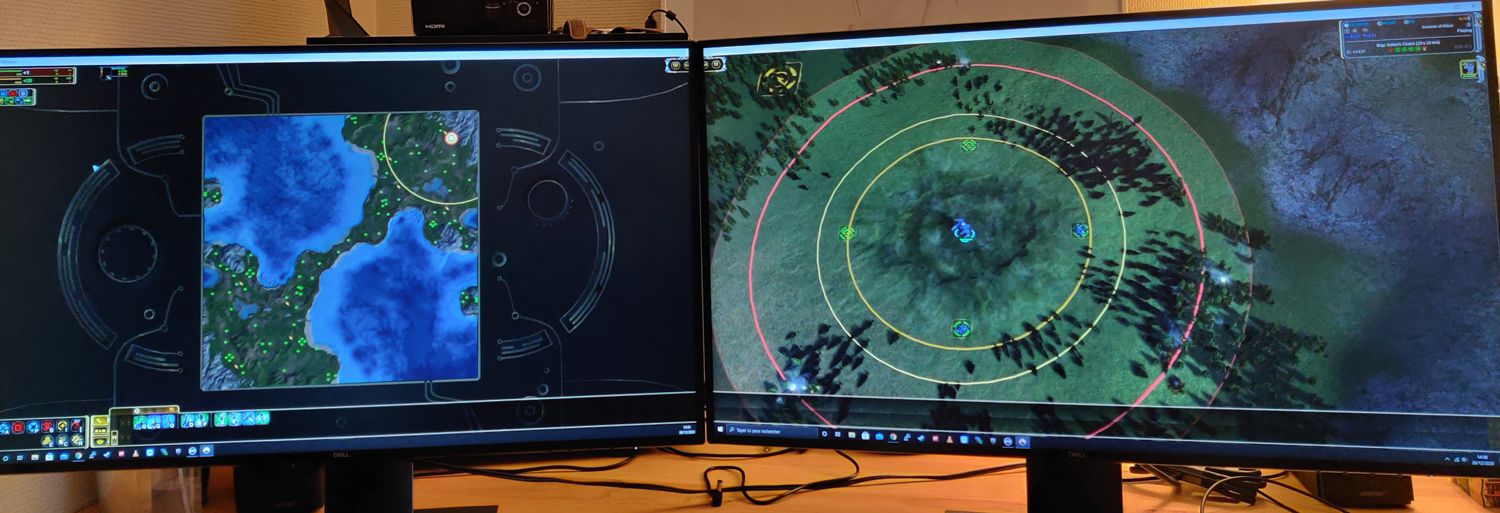
The goal is to play on the right screen, and have like a giant "mini map" on the left screenThe issue, when i stretch the Forged alliance window to both screen, is that all the construction panel, and all the info apart for the scoreboard go on the left of the left screen.
So is their a way to get all the panel on the right screen ?
Other issue, the menu is right in the middle
I tryed to enable and play with ui party settings with the same issues.Here is a picture of the issue
-
you can use ui festival instead of ui party. It allows to select your right monitor as main monitor.
-
Hey, got no results in mod vault for "ui festival" or "festival"
-
Have you tried setting it to fullscreen and using the dual monitor option in the Forged Alliance menu?
-
I had many issues with fullscreen, i rather keep in windowed on a single screen.
I have found ui festival on github. But when i enable the mod, i have a crash at the beginning of the game.
Unhandled exception: state->m_rootState == m_state Program : C:\ProgramData\FAForever\bin\ForgedAlliance.exe Cmd line arguments : /init init.lua /nobugreport /log C:\ProgramData\FAForever\logs\game_13468701.log /gpgnet 127.0.0.1:33021 /mean 1871.994 /deviation 92.96338 /savereplay gpgnet://127.0.0.1:59358/13468701/Th3-11.SCFAreplay /country FR /numgames 1846 Callstack: Unknown symbol (address 0x008d462c) Last 100 lines of log... warning: [C]: in function `doscript' warning: [C]: in function `pcall' warning: ...alliance\gamedata\mohodata.scd\lua\system\import.lua(48): in function `import' warning: ...alliance\gamedata\mohodata.scd\lua\system\import.lua(37): in function `import' warning: ...\faforever\gamedata\lua.nx2\lua\ui\game\gamemain.lua(978): in main chunk warning: [C]: in function `doscript' warning: [C]: in function `pcall' warning: ...alliance\gamedata\mohodata.scd\lua\system\import.lua(48): in function `import' warning: ...alliance\gamedata\mohodata.scd\lua\system\import.lua(37): in function `import' warning: ...r forged alliance\gamedata\lua.scd\lua\ui\uimain.lua(85): in function <...r forged alliance\gamedata\lua.scd\lua\ui\uimain.lua:83> warning: ...alliance\gamedata\mohodata.scd\lua\system\import.lua(37): Error importing '/mods/ui-festival/modules/main.lua' warning: stack traceback: warning: [C]: in function `error' warning: ...alliance\gamedata\mohodata.scd\lua\system\import.lua(52): in function `import' warning: ...alliance\gamedata\mohodata.scd\lua\system\import.lua(37): in function `import' warning: ...\faforever\gamedata\lua.nx2\lua\ui\game\gamemain.lua(978): in main chunk warning: [C]: in function `doscript' warning: [C]: in function `pcall' warning: ...alliance\gamedata\mohodata.scd\lua\system\import.lua(48): in function `import' warning: ...alliance\gamedata\mohodata.scd\lua\system\import.lua(37): in function `import' warning: ...r forged alliance\gamedata\lua.scd\lua\ui\uimain.lua(85): in function <...r forged alliance\gamedata\lua.scd\lua\ui\uimain.lua:83> warning: Error running '/lua/ui/uimain.lua:StartGameUI': ...alliance\gamedata\mohodata.scd\lua\system\import.lua(37): Error importing '/lua/ui/game/gamemain.lua' stack traceback: [C]: in function `error' ...alliance\gamedata\mohodata.scd\lua\system\import.lua(52): in function `import' ...alliance\gamedata\mohodata.scd\lua\system\import.lua(37): in function `import' ...r forged alliance\gamedata\lua.scd\lua\ui\uimain.lua(85): in function <...r forged alliance\gamedata\lua.scd\lua\ui\uimain.lua:83> debug: Loading module '\000/lua/usercamera.lua\000' debug: Loading module '\000/lua/ui/game/missiontext.lua\000' debug: Loading module '\000/lua/ui/game/gamemain.lua\000' info: Hooked /lua/ui/game/gamemain.lua with /mods/ui-festival-master/hook/lua/ui/game/gamemain.lua warning: Hotbuild key Alt-D is already bound to action "Dumps info about all UI controls to the log window" under "DEBUG" category warning: Hotbuild key Alt-Q is already bound to action "Toggles the display of a rectangle around the focus UI control" under "DEBUG" category debug: Loading module '\000/mods/ui-festival/modules/main.lua\000' warning: Unable to find file /mods/ui-festival/modules/main.lua warning: stack traceback: warning: [C]: in function `doscript' warning: [C]: in function `pcall' warning: ...alliance\gamedata\mohodata.scd\lua\system\import.lua(48): in function `import' warning: ...alliance\gamedata\mohodata.scd\lua\system\import.lua(37): in function `import' warning: ...\faforever\gamedata\lua.nx2\lua\ui\game\gamemain.lua(978): in main chunk warning: [C]: in function `doscript' warning: [C]: in function `pcall' warning: ...alliance\gamedata\mohodata.scd\lua\system\import.lua(48): in function `import' warning: ...alliance\gamedata\mohodata.scd\lua\system\import.lua(37): in function `import' warning: ...forever\gamedata\lua.nx2\lua\ui\game\missiontext.lua(16): in main chunk warning: [C]: in function `doscript' warning: [C]: in function `pcall' warning: ...alliance\gamedata\mohodata.scd\lua\system\import.lua(48): in function `import' warning: ...gramdata\faforever\gamedata\lua.nx2\lua\usersync.lua(154): in function `OnSync' warning: [string "OnSync()"](1): in main chunk warning: ...alliance\gamedata\mohodata.scd\lua\system\import.lua(37): Error importing '/mods/ui-festival/modules/main.lua' warning: stack traceback: warning: [C]: in function `error' warning: ...alliance\gamedata\mohodata.scd\lua\system\import.lua(52): in function `import' warning: ...alliance\gamedata\mohodata.scd\lua\system\import.lua(37): in function `import' warning: ...\faforever\gamedata\lua.nx2\lua\ui\game\gamemain.lua(978): in main chunk warning: [C]: in function `doscript' warning: [C]: in function `pcall' warning: ...alliance\gamedata\mohodata.scd\lua\system\import.lua(48): in function `import' warning: ...alliance\gamedata\mohodata.scd\lua\system\import.lua(37): in function `import' warning: ...forever\gamedata\lua.nx2\lua\ui\game\missiontext.lua(16): in main chunk warning: [C]: in function `doscript' warning: [C]: in function `pcall' warning: ...alliance\gamedata\mohodata.scd\lua\system\import.lua(48): in function `import' warning: ...gramdata\faforever\gamedata\lua.nx2\lua\usersync.lua(154): in function `OnSync' warning: [string "OnSync()"](1): in main chunk warning: ...alliance\gamedata\mohodata.scd\lua\system\import.lua(37): Error importing '/lua/ui/game/gamemain.lua' warning: stack traceback: warning: [C]: in function `error' warning: ...alliance\gamedata\mohodata.scd\lua\system\import.lua(52): in function `import' warning: ...alliance\gamedata\mohodata.scd\lua\system\import.lua(37): in function `import' warning: ...forever\gamedata\lua.nx2\lua\ui\game\missiontext.lua(16): in main chunk warning: [C]: in function `doscript' warning: [C]: in function `pcall' warning: ...alliance\gamedata\mohodata.scd\lua\system\import.lua(48): in function `import' warning: ...gramdata\faforever\gamedata\lua.nx2\lua\usersync.lua(154): in function `OnSync' warning: [string "OnSync()"](1): in main chunk warning: Error running lua command: ...gramdata\faforever\gamedata\lua.nx2\lua\usersync.lua(154): Error importing '/lua/ui/game/missiontext.lua' stack traceback: [C]: in function `error' ...alliance\gamedata\mohodata.scd\lua\system\import.lua(52): in function `import' ...gramdata\faforever\gamedata\lua.nx2\lua\usersync.lua(154): in function `OnSync' [string "OnSync()"](1): in main chunk debug: Loading module '\000/lua/ui/game/gamemain.lua\000' info: Hooked /lua/ui/game/gamemain.lua with /mods/ui-festival-master/hook/lua/ui/game/gamemain.lua warning: Hotbuild key Alt-D is already bound to action "Dumps info about all UI controls to the log window" under "DEBUG" category warning: Hotbuild key Alt-Q is already bound to action "Toggles the display of a rectangle around the focus UI control" under "DEBUG" category debug: Loading module '\000/mods/ui-festival/modules/main.lua\000' warning: Unable to find file /mods/ui-festival/modules/main.lua warning: stack traceback: warning: [C]: in function `doscript' warning: [C]: in function `pcall' warning: ...alliance\gamedata\mohodata.scd\lua\system\import.lua(48): in function `import' warning: ...alliance\gamedata\mohodata.scd\lua\system\import.lua(37): in function `import' warning: ...\faforever\gamedata\lua.nx2\lua\ui\game\gamemain.lua(978): in main chunk warning: [C]: in function `doscript' warning: [C]: in function `pcall' warning: ...alliance\gamedata\mohodata.scd\lua\system\import.lua(48): in function `import' warning: ...alliance\gamedata\mohodata.scd\lua\system\import.lua(37): Error importing '/mods/ui-festival/modules/main.lua' warning: stack traceback: warning: [C]: in function `error' warning: ...alliance\gamedata\mohodata.scd\lua\system\import.lua(52): in function `import' warning: ...alliance\gamedata\mohodata.scd\lua\system\import.lua(37): in function `import' warning: ...\faforever\gamedata\lua.nx2\lua\ui\game\gamemain.lua(978): in main chunk warning: [C]: in function `doscript' warning: [C]: in function `pcall' warning: ...alliance\gamedata\mohodata.scd\lua\system\import.lua(48): in function `import' warning: Error importing /lua/ui/game/gamemain.lua: Error importing '/lua/ui/game/gamemain.lua' stack traceback: [C]: in function `error' ...alliance\gamedata\mohodata.scd\lua\system\import.lua(52): in function `import' warning: Error running '/lua/ui/game/gamemain.lua:OnBeat': attempt to index a nil value stack traceback: -
A friend of mine also had some crashing issues. We didn't manage to resolve those, maybe someone with a bit more knowledge could help here. He would certainly appreaciate as well. He also had a 1440p monitor. Maybe that is a reason for it.
-
What is the purpose of the mod?
-
@Jip said in Help setup dual screen:
What is the purpose of the mod?
Use dual screen windowed with all ui panel on the right screen
Edit : i got it working just renaming the folder name of the mod.
Looks like it does exactly what i want.
Future will tell if its stable or not.So thx @harzer99
-
Sorry to necro this, but I had the same issue in Forged Alliance and FAF today 08/29/2025. I have a solution that worked for me. First, I have three screens of different resolution and refresh rate, if you want to use the second screen, and have more than two, first disable the ones you are not going to use. Don't let Windows see more than two screens.
Now for context, in my case the main culprit was the Anti-Aliasing setting. The moment I enabled AA, or if AA was enabled when I selected a second monitor, it would not work. My monitors are different resolution and refresh, I don't know if it has anything to do, but this worked for me 100% of the time. After you make sure only two screens are active follow the steps below:
- Start Forged Alliance and disable the non-working, secondary screen.
- Set the main display to the correct resolution but set your Fidelity Preset to Low, make sure AA is off. Save and restart FA.
- After FA starts with the correct resolution and low Fidelity, enable the secondary display, at a lower resolution and refresh rate than the default settings for the secondary monitor. Save and restart FA.
- After restarting and displaying the menu, the secondary screen should work, displaying an FA splash screen. Now carefully adjust set a higher preset and edit your graphic settings if desired, but ALWAYS make sure that Anti-Aliasing is OFF before you click OK. I know the High preset will enable AA, so be careful, if you enable AA by accident at this point and hit OK you will get two white screens, or some other form of failure. Save settings and restart FA.
At this point you can play FA or FAF, as the settings carry over from FA to FAF.
Hope this helps, it worked for me.
Hello! It looks like you're interested in this conversation, but you don't have an account yet.
Getting fed up of having to scroll through the same posts each visit? When you register for an account, you'll always come back to exactly where you were before, and choose to be notified of new replies (either via email, or push notification). You'll also be able to save bookmarks and upvote posts to show your appreciation to other community members.
With your input, this post could be even better 💗
Register Login