FAForever Forums
    • Categories
    • Recent
    • Tags
    • Popular
    • Users
    • Groups
    • Login
    The current pre-release of the client ("pioneer" in the version) is only compatible to itself. So you can only play with other testers. Please be aware!

    Better chat [UI]

    Scheduled Pinned Locked Moved Modding & Tools
    26 Posts 9 Posters 3.5k Views
    Loading More Posts
    • Oldest to Newest
    • Newest to Oldest
    • Most Votes
    Reply
    • Reply as topic
    Log in to reply
    This topic has been deleted. Only users with topic management privileges can see it.
    • JipJ Offline
      Jip
      last edited by

      That is a nice feature 🙂 - chat is unclickable unless some message is visible (or you hit enter to chat yourself).

      A work of art is never finished, merely abandoned

      1 Reply Last reply Reply Quote 0
      • nullptrN Offline
        nullptr
        last edited by

        bcshadow3.gif

        “Be a yardstick of quality. Some people aren’t used to an environment where excellence is expected.”
        — Steve Jobs.
        My UI Mods
        Support me

        1 Reply Last reply Reply Quote 1
        • FemboyF Offline
          Femboy
          last edited by

          Nice job! Keep up the great work mate!

          FAF Website Developer

          1 Reply Last reply Reply Quote 0
          • nullptrN Offline
            nullptr
            last edited by

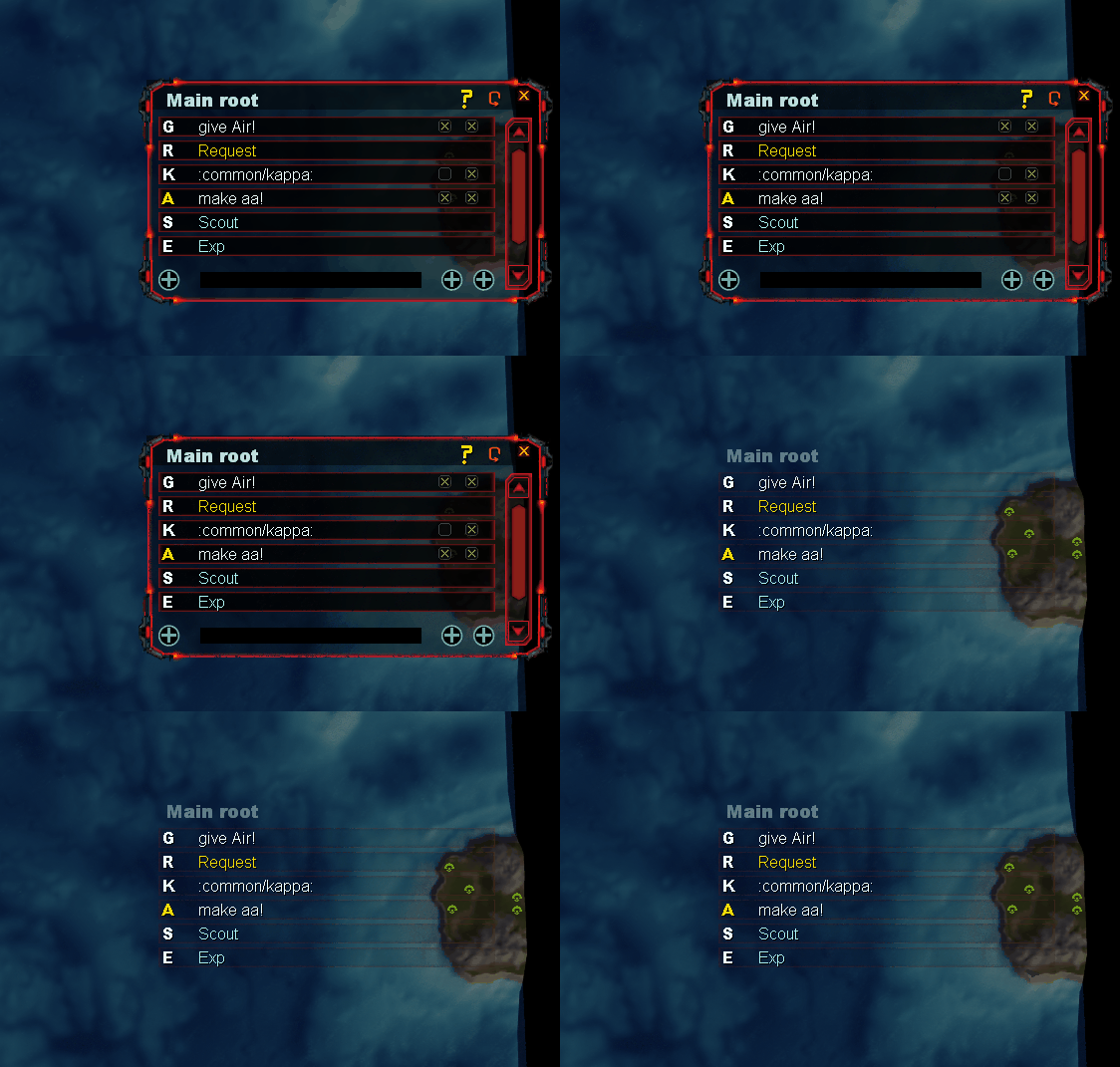
            Version 6 released.

            • Shadow mode added: window will fade after some time

            “Be a yardstick of quality. Some people aren’t used to an environment where excellence is expected.”
            — Steve Jobs.
            My UI Mods
            Support me

            1 Reply Last reply Reply Quote 0
            • nullptrN nullptr referenced this topic on
            • ZartanZ Offline
              Zartan
              last edited by

              How do you get this to work? I have the mod installed and active. But nothing new is on my screen?

              nullptrN 1 Reply Last reply Reply Quote 0
              • nullptrN Offline
                nullptr @Zartan
                last edited by

                @scout_more_often bind a key to call a window in F1

                “Be a yardstick of quality. Some people aren’t used to an environment where excellence is expected.”
                — Steve Jobs.
                My UI Mods
                Support me

                ZartanZ 1 Reply Last reply Reply Quote 0
                • ZartanZ Offline
                  Zartan @nullptr
                  last edited by

                  @ctrl-k Thanks!

                  1 Reply Last reply Reply Quote 0
                  • nullptrN Offline
                    nullptr
                    last edited by

                    Version 9 released.

                    • bug fixes + preparing for integration of options window

                    “Be a yardstick of quality. Some people aren’t used to an environment where excellence is expected.”
                    — Steve Jobs.
                    My UI Mods
                    Support me

                    1 Reply Last reply Reply Quote 0
                    • ZartanZ Offline
                      Zartan
                      last edited by

                      Any chance of a video showing how to best use this?

                      nullptrN 1 Reply Last reply Reply Quote 1
                      • nullptrN Offline
                        nullptr @Zartan
                        last edited by

                        @scout_more_often usually i use it for warning teammates about exps, snipes, nukes and etc. For requesting energy or mass, ofc there are some special cases.

                        “Be a yardstick of quality. Some people aren’t used to an environment where excellence is expected.”
                        — Steve Jobs.
                        My UI Mods
                        Support me

                        1 Reply Last reply Reply Quote 0
                        • nullptrN Offline
                          nullptr
                          last edited by nullptr

                          Version 10 coming:

                          • Rework of shadow mode due to some logical issues with it: you will be able to switch between modes, shadow mode is same as before but whole window is unclickable and calling window with keybind for it no longer returns to default, only changes focus on it.
                          • Removing redundant functionality of calling phrases (second checkbox)

                          “Be a yardstick of quality. Some people aren’t used to an environment where excellence is expected.”
                          — Steve Jobs.
                          My UI Mods
                          Support me

                          1 Reply Last reply Reply Quote 1
                          • nullptrN Offline
                            nullptr
                            last edited by

                            Version 10 released.

                            • Rework of shadow mode.
                            • Removing redundant functionality of calling phrases (second checkbox).

                            “Be a yardstick of quality. Some people aren’t used to an environment where excellence is expected.”
                            — Steve Jobs.
                            My UI Mods
                            Support me

                            1 Reply Last reply Reply Quote 0
                            • nullptrN nullptr referenced this topic on
                            • nullptrN nullptr referenced this topic on
                            • nullptrN nullptr referenced this topic on
                            • nullptrN nullptr referenced this topic on
                            • W Offline
                              woofiewilly
                              last edited by

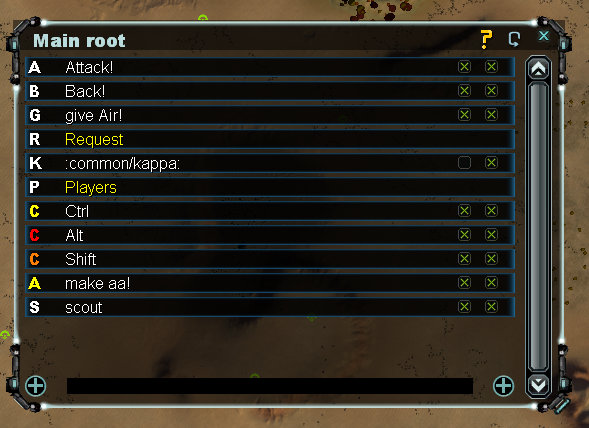
                              Great, flexible mod!

                              Those plus symbols should get actual identifiable icons though!

                              1 Reply Last reply Reply Quote 0
                              • D Offline
                                Deiv
                                last edited by Deiv

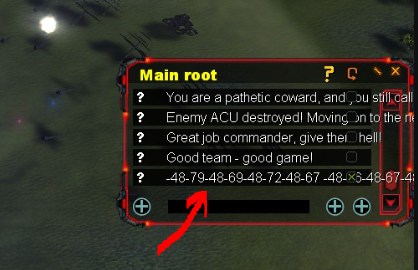
                                Снимок.PNG

                                Hi, this mod is fantastic!

                                1. Russian text turns into numbers after re-entering the game. Is there a way to fix this? (Screenshot attached)
                                2. Commands like /69 don't work. They just send symbols to the chat, and characters in the group don't send any responses! I'd just like to make a list of top commands so they're always at hand.
                                3. Please tell me in which file the text templates are saved?
                                4. For those who need it, I've uploaded a Russian translation. Open the tooltips file in the FAF\mods\better chat\hook\lua\ui\help folder and replace the text.

                                Привет, модификация просто огонь!

                                1. Русский текст после перезахода в игру превращаяется в цифры, можно ли это как-то исправить? (скриншот приложил)
                                2. Команды типо /69 не работают. В чат отправляются просто символы, а персонажи из компании реплики не отправляют! Просто хотелось бы сделать топ команд, что бы они всегда были под рукой.
                                3. Подскажи пожалуйста в каком файле сохраняются текстовые шаблоны?
                                4. Кому нужно, залил руссификатор, открываем файл tooltips в папке FAF\mods\better chat\hook\lua\ui\help и заменяем текст.

                                Текст для руссификации/Text for localization


                                Tooltips.team_cb = {
                                    title = "Team",
                                    description = "Send message to allies"
                                }
                                
                                Tooltips.bc_hint = {
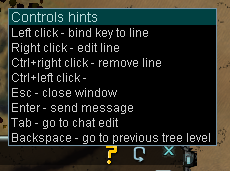
                                    title = "Подсказки по управлению",
                                    description = [[Нажмите кнопку вызова окна, чтобы передать ему управление.
                                        ЛКМ - Отправить в чат
                                        ПКМ - Редактировать текст
                                        Ctrl+ПКМ - Удалить текст
                                        Ctrl+ЛКМ - Назначить горячую клавишу
                                        Esc - Закрыть окно
                                        Tab - Прозрачный режим
                                        Backspace - Поднятся на папку выше
                                    ]]
                                }
                                
                                Tooltips.add_line = {
                                    title = "Добавить текст",
                                    
                                }
                                Tooltips.add_tree = {
                                    title = "Добавить папку",
                                    
                                }
                                Tooltips.add_ping = 
                                {
                                    title = 'Добавить маркер',
                                }
                                
                                
                                1 Reply Last reply Reply Quote 0

                                Hello! It looks like you're interested in this conversation, but you don't have an account yet.

                                Getting fed up of having to scroll through the same posts each visit? When you register for an account, you'll always come back to exactly where you were before, and choose to be notified of new replies (either via email, or push notification). You'll also be able to save bookmarks and upvote posts to show your appreciation to other community members.

                                With your input, this post could be even better 💗

                                Register Login
                                • First post
                                  Last post