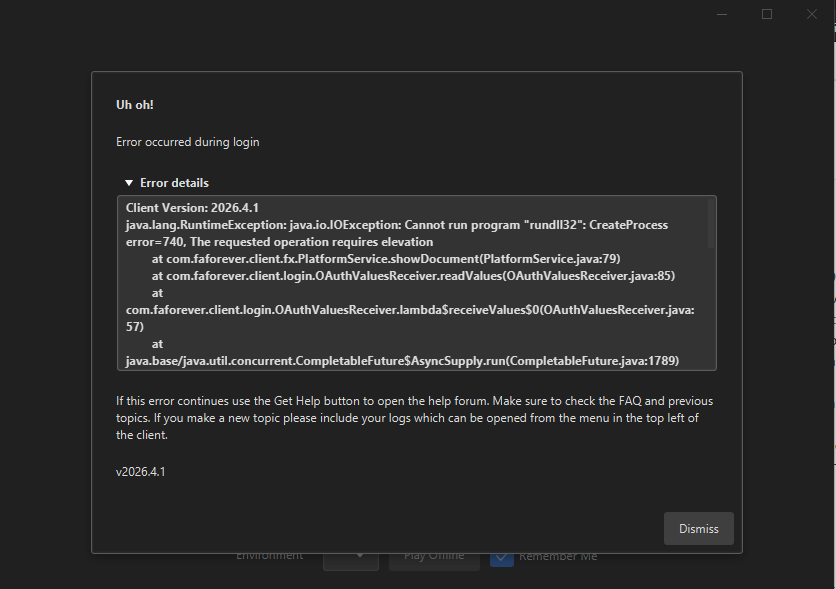
I tried to login browser but i can't log in and i keep getting this error
-
Client Version: 2026.4.1
java.lang.RuntimeException: java.io.IOException: Cannot run program "rundll32": CreateProcess error=740, The requested operation requires elevation
at com.faforever.client.fx.PlatformService.showDocument(PlatformService.java:79)
at com.faforever.client.login.OAuthValuesReceiver.readValues(OAuthValuesReceiver.java:85)
at com.faforever.client.login.OAuthValuesReceiver.lambda$receiveValues$0(OAuthValuesReceiver.java:57)
at java.base/java.util.concurrent.CompletableFuture$AsyncSupply.run(CompletableFuture.java:1789)
at java.base/java.util.concurrent.CompletableFuture$AsyncSupply.exec(CompletableFuture.java:1781)
at java.base/java.util.concurrent.ForkJoinTask.doExec(ForkJoinTask.java:511)
at java.base/java.util.concurrent.ForkJoinPool$WorkQueue.topLevelExec(ForkJoinPool.java:1450)
at java.base/java.util.concurrent.ForkJoinPool.runWorker(ForkJoinPool.java:2019)
at java.base/java.util.concurrent.ForkJoinWorkerThread.run(ForkJoinWorkerThread.java:187)
Caused by: java.io.IOException: Cannot run program "rundll32": CreateProcess error=740, The requested operation requires elevation
at java.base/java.lang.ProcessBuilder.start(ProcessBuilder.java:1112)
at java.base/java.lang.ProcessBuilder.start(ProcessBuilder.java:1046)
at java.base/java.lang.Runtime.exec(Runtime.java:605)
at java.base/java.lang.Runtime.exec(Runtime.java:436)
at java.base/java.lang.Runtime.exec(Runtime.java:321)
at com.faforever.client.fx.PlatformService.showDocument(PlatformService.java:66)
... 8 more
Caused by: java.io.IOException: CreateProcess error=740, The requested operation requires elevation
at java.base/java.lang.ProcessImpl.create(Native Method)
at java.base/java.lang.ProcessImpl.<init>(ProcessImpl.java:485)
at java.base/java.lang.ProcessImpl.start(ProcessImpl.java:146)
at java.base/java.lang.ProcessBuilder.start(ProcessBuilder.java:1078)
... 13 more -
java.lang.RuntimeException: java.io.IOException: Cannot run program "rundll32": CreateProcess error=740, The requested operation requires elevation
You have some weird Windows issue, that the process claims it needs more permissions (admin permissions) to run the windows core dll to open the browser.
-
also i can't see the get help button in the client
-
And i can't play offline too for some reason
Client Version: 2026.4.1
java.io.IOException: Cannot run program "C:\ProgramData\FAForever\bin\ForgedAlliance.exe" (in directory "C:\ProgramData\FAForever\bin"): CreateProcess error=2, The system cannot find the file specified
at java.base/java.lang.ProcessBuilder.start(ProcessBuilder.java:1112)
at java.base/java.lang.ProcessBuilder.start(ProcessBuilder.java:1046)
at com.faforever.client.fa.ForgedAllianceLaunchService.launch(ForgedAllianceLaunchService.java:161)
at com.faforever.client.fa.ForgedAllianceLaunchService.launchOfflineGame(ForgedAllianceLaunchService.java:49)
at com.faforever.client.game.GameRunner.lambda$startOffline$1(GameRunner.java:556)
at java.base/java.util.concurrent.CompletableFuture$AsyncSupply.run(CompletableFuture.java:1789)
at java.base/java.util.concurrent.CompletableFuture$AsyncSupply.exec(CompletableFuture.java:1781)
at java.base/java.util.concurrent.ForkJoinTask.doExec(ForkJoinTask.java:511)
at java.base/java.util.concurrent.ForkJoinPool$WorkQueue.topLevelExec(ForkJoinPool.java:1450)
at java.base/java.util.concurrent.ForkJoinPool.runWorker(ForkJoinPool.java:2019)
at java.base/java.util.concurrent.ForkJoinWorkerThread.run(ForkJoinWorkerThread.java:187)
Caused by: java.io.IOException: CreateProcess error=2, The system cannot find the file specified
at java.base/java.lang.ProcessImpl.create(Native Method)
at java.base/java.lang.ProcessImpl.<init>(ProcessImpl.java:485)
at java.base/java.lang.ProcessImpl.start(ProcessImpl.java:146)
at java.base/java.lang.ProcessBuilder.start(ProcessBuilder.java:1078)
... 10 more -
I put it on directory F but the error seems to think i put it on the C?
-
@Brutus5000
Any idea why i can't play offline? -
You also need to update the game path in the FAF client. Only moving the game folder is not enough. The log indicates it:
java.io.IOException: Cannot run program "C:\ProgramData\FAForever\bin\ForgedAlliance.exe": CreateProcess error=2, The system cannot find the file specifiedYou can change it in Settings in the FAF Client. If you cannot find it, gimme a ping; I am currently on mobile.
-
I am trying play FAF on the client which I have just installed on Windows 11. I am currently on a laptop.
Whenever I try and play in offline mode this error comes up:
Client Version: 2026.7.0
java.io.IOException: Cannot run program "C:\ProgramData\FAForever\bin\ForgedAlliance.exe" (in directory "C:\ProgramData\FAForever\bin"): CreateProcess error=2, The system cannot find the file specified
at java.base/java.lang.ProcessBuilder.start(ProcessBuilder.java:1112)
at java.base/java.lang.ProcessBuilder.start(ProcessBuilder.java:1046)
at com.faforever.client.fa.ForgedAllianceLaunchService.launch(ForgedAllianceLaunchService.java:161)
at com.faforever.client.fa.ForgedAllianceLaunchService.launchOfflineGame(ForgedAllianceLaunchService.java:49)
at com.faforever.client.game.GameRunner.lambda$startOffline$1(GameRunner.java:556)
at java.base/java.util.concurrent.CompletableFuture$AsyncSupply.run(CompletableFuture.java:1789)
at java.base/java.util.concurrent.CompletableFuture$AsyncSupply.exec(CompletableFuture.java:1781)
at java.base/java.util.concurrent.ForkJoinTask.doExec(ForkJoinTask.java:511)
at java.base/java.util.concurrent.ForkJoinPool$WorkQueue.topLevelExec(ForkJoinPool.java:1450)
at java.base/java.util.concurrent.ForkJoinPool.runWorker(ForkJoinPool.java:2019)
at java.base/java.util.concurrent.ForkJoinWorkerThread.run(ForkJoinWorkerThread.java:187)
Caused by: java.io.IOException: CreateProcess error=2, The system cannot find the file specified
at java.base/java.lang.ProcessImpl.create(Native Method)
at java.base/java.lang.ProcessImpl.<init>(ProcessImpl.java:485)
at java.base/java.lang.ProcessImpl.start(ProcessImpl.java:146)
at java.base/java.lang.ProcessBuilder.start(ProcessBuilder.java:1078)
... 10 moreAnd also, when I try and login with browser, nothing happens.


Hello! It looks like you're interested in this conversation, but you don't have an account yet.
Getting fed up of having to scroll through the same posts each visit? When you register for an account, you'll always come back to exactly where you were before, and choose to be notified of new replies (either via email, or push notification). You'll also be able to save bookmarks and upvote posts to show your appreciation to other community members.
With your input, this post could be even better 💗
Register Login