FAForever Forums
    • Categories
    • Recent
    • Tags
    • Popular
    • Users
    • Groups
    • Login
    1. Home
    2. UrbanArtillery
    The current pre-release of the client ("pioneer" in the version) is only compatible to itself. So you can only play with other testers. Please be aware!
    U
    Offline
    • Profile
    • Following 0
    • Followers 0
    • Topics 1
    • Posts 5
    • Groups 0

    UrbanArtillery

    @UrbanArtillery

    0
    Reputation
    1
    Profile views
    5
    Posts
    0
    Followers
    0
    Following
    Joined
    Last Online

    UrbanArtillery Unfollow Follow

    Latest posts made by UrbanArtillery

    • RE: Game error on new PC, unable to play FAF

      now i get this...
      image.png

      Client Version: 2025.11.2
      java.io.IOException: Cannot run program "C:\ProgramData\FAForever\bin\ForgedAlliance.exe" (in directory "C:\Program Files (x86)\Steam\steamapps\common\Supreme Commander Forged Alliance\bin"): CreateProcess error=2, The system cannot find the file specified
      at java.base/java.lang.ProcessBuilder.start(ProcessBuilder.java:1112)
      at java.base/java.lang.ProcessBuilder.start(ProcessBuilder.java:1046)
      at com.faforever.client.fa.ForgedAllianceLaunchService.launch(ForgedAllianceLaunchService.java:161)
      at com.faforever.client.fa.ForgedAllianceLaunchService.launchOfflineGame(ForgedAllianceLaunchService.java:49)
      at com.faforever.client.game.GameRunner.lambda$startOffline$1(GameRunner.java:556)
      at java.base/java.util.concurrent.CompletableFuture$AsyncSupply.run(CompletableFuture.java:1789)
      at java.base/java.util.concurrent.CompletableFuture$AsyncSupply.exec(CompletableFuture.java:1781)
      at java.base/java.util.concurrent.ForkJoinTask.doExec(ForkJoinTask.java:511)
      at java.base/java.util.concurrent.ForkJoinPool$WorkQueue.topLevelExec(ForkJoinPool.java:1450)
      at java.base/java.util.concurrent.ForkJoinPool.runWorker(ForkJoinPool.java:2019)
      at java.base/java.util.concurrent.ForkJoinWorkerThread.run(ForkJoinWorkerThread.java:187)
      Caused by: java.io.IOException: CreateProcess error=2, The system cannot find the file specified
      at java.base/java.lang.ProcessImpl.create(Native Method)
      at java.base/java.lang.ProcessImpl.<init>(ProcessImpl.java:485)
      at java.base/java.lang.ProcessImpl.start(ProcessImpl.java:146)
      at java.base/java.lang.ProcessBuilder.start(ProcessBuilder.java:1078)
      ... 10 more
      posted in FAF support (client and account issues)
      U
      UrbanArtillery
    • RE: Game error on new PC, unable to play FAF

      Ill be back on around 8pm tonight, any help would be appreciated. FAF is one of the few RTS that I enjoy.

      posted in FAF support (client and account issues)
      U
      UrbanArtillery
    • RE: Game error on new PC, unable to play FAF

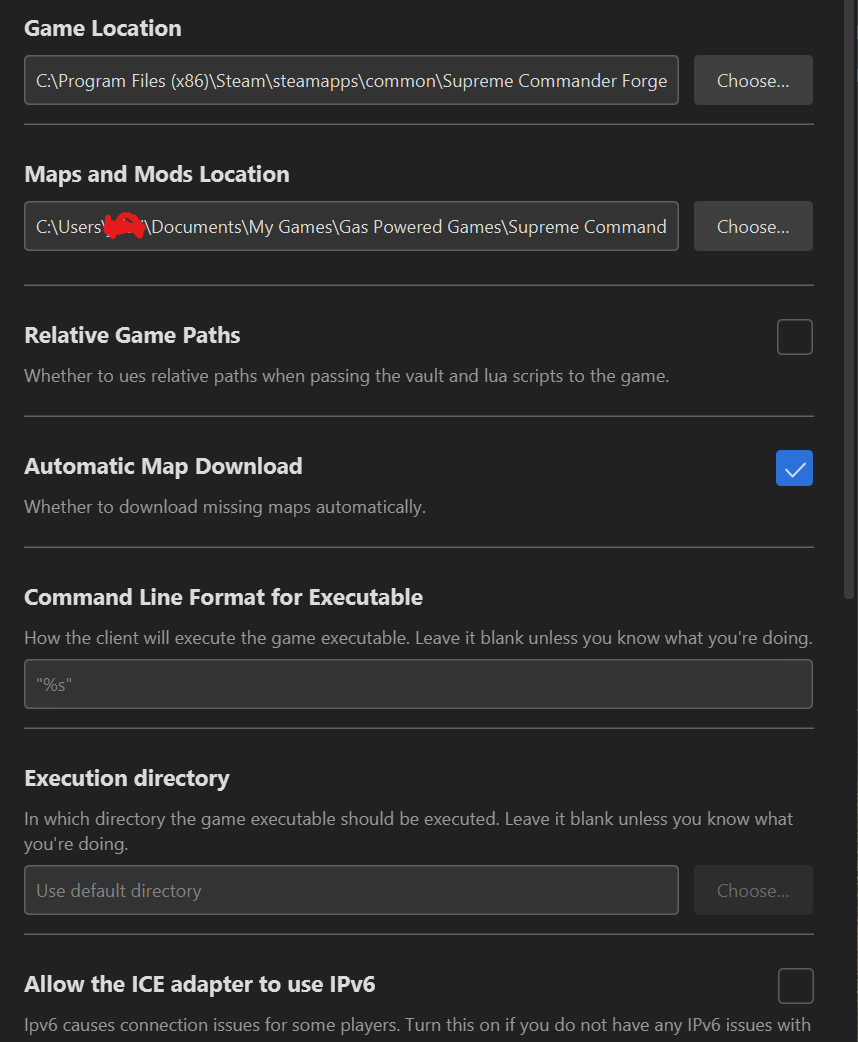
      Uninstalled & reinstalled the game roughly 5 times trying to trouble shoot it with Chat GPT, checked the FAF game location, maps and mods folder, and directory. I even reset the enitre PC to factory settings last night after mutiple failed attemps to fix
      image.png

      posted in FAF support (client and account issues)
      U
      UrbanArtillery
    • RE: Game error on new PC, unable to play FAF

      Yes, no problems starting and playing SC via steam

      posted in FAF support (client and account issues)
      U
      UrbanArtillery
    • Game error on new PC, unable to play FAF

      I have been going in circles with Chat GPT trying to fix this but clearly, neither Chatgpt or I know what is going on. I bought a new laptop for gaming and wanted to be sure that FAF worked before installing other games. I cant get past "Play Offline", I keep getting this error bbdc0d95-dbea-4375-9ed2-e7ff35841c29-image.png

      posted in FAF support (client and account issues)
      U
      UrbanArtillery